剪辑平面
|
该页面正在翻译中。 |
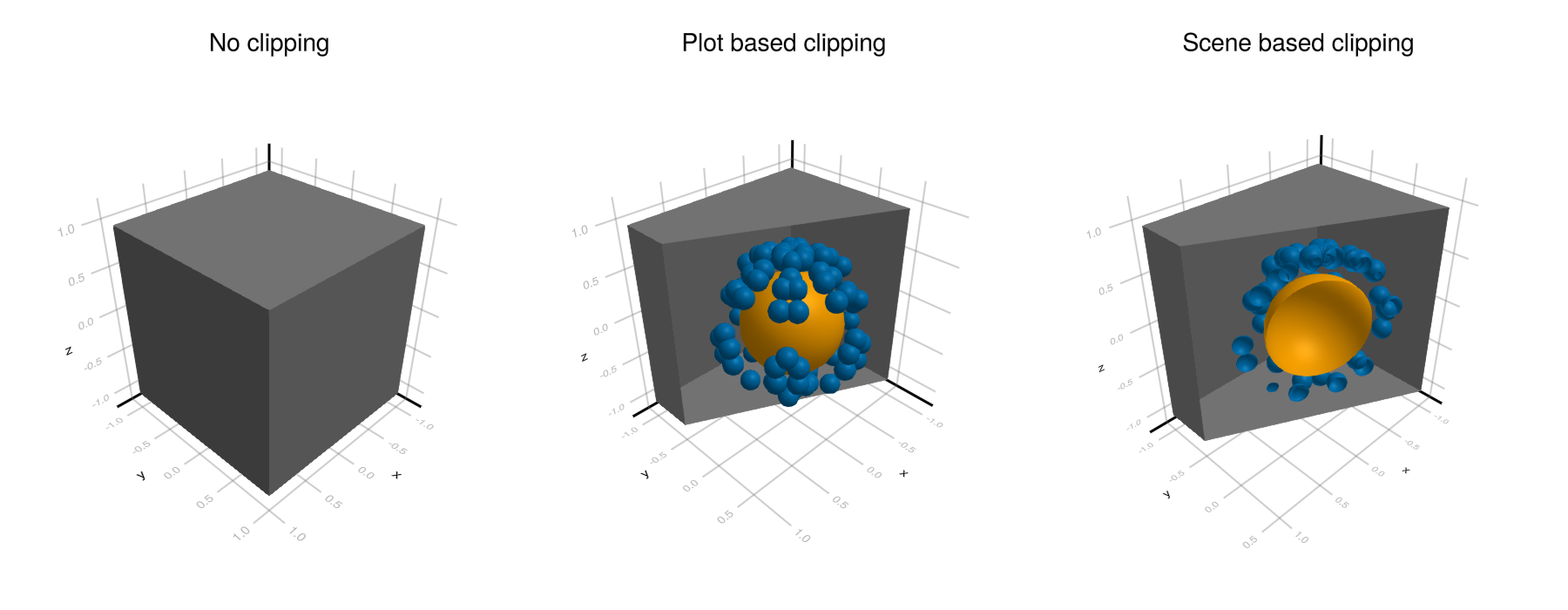
剪辑平面是将空间分成两部分的平面,一个是绘制的,一个不是绘制的。 Makie允许您在场景或情节级别上指定最多8个剪辑平面。 这些剪辑平面是在世界空间中给出的,这意味着它们在 变换_func (例如 日志 缩放)和 模型 矩阵(即 翻译!(情节,。..), 旋转!(情节,。..) 和 规模!(情节,。..))已经应用。 如果 情节。space[]in(:pixel,:relative,:clip).
例子:
using GLMakie
box = Rect3f(Point3f(-1), Vec3f(2))
sphere = Sphere(Point3f(0), 0.5f0)
points = [0.7f0 * Point3f(cos(x) * sin(y), cos(x) * cos(y), sin(x)) for x in 0:8 for y in 0:8]
clip_planes = [Plane3f(Point3f(0), Vec3f(-0.5, -1, 0))]

f = Figure(size = (900, 350))

# Hide some plots in a box
Label(f[1, 1], "No clipping", tellwidth = false)
a = LScene(f[2, 1])

mesh!(a, box, color = :gray)
meshscatter!(a, points)
mesh!(a, sphere, color = :orange)

# Add a clip plane to the box to reveal the other plots
Label(f[1, 2], "Plot based clipping", tellwidth = false)
a = LScene(f[2, 2])

# backlight = 1 enables two-sided shading
mesh!(a, Rect3f(Point3f(-1), Vec3f(2)), color = :gray, backlight = 1, clip_planes = clip_planes)
meshscatter!(a, points)
mesh!(a, sphere, color = :orange)

# Adding the clip plane to the scene will make every plot inherit them
Label(f[1, 3], "Scene based clipping", tellwidth = false)
a = LScene(f[2, 3])
a.scene.theme[:clip_planes] = clip_planes

mesh!(a, Rect3f(Point3f(-1), Vec3f(2)), color = :gray, backlight = 1)
meshscatter!(a, points, backlight = 1)
mesh!(a, sphere, color = :orange, backlight = 1)

f