欧拉的软件管理
本页显示了欧拉的所有可用软件控制功能 AnyMath .
|
使用欧拉软件控制功能 AnyMath ,按照指定的方式安装硬件支持包 文章. 安装后,运行: 接下来,您需要创建一个会话对象: 所有方法都采用第一个参数 状态代码不会发送出去:如果出现错误,该方法会抛出异常及其描述。 |
#
Main.EngeeDeviceManager.EULER_API.closeProject — Method
EULER_API.closeProject(session) -> Nothing关闭当前打开的项目。释放项目资源,但会话仍保持活动状态。
如果发生错误,将抛出异常。
#
Main.EngeeDeviceManager.EULER_API.closeSession — Method
EULER_API.closeSession(session) -> NothingTerminates the session with EILER. Frees all resources and closes the solver. After calling this function, the object session is no longer valid.
Arguments
-
session::Tuple{Main.EngeeDeviceManager.EULER_API.EulerSession}: session object.
#
Main.EngeeDeviceManager.EULER_API.createSession — Method
EULER_API.createSession(euler_path::String="") -> sessionCreates a session for working with the EULER solver. Initialises the solver core.
Returns session::Tuple{Main.EngeeDeviceManager.EULER_API.EulerSession}-- the session object, which is passed to all other methods.euler_path::String: the path to the EYLER executable. By default, euler_path="" — auto-detection.
#
Main.EngeeDeviceManager.EULER_API.getCurrentTime — Method
EULER_API.getCurrentTime(session) -> Float64Returns the current model time in seconds.
Arguments
-
session::Tuple{Main.EngeeDeviceManager.EULER_API.EulerSession}: session object.
#
Main.EngeeDeviceManager.EULER_API.getLastProject — Method
EULER_API.getLastProject(session) -> StringReturns the full path to the .elr file of the latest EULER project. Useful for restoring the state after a restart.
Arguments
-
session::Tuple{Main.EngeeDeviceManager.EULER_API.EulerSession}: session object.
#
Main.EngeeDeviceManager.EULER_API.getRigidBodyCount — Method
EULER_API.getRigidBodyCount(session) -> IntReturns the number of solid bodies in the current project.
Arguments
-
session::Tuple{Main.EngeeDeviceManager.EULER_API.EulerSession}: session object.
#
Main.EngeeDeviceManager.EULER_API.getRigidBodyPos — Method
EULER_API.getRigidBodyPos(session, index=0) -> Vector{Float64}Returns an array of 12 elements: the centre-of-mass coordinates (X, Y, Z) and a 3×3 orientation matrix (9 elements, column-oriented).
Arguments
-
session::Tuple{Main.EngeeDeviceManager.EULER_API.EulerSession}: session object. -
index::Int64: solid body index; indexing starts from0. By default,0.
#
Main.EngeeDeviceManager.EULER_API.getSensorUnits — Method
EULER_API.getSensorUnits(session, name) -> StringReturns a string containing the sensor’s units of measurement in the SI system based on its name, for example, "Н", "м", "м/с".
Arguments
-
session::Tuple{Main.EngeeDeviceManager.EULER_API.EulerSession}: session object. -
name::String: sensor name.
#
Main.EngeeDeviceManager.EULER_API.getSensorValue — Method
EULER_API.getSensorValue(session, name) -> Float64Returns the current value of the sensor by name in SI units. The value corresponds to the most recent calculated data point.
An exception is thrown if an error occurs.
Arguments
-
: session object.
-
name::String: sensor name (e.g.,"fx_sensor","X","Y").
#
Main.EngeeDeviceManager.EULER_API.getUserCommands — Method
EULER_API.getUserCommands(session) -> String返回包含可用用户命令名称的字符串。命令以";" 分隔。在打开项目后的任何 模式下 均可使用。
参数
-
session::Tuple{Main.EngeeDeviceManager.EULER_API.EulerSession}: 会话对象。
#
Main.EngeeDeviceManager.EULER_API.getVersion — Method
@binding: Main.EngeeDeviceManager.EULER_API.createSession @typesig: Tuple{String}
EULER_API.getVersion(session) -> String返回 EILER 求解器的版本号,格式为字符串(例如,"13.05.43" )。
参数
-
session::Tuple{Main.EngeeDeviceManager.EULER_API.EulerSession}:会话对象。
#
Main.EngeeDeviceManager.EULER_API.journalLoadPoint — Method
EULER_API.journalLoadPoint(session, index) -> NothingLoads the log point by index into the current context. After loading, getSensorValue will return the sensor values for this point, rather than for the last calculated one.
An exception is thrown on error.
Arguments
-
session::Tuple{Main.EngeeDeviceManager.EULER_API.EulerSession}: session object. -
index::Int64: point index (indexes are numbered starting from0).
#
Main.EngeeDeviceManager.EULER_API.journalSensorValues — Method
EULER_API.journalSensorValues(session, name) -> Vector{Float64}Returns an array of sensor values at all points in the calculation log in chronological order.
An exception is thrown if an error occurs.
Arguments
-
session::Tuple{Main.EngeeDeviceManager.EULER_API.EulerSession}: session object. -
name::String: sensor name.
#
Main.EngeeDeviceManager.EULER_API.journalSize — Method
EULER_API.journalSize(session) -> IntReturns the number of points stored in the calculation log. The value 0 corresponds to an empty log.
Arguments
-
session::Tuple{Main.EngeeDeviceManager.EULER_API.EulerSession}: session object.
#
Main.EngeeDeviceManager.EULER_API.journalTime — Method
EULER_API.journalTime(session, index) -> Float64Returns the model time in seconds for the log point at the specified index.
- Arguments
-
session object.
-
index::Int64: point index (indexes start at0).
-
#
Main.EngeeDeviceManager.EULER_API.openProject — Method
EULER_API.openProject(session, path) -> String打开 EILER 项目(.elr 文件)。打开后,命令、传感器和参数均可使用。返回 已加载项目的路径(字符串形式);若发生错误,则抛出异常。
参数
-
session::Tuple{Main.EngeeDeviceManager.EULER_API.EulerSession}: 会话对象。 -
path::String:.elr 文件的完整路径。
#
Main.EngeeDeviceManager.EULER_API.runAnyCommand — Method
EULER_API.runAnyCommand(session, command, step=1) -> NothingRuns a user-defined command without a time limit. The calculation runs until the command naturally completes. Available in exploration mode only.
An exception is thrown if an error occurs.
Arguments
-
session::Tuple{Main.EngeeDeviceManager.EULER_API.EulerSession}: session object. -
command::String: command name. -
step::Int64: output step. By default,1.
#
Main.EngeeDeviceManager.EULER_API.runCommand — Method
EULER_API.runCommand(session, command, calc_time=10.0, step=1.0) -> NothingRuns a user command with a time limit. The calculation will stop when calc_time seconds of model time have elapsed or when the command completes — whichever comes first. Available only in exploration mode (setCalcRegime).
An exception is thrown if an error occurs.
Arguments
-
session::Tuple{Main.EngeeDeviceManager.EULER_API.EulerSession}: session object. -
command::String: command name (from the listgetUserCommands). -
calc_time::Float64: maximum calculation duration in seconds of model time. By default:10.0. -
step::Float64: output step for this command. By default,1.0(every integrator step).
#
Main.EngeeDeviceManager.EULER_API.saveProject — Method
EULER_API.saveProject(session) -> Nothing保存当前项目。更改将写入原始 .elr 文件。
发生错误时将抛出异常。
参数
-
session::Tuple{Main.EngeeDeviceManager.EULER_API.EulerSession}: 会话对象。
#
Main.EngeeDeviceManager.EULER_API.saveResults — Method
EULER_API.saveResults(session, path) -> NothingSaves the calculation results to an .epp (Euler Project Package) file.
An exception is thrown if an error occurs.
Arguments
-
session::Tuple{Main.EngeeDeviceManager.EULER_API.EulerSession}: session object. -
path::String: path to save the .epp file.
#
Main.EngeeDeviceManager.EULER_API.setCalcRegime — Method
EULER_API.setCalcRegime(session) -> NothingПереводит проект в режим исследования (расчета). В этом режиме доступен запуск команд (runCommand, runAnyCommand) и чтение датчиков. Изменение скаляров недоступно.
При ошибке выбрасывается исключение.
Аргументы
-
session::Tuple{Main.EngeeDeviceManager.EULER_API.EulerSession}: объект сеанса.
#
Main.EngeeDeviceManager.EULER_API.setEditRegime — Method
EULER_API.setEditRegime(session) -> Nothing将项目切换至编辑模式。在此模式下,可通过setScalar 修改参数(标量)。无法启动 计算。
发生错误时将抛出异常。
参数
-
session::Tuple{Main.EngeeDeviceManager.EULER_API.EulerSession}:会话对象。
#
Main.EngeeDeviceManager.EULER_API.setOutputParam — Method
EULER_API.setOutputParam(session, step_out=1, time_out=0.0, before_event=false, after_event=false) -> NothingConfigures the parameters for outputting results to the calculation log.
An exception is thrown if an error occurs.
Arguments
-
session::Tuple{Main.EngeeDeviceManager.EULER_API.EulerSession}: session object. -
step_out::Int64: output step. Every Nth calculation point is included in the log. By default,1. -
time_out::Float64: output frequency in model time, in seconds. By default,0.0(disabled; onlystep_outis used). -
before_event::Bool: whether to save a point before an event. By default,false— do not save. -
after_event::Bool: whether to save a point after an event. By default,false— do not save.
#
Main.EngeeDeviceManager.EULER_API.setScalar — Method
EULER_API.setCalcRegime(session) -> NothingPuts the project into exploration (calculation) mode. In this mode, it is possible to run commands (runCommand, runAnyCommand) and read sensors. Modifying scalars is not permitted.
An exception is thrown if an error occurs.
@binding: Main.EngeeDeviceManager.EULERAPI.setCalcRegime @typesig: Tuple{Main.EngeeDeviceManager.EULERAPI.EulerSession}
Sets the value of a scalar parameter by name. Only available in edit mode (setEditRegime).
An exception is thrown if an error occurs.
Arguments
-
session::Tuple{Main.EngeeDeviceManager.EULER_API.EulerSession}: the session object. -
name::String: the name of the scalar (e.g.,"FX","mass"). -
value::Float64: the new value of the scalar.
#
Main.EngeeDeviceManager.EULER_API.startCalc — Method
EULER_API.startCalc(session) -> NothingResets the model time to 0.0 (start position) and initialises the calculation. Called once before the first command runCommand or runAnyCommand.
An exception is thrown if an error occurs.
Arguments
-
session::Tuple{Main.EngeeDeviceManager.EULER_API.EulerSession}: session object.
#
Main.EngeeDeviceManager.EULER_API.stopCalc — Method
EULER_API.stopCalc(session) -> NothingStops the current calculation. Can be called at any time after running runCommand or runAnyCommand. The time of the stop can be obtained via getCurrentTime.
An exception is thrown if an error occurs.
Arguments
-
session::Tuple{Main.EngeeDeviceManager.EULER_API.EulerSession}: session object.
操作模式
打开后,项目处于编辑模式—您可以打开和关闭项目,使用以下方法更改参数(标量 [医]集. 在此模式下无法启动计算。 要运行模型,请切换到研究模式(n.集,集),之后命令将可用于运行(n.跑动,跑动, [医][医][医][医])和在计算过程中读取传感器(getSensorValue,getSensorValue, 期刊价值),但更改标量将被阻止。 要在模式之间切换,请使用 [医]集 和 n.集,集.
示例:模拟投掷一个重量为1公斤,直径为20厘米的球,并显示轨迹
安装后 硬件支持包完成:
using Main.EngeeDeviceManager
using Main.EngeeDeviceManager.EULER_API
using Main.EngeeDeviceManager.UTILS_API
创建会话:
session = EULER_API.createSession()
ver = EULER_API.getVersion(session)
println("Версия ЭЙЛЕР: $ver")
Версия ЭЙЛЕР: Solver 13.05.43.beta Pro (Windows x64)上传测试项目:
engee.package.getdemos("Engee-Device-Manager")"/user/Engee-Device-Manager-demos"一、使用模块 Utils的 复制测试文件 .elr,elr 从演示文件夹 AnyMath 到用户的计算机:
# Создаем объект Utils для файловых операций
utils = UTILS_API.Utils()

# Определяем пути к демонстрационному проекту ЭЙЛЕР в {docs_engee} и директории, в которую будет скопирован проект
euler_local_project_path = "/user/Engee-Device-Manager-demos/example_euler/sample_project.elr"
host_project_dir = raw"C:\Users\Public\Engee"

# Создаем тестовую директорию и загружаем проект на хост
UTILS_API.createFolder(utils, host_project_dir, "")
UTILS_API.uploadFile(utils, euler_local_project_path, host_project_dir)

println("Проект загружен в $host_project_dir")
Проект загружен в C:\Users\Public\Engee打开项目并启动计算:
# Открываем проект
project_path = joinpath(host_project_dir, "sample_project.elr")
EULER_API.openProject(session, project_path)
println("Проект открыт: $project_path")

# Получаем список доступных команд
cmds = EULER_API.getUserCommands(session)
println("Доступные команды: $cmds")

# Переключаем в режим исследования проекта
EULER_API.setCalcRegime(session)
println("Режим исследования проекта")

# Настраиваем вывод данных на каждом 10-м шаге
EULER_API.setOutputParam(session, 10, 0.0)

# Запускаем расчет на 15 секунд
EULER_API.runCommand(session, "RK4_coarse", 15.0)
println("Расчет запущен")
Проект открыт: C:\Users\Public\Engee/sample_project.elr
Доступные команды: RK4_fine;RK4_coarse;
Режим исследования проекта
Расчет запущен取得成果:
# Получаем все точки из журнала расчета
x_vals = EULER_API.journalSensorValues(session, "X")
y_vals = EULER_API.journalSensorValues(session, "Y")

n_points = length(x_vals)
println("Получено $n_points точек")

# Выводим первые и последние точки
println("Первая точка: X=$(round(x_vals[1], digits=2)) м, Y=$(round(y_vals[1], digits=2)) м")
if n_points > 1
    println("Последняя точка: X=$(round(x_vals[end], digits=2)) м, Y=$(round(y_vals[end], digits=2)) м")
end
Получено 1447 точек
Первая точка: X=0.0 м, Y=0.0 м
Последняя точка: X=1019.72 м, Y=-0.0 м轨迹的可视化:
using Plots

# Получаем время каждой точки (значения датчика "t")
t_vals = EULER_API.journalSensorValues(session, "t")

# График зависимости высоты от времени
plot(t_vals, y_vals,
    xlabel = "Время, с",
    ylabel = "Высота Y, м",
    title = "Траектория броска шара
    D = 20 см
    m = 1 кг",
    legend = false,
    linewidth = 2,
    color = :blue,
    size = (600, 400)
)

hline!([0.0], color = :orange, linewidth = 1, linestyle = :dash, label = "Земля")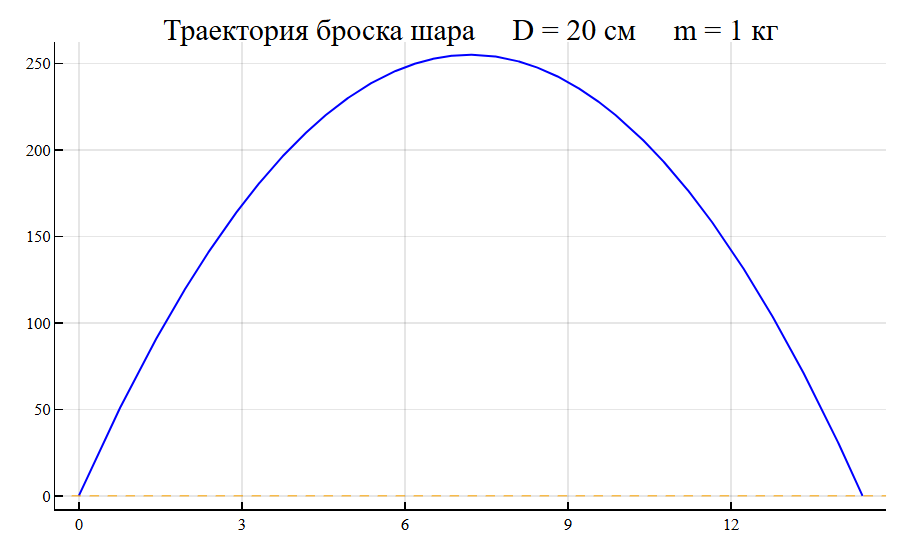
完成工作:
EULER_API.closeSession(session)
println("Сеанс завершен")
Сеанс завершен