Moving Minimum
A moving minimum.
blockType: MovingMinimum
|
Path in the library: |
Description
Block Moving Minimum determines the sliding minimum of the input signal for each channel regardless of time. To determine the sliding minimum, the block uses the sliding window method. In this method, the block determines the minimum according to the data in the window of a given length, which moves through each channel sample by sample.
Ports
Input
#
IN_1
—
input data
vector-string | column vector | the matrix
Details
Input data used to determine the sliding minimum by the sliding window method. The block accepts multichannel input data of dimension on , where and , with real or complex values. The block also accepts input data of variable size. During the simulation, you can change the size of each input channel, but the number of channels cannot change.
| Data types |
|
| Complex numbers support |
Yes |
Output
#
OUT_1
—
output of the moving minimum
vector-string | column vector | the matrix
Details
A sliding minimum determined by the sliding window method. The size of the output data corresponds to the size of the input data. The window slides along the columns along each channel, and the block determines the minimum of data in the window.
| Data types |
|
| Complex numbers support |
Yes |
Parameters
Main
#
Specify window length —
specify the window length
Logical
Details
If you select this option, the length of the sliding window will be equal to the value set for the parameter Window length. If you uncheck this option, the sliding window will be infinite in length. In this mode, the block calculates the minimum value of the current sample and all previous samples in the channel.
| Default value |
|
| Program usage name |
|
| Tunable |
No |
| Evaluatable |
No |
#
Window length —
sliding window length
Int64 integer
Details
Specifies the length of the sliding window in the selections.
Dependencies
To use this option, check the box Specify window length.
| Default value |
|
| Program usage name |
|
| Tunable |
No |
| Evaluatable |
Yes |
Algorithms
Sliding window method
Details
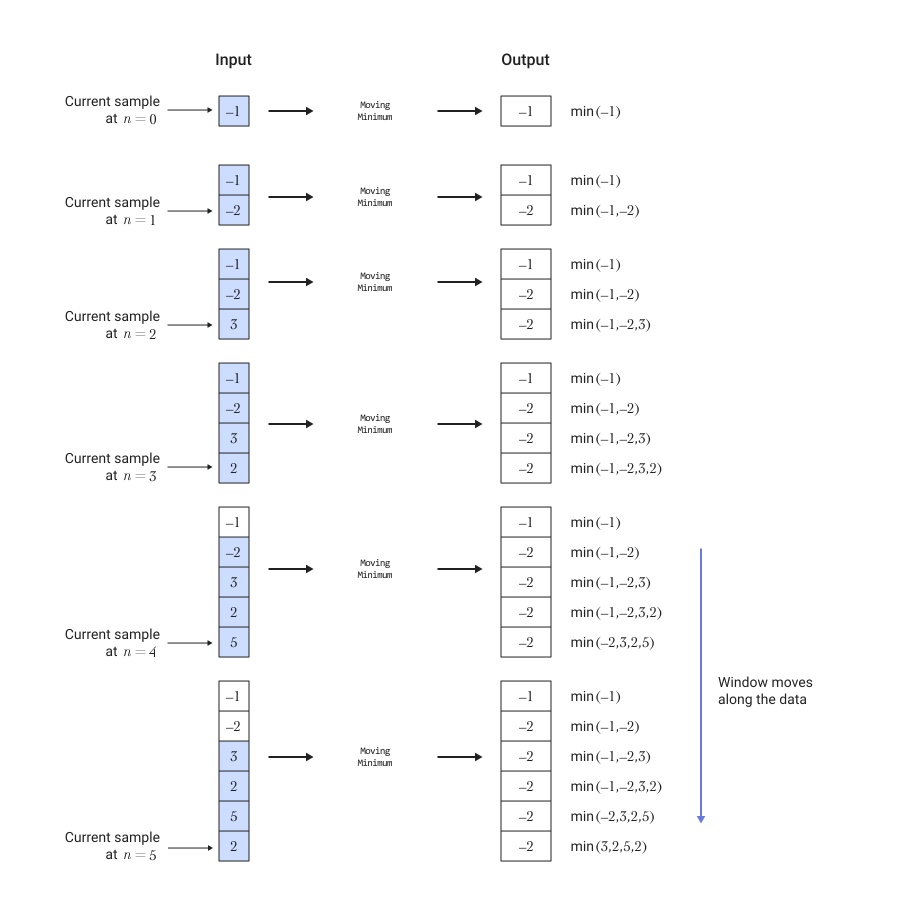
In the sliding window method, the output for each input sample is the minimum value of the current sample and previous samples, where — this is the length of the window in samples. When the algorithm calculates the first output data, the length of the window is equal to the length of the available data.
If the window length is not specified, the algorithm selects an infinite window length. In this mode, the output is the minimum value of the current sample and all previous samples in the channel.
The figure below shows an example of calculating the sliding minimum of streaming input data using the sliding window method. The algorithm uses a window of length 4. With each incoming input sample, a window of length 4 moves along the data.