Double-Shoe Brake
A friction brake with two pivotally mounted pads located diametrically opposite on a rotating drum.
blockType: Engee1DMechanical.Brakes.DoubleShoe
|
Path in the library: |
Description
Block Double-Shoe Brake It is a friction brake with two pivotally mounted rigid pads that are pressed against a rotating drum, providing braking. The rigid pads are located inside or outside the rotating drum at diametrically opposite points. The positive acting force causes the rigid pads to press against the rotating drum. The viscous and contact friction between the drum and the surfaces of the rigid pads slows down the rotation of the drum.
Dual-cylinder brakes provide high braking torque with low drive deflections in applications such as automobiles and some types of heavy machinery. The model uses simple parameterization with easily accessible brake geometry and friction parameters.
The equations
The diagram on the left shows an internal two—cylinder brake, and on the right is an external two-cylinder brake. There is a positive acting force in both configurations. it brings the friction surface of the pads and the drum into contact. As a result, there is a moment of friction that causes the rotating drum to slow down. Zero and negative forces do not bring the friction surfaces of the pads and the drum into contact and create zero braking torque.
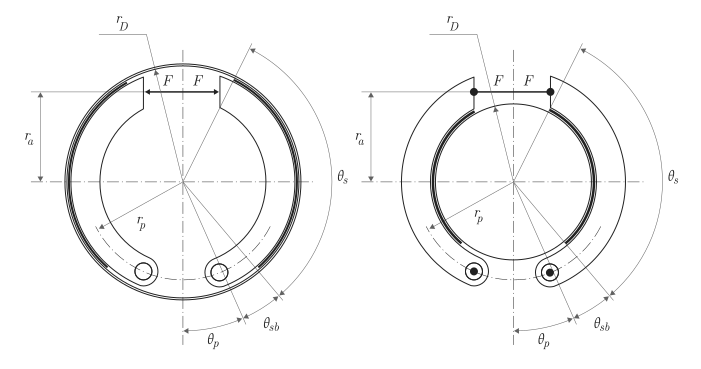
The model uses the approximation of long pads. The equations for the moment of friction created by the front and rear pads have the form:
where at
and when
The following variables are used in the equations:
-
— braking torque generated by the front shoe;
-
— braking torque generated by the rear brake pad;
-
— effective coefficient of contact friction;
-
— maximum linear pressure at the point of contact between the surfaces of the front pad and the drum;
-
— maximum linear pressure at the point of contact between the surfaces of the rear pad and the drum;
-
— the radius of the drum;
-
— the initial angle of the shoe;
-
— the angle of coverage of the pad;
-
— the angle from the hinge pin to the maximum pressure point;
-
— the length of the cylinder force arm relative to the hinge pin;
-
— the radius of the finger position;
-
— angle of the hinge pin position;
-
— the radius of the drive position.
The model assumes that when the pad surface comes into contact with the drum, only Coulomb friction acts. Zero relative velocity between the drum and the pads results in zero Coulomb friction. To avoid rupture at zero relative velocity, the formula of the coefficient of friction uses a hyperbolic function
where
-
— effective coefficient of contact friction;
-
— coefficient of contact friction;
-
— the speed of rotation of the shaft;
-
— threshold value of the angular velocity.
Balancing the moments acting on each pad relative to the finger allows you to determine the pressure acting at the point of contact of the pad and drum surfaces. The equations for determining the balance of moments for the front shoe are as follows:
where
-
— the active force;
-
— the moment acting on the front shoe under the influence of normal force;
-
— the moment acting on the front shoe under the influence of the friction force;
-
— the length of the cylinder force arm relative to the hinge pin;
-
— maximum linear pressure at the point of contact of the pad and drum surfaces;
-
— the radius of the finger position;
-
— angle of the hinge pin position;
-
— the radius of the drive position.
The model does not simulate self-locking brakes. If the geometry of the brake and the friction parameters cause self-locking, the model generates a simulation error. The brake self-locks if the moment of friction exceeds the moment due to normal forces, that is, when .
The balance of moments for the rear brake pad is
The resulting braking torque is
where — coefficient of viscous friction.
The thermal model
You can simulate the effects of heat flow and temperature changes by opening an additional heat port. To use this port, in the parameter group Friction check the box Thermal port. Opening the port also opens or changes the default values for the following related settings, parameters, and variables:
-
Friction → Temperature;
-
Friction → Contact friction coefficient vector;
-
Thermal Port → Thermal mass;
-
Initial targets → Temperature (for more information, see Configuring physical blocks using target values).
Ports
Conserving
#
H
—
heat flow
heat
Details
A non-directional port connected to the heat flow.
Dependencies
To use this port, in the parameter group Friction check the box Thermal port.
Opening this port makes the associated settings visible.
| Program usage name |
|
#
S
—
rotation of the drum shaft
rotational mechanics
Details
A non-directional port connected to a rotating drum shaft.
| Program usage name |
|
Input
#
F
—
the acting force
scalar
Details
The input port of the scalar signal associated with the applied acting force.
| Data types |
|
| Complex numbers support |
I don’t |
Parameters
Friction
# Contact friction coefficient vector — Coulomb friction
Details
The coefficient of Coulomb friction at the point of contact between the surfaces of the pad and the drum. For the thermal model:
-
The number of elements in the vector must be equal to the number of elements in the specified vector for the parameter Temperature.
-
The values should increase from left to right.
-
Each value must be greater than zero.
Dependencies
To use this option, check the box Thermal port.
| Default value |
|
| Program usage name |
|
| Evaluatable |
Yes |
#
Viscous friction coefficient —
viscous friction
N*m*s/rad | mN*m*s/rad | kN*m*s/rad | kgf*m*s/rad | lbf*ft*s/rad
Details
The coefficient of viscous friction at the point of contact of the surfaces. The value must be greater than or equal to zero.
| Units |
|
| Default value |
|
| Program usage name |
|
| Evaluatable |
Yes |
# Thermal port — The thermal model
Details
A model of heat flow and temperature changes. If unchecked, the unit ignores heat flow and temperature changes. If the box is checked, the block takes into account the presence of heat flow and temperature changes.
Selecting this option activates the thermal port H and its associated settings.
| Default value |
|
| Program usage name |
|
| Evaluatable |
No |
# Contact friction coefficient — Coulomb friction
Details
The coefficient of Coulomb friction at the point of contact between the surfaces of the pad and the drum. The value must be greater than zero.
Dependencies
To use this option, uncheck the box. Thermal port.
| Default value |
|
| Program usage name |
|
| Evaluatable |
Yes |
#
Angular velocity threshold —
the rotational speed required to achieve an almost steady-state value of contact friction
rad/s | deg/s | rad/min | deg/min | rpm | rps
Details
The angular velocity at which the coefficient of contact friction practically reaches its steady-state value. The value must be greater than zero.
| Units |
|
| Default value |
|
| Program usage name |
|
| Evaluatable |
Yes |
#
Temperature —
temperature
K | degC | degF | degR | deltaK | deltadegC | deltadegF | deltadegR
Details
The temperature vector used to construct a one-dimensional interpolation table of temperature and efficiency correspondence. The values in the vector should increase from left to right.
Dependencies
To use this option, check the box Thermal port.
| Units |
|
| Default value |
|
| Program usage name |
|
| Evaluatable |
Yes |
Geometry
#
Pin location radius —
the distance between the centers of the hinge pin and the drum
m | um | mm | cm | km | in | ft | yd | mi | nmi
Details
The distance between the centers of the hinge pin and the drum. The parameter value must be greater than zero.
| Units |
|
| Default value |
|
| Program usage name |
|
| Evaluatable |
Yes |
#
Shoe beginning angle —
the angle between the hinge pin and the friction material
rad | deg | rev | mrad | arcsec | arcmin | gon
Details
The angle between the hinge pin and the beginning of the friction pad material. The parameter value must be in the range .
| Units |
|
| Default value |
|
| Program usage name |
|
| Evaluatable |
Yes |
#
Shoe span angle —
the angle between the beginning and the end of the friction material
rad | deg | rev | mrad | arcsec | arcmin | gon
Details
The angle between the beginning and the end of the friction pad material. The parameter value must be in the range .
| Units |
|
| Default value |
|
| Program usage name |
|
| Evaluatable |
Yes |
#
Pin location angle —
the angular distance from the hinge pin to the axis of symmetry of the brake
rad | deg | rev | mrad | arcsec | arcmin | gon
Details
The angular coordinate of the hinge pin position relative to the axis of symmetry of the brake. The value must be greater than or equal to zero.
| Units |
|
| Default value |
|
| Program usage name |
|
| Evaluatable |
Yes |
#
Actuator location radius —
the distance between the center of the drum and the line of action of the force
m | um | mm | cm | km | in | ft | yd | mi | nmi
Details
The distance between the center of the drum and the line of action of the force. The value must be greater than zero.
| Units |
|
| Default value |
|
| Program usage name |
|
| Evaluatable |
Yes |
#
Drum radius —
radius of the contact surface
m | um | mm | cm | km | in | ft | yd | mi | nmi
Details
The radius of the contact surface of the drum. The value must be greater than zero.
| Units |
|
| Default value |
|
| Program usage name |
|
| Evaluatable |
Yes |
Thermal Port
#
Thermal mass —
heat capacity
J/K | kJ/K
Details
The thermal energy required to change the temperature of a component by one degree. The higher the heat capacity, the more resistant the component is to temperature changes.
Dependencies
To use this option, check the box Thermal port.
| Units |
|
| Default value |
|
| Program usage name |
|
| Evaluatable |
Yes |