Generic Engine
A general purpose internal combustion engine.
blockType: Engee1DMechanical.Engines.Generic
|
Path in the library: |
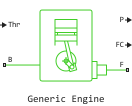
Description
Block Generic Engine It is a configurable internal combustion engine suitable for electric ignition and diesel engines. The unit can be controlled using either the torque or the normalized physical throttle signal. The unit parameters can be adjusted using third-order polynomials or tabular data on torque or power. Additional dynamic parameters include crankshaft inertia and response delay. The physical signal port FC outputs fuel consumption data from the engine based on the selected fuel consumption model. Additional speed and speed limit controls prevent the engine from stopping and enable cruise control. The figure shows how these ports relate to the engine configuration.
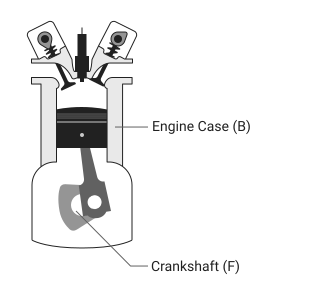
Engine speed, throttle, engine power and torque
By default, the block Generic Engine Uses a pre-programmed ratio between torque and rotational speed, which is modulated by a throttle signal or a torque control signal.
The unit evaluates the required engine power as a function of the engine speed . The function calculates the maximum power available for a given engine speed. . Block Parameters Maximum power, Speed at maximum power and Maximum speed This function is normalized relative to the physical values of maximum torque and rotational speed.
Normalized throttle signal regulates the engine power in such a way that . When selecting a value Normalized throttle for the parameter Model parameterization The physical input signal Thr controls the power of the motor. When selecting a value Torque command The unit calculates the value of the normalized throttle signal automatically. The unit outputs power equal to a fraction of the maximum possible power in steady-state mode at a fixed engine speed.
Polynomial motor control
If for the parameter Model parameterization the value is set Normalized 3rd-order polynomial, the unit uses a normalized engine speed to calculate the rotation speed and torque. The block defines the normalized engine speed as
where
-
— current engine speed;
-
— engine speed at maximum power.
The block processes the normalized dimensionless engine power as a third-order polynomial such that
where , and — constant polynomial coefficients, — peak power. In typical engines, the coefficients are they are positive.
The unit calculates the engine torque with the throttle fully open using polynomial coefficients such that
The unit sets the normalized engine speed at peak power in such a way that
Substituting this equality into the formula for gives
This condition normalizes the power relative to the engine speed at peak power. The unit sets the slope equal to zero, so that
The block defines the normalized engine speed with peak torque as
where the speed of reaching peak power is greater than the speed of reaching peak torque. The block uses a polynomial formula to find the dimensionless normalized torque. and sets the tilt angle to zero in such a way that
The solution for using these equations gives
The unit calculates the engine torque as follows
where — peak torque. Substituting the equation for gives a restriction
The block uses , and to calculate the engine speed at peak power so that
where equivalent to power at peak torque , which is always less than the peak power .
Engine power forms for different types of engines
The block calculates the polynomial using the corresponding coefficients specified in the parameter Engine type. When selecting values Spark-ignition or Diesel for the parameter Engine type The block selects the appropriate coefficients from the table. When selecting a value Generic The block calculates these coefficients independently.
Power consumption factor |
Engine type |
|
Spark-ignition |
Diesel |
|
|
|
|
|
|
|
|
|
|
Fuel consumption
The unit can additionally simulate fuel consumption and output the results as a physical signal to the FC port. To include fuel consumption in the simulation, set the parameter Fuel consumption model one of the following values:
-
Constant per revolution; -
Fuel consumption by speed and torque; -
Brake specific fuel consumption by speed and torque; -
Brake specific fuel consumption by speed and brake mean effective pressure.
Idle speed controller model
The idle speed control adjusts the throttle signal to increase the engine speed below the reference speed in accordance with
and
where
-
— engine throttle;
-
— throttle input port Thr;
-
— throttle valve of the regulator;
-
— engine speed or angular velocity of the crankshaft;
-
— reference idle speed;
-
— the threshold value of the regulator’s rotation speed;
-
— the time constant of the regulator.
The controlled throttle increases with a first-order delay from 0 before 1 when the engine speed drops below the reference speed. When the engine speed exceeds the reference speed, the adjustable throttle decreases from one to zero. When the difference between the engine speed and the reference speed is less than the speed threshold set by the regulator, the tangential component of the equation smooths out the time derivative of the controlled throttle. The smoothing function limits the adjustable throttle to a range of [0, 1]. The motor uses the larger of two values: input and adjustable. If the engine delay is enabled, the controller will change the input data before calculating the delay.
The model of the red zone regulator
The idle speed control determines the minimum throttle opening value to maintain engine speed, and the red zone control prevents exceeding the permissible speed based on the maximum throttle opening value. To determine the maximum throttle opening value, the red zone controller uses the equation of the idle speed controller model. However, for the red zone regulator:
-
— reference speed value in the red zone;
-
— speed threshold value;
-
— time constant in the red zone.
Efficiency
To increase the simulation speed, set the parameter Fuel consumption model meaning No fuel consumption. When using this setting, the unit does not calculate fuel consumption regardless of the FC port.
If any other value is selected for the parameter Fuel consumption model, the block must perform a non-linear calculation. The unit solves the equation even if the FC port that reports fuel consumption is not connected to another unit.
Assumptions and limitations
Engines respond with delay to changes in throttle speed and position. The unit maintains a delay only due to a change in the throttle position.
Dependencies for a group of fuel consumption parameters
The table shows how the parameter values are Fuel consumption model they affect the availability of dependent parameters.
| Fuel Consumption | ||||
|---|---|---|---|---|
Fuel consumption model |
||||
|
|
|
|
|
Fuel consumption per revolution |
Displaced volume |
|||
Revolutions per cycle |
||||
Speed vector |
||||
Torque vector |
Brake mean effective pressure vector |
|||
Fuel consumption table |
Brake specific fuel consumption table |
|||
Interpolation method |
||||
Ports
Conserving
#
F
—
engine crankshaft
rotational mechanics
Details
The mechanical rotation preservation port connected to the engine crankshaft. This is the slave port of the engine. The crankshaft transmits the power generated during the combustion process. As a rule, the clutch and gearbox are connected to this port.
| Program usage name |
|
#
B
—
engine housing
rotational mechanics
Details
A port for maintaining mechanical rotation connected to the engine block. This is the master port. An engine block is a physical body containing piston cylinders.
| Program usage name |
|
Output
#
P
—
instantaneous engine power, W
scalar
Details
The power developed by the engine, Watts.
| Data types |
|
| Complex numbers support |
No |
#
FC
—
fuel consumption, kg/s
scalar
Details
Engine fuel consumption, kg/s.
| Data types |
|
| Complex numbers support |
No |
Input
#
Thr
—
the normalized throttle level of the engine, dimensionless
scalar
Details
The required engine torque as a fraction of the maximum possible torque. This signal must be in the range of [0, 1].
Dependencies
To use this port, set the parameter Input type meaning Normalized throttle.
| Data types |
|
| Complex numbers support |
No |
#
Trq
—
torque control, N·m
scalar
Details
The required engine torque as a fraction of the maximum possible torque, NM. This signal must be in the range of 0 before the parameter value Maximum torque.
Dependencies
To use this port, set the parameter Input type meaning Torque command.
| Data types |
|
| Complex numbers support |
No |
Parameters
Engine Specifications
#
Torque vector —
tabular data on engine torque
N*m | uN*m | mN*m | kN*m | MN*m | GN*m | kgf*m | lbf*in | lbf*ft
Details
A vector of torque values for a given rotation speed. The size of this vector must match the parameter Speed vector.
Dependencies
To use this parameter, set for the parameter Model parameterization meaning Tabulated torque data.
| Units |
|
| Default value |
|
| Program usage name |
|
| Evaluatable |
Yes |
#
Speed at maximum torque —
angular velocity of the crankshaft when the engine reaches maximum power
rad/s | deg/s | rad/min | deg/min | rpm | rps
Details
The engine speed at which the engine develops maximum torque . This value determines the position of the peak on the torque curve.
Dependencies
To use this parameter, set for the parameter Model parameterization meaning Normalized 3rd-order polynomial and for the parameter Engine type meaning Generic.
| Units |
|
| Default value |
|
| Program usage name |
|
| Evaluatable |
Yes |
#
Maximum speed —
maximum angular velocity of the crankshaft
rad/s | deg/s | rad/min | deg/min | rpm | rps
Details
Maximum rotation speed , at which the engine can develop a torque. This value sets the upper bound of the power curve.
During the simulation, if If it exceeds this value, the simulation stops with an error. Maximum engine speed It cannot exceed the engine speed at which the engine power becomes negative.
Dependencies
To use this parameter, set for the parameter Model parameterization meaning Normalized 3rd-order polynomial.
| Units |
|
| Default value |
|
| Program usage name |
|
| Evaluatable |
Yes |
#
Input type —
the ability to control using a normalized throttle or torque
Normalized throttle | Torque command
Details
The unit receives either control via a normalized throttle or torque control. The settings control the ports:
-
Normalized throttle— Enables the Thr port of the physical signal, which accepts throttle control in the range from zero to one. -
Torque command— Enables the Trq physical signal port, which accepts torque control in the range from zero to maximum torque.
| Values |
|
| Default value |
|
| Program usage name |
|
| Evaluatable |
No |
#
Maximum torque —
the physical limit of the engine torque
N*m | uN*m | mN*m | kN*m | MN*m | GN*m | kgf*m | lbf*in | lbf*ft
Details
Maximum torque , which can develop the engine. This value determines the peak on the curve of the rotation speed versus the torque.
Dependencies
To use this parameter, set for the parameter Model parameterization meaning Normalized 3rd-order polynomial and for the parameter Engine type meaning Generic.
| Units |
|
| Default value |
|
| Program usage name |
|
| Evaluatable |
Yes |
#
Stall speed —
engine idling speed
rad/s | deg/s | rad/min | deg/min | rpm | rps
Details
Minimum rotation speed , at which the engine can develop a torque. This value sets the lower bound of the power curve.
During the simulation, if drops below this value, the engine torque is reduced to zero.
Dependencies
To use this parameter, set for the parameter Model parameterization meaning Normalized 3rd-order polynomial.
| Units |
|
| Default value |
|
| Program usage name |
|
| Evaluatable |
Yes |
#
Engine type —
the combustion process for simulation
Spark-ignition | Diesel | Generic
Details
Simulation of the internal combustion process. You can adjust the parameters of an electric ignition engine, a diesel engine, or a general-purpose engine based on maximum torque, rotational speed at maximum torque, and maximum speed.
Dependencies
To use this parameter, set for the parameter Model parameterization meaning Normalized 3rd-order polynomial.
| Values |
|
| Default value |
|
| Program usage name |
|
| Evaluatable |
No |
#
Power vector —
tabular data on engine power
W | uW | mW | kW | MW | GW | V*A | HP_DIN
Details
A vector of power values for a given rotation speed. The size of this vector must match the parameter Speed vector.
Dependencies
To use this parameter, set for the parameter Model parameterization meaning Tabulated power data.
| Units |
|
| Default value |
|
| Program usage name |
|
| Evaluatable |
Yes |
#
Maximum power —
the physical limit of the motor output power
W | uW | mW | kW | MW | GW | V*A | HP_DIN
Details
Maximum power which can be developed by the engine. This value determines the peak on the curve of the dependence of power on the rotation speed.
Dependencies
To use this parameter, set for the parameter Model parameterization meaning Normalized 3rd-order polynomial and for the parameter Engine type meaning Spark-ignition or Diesel.
| Units |
|
| Default value |
|
| Program usage name |
|
| Evaluatable |
Yes |
#
Speed vector —
tabular engine speed data
rad/s | deg/s | rad/min | deg/min | rpm | rps
Details
The vector of engine speeds that transmits data to the interpolation parameterization table of the model.
Dependencies
To use this parameter, set for the parameter Model parameterization meaning Tabulated torque data or Tabulated power data.
| Units |
|
| Default value |
|
| Program usage name |
|
| Evaluatable |
Yes |
#
Speed at maximum power —
angular velocity of the crankshaft when the engine reaches maximum torque
rad/s | deg/s | rad/min | deg/min | rpm | rps
Details
Engine speed , at which the engine is running at maximum power. This value determines the position of the peak on the power curve.
Dependencies
To use this parameter, set for the parameter Model parameterization meaning Normalized 3rd-order polynomial and for the parameter Engine type meaning Spark-ignition or Diesel.
| Units |
|
| Default value |
|
| Program usage name |
|
| Evaluatable |
Yes |
#
Interpolation method —
type of interpolation
Linear | Smooth
Details
A method for calculating fuel consumption at intermediate values of rotational speed and torque. Outside of the data range, fuel consumption remains constant at the level of the final value of the interpolation table.
Dependencies
To use this parameter, set for the parameter Model parameterization meaning Tabulated torque data or Tabulated power data.
| Values |
|
| Default value |
|
| Program usage name |
|
| Evaluatable |
No |
#
Stall speed threshold —
engine shutdown threshold
rad/s | deg/s | rad/min | deg/min | rpm | rps
Details
The threshold speed at which the engine speed drops to zero after the speed drops below . Use this parameter to adjust simulation performance during shutdowns.
Dependencies
To use this parameter, set for the parameter Model parameterization meaning Normalized 3rd-order polynomial.
| Units |
|
| Default value |
|
| Program usage name |
|
| Evaluatable |
Yes |
#
Model parameterization —
engine model
Normalized 3rd-order polynomial | Tabulated torque data | Tabulated power data
Details
The engine model. Select one of the following values based on the available data:
-
Normalized 3rd-order polynomial— Adjust the engine parameters using the power curve interpolation table, determined by the power and speed characteristics. -
Tabulated torque data— Adjust the engine parameters using the table of rotation speed versus torque. -
Tabulated power data— Adjust the engine parameters using the table of rotation speed versus power.
| Values |
|
| Default value |
|
| Program usage name |
|
| Evaluatable |
No |
Speed Control
#
Redline time constant —
delay in operation of the red zone controller
s | ns | us | ms | min | hr | d
Details
Reaction time when the engine speed exceeds the parameter value Redline speed. Enter the value of the time constant associated with the increase or decrease of the adjustable throttle value.
Dependencies
To use this option, check the box next to the option Redline control.
| Units |
|
| Default value |
|
| Program usage name |
|
| Evaluatable |
Yes |
#
Controller time constant —
delay in the operation of the idle speed control
s | ns | us | ms | min | hr | d
Details
Reaction time to deviations from the parameter value Idle speed reference.
Dependencies
To use this option, check the box next to the option Idle speed control.
| Units |
|
| Default value |
|
| Program usage name |
|
| Evaluatable |
Yes |
#
Redline threshold speed —
smooth operation of the red zone control
rad/s | deg/s | rad/min | deg/min | rpm | rps
Details
The range of angular velocities of the transition to the red zone. Specify the speed range around the red zone where the controller switches from fully on to off. The unit uses this parameter to smooth the adjustable throttle value when the engine speed exceeds the preset value of the red zone. High values reduce the response rate of the regulator. Small values increase computational costs.
Dependencies
To use this option, check the box next to the option Redline control.
| Units |
|
| Default value |
|
| Program usage name |
|
| Evaluatable |
Yes |
# Idle speed control — activating speed control parameters
Details
The ability to enable speed control. The speed control keeps the engine idling at a preset level. Idling the engine prevents it from stopping when the throttle valve is slightly open is not enough to rotate the crankshaft. When the speed control parameters are enabled, the unit ensures a sufficient throttle opening level to maintain the set parameter value. Idle speed reference. For more information, see Idle speed controller model.
| Default value |
|
| Program usage name |
|
| Evaluatable |
No |
# Redline control — activating the parameters of the red zone controller
Details
A parameter that allows you to turn on the limiter of the maximum angular velocity of the crankshaft of the engine. When checking the box next to the parameter Redline control The unit prevents exceeding the maximum set engine speed.
| Default value |
|
| Program usage name |
|
| Evaluatable |
No |
#
Idle speed reference —
steady-state idle speed
rad/s | deg/s | rad/min | deg/min | rpm | rps
Details
Reference angular velocity of the crankshaft. The idle speed control keeps the rotation speed not lower than the given one.
Dependencies
To use this option, check the box next to the option Idle speed control.
| Units |
|
| Default value |
|
| Program usage name |
|
| Evaluatable |
Yes |
#
Controller threshold speed —
smooth response of the regulator
rad/s | deg/s | rad/min | deg/min | rpm | rps
Details
The smoothing parameter of the controller. Parameter Controller threshold speed smoothes the adjustable throttle value when the engine speed exceeds the reference idle speed. For more information, see Idle speed controller model. High values reduce the response rate of the regulator. Small values increase computational costs. This parameter must be positive.
Dependencies
To use this option, check the box next to the option Idle speed control.
| Units |
|
| Default value |
|
| Program usage name |
|
| Evaluatable |
Yes |
#
Redline speed —
peak threshold value of the crankshaft speed control
rad/s | deg/s | rad/min | deg/min | rpm | rps
Details
The set engine speed value for regulating the red zone. Enter the value of the reference rotation speed, when exceeded, the red zone control is activated.
Dependencies
To use this option, check the box next to the option Redline control.
| Units |
|
| Default value |
|
| Program usage name |
|
| Evaluatable |
Yes |
Fuel Consumption
#
Brake specific fuel consumption table —
data on specific fuel consumption during engine testing on the brake stand
s^2/m^2 | s^2/ft^2 | g/(hr*kW)
Details
When selecting a value Brake specific fuel consumption by speed and torque for the parameter Fuel consumption model This parameter is a matrix of indicators of specific fuel consumption during braking, which corresponds to the vectors of engine speed and torque. Specific fuel consumption is the ratio of fuel consumption to power output.
When selecting a value Brake specific fuel consumption by speed and brake mean effective pressure for the parameter Fuel consumption model This parameter is a matrix of indicators of specific fuel consumption during braking, which corresponds to the vectors of engine speed and average effective braking pressure. The average effective braking pressure is the ratio of fuel consumption to power output.
For both fuel consumption models, the number of rows should be equal to the number of items in the parameter. Speed vector. The number of columns must be equal to the number of items in the parameter. Torque vector or in the parameter Brake mean effective pressure vector.
Dependencies
To use this parameter, set for the parameter Fuel consumption model meaning Brake specific fuel consumption by speed and torque or Brake specific fuel consumption by speed and brake mean effective pressure.
| Units |
|
| Default value |
|
| Program usage name |
|
| Evaluatable |
Yes |
#
Fuel consumption per revolution —
the constant
mg/rev | kg/rad
Details
Constant fuel consumption rate as a function of the number of revolutions of the crankshaft. Enter the amount of fuel consumed per revolution of the crankshaft.
Dependencies
To use this parameter, set for the parameter Fuel consumption model meaning Constant per revolution.
| Units |
|
| Default value |
|
| Program usage name |
|
| Evaluatable |
Yes |
# Revolutions per cycle — number of revolutions in the combustion cycle
Details
The number of revolutions of the crankshaft per combustion cycle. Enter the value 2 for a four-stroke engine or 1 for two-stroke.
Dependencies
To use this parameter, set for the parameter Fuel consumption model meaning Brake specific fuel consumption by speed and brake mean effective pressure.
| Default value |
|
| Program usage name |
|
| Evaluatable |
Yes |
#
Fuel consumption table —
engine fuel consumption data
kg/s | kg/hr | kg/min | g/hr | g/min | g/s | t/hr | lbm/hr | lbm/min | lbm/s
Details
A matrix of fuel consumption values corresponding to the engine speed and torque vectors. The number of rows must be equal to the number of elements in the parameter. Speed vector. The number of columns must be equal to the number of items in the parameter. Torque vector.
Dependencies
To use this parameter, set for the parameter Fuel consumption model meaning Fuel consumption by speed and torque.
| Units |
|
| Default value |
|
| Program usage name |
|
| Evaluatable |
Yes |
#
Speed vector —
engine speed data
rad/s | deg/s | rad/min | deg/min | rpm | rps
Details
The vector of engine torques corresponding to rows of the fuel consumption reference table.
Dependencies
To use this parameter, set for the parameter Fuel consumption model one of the following values:
-
Fuel consumption by speed and torque; -
Brake specific fuel consumption by speed and torque; -
Brake specific fuel consumption by speed and brake mean effective pressure.
| Units |
|
| Default value |
|
| Program usage name |
|
| Evaluatable |
Yes |
#
Fuel consumption model —
activating fuel consumption simulation parameters
No fuel consumption | Constant per revolution | Fuel consumption by speed and torque | Brake specific fuel consumption by speed and torque | Brake specific fuel consumption by speed and brake mean effective pressure
Details
A method for calculating fuel consumption based on available data. The methods allow the use of parameters corresponding to typical industrial data. Choose one of the following options:
-
No fuel consumption; -
Constant per revolution; -
Fuel consumption by speed and torque; -
Brake specific fuel consumption by speed and torque; -
Brake specific fuel consumption by speed and brake mean effective pressure.
If for the parameter Fuel consumption model value selected No fuel consumption The unit will not calculate fuel consumption even when the FC port is connected to another unit. Selecting this option increases the simulation speed.
| Values |
|
| Default value |
|
| Program usage name |
|
| Evaluatable |
No |
#
Displaced volume —
the volume of fuel displaced in one stroke of the piston
m^3 | um^3 | mm^3 | cm^3 | km^3 | ml | l | gal | igal | in^3 | ft^3 | yd^3 | mi^3
Details
The volume of fuel displaced in one stroke of the piston. It is equal to the cross-sectional area of a cylinder with a round piston multiplied by the stroke length of the piston.
Dependencies
To use this parameter, set for the parameter Fuel consumption model meaning Brake specific fuel consumption by speed and brake mean effective pressure.
| Units |
|
| Default value |
|
| Program usage name |
|
| Evaluatable |
Yes |
#
Brake mean effective pressure vector —
piston pressure data
Pa | uPa | hPa | kPa | MPa | GPa | kgf/m^2 | kgf/cm^2 | kgf/mm^2 | mbar | bar | kbar | atm | ksi | psi | mmHg | inHg
Details
The vector of values of the average effective braking pressure. The values of the average effective braking pressure satisfy the expression
where
-
— output torque;
-
— number of cycles per revolution;
-
— the working volume of the cylinder.
Dependencies
To use this parameter, set for the parameter Fuel consumption model meaning Brake specific fuel consumption by speed and brake mean effective pressure.
| Units |
|
| Default value |
|
| Program usage name |
|
| Evaluatable |
Yes |
#
Interpolation method —
the interpolation method for calculating fuel consumption
Linear | Smooth
Details
An interpolation method for calculating fuel consumption at intermediate values of rotational speed and torque. Fuel consumption remains constant outside the range indicated in the interpolation table.
Dependencies
To use this parameter, set for the parameter Fuel consumption model one of the following values:
-
Fuel consumption by speed and torque; -
Brake specific fuel consumption by speed and torque; -
Brake specific fuel consumption by speed and brake mean effective pressure.
| Values |
|
| Default value |
|
| Program usage name |
|
| Evaluatable |
No |
#
Torque vector —
engine torque data
N*m | uN*m | mN*m | kN*m | MN*m | GN*m | kgf*m | lbf*in | lbf*ft
Details
The vector of engine torques corresponding to columns of the fuel consumption reference table.
Dependencies
To use this parameter, set for the parameter Fuel consumption model meaning Fuel consumption by speed and torque or Brake specific fuel consumption by speed and torque.
| Units |
|
| Default value |
|
| Program usage name |
|
| Evaluatable |
Yes |
Dynamics
# Inertia — activation of inertia simulation parameters
Details
The possibility of parameterization of inertia and initial velocity. You can simulate inertia to improve accuracy or numerical stability.
| Default value |
|
| Program usage name |
|
| Evaluatable |
No |
# Initial normalized throttle — the initial value of the engine throttle
Details
The initial value of the normalized engine throttle. This value must be in the range [0,1]. Specify a positive value for this parameter to account for the delay.
Dependencies
To use this option, check the box next to the option Time constant.
| Default value |
|
| Program usage name |
|
| Evaluatable |
Yes |
# Time constant — activating engine delay simulation parameters
Details
The possibility of parameterizing the time constant and the initial normalized position of the engine throttle.
| Default value |
|
| Program usage name |
|
| Evaluatable |
No |
#
Engine time constant —
engine delay value
s | ns | us | ms | min | hr | d
Details
Time delay in engine response. This parameter determines the delay between the throttle signal and the engine response.
Dependencies
To use this option, check the box next to the option Time constant.
| Units |
|
| Default value |
|
| Program usage name |
|
| Evaluatable |
Yes |
#
Engine inertia —
inertia of engine crankshaft rotation
kg*m^2 | g*m^2 | kg*cm^2 | g*cm^2 | lbm*in^2 | lbm*ft^2 | slug*in^2 | slug*ft^2
Details
The initial inertia of rotation. This parameter initializes the calculation of the inertia of the engine.
Dependencies
To use this option, check the box next to the option Inertia.
| Units |
|
| Default value |
|
| Program usage name |
|
| Evaluatable |
Yes |
#
Initial velocity —
angular velocity of the engine crankshaft
rad/s | deg/s | rad/min | deg/min | rpm | rps
Details
The initial angular velocity. This parameter initializes the calculation of the inertia of the engine.
| Units |
|
| Default value |
|
| Program usage name |
|
| Evaluatable |
Yes |