Controlled Mass Flow Rate Source (2P)
A source of mass or volume flow.
blockType: AcausalFoundation.TwoPhaseFluid.Sources.FlowRate
|
Controlled Mass Flow Rate Source (2P) Path in the library: |
|
Controlled Volumetric Flow Rate Source (2P) Path in the library: |
|
Mass Flow Rate Source (2P) Path in the library: |
|
Volumetric Flow Rate Source (2P) Path in the library: |
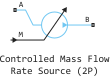
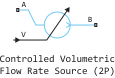


Description
Block Controlled Mass Flow Rate Source (2P) It is an ideal source of mechanical energy in a two-phase liquid network. The source can maintain a preset mass or volume flow rate regardless of the pressure drop. At the same time, there is no hydraulic resistance and no heat exchange with the environment. The flow type is set using the parameter Flow rate type.
The block icon changes depending on the parameter values. Controlled and Flow rate type.
Ports A and B represent the input and output of the source. If the check box is selected Controlled, the mass or volume flow rate is controlled by an input signal on the M or V ports, respectively. If the check box Controlled if not set, then the mass or volume flow rate is constant and is set in the parameters Mass flow rate or Volumetric flow rate accordingly. When the flow rate is positive, the liquid flows from port A to port B.
Conservation of mass
The volume of liquid in the source is considered negligible and is ignored in the model. There is no accumulation of liquid between the ports, so the sum of all mass flow rates entering the source should be zero.:
where — mass flow rate at the source through the appropriate port.
If for the parameter Flow rate type the value is set Volumetric flow rate, then the mass flow through port A is calculated based on the volume flow:
where
-
— volume consumption;
-
— specific volume.
Energy conservation
By default, the source maintains the set flow rate by performing isentropic work on the incoming liquid, although the block provides the option to ignore this term. If the model takes into account the speed at which the source performs work, then it is equal to the sum of the energy flows through the ports.:
where — the flow of energy to the source through the port or through work. The energy flow due to work is equal to the power generated by the source. Its value is calculated from the values of the specific total enthalpy at the ports:
Specific total enthalpy defined as
where
-
the asterisk indicates the port (A or B);
-
— specific internal energy;
-
— pressure;
-
— the area of the stream.
The value of the specific internal energy is determined taking into account the fact that the work performed by the source is isentropic. Then the specific entropy, which is a function of the specific internal energy, should have the same value at ports A and B:
where — specific entropy. If the check box is Isentropic power added removed, the specific total enthalpies in the ports have the same value ( ), and the work done by the source is zero ( ).
Ports
Conserving
#
A
—
Input to the source
two-phase liquid
Details
Non-directional port of two-phase liquid. If the flow rate is positive, the liquid flows from port A to port B.
| Program usage name |
|
#
B
—
exit from the source
two-phase liquid
Details
Non-directional port of two-phase liquid. If the flow rate is positive, the liquid flows from port A to port B.
| Program usage name |
|
Input
#
M
—
mass flow control signal, kg/s
scalar
Details
The input value of the mass flow through the source.
Dependencies
To use this port, check the box Controlled, and for the parameter Flow rate type set the value Mass.
| Data types |
|
| Complex numbers support |
I don’t |
#
V
—
volume flow control signal, m3/s
scalar
Details
The input value of the volumetric flow rate through the source.
Dependencies
To use this port, check the box Controlled, and for the parameter Flow rate type set the value Volumetric.
| Data types |
|
| Complex numbers support |
I don’t |
Parameters
Main
#
Volumetric flow rate —
constant volume flow through the source
m^3/s | mm^3/s | cm^3/s | m^3/hr | m^3/min | l/hr | l/min | l/s | gal/hr | gal/min | gal/s | ft^3/hr | ft^3/min | ft^3/s
Details
Volume flow through the source.
Dependencies
To use this option, uncheck the box. Controlled, and for the parameter Flow rate type set the value Volumetric.
| Units |
|
| Default value |
|
| Program usage name |
|
| Evaluatable |
Yes |
# Isentropic power added — is the source doing the job
Details
Sets whether the source is working with the liquid flow.:
-
If the check box is selected, the source performs isentropic work on the liquid to maintain the set mass flow rate. Use this parameter to represent the ideal pump or compressor and to properly account for energy consumption and output, especially in closed-loop systems.
-
If unchecked, the source does not perform any work on the flow, neither adding nor subtracting energy, regardless of the mass flow rate generated by the source. Use this option to set the desired flow mode at the system entrance without affecting the flow temperature.
| Default value |
|
| Program usage name |
|
| Evaluatable |
No |
#
Cross-sectional area at port B —
the cross-sectional area normal to the flow path at port B
m^2 | um^2 | mm^2 | cm^2 | km^2 | in^2 | ft^2 | yd^2 | mi^2 | ha | ac
Details
The cross-sectional area normal to the flow path at port B.
| Units |
|
| Default value |
|
| Program usage name |
|
| Evaluatable |
Yes |
#
Cross-sectional area at port A —
the cross-sectional area normal to the flow path at port A
m^2 | um^2 | mm^2 | cm^2 | km^2 | in^2 | ft^2 | yd^2 | mi^2 | ha | ac
Details
The cross-sectional area normal to the flow path at port A.
| Units |
|
| Default value |
|
| Program usage name |
|
| Evaluatable |
Yes |
# Controlled — is the flow rate set by the input signal
Details
Determines how the flow rate will be set:
-
If the check box is selected, the mass or volume flow rate is set by the input signal M or V, respectively.;
-
If the checkbox is unchecked, then the constant mass or volume flow rate is set by the parameters Mass flow rate or Volumetric flow rate.
| Default value |
|
| Program usage name |
|
| Evaluatable |
No |
#
Flow rate type —
the mass or volume flow is set
Mass | Volumetric
Details
Determines which type of flow is set:
-
Mass— the mass flow rate is set; -
Volumetric— the volume flow is set.
| Values |
|
| Default value |
|
| Program usage name |
|
| Evaluatable |
No |
#
Mass flow rate —
constant mass flow through the source
kg/s | kg/hr | kg/min | g/hr | g/min | g/s | t/hr | lbm/hr | lbm/min | lbm/s
Details
Mass flow through the source.
Dependencies
To use this option, uncheck the box. Controlled, and for the parameter Flow rate type set the value Mass.
| Units |
|
| Default value |
|
| Program usage name |
|
| Evaluatable |
Yes |