GOOSE TX
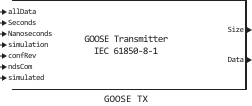
Formation of a GOOSE message from a set of fields for further transmission of all types of data over Ethernet according to IEC 61850-7-2 and IEC 61850-8-1.
blockType: SubSystem
|
Path in the library: |
Description
Block GOOSE TX It is used to generate a GOOSE message from a set of fields for further transmission of all types of data over Ethernet according to IEC 61850-7-2 and IEC 61850-8-1.
Ports
Input
#
allData
—
BusSignal type signal according to Table A.2 of IEC61850-8-1
BusSignal
Details
A type signal BusSignal, which is formed by a block Bus Creator or similar. The type of each signal in the composition BusSignal awarded according to the Data types of entries parameter. The number and order of the signals in the composition BusSignal, must match the number and order of the elements of the Data types of entries parameter.
| Data types |
|
| Complex numbers support |
No |
#
Seconds
—
time in seconds since midnight on January 1, 1970
scalar
Details
It is written to the GOOSE message at the last data change (event).
| Data types |
|
| Complex numbers support |
No |
#
Nanoseconds
—
the number of nanoseconds that have passed since the beginning of the second
scalar
Details
It is recorded in the GOOSE message at the last data change (event).
| Data types |
|
| Complex numbers support |
No |
#
simulation
—
the value of the simulation field
scalar
Details
If the value of the simulation field is true, then the message and its value were issued by the simulation module and are not real values.
| Data types |
|
| Complex numbers support |
No |
#
confRev
—
configuration revision version
scalar
Details
The integer must be between 0 and 4,294,967,295.
| Data types |
|
| Complex numbers support |
No |
#
ndsCom
—
indication of the need for commissioning
scalar
Details
| Data types |
|
| Complex numbers support |
No |
#
simulated
—
the highest bit of the field is Reserved 1
scalar
Details
The highest bit of the Reserved 1 field indicates that the device is in test mode.
| Data types |
|
| Complex numbers support |
No |
Output
#
Size
—
GOOSE message size
scalar
Details
The size of the GOOSE message as the number of bytes transmitted. No more than the value of the parameter Maximum message size block RITM-ETH-RAW TX.
| Data types |
|
| Complex numbers support |
No |
#
Data
—
a generated GOOSE message in the form of a set of bytes
vector
Details
| Data types |
|
| Complex numbers support |
No |
Parameters
MAC addresses
# Enable MAC addresses inputs — enabling/disabling the ability to set the MAC address via the Source MAC input
Details
| Default value |
|
| Program usage name |
|
| Evaluatable |
Yes |
# Source MAC address — MAC address of the source of transmission of GOOSE messages
Details
MAC address of the source of transmission of GOOSE messages in the form of an array of 6 bytes.
| Default value |
|
| Program usage name |
|
| Evaluatable |
Yes |
# Destination MAC address — MAC address of the GOOSE message receiver
Details
The MAC address of the receiver of GOOSE messages in the form of an array of 6 bytes. For example, for multicast, MAC addresses in the range 01:0C are assigned to streams.:CD:01:00:00-01:0C:CD:01:01:FF.
| Default value |
|
| Program usage name |
|
| Evaluatable |
Yes |
VLAN
# Enable VLAN — the button for enabling/disabling VLAN field generation
Details
| Default value |
|
| Program usage name |
|
| Evaluatable |
Yes |
#
VLAN priority —
traffic transmission priority tag in the format UInt8.
Details
| Default value |
|
| Program usage name |
|
| Evaluatable |
Yes |
#
VLAN ID (VID) —
network stream ID (12 bits) in the format UInt16
Details
| Default value |
|
| Program usage name |
|
| Evaluatable |
Yes |
General fields
# APPID — the value of the APPID message identification tag
Details
Specifying the value of the APPID message identification tag (the standard provides 0x8000-0xBFFF for message class 1A, 0x0000-0x3FFF for message class 1, however, it is possible to set a different value).
| Default value |
|
| Program usage name |
|
| Evaluatable |
Yes |
# gocbRef — specifying the value of the gocbRef GOOSE message field
Details
| Default value |
|
| Program usage name |
|
| Evaluatable |
Yes |
# datSet — specifying the value of the datSet GOOSE message field
Details
| Default value |
|
| Program usage name |
|
| Evaluatable |
Yes |
# goID — specifying the value of the goID GOOSE message field
Details
| Default value |
|
| Program usage name |
|
| Evaluatable |
Yes |
allData
# Data types of entries — specifying the data type of the elements supplied to the allData port as a vector
Details
Specifying the data type of the Data elements of the allData field in the form of a vector, where the ordinal number of the vector element corresponds to the signal number in the composition BusSignal. Depending on the value of the vector element, the signal is assigned a data type according to the table:
The value of the vector element "Data types" |
Data type |
Comments |
|---|---|---|
1 |
Boolean |
Scalar |
2 |
Int8 |
Scalar |
3 |
Int16 |
Scalar |
4 |
Int32 |
Scalar |
5 |
Int64 |
Scalar |
6 |
Int8U |
Scalar |
7 |
Int16U |
Scalar |
8 |
Int24U |
(unused data type) |
9 |
Int32U |
Scalar |
10 |
Float32 |
Scalar |
11 |
Enumerated |
Scalar equivalent |
12 |
Coded Enum |
A bit string; is received into the block as a vector of two numbers in a range of values |
13 |
Octet String |
Vector from |
14 |
Visible String |
Vector from |
15 |
TimeStamp |
A vector of two integers, the first is UNIX time in seconds, the second is nanoseconds |
16 |
Quality |
A bit string; represented by a numeric value, can be supplied from the block GOOSE Quality |
| Default value |
|
| Program usage name |
|
| Evaluatable |
Yes |
# Encode data into structures — enabling/disabling the possibility of packing data or a part of GOOSE message data into a structure format
Details
| Default value |
|
| Program usage name |
|
| Evaluatable |
Yes |
# Sequence of structures — an array of vectors with the numbers of elements to be grouped into structures
Details
A Tuple type array of Vector{Int64}, which contains vectors with element numbers. These vectors will be grouped into structures.
Each individual vector inside the main array is a separate structure inside the allData GOOSE message field. The grouping of elements within the structure vector should occur from the smaller element number to the larger one. The signals inside the vector must be located at the adjacent inputs of the block. Example: you can — [3 4 5] cannot — [1 3 5].
The grouping of structure vectors inside a Tuple array should occur in a similar way: from the vector with the lowest element numbers to the vector with the highest element numbers. Example: you can — {[1 2 3] [4 5]}, {[1 2] [4 5]}, {[1 2] [3 4]}, not allowed — {[4 5] [1 2 3]}, {[4 5] [1 2], [3 4] [1 2]}.
Elements that are not included in any of the vectors inside the Tuple array will be encapsulated in a GOOSE message outside the structure, sequentially, according to the input number they occupy. Example: {[1 2] [4 5]} — the composition of the allData field: 1 and 2 signals in the structure, the third signal outside the structure, 4 and 5 signals in the structure, {[3 4]} — the composition of the allData field: 1 and 2 signals outside the structure, 3 and 4
signals in the structure, 5 signal outside the structure.
| Default value |
|
| Program usage name |
|
| Evaluatable |
Yes |
Timing
# Retransmission time in stable conditions, s — the value of the normal transmission time interval between GOOSE messages in seconds
Details
| Default value |
|
| Program usage name |
|
| Evaluatable |
Yes |
# Retransmission times after events, s — vector of values of transmission time intervals T1 … Tp between GOOSE messages, after changing at least one of the message data attributes
Details
| Default value |
|
| Program usage name |
|
| Evaluatable |
Yes |
# Retransmission counts — vector of the number of transmission time intervals T1 … Tp between GOOSE messages until the normal transmission period is reached
Details
By default, the values Retransmission times after events and Retransmission counts mean that after data changes, they will be resent 4 times with a range of 0.01 seconds, 3 times with a range of 0.04 seconds, and 2 times with a range of 2.5 seconds.
| Default value |
|
| Program usage name |
|
| Evaluatable |
Yes |
Sample time
# Sample time, s — the calculation step that the block will work with GOOSE TX
Details
The calculation step must be a multiple of the main calculation step specified in the model settings. Inheritance is not supported.
| Default value |
|
| Program usage name |
|
| Evaluatable |
Yes |
