Tank (IL)
A tank in an isothermal fluid network.
blockType: EngeeFluids.IsothermalLiquid.Volumes.Tank
|
Path in the library: |
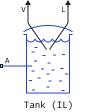
Description
Block Tank (IL) simulates a container with six input ports, from A to F, in an isothermal fluid network. The unit outputs the values of the liquid volume in port V and the liquid level in port L as scalar signals. The block simulates the difference in hydrostatic pressure between the surface of the liquid and the height of the inlet port. The tank can be under a preset constant pressure, pressure set via an external user signal, or atmospheric pressure.
Liquid volume
The volume of liquid in the tank is determined from the total mass flow in the tank:
where
-
— the total mass of liquid in the tank coming through all ports;
-
— the density of the liquid.
Due to the constant pressure in the tank, the volume of liquid inside the tank varies depending on the mass flow rate. Note that the opposite is true for pipes, where pressure is a function of a fixed volume of liquid.
It is possible to set a notification if the volume of liquid in the tank exceeds its capacity. Set for the parameter Liquid volume above max capacity meaning Error if you want the simulation to stop when this happens.
Liquid level
If for the parameter Tank volume parameterization the value is set Constant cross-section area, then the liquid level in the tank is determined by the volume of the liquid , which is due to the constant cross-sectional area of the tank opening. Otherwise, the liquid level can be set as tabular data in the option Tabulated data - volume vs. level.
If the liquid level in the tank falls below the height of the tank entrance, then the assumption that the liquid completely fills the volume of the connected blocks may be incorrect. Connections to the block Pipe (IL) which are based on this assumption, in this case may give non-physical results.
If you plan to simulate the liquid levels in the tank below the height of the tank entrance, then connect the unit Tank (IL) to access the system using the block Partially Filled Pipe (IL).
As in the case of the parameter Liquid volume above max capacity you can be notified if the liquid level in the tank drops below the height of the inlet(s) during the simulation by setting the appropriate value for the parameter Liquid level below inlet height.
Mass consumption
If you set for the parameter Number of inlets a number greater than 1, then the equations below apply to each port. Dynamic pressure for the input port equally
where
-
— density of the liquid;
-
— flow rate;
-
— the mass flow rate of the liquid flowing into the tank through the port.
Total pressure
where
-
— pressure in the tank:
-
if for the parameter Pressurization specification the value is set
Atmospheric pressureThen is equal to atmospheric pressure; -
if for the parameter Pressurization specification the value is set
Constant specified pressureThen is equal to the value of the parameter Tank pressurization; -
if for the parameter Pressurization specification the value is set
Variable pressureThen is equal to the input signal of the P port.
-
-
— hydrostatic pressure drop at the specified port Inlet height:
,
where — either the height difference between the liquid level and the height of the tank entrance, or zero, whichever is greater.
Assumptions and limitations
If for the parameter Pressurization specification the value is set Variable pressure, then the block assumes that the pressure change is slow, and there is no derivative of pressure in the equations of conservation of mass and energy.
Variables
Use the parameter group Initial Targets to set the priority and initial target values for the block parameter variables before modeling. For more information, see Configuring physical blocks using target values.
Ports
Conserving
#
A
—
isothermal fluid port
isothermal liquid
Details
The entrance to the cistern.
| Program usage name |
|
#
B
—
isothermal fluid port
isothermal liquid
Details
Additional entrance to the tank.
Dependencies
To use this parameter, set for the parameter Number of inlets one of the values is: 2, 3, 4, 5 or 6.
| Program usage name |
|
#
C
—
isothermal fluid port
isothermal liquid
Details
Additional entrance to the tank.
Dependencies
To use this parameter, set for the parameter Number of inlets one of the values is: 3, 4, 5 or 6.
| Program usage name |
|
#
D
—
isothermal fluid port
isothermal liquid
Details
Additional entrance to the tank.
Dependencies
To use this parameter, set for the parameter Number of inlets one of the values is: 4, 5 or 6.
| Program usage name |
|
#
E
—
isothermal fluid port
isothermal liquid
Details
Additional entrance to the tank.
Dependencies
To use this parameter, set for the parameter Number of inlets meaning 5 or 6.
| Program usage name |
|
#
F
—
isothermal fluid port
isothermal liquid
Details
Additional entrance to the tank.
Dependencies
To use this parameter, set for the parameter Number of inlets meaning 6.
| Program usage name |
|
Output
#
V
—
liquid volume
scalar
Details
The volume of liquid in the tank in m3, given as a scalar.
| Data types |
|
| Complex numbers support |
No |
#
L
—
liquid level
scalar
Details
The liquid level in the tank in m, set as a scalar.
| Data types |
|
| Complex numbers support |
No |
Input
#
P
—
pressure in the tank
scalar
Details
The pressure in the tank in Pa, set as a scalar.
Dependencies
To use this parameter, set for the parameter Pressurization specification meaning Variable pressure.
| Data types |
|
| Complex numbers support |
No |
Parameters
Parameters
#
Number of inlets —
Number of input ports
1 | 2 | 3 | 4 | 5 | 6
Details
The number of input ports. Setting this parameter to 2 or more opens additional input ports.
| Values |
|
| Default value |
|
| Program usage name |
|
| Evaluatable |
No |
#
Pressurization specification —
the method of setting the pressure in the tank
Atmospheric pressure | Constant specified pressure | Variable pressure
Details
The method of setting the pressure in the tank.
To set a constant pressure that is not equal to atmospheric pressure, set this parameter to Constant specified pressure and specify the pressure value using the parameter Tank pressurization.
To set the variable pressure in the tank, set this parameter to Variable pressure and apply the pressure value in the tank in the form of a scalar to the port P.
| Values |
|
| Default value |
|
| Program usage name |
|
| Evaluatable |
No |
#
Tank pressurization —
user-defined tank pressure
Pa | uPa | hPa | kPa | MPa | GPa | kgf/m^2 | kgf/cm^2 | kgf/mm^2 | mbar | bar | kbar | atm | ksi | psi | mmHg | inHg
Details
User-defined tank pressure.
Dependencies
To use this parameter, set for the parameter Pressurization specification meaning Specified pressure.
| Units |
|
| Default value |
|
| Program usage name |
|
| Evaluatable |
Yes |
#
Tank volume parameterization —
characteristics of the tank area
Constant cross-section area | Tabulated data - volume vs. level
Details
Indicates the characteristics of the tank area.
This parameter is used to determine the liquid level in the tank. If you want to model a tank with a variable cross-sectional area according to the height of the tank, you can provide data for the tank volume depending on the liquid level using the option Tabulated data - volume vs. level.
| Values |
|
| Default value |
|
| Program usage name |
|
| Evaluatable |
No |
#
Tank cross-sectional area —
tank cross-sectional area
m^2 | um^2 | mm^2 | cm^2 | km^2 | in^2 | ft^2 | yd^2 | mi^2 | ha | ac
Details
The cross-sectional area of the tank in the horizontal plane.
Dependencies
To use this parameter, set for the parameter Tank volume parameterization meaning Constant cross-section area.
| Units |
|
| Default value |
|
| Program usage name |
|
| Evaluatable |
Yes |
#
Liquid level vector —
the vector of liquid level values in the tank
m | um | mm | cm | km | in | ft | yd | mi | nmi
Details
A vector of values of the liquid level in the tank for tabular parameterization of the variable area of the tank. The values in this vector correspond to the values in the parameter Liquid volume vector. The items must be positive and listed in ascending order. The first element must be equal to 0.
Dependencies
To use this parameter, set for the parameter Tank volume parameterization meaning Tabulated data - volume vs. level.
| Units |
|
| Default value |
|
| Program usage name |
|
| Evaluatable |
Yes |
#
Liquid volume vector —
vector of liquid volume values in the tank
m^3 | um^3 | mm^3 | cm^3 | km^3 | ml | l | gal | igal | in^3 | ft^3 | yd^3 | mi^3
Details
A vector of liquid volume values in a tank for tabular parameterization of a variable tank area. The values in this vector correspond to the values in the parameter Liquid level vector. The elements must be positive and listed in ascending order. The first element must be equal to 0.
Dependencies
To use this parameter, set for the parameter Tank volume parameterization meaning Tabulated data - volume vs. level.
| Units |
|
| Default value |
|
| Program usage name |
|
| Evaluatable |
Yes |
#
Inlet height —
height of the tank entrance
m | um | mm | cm | km | in | ft | yd | mi | nmi
Details
The height of the entrance to the tank. The value must be greater than or equal to 0.
Dependencies
To use this parameter, set for the parameter Number of inlets meaning 1.
| Units |
|
| Default value |
|
| Program usage name |
|
| Evaluatable |
Yes |
#
Inlet cross-sectional area —
the cross-sectional area of the tank entrance
m^2 | um^2 | mm^2 | cm^2 | km^2 | in^2 | ft^2 | yd^2 | mi^2 | ha | ac
Details
The cross-sectional area of the tank entrance port. This value should be higher. 0.
Dependencies
To use this parameter, set for the parameter Number of inlets meaning 1.
| Units |
|
| Default value |
|
| Program usage name |
|
| Evaluatable |
Yes |
#
Height vector for inlets A and B —
height vector of ports A and B
m | um | mm | cm | km | in | ft | yd | mi | nmi
Details
The vector of port heights for the enabled input ports A and B. Parameter Height vector for inlets A and B It is a vector of values corresponding to the height of each input port, starting from port A. Each element of this vector must be greater than or equal to 0.
Dependencies
To use this parameter, set for the parameter Number of inlets one of the values is: 2.
| Units |
|
| Default value |
|
| Program usage name |
|
| Evaluatable |
Yes |
#
Cross-sectional area vector for inlets A and B —
vector of cross-sectional areas of the input ports A and B
m^2 | um^2 | mm^2 | cm^2 | km^2 | in^2 | ft^2 | yd^2 | mi^2 | ha | ac
Details
Vector of the cross-sectional areas of the tank entrances for the included entry ports A and B. Parameter Cross-sectional area vector for inlets A and B It is a vector of values corresponding to the cross-sectional area of each input port, starting from port A. Each element of this vector must be larger 0.
Dependencies
To use this parameter, set for the parameter Number of inlets one of the values is: 2.
| Units |
|
| Default value |
|
| Program usage name |
|
| Evaluatable |
Yes |
#
Height vector for inlets A, B, and C —
height vector of ports A, B and C
m | um | mm | cm | km | in | ft | yd | mi | nmi
Details
A vector of port heights for the enabled input ports A, B, and C. Parameter Height vector for inlets A, B, and C It is a vector of values corresponding to the height of each input port, starting from port A. Each element of this vector must be greater than or equal to 0.
Dependencies
To use this parameter, set for the parameter Number of inlets one of the values is: 3.
| Units |
|
| Default value |
|
| Program usage name |
|
| Evaluatable |
Yes |
#
Cross-sectional area vector for inlets A, B, and C —
vector of cross-sectional areas of the input ports A, B and C
m^2 | um^2 | mm^2 | cm^2 | km^2 | in^2 | ft^2 | yd^2 | mi^2 | ha | ac
Details
Vector of the cross-sectional areas of the tank entrances for the included entry ports A, B and C. Parameter Cross-sectional area vector for inlets A, B, and C It is a vector of values corresponding to the cross-sectional area of each input port, starting from port A. Each element of this vector must be larger 0.
Dependencies
To use this parameter, set for the parameter Number of inlets one of the values is: 3.
| Units |
|
| Default value |
|
| Program usage name |
|
| Evaluatable |
Yes |
#
Height vector for inlets A, B, C and D —
height vector of ports A, B, C and D
m | um | mm | cm | km | in | ft | yd | mi | nmi
Details
A vector of port heights for the enabled input ports A, B, C and D. Parameter Height vector for inlets A, B, C and D It is a vector of values corresponding to the height of each input port, starting from port A. Each element of this vector must be greater than or equal to 0.
Dependencies
To use this parameter, set for the parameter Number of inlets one of the values is: 4.
| Units |
|
| Default value |
|
| Program usage name |
|
| Evaluatable |
Yes |
#
Cross-sectional area vector for inlets A, B, C and D —
vector of cross-sectional areas of the input ports A, B, C and D
m^2 | um^2 | mm^2 | cm^2 | km^2 | in^2 | ft^2 | yd^2 | mi^2 | ha | ac
Details
Vector of the cross-sectional areas of the tank entrances for the included entry ports A, B, C and D. Parameter Cross-sectional area vector for inlets A, B, C and D It is a vector of values corresponding to the cross-sectional area of each input port, starting from port A. Each element of this vector must be larger 0.
Dependencies
To use this parameter, set for the parameter Number of inlets one of the values is: 4.
| Units |
|
| Default value |
|
| Program usage name |
|
| Evaluatable |
Yes |
#
Height vector for inlets A, B, C, D and E —
height vector of ports A, B, C, D and E
m | um | mm | cm | km | in | ft | yd | mi | nmi
Details
The vector of port heights for the enabled input ports is A, B, C, D and E. Parameter Height vector for inlets A, B, C, D and E It is a vector of values corresponding to the height of each input port, starting from port A. Each element of this vector must be greater than or equal to 0.
Dependencies
To use this parameter, set for the parameter Number of inlets meaning 5.
| Units |
|
| Default value |
|
| Program usage name |
|
| Evaluatable |
Yes |
#
Cross-sectional area vector for inlets A, B, C, D and E —
vector of cross-sectional areas of the input ports A, B, C, D and E
m^2 | um^2 | mm^2 | cm^2 | km^2 | in^2 | ft^2 | yd^2 | mi^2 | ha | ac
Details
Vector of the cross-sectional areas of the tank entrances for the included entry ports A, B, C, D and E. Parameter Cross-sectional area vector for inlets A, B, C, D and E It is a vector of values corresponding to the cross-sectional area of each input port, starting from port A. Each element of this vector must be larger 0.
Dependencies
To use this parameter, set for the parameter Number of inlets meaning 5.
| Units |
|
| Default value |
|
| Program usage name |
|
| Evaluatable |
Yes |
#
Height vector for inlets A, B, C, D, E and F —
height vector of ports A, B, C, D, E and F
m | um | mm | cm | km | in | ft | yd | mi | nmi
Details
The vector of port heights for the enabled input ports is A, B, C, D, E, and F. Parameter Height vector for inlets A, B, C, D, E and F It is a vector of values corresponding to the height of each input port, starting from port A. Each element of this vector must be greater than or equal to 0.
Dependencies
To use this parameter, set for the parameter Number of inlets meaning 6.
| Units |
|
| Default value |
|
| Program usage name |
|
| Evaluatable |
Yes |
#
Cross-sectional area vector for inlets A, B, C, D, E and F —
vector of cross-sectional areas of the input ports A, B, C, D, E and F
m^2 | um^2 | mm^2 | cm^2 | km^2 | in^2 | ft^2 | yd^2 | mi^2 | ha | ac
Details
Vector of the cross-sectional areas of the tank entrances for the included entry ports A, B, C, D, E and F. Parameter Cross-sectional area vector for inlets A, B, C, D, E and F It is a vector of values corresponding to the cross-sectional area of each input port, starting from port A. Each element of this vector must be larger 0.
Dependencies
To use this parameter, set for the parameter Number of inlets meaning 6.
| Units |
|
| Default value |
|
| Program usage name |
|
| Evaluatable |
Yes |
#
Liquid level below inlet height —
notification of low liquid level in the tank
None | Error
Details
Do I need to be notified if the liquid level in the tank drops below the height of the port entrance during the simulation? Set this parameter to Warning if you want to receive an alert when this happens during the simulation. Set the value Error if you want the simulation to stop when this happens.
| Values |
|
| Default value |
|
| Program usage name |
|
| Evaluatable |
No |
#
Liquid volume above max capacity —
notification of excess tank volume
None | Error
Details
Do I need to be notified if the volume of liquid in the tank exceeds the maximum tank capacity during the simulation? Set this parameter to Warning if you want to receive an alert when this happens during the simulation. Set the value Error if you want the simulation to stop when this happens.
| Values |
|
| Default value |
|
| Program usage name |
|
| Evaluatable |
No |
#
Maximum tank capacity —
tank filling limit
m^3 | um^3 | mm^3 | cm^3 | km^3 | ml | l | gal | igal | in^3 | ft^3 | yd^3 | mi^3
Details
Tank filling limit.
Dependencies
To use this parameter, set for the parameter Liquid volume above max capacity meaning Warning or Error.
| Units |
|
| Default value |
|
| Program usage name |
|
| Evaluatable |
Yes |
#
Gravitational acceleration —
acceleration of free fall
m/s^2 | mm/s^2 | cm/s^2 | km/s^2 | in/s^2 | ft/s^2 | mi/s^2 | gn
Details
Acceleration of free fall.
| Units |
|
| Default value |
|
| Program usage name |
|
| Evaluatable |
Yes |