Coordinate Transformation Conversion
Conversion to a given coordinate representation.
blockType: CoordinateTransformationConversion
|
Path in the library: |
Description
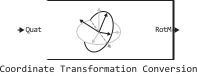
Block Coordinate Transformation Conversion converts coordinates from an input representation to a specified output representation. The input and output representations have the following forms:
-
Axis-Angle— the angle between the axes (AxAng) —[x y z theta]; -
Euler Angles— Euler angles (Eul) — a three-element vector, for example[z y x]; -
Homogeneous Transformation— homogeneous transformation (TForm) — matrix4on4; -
Quaternion— Quaternion (Quat) —[w x y z]; -
Rotation Matrix— rotation matrix (RotM) — matrix3on3; -
Translation Vector— displacement vector (TrVec) —[x y z].
All vectors must be vectors-column.
To process representations containing only position or orientation information (for example, TrVec or Eul), you can specify two Inputs or outputs to process all transformation information. When you select a homogeneous transformation as an Input or output, you can check the boxes on the block mask Show TrVec input port or Show TrVec output port to switch between multiple ports.
Ports
Input
#
Input transformation
—
coordinate conversion
column vector | the matrix is 3 by 3 | the matrix is 4 by 4
Details
The input transformation specified as the coordinate transformation. The following views are supported:
-
The angle between the axes (AxAng) —
[x y z theta]; -
Euler angles (Eul) is a three—element vector, for example
[z y x]; -
Homogeneous transformation (TForm) — matrix
4on4; -
Quaternion (Quat, by default) —
[w x y z]; -
The rotation matrix (RotM) is a matrix
3on3; -
Displacement vector (TrVec) —
[x y z].
All vectors must be vectors-column.
To process views that contain only position or orientation information (for example, TrVec or Eul), you can specify two Inputs or outputs to process all transformation information. When selecting a homogeneous transformation as an Input or output, optional checkboxes can be set on the block mask Show TrVec input port or Show TrVec output port to switch between multiple ports.
| Data types |
|
| Complex numbers support |
Yes |
#
TrVec
—
displacement vector
three-element column vector
Details
The displacement vector specified as a three-element column vector [x y z] corresponding to the axis offset , and accordingly. This port can be used to input or output movement information separately from the rotation vector.
Dependencies
To use this port, set the parameter Representation value Homogeneous Transformation and check the box Show TrVec input port.
| Data types |
|
| Complex numbers support |
Yes |
Output
#
Output transformation
—
coordinate transformation
column vector | the matrix is 3 by 3 | the matrix is 4 by 4
Details
The output transformation returned as a coordinate transformation with the specified representation. The following views are supported:
-
The angle between the axes (AxAng) —
[x y z theta]; -
Euler angles (Eul) is a three—element vector, for example
[z y x]; -
Homogeneous transformation (TForm) — matrix
4on4; -
Quaternion (Quat) —
[w x y z]. -
Rotation matrix (RotM, by default) — matrix
3on3; -
Displacement vector (TrVec) —
[x y z].
All vectors must be vectors-column.
To process representations containing only position or orientation information (for example, TrVec or Eul), you can specify two Inputs or outputs to process all transformation information. When selecting a homogeneous transformation as an Input or output, optional checkboxes can be set on the block mask Show TrVec input port or Show TrVec output port to switch between multiple ports.
| Data types |
|
| Complex numbers support |
Yes |
# TrVec — displacement vector
+
three-element column vector
Details
The displacement vector returned as a three-element column vector [x y z], corresponding to the offset along the axes , and . This port can be used to input or output movement information separately from the rotation vector.
Dependencies
To use this port, set the parameter Representation value Homogeneous Transformation and check the box Show TrVec output port.
| Типы данных |
|
| Support for complex numbers |
Yes |
Parameters
Input
#
Representation —
The input representation
Axis-Angle | Euler Angles | Homogeneous Transformation | Quaternion | Rotation Matrix | Translation Vector
Details
Select the representation for the input port of the block. If you are using a transformation that contains orientation information only, you can also check the boxes Show TrVec input port or Show TrVec output port when converting to or from a homogeneous transformation.
| Values |
|
| Default value |
|
| Program usage name |
|
| Tunable |
No |
| Evaluatable |
No |
#
Axis rotation sequence —
the sequence of axis rotations for Euler angles
ZYX | ZYZ | XYZ | ZXY | ZXZ | YXZ | YXY | YZX | YZY | XYX | XZY | XZX
Details
The sequence of axis rotations for Euler angles, given by one of the following scalar values:
-
ZYX(by default); -
ZYZ; -
XYZ; -
ZXY; -
ZXZ; -
YXZ; -
YXY; -
YZX; -
YZY; -
XYX; -
XZY; -
XZX.
The order of the angles in the input port Eul must correspond to this sequence of turns. Each symbol represents a corresponding axis. For example, if the sequence — ZYX, then the three given Euler angles are interpreted in order as rotations around the axis , rotation around the axis and rotation around the axis . When applying this rotation to a point, the axis rotations will be applied in the following order , then , then .
Dependencies
To use this parameter, set for the input parameter Representation meaning Euler Angles. The rotation sequence around the axes applies only to rotations around Euler angles.
| Values |
|
| Default value |
|
| Program usage name |
|
| Tunable |
No |
| Evaluatable |
No |
#
Show TrVec input port —
enable the TrVec input port
Logical
Details
Enable the TrVec input port if you want to specify a separate displacement vector for position information along with an orientation representation.
Dependencies
To use this parameter, set for the input parameter Representation meaning Homogeneous Transformation. Enable the TrVec port by checking the box Show TrVec input port.
| Default value |
|
| Program usage name |
|
| Tunable |
No |
| Evaluatable |
No |
Output
#
Representation —
output representation
Axis-Angle | Euler Angles | Homogeneous Transformation | Quaternion | Rotation Matrix | Translation Vector
Details
Select the representation for the output port of the block. If you are using a transformation that contains orientation information only, you can also check the boxes Show TrVec input port or Show TrVec output port when converting to or from a homogeneous transformation.
| Values |
|
| Default value |
|
| Program usage name |
|
| Tunable |
No |
| Evaluatable |
No |
#
Axis rotation sequence —
the order of rotations of the axis of Euler angles
ZYX | ZYZ | XYZ | ZXY | ZXZ | YXZ | YXY | YZX | YZY | XYX | XZY | XZX
Details
The order of rotations of the axis of the Euler angles, given by one of the following scalar values:
-
ZYX(by default); -
ZYZ; -
XYZ; -
ZXY; -
ZXZ; -
YXZ; -
YXY; -
YZX; -
YZY; -
XYX; -
XZY; -
XZX.
The order of the angles in the output port Eul must correspond to this sequence of turns. Each symbol represents a corresponding axis. For example, if the sequence — ZYX, then the three returned Euler angles are interpreted in order as rotations around the axis , rotation around the axis and rotation around the axis . When applying this rotation to a point, the axis rotation will be applied in the following order , then , then .
Dependencies
To use this parameter, set for the output parameter Representation meaning Euler Angles. The rotation sequence around the axes applies only to rotations around Euler angles.
| Values |
|
| Default value |
|
| Program usage name |
|
| Tunable |
No |
| Evaluatable |
No |
#
Show TrVec output port —
enable the TrVec output port
Logical
Details
Turn on the TrVec output port if you want to receive a separate displacement vector for position information along with an orientation representation.
Dependencies
To use this parameter, set for the output parameter Representation meaning Homogeneous Transformation. Enable the TrVec port by checking the box Show TrVec output port.
| Default value |
|
| Program usage name |
|
| Tunable |
No |
| Evaluatable |
No |