Superposition Signal Generator
Formation of a test signal in the form of a sum of harmonic signals to evaluate the frequency response of the system.
blockType: SubSystem
|
Path in the library: |
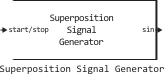
Description
Block Superposition Signal Generator generates a test signal or a set of test signals as a sum of harmonic signals of the form
where
-
is a set of test signal amplitudes;
-
is a set of frequencies of the test signal.
The unit supports the generation of three-phase test signals, which can be useful in determining the frequency response of three-phase AC systems. For example, the generated signal can be used to measure the impedance of an inverter that connects renewable energy sources to three-phase alternating current networks.
It is recommended not to use a test signal with more than 50 frequencies.
Ports
Entrance
# start/stop — start/stop signal
+
scalar
Details
The signal for the start and stop of the experiment. When the signal changes:
-
from a negative value or
0If the value is positive, the experiment starts; -
from a positive value to
0or a negative value, the experiment stops.
When the experiment is not running, the unit does not generate a test signal.
The experiment should last long enough to obtain high-quality frequency responses at all specified frequencies. Recommended duration of the experiment , where — minimum frequency
| Data types |
|
| Support for complex numbers |
None |
# w is the frequency of the test signal
+
vector
Details
A set of frequencies for conducting an experiment to determine the frequency response. Detailed information is found in the parameter description. Frequencies.
If you are setting the frequencies of the test signal via the external port w, specify the number of frequencies (vector length) in the parameter Number of frequencies.
Dependencies
To use this port, set the parameter Excitation Signal Source: meaning External ports.
| Data types |
|
| Support for complex numbers |
None |
# amp — test signal amplitudes
+
scalar | vector
Details
The amplitude of the test signal or a set of amplitudes of test signals for conducting an experiment to determine the frequency response. Detailed information is found in the parameter description. Amplitudes.
Dependencies
To use this port, set the parameter Excitation Signal Source: meaning External ports.
| Data types |
|
| Support for complex numbers |
None |
Output
# sin, cos, sin cos — test signal
+
scalar | vector
Details
The test signal is in the form of a sum of harmonic signals. The name of the port and the type of harmonic signal depend on the parameter value. Waveform Type:.
| Data types |
|
| Support for complex numbers |
None |
# 3Φ-sin, 3Φ-cos, 3Φ-sin cos — test signal
+
vector
Details
A three-phase test signal in the form of a sum of harmonic signals. The name of the port and the type of harmonic signal depend on the parameter value. Waveform Type:.
To extract a single phase signal, use the block Mux.
Dependencies
To use this port, check the box Generate three-phase perturbation signal.
| Data types |
|
| Support for complex numbers |
None |
Parameters
Main
# Sample time (Ts) — sampling period
Details
The sampling period of the generated signals.
The maximum frequency at which it is possible to obtain a frequency response is limited by the minimum allowable sampling frequency of the signal (Nyquist frequency) (glad/s). It is recommended to use a sampling period of five times the minimum allowable sampling frequency.:
where
-
— the highest value in the set of frequencies determined by the parameter Frequencies, glad/s;
-
— the highest value in this set of frequencies, Hz.
The sampling period should be small enough to correctly determine the frequency response at the maximum desired frequency. But it should not be too small, so that the cost of computing resources does not increase.
| Default value |
|
| Program usage name |
|
| Tunable |
No |
| Evaluatable |
Yes |
#
Excitation Signal Source: —
the source of the test signal
Block parameters | External ports
Details
Choose how the frequencies and amplitudes of the disturbing experimental signal will be set: through the block parameters or through external ports.
| Values |
|
| Default value |
|
| Program usage name |
|
| Tunable |
No |
| Evaluatable |
Yes |
Excitation Signal Settings
# Frequencies — a set of frequencies
Details
A set of desired frequencies at which it is required to obtain the frequency response of the system under study (control object). The unit generates a test signal of each frequency from the specified set. The highest frequency at which it is possible to obtain a frequency response is limited by the minimum allowable sampling rate of the signal (Nyquist frequency) (rad/s), where — the sampling period determined by the parameter Sample time (Ts).
Dependencies
To use this parameter, set for the parameter Excitation Signal Source: meaning Block parameters.
| Default value |
|
| Program usage name |
|
| Tunable |
No |
| Evaluatable |
Yes |
# Number of frequencies — number of frequencies
Details
If you set the frequencies of the excitation signal via the external port w, specify the number of frequencies (length of the vector w) in this parameter.
Dependencies
To use this parameter, set for the parameter Excitation Signal Source: meaning External ports.
| Default value |
|
| Program usage name |
|
| Tunable |
No |
| Evaluatable |
Yes |
#
Frequency units: —
frequency measurement unit
rad/s | Hz
Details
The unit of frequency measurement.
| Values |
|
| Default value |
|
| Program usage name |
|
| Tunable |
No |
| Evaluatable |
Yes |
# Amplitudes — test signal amplitudes
Details
The amplitude (amplitudes) of the generated signals. To set the same signal amplitude for all frequencies, specify one value (scalar) in the field. If you know that the frequency response varies significantly depending on the frequency, then specify the amplitudes of the signals as a set of values (vector) for each desired frequency. For example, you can specify a smaller amplitude near the resonant frequency and a larger amplitude at a frequency higher than the frequency response decay frequency. The number of amplitudes should be equal to the number of frequencies in the set defined by the parameter Frequencies.
The amplitudes should be:
-
large enough to eliminate the effects of any dead zones and at the same time obtain a frequency response at frequencies above the noise level.;
-
small enough so that the system under study (the control object) remains in a linear area near the operating point.
Dependencies
To use this parameter, set for the parameter Excitation Signal Source: meaning Block parameters.
| Default value |
|
| Program usage name |
|
| Tunable |
No |
| Evaluatable |
Yes |
Advanced settings
#
Waveform Type: —
signal type
sine | cosine | both
Details
Type of test signal: sinusoidal, cosine, or both at the same time.
| Values |
|
| Default value |
|
| Program usage name |
|
| Tunable |
No |
| Evaluatable |
Yes |
# Generate three-phase perturbation signal — formation of a three-phase test signal
Details
Select this option to generate a three-phase phase-shifted test signal. 120°. Three-phase signals are useful in determining the frequency response of three-phase AC systems.
| Default value |
|
| Program usage name |
|
| Tunable |
No |
| Evaluatable |
Yes |
# Phase Shift — phase shift
Details
Phase shift of the test signal.
| Default value |
|
| Program usage name |
|
| Tunable |
No |
| Evaluatable |
Yes |
#
Phase Shift units: —
the unit of measurement of the phase shift
rad | deg
Details
The unit of measurement of the phase shift.
| Values |
|
| Default value |
|
| Program usage name |
|
| Tunable |
No |
| Evaluatable |
Yes |