Variable Selector
Fetching a subset of rows or columns from the input data.
blockType: Variable Selector
|
Path in the library: |
Description
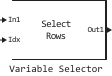
Block Variable Selector extracts a subset of rows or columns from the input matrix size on on each input port. The number of input and output ports is set in the parameter Number of input signals.
If an element of the index vector refers to a non-existent row or column of the input signal, the block performs the action that you specify using the parameter Invalid index.
If the elements of the indexing vector have a data type Bool, the block performs logical indexing. Select the option checkbox Fill empty spaces in outputs (for logical indexing) to use the parameter Fill values. These values are added to the output signal to make its length equal to the length of the input elements.
Ports
Input
#
InN
—
-th input signal
scalar | vector | the matrix
Details
-th input signal, where – the number of inputs specified in the parameter Number of input signals.
| Data types |
|
| Complex numbers support |
Yes |
#
Idx
—
index vector
scalar | vector
Details
Specify a scalar value or vector containing the indexes of the input rows or columns that appear in the output matrix.
Dependencies
To use this port, specify for the parameter Selector mode meaning Variable
| Data types |
|
| Complex numbers support |
No |
Output
#
OutN
—
-th output signal
scalar | vector | the matrix
Details
-th output signal corresponding to -the input signal, where – the number of inputs specified in the parameter Number of input signals. The output signal is returned as a scalar, vector, or matrix of the same type, size, and complexity as the corresponding input signal.
| Data types |
|
| Complex numbers support |
Yes |
Parameters
Main
#
Number of input signals —
number of input ports
Real number
Details
The number of input signals as a positive integer. An input port is created for each input signal in the block.
| Default value |
|
| Program usage name |
|
| Tunable |
No |
| Evaluatable |
Yes |
#
Select —
the dimension of the input
Rows | Columns
Details
Select the input dimension:
-
Rows– the block extracts rows from each input matrix; -
Columns– the block extracts columns from each input matrix.
The selected input row or column can appear any number of times in any of the outputs or not at all.
| Values |
|
| Default value |
|
| Program usage name |
|
| Tunable |
No |
| Evaluatable |
No |
#
Selector mode —
indexing mode
Fixed | Variable
Details
The type of indexing operation being performed. Set as:
-
Variable– a vector of length , applied to the input of the Idx port, selects rows or columns of each input to be transferred to the output. You can update the elements of the indexing vector in each sampling period, but the length of the vector must remain the same throughout the simulation period. -
Fixed– the Idx port is disabled. A vector of length which you specified in the parameter Elements, selects rows or columns of each input to be transferred to the output. Parameter Elements It is configurable, so you can change the values of the indexing vector elements at any time during the simulation, but the length of the vector must remain the same.
| Values |
|
| Default value |
|
| Program usage name |
|
| Tunable |
No |
| Evaluatable |
No |
#
Elements —
indexes of the elements of the output matrix
Scalar / array of real numbers
Details
A vector containing the indexes of the input rows or columns that appear in the output matrix.
Dependencies
To use this parameter, set for the parameter Selector mode meaning Fixed.
| Default value |
|
| Program usage name |
|
| Tunable |
Yes |
| Evaluatable |
Yes |
#
Index mode —
indexing mode
Zero-based | One-based
Details
Indexing mode. Set as:
-
One-based– index value1refers to the first row or the first column of the input. -
Zero-based– index value0refers to the first row or the first column of the input.
| Values |
|
| Default value |
|
| Program usage name |
|
| Tunable |
No |
| Evaluatable |
No |
#
Invalid index —
error handling
Clip Index | Generate Error
Details
Specify how the block handles an invalid index value. Set as:
-
Clip Index– truncate the index to the nearest acceptable value and do not issue a warning.For example, if a signal is applied to the input of the block
[64, 4]and for the parameter Select the value is set:-
Rows– the block truncates the index from72before64. -
Columns– the block truncates the index from72before4.In both cases, the block truncates the index from
-2before1.
-
-
Generate Error– displays an error dialog box and completes the simulation.
| Values |
|
| Default value |
|
| Program usage name |
|
| Tunable |
No |
| Evaluatable |
No |
#
Fill empty spaces in outputs (for logical indexing) —
option to fill in empty spaces in the output data
Logical
Details
When the elements of the indexing vector have a data type Bool, the block performs logical indexing. Logical indexing can lead to empty spaces in the output data.
Check this box to specify the values that will be added to the output in the parameter. Fill values.
| Default value |
|
| Program usage name |
|
| Tunable |
No |
| Evaluatable |
No |
# Fill values — fill-in values
Details
Padding values when the block performs logical indexing.
Dependencies
To use this option, check the box Fill empty spaces in outputs (for logical indexing).
| Default value |
|
| Program usage name |
|
| Tunable |
No |
| Evaluatable |
Yes |