EULER software control
This page presents all available EULER software control functions in Engee.
|
To work with EULER software control functions in Engee. install the hardware support package as specified in article. After installation, run: Next, you need to create a session object: All methods take the first argument Status codes are not sent out: if an error occurs, the method throws an exception with its description. |
#
Main.EngeeDeviceManager.EULER_API.closeProject — Method
EULER_API.closeProject(session) -> NothingCloses the currently open project. Frees up the project’s resources, but the session remains active.
An exception is thrown if an error occurs.
#
Main.EngeeDeviceManager.EULER_API.closeSession — Method
EULER_API.closeSession(session) -> NothingTerminates the session with EILER. Frees all resources and closes the solver. After calling this function, the object session is no longer valid.
Arguments
-
session::Tuple{Main.EngeeDeviceManager.EULER_API.EulerSession}: session object.
#
Main.EngeeDeviceManager.EULER_API.createSession — Method
EULER_API.createSession(euler_path::String="") -> sessionCreates a session for working with the EULER solver. Initialises the solver core.
Returns session::Tuple{Main.EngeeDeviceManager.EULER_API.EulerSession}-- the session object, which is passed to all other methods.euler_path::String: the path to the EYLER executable. By default, euler_path="" — auto-detection.
#
Main.EngeeDeviceManager.EULER_API.getCurrentTime — Method
EULER_API.getCurrentTime(session) -> Float64Returns the current model time in seconds.
Arguments
-
session::Tuple{Main.EngeeDeviceManager.EULER_API.EulerSession}: session object.
#
Main.EngeeDeviceManager.EULER_API.getLastProject — Method
EULER_API.getLastProject(session) -> StringReturns the full path to the .elr file of the latest EULER project. Useful for restoring the state after a restart.
Arguments
-
session::Tuple{Main.EngeeDeviceManager.EULER_API.EulerSession}: session object.
#
Main.EngeeDeviceManager.EULER_API.getRigidBodyCount — Method
EULER_API.getRigidBodyCount(session) -> IntReturns the number of solid bodies in the current project.
Arguments
-
session::Tuple{Main.EngeeDeviceManager.EULER_API.EulerSession}: session object.
#
Main.EngeeDeviceManager.EULER_API.getRigidBodyPos — Method
EULER_API.getRigidBodyPos(session, index=0) -> Vector{Float64}Returns an array of 12 elements: the centre-of-mass coordinates (X, Y, Z) and a 3×3 orientation matrix (9 elements, column-oriented).
Arguments
-
session::Tuple{Main.EngeeDeviceManager.EULER_API.EulerSession}: session object. -
index::Int64: solid body index; indexing starts from0. By default,0.
#
Main.EngeeDeviceManager.EULER_API.getSensorUnits — Method
EULER_API.getSensorUnits(session, name) -> StringReturns a string containing the sensor’s units of measurement in the SI system based on its name, for example, "Н", "м", "м/с".
Arguments
-
session::Tuple{Main.EngeeDeviceManager.EULER_API.EulerSession}: session object. -
name::String: sensor name.
#
Main.EngeeDeviceManager.EULER_API.getSensorValue — Method
EULER_API.getSensorValue(session, name) -> Float64Returns the current value of the sensor by name in SI units. The value corresponds to the most recent calculated data point.
An exception is thrown if an error occurs.
Arguments
-
: session object.
-
name::String: sensor name (e.g.,"fx_sensor","X","Y").
#
Main.EngeeDeviceManager.EULER_API.getUserCommands — Method
EULER_API.getUserCommands(session) -> StringReturns a string containing the names of available user commands. Commands are separated by the '``";"` ’ character. Available in any mode after opening a project.
Arguments
-
session::Tuple{Main.EngeeDeviceManager.EULER_API.EulerSession}: session object.
#
Main.EngeeDeviceManager.EULER_API.getVersion — Method
EULER_API.getVersion(session) -> StringReturns the version of the EYLER solver as a string (for example, "13.05.43").
Arguments
-
session::Tuple{Main.EngeeDeviceManager.EULER_API.EulerSession}: session object.
#
Main.EngeeDeviceManager.EULER_API.journalLoadPoint — Method
EULER_API.journalLoadPoint(session, index) -> NothingLoads the log point by index into the current context. After loading, getSensorValue will return the sensor values for this point, rather than for the last calculated one.
An exception is thrown on error.
Arguments
-
session::Tuple{Main.EngeeDeviceManager.EULER_API.EulerSession}: session object. -
index::Int64: point index (indexes are numbered starting from0).
#
Main.EngeeDeviceManager.EULER_API.journalSensorValues — Method
EULER_API.journalSensorValues(session, name) -> Vector{Float64}Returns an array of sensor values at all points in the calculation log in chronological order.
An exception is thrown if an error occurs.
Arguments
-
session::Tuple{Main.EngeeDeviceManager.EULER_API.EulerSession}: session object. -
name::String: sensor name.
#
Main.EngeeDeviceManager.EULER_API.journalSize — Method
EULER_API.journalSize(session) -> IntReturns the number of points stored in the calculation log. The value 0 corresponds to an empty log.
Arguments
-
session::Tuple{Main.EngeeDeviceManager.EULER_API.EulerSession}: session object.
#
Main.EngeeDeviceManager.EULER_API.journalTime — Method
EULER_API.journalTime(session, index) -> Float64Returns the model time in seconds for the log point at the specified index.
- Arguments
-
session object.
-
index::Int64: point index (indexes start at0).
-
#
Main.EngeeDeviceManager.EULER_API.openProject — Method
EULER_API.openProject(session, path) -> StringOpens an EILER project (an .elr file). Once opened, commands, sensors and parameters become available. Returns the path to the loaded project as a string; an exception is thrown if an error occurs.
Arguments
-
session::Tuple{Main.EngeeDeviceManager.EULER_API.EulerSession}: session object. -
path::String: full path to the .elr file.
#
Main.EngeeDeviceManager.EULER_API.runAnyCommand — Method
EULER_API.runAnyCommand(session, command, step=1) -> NothingRuns a user-defined command without a time limit. The calculation runs until the command naturally completes. Available in exploration mode only.
An exception is thrown if an error occurs.
Arguments
-
session::Tuple{Main.EngeeDeviceManager.EULER_API.EulerSession}: session object. -
command::String: command name. -
step::Int64: output step. By default,1.
#
Main.EngeeDeviceManager.EULER_API.runCommand — Method
EULER_API.runCommand(session, command, calc_time=10.0, step=1.0) -> NothingRuns a user command with a time limit. The calculation will stop when calc_time seconds of model time have elapsed or when the command completes — whichever comes first. Available only in exploration mode (setCalcRegime).
An exception is thrown if an error occurs.
Arguments
-
session::Tuple{Main.EngeeDeviceManager.EULER_API.EulerSession}: session object. -
command::String: command name (from the listgetUserCommands). -
calc_time::Float64: maximum calculation duration in seconds of model time. By default:10.0. -
step::Float64: output step for this command. By default,1.0(every integrator step).
#
Main.EngeeDeviceManager.EULER_API.saveProject — Method
EULER_API.saveProject(session) -> NothingSaves the current project. Changes are written to the original .elr file.
An exception is thrown if an error occurs.
Arguments
-
session::Tuple{Main.EngeeDeviceManager.EULER_API.EulerSession}: the session object.
#
Main.EngeeDeviceManager.EULER_API.saveResults — Method
EULER_API.saveResults(session, path) -> NothingSaves the calculation results to an .epp (Euler Project Package) file.
An exception is thrown if an error occurs.
Arguments
-
session::Tuple{Main.EngeeDeviceManager.EULER_API.EulerSession}: session object. -
path::String: path to save the .epp file.
#
Main.EngeeDeviceManager.EULER_API.setCalcRegime — Method
EULER_API.setCalcRegime(session) -> NothingПереводит проект в режим исследования (расчета). В этом режиме доступен запуск команд (runCommand, runAnyCommand) и чтение датчиков. Изменение скаляров недоступно.
При ошибке выбрасывается исключение.
Аргументы
-
session::Tuple{Main.EngeeDeviceManager.EULER_API.EulerSession}: объект сеанса.
#
Main.EngeeDeviceManager.EULER_API.setEditRegime — Method
EULER_API.setEditRegime(session) -> NothingSwitches the project to edit mode. In this mode, parameters (scalars) can be modified via setScalar. Running a calculation is not possible.
An exception is thrown if an error occurs.
Arguments
-
session::Tuple{Main.EngeeDeviceManager.EULER_API.EulerSession}: session object.
#
Main.EngeeDeviceManager.EULER_API.setOutputParam — Method
EULER_API.setOutputParam(session, step_out=1, time_out=0.0, before_event=false, after_event=false) -> NothingConfigures the parameters for outputting results to the calculation log.
An exception is thrown if an error occurs.
Arguments
-
session::Tuple{Main.EngeeDeviceManager.EULER_API.EulerSession}: session object. -
step_out::Int64: output step. Every Nth calculation point is included in the log. By default,1. -
time_out::Float64: output frequency in model time, in seconds. By default,0.0(disabled; onlystep_outis used). -
before_event::Bool: whether to save a point before an event. By default,false— do not save. -
after_event::Bool: whether to save a point after an event. By default,false— do not save.
#
Main.EngeeDeviceManager.EULER_API.setScalar — Method
EULER_API.setCalcRegime(session) -> NothingPuts the project into exploration (calculation) mode. In this mode, it is possible to run commands (runCommand, runAnyCommand) and read sensors. Modifying scalars is not permitted.
An exception is thrown if an error occurs.
@binding: Main.EngeeDeviceManager.EULERAPI.setCalcRegime @typesig: Tuple{Main.EngeeDeviceManager.EULERAPI.EulerSession}
Sets the value of a scalar parameter by name. Only available in edit mode (setEditRegime).
An exception is thrown if an error occurs.
Arguments
-
session::Tuple{Main.EngeeDeviceManager.EULER_API.EulerSession}: the session object. -
name::String: the name of the scalar (e.g.,"FX","mass"). -
value::Float64: the new value of the scalar.
#
Main.EngeeDeviceManager.EULER_API.startCalc — Method
EULER_API.startCalc(session) -> NothingResets the model time to 0.0 (start position) and initialises the calculation. Called once before the first command runCommand or runAnyCommand.
An exception is thrown if an error occurs.
Arguments
-
session::Tuple{Main.EngeeDeviceManager.EULER_API.EulerSession}: session object.
#
Main.EngeeDeviceManager.EULER_API.stopCalc — Method
EULER_API.stopCalc(session) -> NothingStops the current calculation. Can be called at any time after running runCommand or runAnyCommand. The time of the stop can be obtained via getCurrentTime.
An exception is thrown if an error occurs.
Arguments
-
session::Tuple{Main.EngeeDeviceManager.EULER_API.EulerSession}: session object.
Operating modes
After opening, the project is in editing mode — you can open and close the project, change the parameters (scalars) using setScalar. Starting the calculation in this mode is not available. To run the model, switch to research mode (setCalcRegime), after which commands will be available to run (runCommand, runAnyCommand) and reading the sensors during the calculation process (getSensorValue, journalSensorValues), but changing scalars will be blocked. To switch between modes, use setEditRegime and setCalcRegime.
Example: simulation of a ball throw with a mass of 1 kg and a diameter of 20 cm with a visualization of the trajectory
After installation hardware support package execute:
using Main.EngeeDeviceManager
using Main.EngeeDeviceManager.EULER_API
using Main.EngeeDeviceManager.UTILS_API
Creating a session:
session = EULER_API.createSession()
ver = EULER_API.getVersion(session)
println("Версия ЭЙЛЕР: $ver")
Версия ЭЙЛЕР: Solver 13.05.43.beta Pro (Windows x64)Uploading a test project:
engee.package.getdemos("Engee-Device-Manager")"/user/Engee-Device-Manager-demos"First using the module Utils copy the test file .elr from the demo folder Engee to the user’s computer:
# Создаем объект Utils для файловых операций
utils = UTILS_API.Utils()

# Определяем пути к демонстрационному проекту ЭЙЛЕР в {docs_engee} и директории, в которую будет скопирован проект
euler_local_project_path = "/user/Engee-Device-Manager-demos/example_euler/sample_project.elr"
host_project_dir = raw"C:\Users\Public\Engee"

# Создаем тестовую директорию и загружаем проект на хост
UTILS_API.createFolder(utils, host_project_dir, "")
UTILS_API.uploadFile(utils, euler_local_project_path, host_project_dir)

println("Проект загружен в $host_project_dir")
Проект загружен в C:\Users\Public\EngeeOpening the project and starting the calculation:
# Открываем проект
project_path = joinpath(host_project_dir, "sample_project.elr")
EULER_API.openProject(session, project_path)
println("Проект открыт: $project_path")

# Получаем список доступных команд
cmds = EULER_API.getUserCommands(session)
println("Доступные команды: $cmds")

# Переключаем в режим исследования проекта
EULER_API.setCalcRegime(session)
println("Режим исследования проекта")

# Настраиваем вывод данных на каждом 10-м шаге
EULER_API.setOutputParam(session, 10, 0.0)

# Запускаем расчет на 15 секунд
EULER_API.runCommand(session, "RK4_coarse", 15.0)
println("Расчет запущен")
Проект открыт: C:\Users\Public\Engee/sample_project.elr
Доступные команды: RK4_fine;RK4_coarse;
Режим исследования проекта
Расчет запущенGetting results:
# Получаем все точки из журнала расчета
x_vals = EULER_API.journalSensorValues(session, "X")
y_vals = EULER_API.journalSensorValues(session, "Y")

n_points = length(x_vals)
println("Получено $n_points точек")

# Выводим первые и последние точки
println("Первая точка: X=$(round(x_vals[1], digits=2)) м, Y=$(round(y_vals[1], digits=2)) м")
if n_points > 1
    println("Последняя точка: X=$(round(x_vals[end], digits=2)) м, Y=$(round(y_vals[end], digits=2)) м")
end
Получено 1447 точек
Первая точка: X=0.0 м, Y=0.0 м
Последняя точка: X=1019.72 м, Y=-0.0 мVisualization of the trajectory:
using Plots

# Получаем время каждой точки (значения датчика "t")
t_vals = EULER_API.journalSensorValues(session, "t")

# График зависимости высоты от времени
plot(t_vals, y_vals,
    xlabel = "Время, с",
    ylabel = "Высота Y, м",
    title = "Траектория броска шара
    D = 20 см
    m = 1 кг",
    legend = false,
    linewidth = 2,
    color = :blue,
    size = (600, 400)
)

hline!([0.0], color = :orange, linewidth = 1, linestyle = :dash, label = "Земля")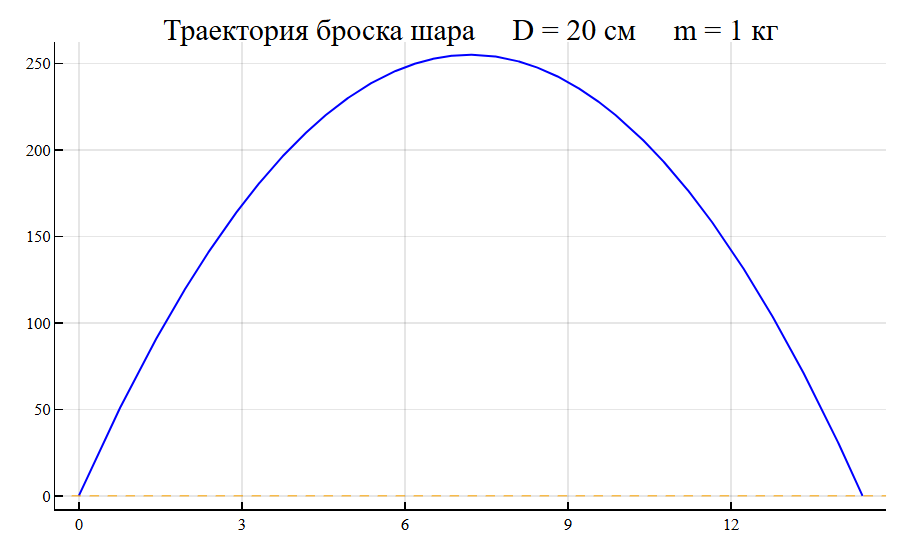
Completion of work:
EULER_API.closeSession(session)
println("Сеанс завершен")
Сеанс завершен