Fundamental Friction Clutch
Friction clutch; input signals are static friction moment and sliding friction moment.
blockType: Engee1DMechanical.Clutches.FundamentalFriction
|
Path in the library: |
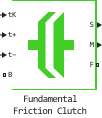
Description
Block Fundamental Friction Clutch It is a mechanism that transmits torque due to friction. The clutch contains two friction discs, each of which is rigidly connected to the shaft and comes into contact for engagement. After contact, the discs receive a frictional torque that allows power to be transferred between the shafts.
The coupling can be bidirectional or unidirectional:
-
The bidirectional coupling can slip in both positive and negative directions.
-
The unidirectional coupling can only slip in the positive direction.
The direction of slippage is positive if the driven shaft rotates faster than the main shaft, and negative if it rotates slower. The block defines the slip rate as the difference:
,
where
-
— the rate of slippage;
-
— angular velocity of the driven shaft;
-
— angular velocity of the drive shaft.
Coupling states
The coupling can be in three states:
-
Locked is the actual state of the clutch, in which the friction discs rotate as a single unit. The locked coupling has one rotational degree of freedom. There is no loss of power due to friction.
-
Unlocked is the actual condition of the clutch, in which the friction discs slip relative to each other. The unlocked clutch has two rotational degrees of freedom. The power loss is equal to the product of the slip velocity and the sliding friction moment.
-
Waiting is the virtual state of the clutch, which preserves the movement of the previous state when checking for locking and unlocking. The degrees of freedom of the coupling and the power loss depend on the previous state of the coupling.
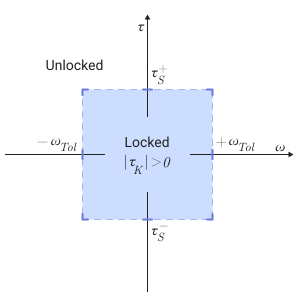
The diagram shows the conditions under which the coupling locks and unlocks. The clutch is usually locked if the torque transmitted by it is within the static moment of friction, and the value of the slip velocity is less than the permissible speed. Otherwise, the clutch will unlock.
-
— the torque transmitted between the clutch discs.
-
and — boundary values of the static moment of friction.
-
— the moment of sliding friction between the clutch discs.
-
— tolerance of the clutch slip rate.
-
— the slip rate between the clutch discs.
The coupling status is displayed via the physical signal port M using values -1, 0 and +1.
The table shows the correspondence between the states and the output values.
| Condition | Meaning |
|---|---|
Unblocked (forward running) or waiting (forward running) |
+1 |
Unblocked (reverse) or waiting (reverse) |
-1 |
Locked or unblocked initial state |
0 |
Transitions between states
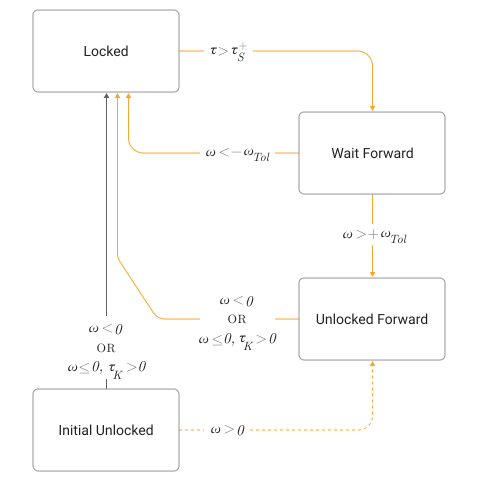
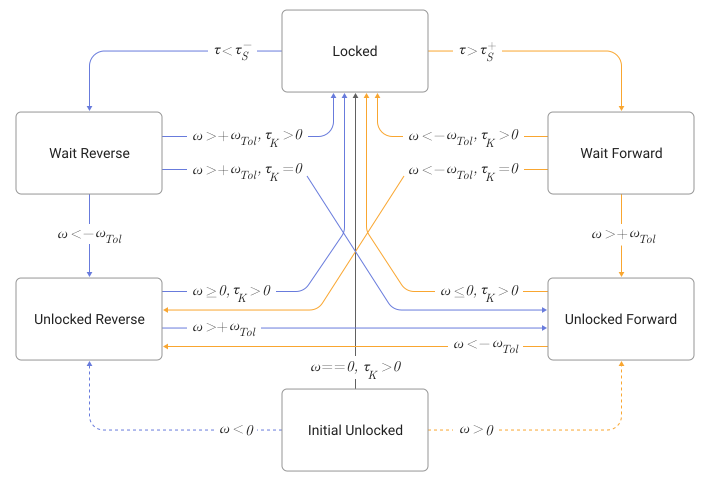
At the beginning of the simulation, the coupling is in one of two states — locked or unlocked. The initial unblocked state is unique in that it lacks a direction of movement. The clutch remains in this state until the clutch slip rate becomes non-zero. Then the clutch switches to the corresponding state — unlocked (reverse stroke) or unlocked (forward stroke) — in accordance with the scheme.
During the simulation, the coupling is tested under various dynamic conditions to determine the appropriate transitions from one state to another, if any. The diagrams show possible transitions, their dynamic conditions, and the resulting states. If the coupling is unidirectional, the circuit is reduced to the right half.
Transition diagram for unidirectional coupling.
The transition diagram for a bidirectional coupling.
Modeling of thermal effects
Block Fundamental Friction Clutch simulates the thermal effects of power loss due to friction when you turn on the heat port.
To simulate the thermal effects, you need to connect the port to another unit with the thermal port turned on.
To turn on the thermal port, check the box Enable thermal port check box.
Variables
Use the parameter group Initial Targets to set the priority and initial target values for the block parameter variables before modeling. For more information, see Configuring physical blocks using target values.
Ports
Input
#
tK
—
sliding friction moment, NM
scalar
Details
The input port that sets the values of the sliding friction moment.
| Data types |
|
| Complex numbers support |
No |
#
t+
—
the upper limit of the static moment of friction, NM
scalar
Details
The input port that defines the upper limit of the static moment of friction.
| Data types |
|
| Complex numbers support |
No |
#
t–
—
the lower limit of the static moment of friction, NM
scalar
Details
The input port that defines the lower limit of the static moment of friction.
| Data types |
|
| Complex numbers support |
No |
Conserving
#
B
—
drive shaft
rotational mechanics
Details
A mechanical rotary port connected to the drive shaft.
| Program usage name |
|
#
F
—
driven shaft
rotational mechanics
Details
A mechanical rotary port connected to a driven shaft.
| Program usage name |
|
#
H
—
heat flow
warm
Details
The heat port associated with the heat flow.
Thermal ports allow you to simulate the heat flow between the unit and the connected network.
Dependencies
To enable this port, check the box Enable thermal port.
| Program usage name |
|
Parameters
Main
#
Directionality —
acceptable sliding directions between discs
Bidirectional | Unidirectional
Details
The directions of slipping of the coupling between its discs.
The bidirectional coupling allows for positive and negative slip rates.
The unidirectional coupling allows only positive slippage.
A unidirectional clutch is equivalent to a friction clutch connected in parallel with a one-way clutch, which is switched off only when the slip rate becomes positive. To simulate a one-way coupling with a slip in the negative direction, reverse the connections of the base and slave ports.
| Values |
|
| Default value |
|
| Program usage name |
|
| Evaluatable |
No |
# Enable thermal port — turning on the heat port
Details
Modeling of thermal effects.
To enable the simulation of thermal effects, select the option checkbox.
| Default value |
|
| Program usage name |
|
| Evaluatable |
No |
#
Thermal mass —
the heat capacity associated with the thermal port
J/K | kJ/K
Details
The heat capacity associated with the thermal port H. It represents the energy needed to increase the temperature of the heating port by one degree. The higher the heat capacity, the more resistant the component is to temperature changes.
Dependencies
To enable this option, install the flood Enable thermal port.
| Units |
|
| Default value |
|
| Program usage name |
|
| Evaluatable |
Yes |
#
Clutch velocity tolerance —
boundary sliding speed
rad/s | deg/s | rad/min | deg/min | rpm | rps
Details
The slip rate below which the clutch can lock.
The clutch is blocked if, after falling below the permissible speed of the clutch, the sliding friction moment is not zero, and the transmitted moment is between the limits of the static friction moment.
| Units |
|
| Default value |
|
| Program usage name |
|
| Evaluatable |
Yes |
#
Initial state —
initial condition of the coupling
Unlocked | Locked
Details
The condition of the coupling at the beginning of the simulation. The coupling can be in one of two states — locked and unlocked.
A locked clutch causes the main and driven shafts to rotate at the same speed, that is, as a single unit. To do this, set the parameter value to Locked.
The unlocked clutch allows the two shafts to rotate at different speeds, resulting in slippage between the clutch discs. To do this, set the parameter value to Unlocked.
The clutch in the initial unlocked state has no direction of slipping. For this reason, after checking that the clutch has switched to the unlocked state, the corresponding direction of slippage is automatically determined based on the dynamics of the transmission. Depending on the direction of movement, the clutch switches to the unlocked state of forward or reverse travel.
| Values |
|
| Default value |
|
| Program usage name |
|
| Evaluatable |
No |