Vehicle Body
The model is a two-axle vehicle moving longitudinally.
blockType: Engee1DMechanical.Vehicles.Body
|
Path in the library: |
Description
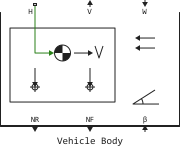
Block Vehicle Body It represents a two-axle vehicle body in longitudinal motion. A vehicle can have the same or different number of wheels on each axle. For example, two wheels on the front axle and one wheel on the rear axle. It is assumed that the wheels of the vehicle are the same size. The center of mass (CG) of the vehicle can be at or below the plane of motion.
The block takes into account the vehicle’s mass, aerodynamic drag, road slope, and weight distribution between axles depending on acceleration and road profile. Optionally, you can take into account the pitch rotation of the vehicle and calculate the dynamics of the suspension. The vehicle does not move vertically relative to the ground.
The block may include an external mass and an external inertia. The mass, inertia, and center of mass of the vehicle body can change during simulation in response to changes in the system.
Model
The axes of the vehicle are parallel and form a plane. Longitudinal direction, , lies in this plane and perpendicular to the axes. If the vehicle is moving on an inclined plane with an incline , that is the normal direction, , not parallel to gravity, but always perpendicular to the longitudinal plane of the vehicle axes.
The figure shows the variables of the vehicle motion model.
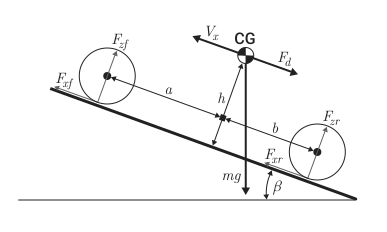
Variables that determine the movement of a vehicle:
-
— parameter value Gravitational acceleration;
-
— the angle of inclination of the road, the value on the port β;
-
— the mass of the vehicle, determined from the parameter Mass and from the value on the M port, if it is in use;
-
— the height of the vehicle’s center of mass above the ground;
-
— the distance to the front and rear axles, respectively, from the point of normal projection of the center of mass of the vehicle onto the common plane of the axes;
-
— vehicle speed. When , the vehicle is moving forward. When , the vehicle is moving backwards;
-
— wind speed. When , the wind is contrary. When , the wind is fair;
-
— parameter value Number of wheels per axle. You can use an integer or a two-element vector, where the elements represent the front and back axes respectively.;
-
— longitudinal forces on each wheel at the front and rear points of contact with the ground, respectively;
-
— normal load forces on each wheel at the front and rear points of contact with the ground, respectively;
-
— midsection area;
-
— coefficient of aerodynamic drag;
-
— mass density of air;
-
— the force of aerodynamic drag.
The equations
The dynamics of the vehicle
The movement of a vehicle is the result of the influence of all forces and torques acting on it. The longitudinal forces of the tires push the vehicle forward or backward. Gravity the vehicle acts through its center of mass. Depending on the angle of inclination, gravity pulls the vehicle to the ground and the vehicle moves forward or backward under its influence. Regardless of whether the vehicle is moving forward or backward, aerodynamic drag slows down its movement. For simplicity, it is assumed that the point of application of the aerodynamic drag force coincides with the center of mass.
Zero normal acceleration and zero torque determine the normal force on each front and rear wheel.
The normal forces of the wheels meet the requirements:
If an externally specified mass or inertia is included in the equation, then the associated parameters in the equations change by the input value.
_ Dynamics of body tilt by pitch_
The angular acceleration when the body rotates in the pitch plane depends on the three components of the vehicle’s torque and inertia:
where
-
— angular acceleration during pitch rotation;
-
— longitudinal force;
-
— the height of the center of mass, measured parallel to the axis ;
-
— inertia.
If a linear model is selected for the stiffness and damping of the suspension, then the unit uses an approximation with the assumption of small angles to calculate the angle of inclination. If a tabular model is selected, the block uses the specified vectors to calculate the dynamics of motion in the pitch plane. For the equations of the rigid limiter, see Translational Hard Stop.
Limitations and assumptions
Block Vehicle Body allows you to simulate only longitudinal dynamics parallel to the ground and oriented along the direction of motion. It is assumed that the vehicle is in equilibrium along the longitudinal and normal axes. The block does not simulate a roll or vertical movement. Therefore, the equations assume that the wheels never lose contact. This limitation can lead to negative normal forces.
Variables
Use the Initial Targets parameter group to set the priority and initial target values for the block parameter variables before modeling. For more information, see Configuring physical blocks using target values.
Ports
Conserving
#
H
—
horizontal movement
`translational mechanics'
Details
A mechanical non-directional port associated with the horizontal movement of the vehicle body. Connect tyre traction to this port.
| Program usage name |
|
Output
#
V
—
longitudinal velocity, m/s
scalar
Details
The longitudinal velocity of the vehicle in the associated coordinate system, in m/s.
| Data types |
|
| Complex numbers support |
No |
#
NR
—
normal force on the rear axle, N
scalar
Details
Normal force on the rear axle, in N. Wheel forces are considered positive when acting downwards.
| Data types |
|
| Complex numbers support |
No |
#
NF
—
normal force on the front axle, N
scalar
Details
Normal force on the front axle, in N. The forces on the wheels are considered positive if they act downwards.
| Data types |
|
| Complex numbers support |
No |
Input
#
W
—
headwind speed, m/s
scalar
Details
Speed of the headwind, in m/s.
| Data types |
|
| Complex numbers support |
No |
#
β
—
is the road slope angle, rad.
scalar
Details
the angle of inclination of the road, in rad.
| Data types |
|
| Complex numbers support |
No |
#
CGX
—
position of the centre of mass along the x axis, m
scalar
Details
Position of the centre of mass of an external defined mass relative to the centre of mass of the vehicle body in the x axis, in m.
Dependencies
To use this parameter, select the check box. Externally-defined additional mass.
| Data types |
|
| Complex numbers support |
No |
#
CGY
—
position of the centre of mass along the y axis, m
scalar
Details
Position of the centre of mass of an external defined mass relative to the centre of mass of the vehicle body in the y axis, in m.
Dependencies
To use this parameter, select the check box. Externally-defined additional mass.
| Data types |
|
| Complex numbers support |
No |
#
M
—
mass, kg
scalar
Details
The value of an external defined mass, in kg.
Dependencies
To use this parameter, select the check box. Externally-defined additional mass.
| Data types |
|
| Complex numbers support |
No |
#
J
—
external moment of inertia, kg⋅m2
scalar
Details
Moment of inertia of an external given mass, in kg⋅m2.
Dependencies
To use this parameter, select the checkbox Externally-defined additional mass and Pitch dynamics.
| Data types |
|
| Complex numbers support |
No |
Parameters
Main
#
Mass —
vehicle weight
kg | mg | g | t | lbm | oz | slug
Details
Vehicle weight.
| Units |
|
| Default value |
|
| Program usage name |
|
| Evaluatable |
Yes |
# Number of wheels per axle — number of wheels per axle
Details
The number of wheels on the front and rear axles. If the input value is a scalar, then the number of wheels on the front and rear axles is considered the same. For example, if the input value is 2, then it is assumed that the front and rear axles have two wheels each.
If the input value is a two—element vector, then the first number is the number of wheels of the front axle, and the second number is the number of wheels of the rear axle. For example, if the input data is an array [2, 1], then it is assumed that the front axle has two wheels, and the rear one has one.
| Default value |
|
| Program usage name |
|
| Evaluatable |
Yes |
#
Horizontal distance from CG to front axle —
distance from the center of mass to the front axle
m | um | mm | cm | km | in | ft | yd | mi | nmi
Details
Horizontal distance, , from the center of mass to the axis of the front wheel of the vehicle.
| Units |
|
| Default value |
|
| Program usage name |
|
| Evaluatable |
Yes |
#
Horizontal distance from CG to rear axle —
distance from the center of mass to the rear axle
m | um | mm | cm | km | in | ft | yd | mi | nmi
Details
Horizontal distance, , from the center of mass to the rear wheel axis of the vehicle.
| Units |
|
| Default value |
|
| Program usage name |
|
| Evaluatable |
Yes |
#
CG height above ground —
distance from the center of mass to the earth
m | um | mm | cm | km | in | ft | yd | mi | nmi
Details
Distance, , between the center of mass of the vehicle and the ground.
| Units |
|
| Default value |
|
| Program usage name |
|
| Evaluatable |
Yes |
# Externally-defined additional mass — enabling variable mass
Details
An option to include mass as a time variable or event that affects the mass and center of mass of the vehicle body. Use this option to account for vehicle occupants or bodies that are not rigidly fixed.
| Default value |
|
| Program usage name |
|
| Evaluatable |
No |
#
Gravitational acceleration —
acceleration of free fall
m/s^2 | mm/s^2 | cm/s^2 | km/s^2 | in/s^2 | ft/s^2 | mi/s^2 | gn
Details
Acceleration caused by the gravitational force acting on the vehicle’s center of mass.
| Units |
|
| Default value |
|
| Program usage name |
|
| Evaluatable |
Yes |
Drag
#
Frontal area —
effective cross-sectional area
m^2 | um^2 | mm^2 | cm^2 | km^2 | in^2 | ft^2 | yd^2 | mi^2 | ha | ac
Details
Effective cross-sectional area of the front of the vehicle, . The unit uses this value to calculate the aerodynamic drag force of the vehicle.
| Units |
|
| Default value |
|
| Program usage name |
|
| Evaluatable |
Yes |
# Drag coefficient — coefficient of aerodynamic drag
Details
Coefficient of aerodynamic drag, . The block uses this value to calculate the aerodynamic drag force of the vehicle.
| Default value |
|
| Program usage name |
|
| Evaluatable |
Yes |
#
Air density —
ambient air density
kg/m^3 | g/m^3 | g/cm^3 | g/mm^3 | lbm/ft^3 | lbm/gal | lbm/in^3
Details
The density of the air surrounding the vehicle.
| Units |
|
| Default value |
|
| Program usage name |
|
| Evaluatable |
Yes |
Pitch
# Pitch dynamics — suspension dynamics accounting option
Details
Select this option if you want to simulate suspension dynamics.
| Default value |
|
| Program usage name |
|
| Evaluatable |
No |
#
Pitch moment of inertia —
moment of inertia of the vehicle
kg*m^2 | g*m^2 | kg*cm^2 | g*cm^2 | lbm*in^2 | lbm*ft^2 | slug*in^2 | slug*ft^2
Details
The moment of inertia of the vehicle relative to the transverse axis of rotation.
Dependencies
To use this option, check the box Pitch dynamics.
| Units |
|
| Default value |
|
| Program usage name |
|
| Evaluatable |
Yes |
#
Suspension model —
suspension parameterization method
Linear | By table lookup
Details
Parameterization method for suspension modeling. To set the data using scalar values, select Linear. To set the data using vector values, select By table lookup.
Dependencies
To use this option, check the box Pitch dynamics.
| Values |
|
| Default value |
|
| Program usage name |
|
| Evaluatable |
No |
#
Front suspension stiffness —
coefficient of elasticity of the front suspension
N/m | mN/m | kN/m | MN/m | GN/m | kgf/m | lbf/ft | lbf/in
Details
The coefficient of elasticity of the front suspension on the axle.
Dependencies
To use this option, check the box Pitch dynamics, and for the parameter Suspension model set the value Linear.
| Units |
|
| Default value |
|
| Program usage name |
|
| Evaluatable |
Yes |
#
Front suspension damping —
front suspension damping
N*s/m | kgf*s/m | lbf*s/ft | lbf*s/in
Details
Damping of the front suspension on the axle.
Dependencies
To use this option, check the box Pitch dynamics, and for the parameter Suspension model set the value Linear.
| Units |
|
| Default value |
|
| Program usage name |
|
| Evaluatable |
Yes |
#
Rear suspension stiffness —
coefficient of elasticity of the rear suspension
N/m | mN/m | kN/m | MN/m | GN/m | kgf/m | lbf/ft | lbf/in
Details
The coefficient of elasticity of the rear suspension on the axle.
Dependencies
To use this option, check the box Pitch dynamics, and for the parameter Suspension model set the value Linear.
| Units |
|
| Default value |
|
| Program usage name |
|
| Evaluatable |
Yes |
#
Rear suspension damping —
rear suspension damping ratio
N*s/m | kgf*s/m | lbf*s/ft | lbf*s/in
Details
The damping coefficient of the rear suspension on the axle.
Dependencies
To use this option, check the box Pitch dynamics, and for the parameter Suspension model set the value Linear.
| Units |
|
| Default value |
|
| Program usage name |
|
| Evaluatable |
Yes |
#
Front suspension stiffness force vector —
the elastic force of the front suspension
N | nN | uN | mN | kN | MN | GN | dyn | lbf | kgf
Details
The elastic force of the front suspension. Set the output values for the interpolation table as a vector. The number of elements in the output vector must be the same as the number of elements in the input vector. The parameter of the input vector is the parameter Front suspension deformation vector.
Dependencies
To use this option, check the box Pitch dynamics, and for the parameter Suspension model set the value By table lookup.
| Units |
|
| Default value |
|
| Program usage name |
|
| Evaluatable |
Yes |
#
Front suspension deformation vector —
front suspension deformation
m | um | mm | cm | km | in | ft | yd | mi | nmi
Details
The deformation of the front suspension axle, defined in terms of displacement. Set the input values for the interpolation table as a vector. The values of the elements in the vector should increase from left to right. The minimum number of elements in a vector depends on the chosen interpolation method. Interpolation method. For Linear specify at least two elements for interpolation. For Smooth specify at least three elements for interpolation. The output vector parameter is the parameter Front suspension stiffness force vector.
Dependencies
To use this option, check the box Pitch dynamics, and for the parameter Suspension model set the value By table lookup.
| Units |
|
| Default value |
|
| Program usage name |
|
| Evaluatable |
Yes |
#
Front suspension damping force vector —
damping force of the front suspension
N | nN | uN | mN | kN | MN | GN | dyn | lbf | kgf
Details
The damping force of the front suspension. Set the output values for the interpolation table as a vector. The number of elements in the output vector must be the same as the number of elements in the input vector. The parameter of the input vector is the parameter Front suspension velocity vector.
Dependencies
To use this option, check the box Pitch dynamics, and for the parameter Suspension model set the value By table lookup.
| Units |
|
| Default value |
|
| Program usage name |
|
| Evaluatable |
Yes |
#
Front suspension velocity vector —
front suspension speed
m/s | mm/s | cm/s | km/s | m/hr | km/hr | in/s | ft/s | mi/s | ft/min | mi/hr | kn
Details
The speed of the front suspension. Set the input values for the interpolation table as a vector. The values of the elements in the vector should increase from left to right. The minimum number of elements in a vector depends on the chosen interpolation method. Interpolation method. For Linear specify at least two elements for interpolation. For Smooth specify at least three elements for interpolation. The output vector parameter is the parameter Front suspension damping force vector.
Dependencies
To use this option, check the box Pitch dynamics, and for the parameter Suspension model set the value By table lookup.
| Units |
|
| Default value |
|
| Program usage name |
|
| Evaluatable |
Yes |
#
Rear suspension stiffness force vector —
the elastic force of the rear suspension
N | nN | uN | mN | kN | MN | GN | dyn | lbf | kgf
Details
The elastic force of the rear suspension. Set the output values for the interpolation table as a vector. The number of elements in the output vector must be the same as the number of elements in the input vector. The parameter of the input vector is the parameter Rear suspension deformation vector.
Dependencies
To use this option, check the box Pitch dynamics, and for the parameter Suspension model set the value By table lookup.
| Units |
|
| Default value |
|
| Program usage name |
|
| Evaluatable |
Yes |
#
Rear suspension deformation vector —
deformation of the rear suspension
m | um | mm | cm | km | in | ft | yd | mi | nmi
Details
The deformation of the rear suspension, defined in terms of displacement. Set the input values for the interpolation table as a vector. The values of the elements in the vector should increase from left to right. The minimum number of elements in a vector depends on the chosen interpolation method. Interpolation method. For Linear specify at least two elements for interpolation. For Smooth specify at least three elements for interpolation. The output vector parameter is the parameter Rear suspension stiffness force vector.
Dependencies
To use this option, check the box Pitch dynamics, and for the parameter Suspension model set the value By table lookup.
| Units |
|
| Default value |
|
| Program usage name |
|
| Evaluatable |
Yes |
#
Rear suspension damping force vector —
damping force of the rear suspension
N | nN | uN | mN | kN | MN | GN | dyn | lbf | kgf
Details
The damping force of the rear suspension. Set the output values for the interpolation table as a vector. The number of elements in the output vector must be the same as the number of elements in the input vector. The parameter of the input vector is the parameter Rear suspension velocity vector.
Dependencies
To use this option, check the box Pitch dynamics, and for the parameter Suspension model set the value By table lookup.
| Units |
|
| Default value |
|
| Program usage name |
|
| Evaluatable |
Yes |
#
Rear suspension velocity vector —
rear suspension speed
m/s | mm/s | cm/s | km/s | m/hr | km/hr | in/s | ft/s | mi/s | ft/min | mi/hr | kn
Details
The speed of the rear suspension. Set the input values for the interpolation table as a vector. The values of the elements in the vector should increase from left to right. The minimum number of elements in a vector depends on the chosen interpolation method. Interpolation method. For Linear specify at least two elements for interpolation. For Smooth specify at least three elements for interpolation. The output vector parameter is the parameter Rear suspension damping force vector.
Dependencies
To use this option, check the box Pitch dynamics, and for the parameter Suspension model set the value By table lookup.
| Units |
|
| Default value |
|
| Program usage name |
|
| Evaluatable |
Yes |
#
Interpolation method —
the interpolation method
Linear | Smooth
Details
The interpolation methods for approximating the output value when the input value is between two consecutive grid points are as follows:
-
Linear— Select this default option to get the best performance. Provide at least two values for each dimension. -
Smooth— select this option to get a continuous curve with continuous first-order derivatives. Provide at least three values per measurement.
Dependencies
To use this option, check the box Pitch dynamics, and for the parameter Suspension model set the value By table lookup.
| Values |
|
| Default value |
|
| Program usage name |
|
| Evaluatable |
No |
#
Extrapolation method —
the extrapolation method
Linear | Nearest | Error
Details
An extrapolation method for determining the output value when the input value is outside the range specified in the argument list.:
-
Linear— obtains a curve with continuous first-order derivatives in the extrapolation domain and on the boundary with the interpolation domain. -
Nearest— produces an extrapolation that does not rise above the highest point in the data or below the lowest point in the data.
Dependencies
To use this option, check the box Pitch dynamics, and for the parameter Suspension model set the value By table lookup.
| Values |
|
| Default value |
|
| Program usage name |
|
| Evaluatable |
No |
# Hard stop — the option of modeling a rigid stop
Details
The option of modeling rigid limiters for the front and rear suspension.
Dependencies
To use this option, check the box Pitch dynamics.
| Default value |
|
| Program usage name |
|
| Evaluatable |
No |
#
Front upper bound —
the upper limit of the rigid limiter of the front suspension
m | um | mm | cm | km | in | ft | yd | mi | nmi
Details
The upper limit of the rigid limiter for the front suspension.
Dependencies
To use this option, check the box Pitch dynamics and Hard stop.
| Units |
|
| Default value |
|
| Program usage name |
|
| Evaluatable |
Yes |
#
Front lower bound —
the lower limit of the rigid limiter of the front suspension
m | um | mm | cm | km | in | ft | yd | mi | nmi
Details
The lower limit of the rigid limiter for the front suspension.
Dependencies
To use this option, check the box Pitch dynamics and Hard stop.
| Units |
|
| Default value |
|
| Program usage name |
|
| Evaluatable |
Yes |
#
Front contact stiffness —
coefficient of elasticity of the rigid limiter of the front suspension
N/m | mN/m | kN/m | MN/m | GN/m | kgf/m | lbf/ft | lbf/in
Details
The coefficient of elasticity of the rigid limiter for the front suspension.
Dependencies
To use this option, check the box Pitch dynamics and Hard stop.
| Units |
|
| Default value |
|
| Program usage name |
|
| Evaluatable |
Yes |
#
Front contact damping —
damping coefficient of the rigid limiter of the front suspension
N*s/m | kgf*s/m | lbf*s/ft | lbf*s/in
Details
The damping coefficient of the rigid limiter for the front suspension.
Dependencies
To use this option, check the box Pitch dynamics and Hard stop.
| Units |
|
| Default value |
|
| Program usage name |
|
| Evaluatable |
Yes |
#
Rear upper bound —
the upper limit of the rigid limiter of the rear suspension
m | um | mm | cm | km | in | ft | yd | mi | nmi
Details
The upper limit of the rigid limiter for the rear suspension.
Dependencies
To use this option, check the box Pitch dynamics and Hard stop.
| Units |
|
| Default value |
|
| Program usage name |
|
| Evaluatable |
Yes |
#
Rear lower bound —
the lower limit of the rigid limiter of the rear suspension.
m | um | mm | cm | km | in | ft | yd | mi | nmi
Details
The lower limit of the rigid limiter for the rear suspension.
Dependencies
To use this option, check the box Pitch dynamics and Hard stop.
| Units |
|
| Default value |
|
| Program usage name |
|
| Evaluatable |
Yes |
#
Rear contact stiffness —
coefficient of elasticity of the rigid limiter of the rear suspension
N/m | mN/m | kN/m | MN/m | GN/m | kgf/m | lbf/ft | lbf/in
Details
The coefficient of elasticity of the rigid limiter for the rear suspension.
Dependencies
To use this option, check the box Pitch dynamics and Hard stop.
| Units |
|
| Default value |
|
| Program usage name |
|
| Evaluatable |
Yes |
#
Rear contact damping —
damping coefficient of the rigid limiter of the rear suspension
N*s/m | kgf*s/m | lbf*s/ft | lbf*s/in
Details
The damping coefficient of the rigid limiter for the rear suspension.
Dependencies
To use this option, check the box Pitch dynamics and Hard stop.
| Units |
|
| Default value |
|
| Program usage name |
|
| Evaluatable |
Yes |
#
Initial pitch —
the slope at the beginning of the simulation
rad | deg | rev | mrad | arcsec | arcmin | gon
Details
The value of the slope in the longitudinal plane at the beginning of the simulation.
Dependencies
To use this option, check the box Pitch dynamics.
| Units |
|
| Default value |
|
| Program usage name |
|
| Evaluatable |
Yes |
#
Initial pitch rate —
angular velocity of rotation at the beginning of the simulation
rad/s | deg/s | rad/min | deg/min | rpm | rps
Details
The value of the tilt velocity in the longitudinal plane at the beginning of the simulation.
Dependencies
To use this option, check the box Pitch dynamics.
| Units |
|
| Default value |
|
| Program usage name |
|
| Evaluatable |
Yes |