To COMTRADE
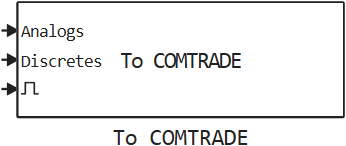
Writes data to COMTRADE files.
blockType: SubSystem
|
Path in the library: |
Description
Block To COMTRADE records the values of the input signals in the oscillogram files of the COMTRADE format:
-
configuration file (.cfg),
-
data file (.dat).
Supported revisions of COMTRADE: 1999 and 2013. Supported data file types: ASCII, BINARY, BINARY32, FLOAT32.
Data is written to files when a trigger is triggered. The files are saved after the simulation is completed. If the trigger is triggered several times during the simulation, several waveforms will be recorded. Existing output files will be overwritten.
Please note: The input port Discretes is of type Bool. If necessary, change the signal type using the block Cast To Bool. If you do not disable the Discretes input and leave it unconnected, an error will occur, since the input signal type will be defined as Float64.
|
The unit automatically determines the number of signals in the input ports. The parameters of the channels are configured on the Channels tab. By default −1 Channel parameters are generated automatically. For detailed settings, you must specify a vector of values, the length of which must match the number of signals.
Ports
Input
#
Analogs
—
Input signal
scalar | vector
Details
Input for recording analog signals of COMTRADE files.
| Data types |
|
| Complex numbers support |
I don’t |
#
Discretes
—
Input signal
scalar | vector
Details
Input for recording discrete signals of COMTRADE files.
| Data types |
|
| Complex numbers support |
I don’t |
#
Trigger
—
Input signal
scalar
Details
Input to activate the recording.
| Data types |
|
| Complex numbers support |
I don’t |
Parameters
Main tab
Main
# Enable analog input — Enable the input of Analogs analog signals
Details
If this option is selected, when the trigger is triggered, the signals coming to the Analog input will be recorded in the COMTRADE files.
| Default value |
|
| Program usage name |
|
| Evaluatable |
Yes |
# Enable discrete input — Enable input Discretes of discrete signals
Details
If this option is selected, when the trigger is triggered, the signals coming to the Discretes input will be recorded in the COMTRADE files.
| Default value |
|
| Program usage name |
|
| Evaluatable |
Yes |
# Files path — file path or name (without extension)
Details
Specify the path or file name without an extension for the saved waveforms. Existing files will be overwritten. If the trigger is triggered several times during the simulation, several waveforms will be recorded. A suffix will be added to the file names of the second and subsequent waveforms. _x, where x — the number of the waveform.
You can specify an absolute path starting with /user, or relative. The relative path is determined from the current directory (pwd).
When simulating on KPM «RITM» it is necessary to transmit the full path to the file, for example joinpath("/home/ritm/build", engee.gcm().name, "untitled").
|
| Default value |
|
| Program usage name |
|
| Evaluatable |
Yes |
# Sample time, s — sampling period, with
Details
| Default value |
|
| Program usage name |
|
| Evaluatable |
Yes |
# Time zone offset, h — offset relative to Coordinated Universal Time (UTC), h
Details
| Default value |
|
| Program usage name |
|
| Evaluatable |
Yes |
COMTRADE configuration
# Station name — substation name
Details
| Default value |
|
| Program usage name |
|
| Evaluatable |
Yes |
# Recording device — identification number or name of the recording device
Details
| Default value |
|
| Program usage name |
|
| Evaluatable |
Yes |
#
Standard revision —
standard version
1999 | 2013
Details
| Values |
|
| Default value |
|
| Program usage name |
|
| Evaluatable |
Yes |
#
Data file type —
data file type
ASCII | BINARY | BINARY32 | FLOAT32
Details
Values BINARY32 and FLOAT32 available only in the 2013 standard version.
| Values |
|
| Default value |
|
| Program usage name |
|
| Evaluatable |
Yes |
# System frequency, Hz — the nominal frequency of the network or subnet in Hz in which the data is recorded
Details
| Default value |
|
| Program usage name |
|
| Evaluatable |
Yes |
External trigger
# Trigger threshold — trigger setpoint
Details
If the value of the Trigger input is equal to or greater than the set value, data recording for the waveform begins.
| Default value |
|
| Program usage name |
|
| Evaluatable |
Yes |
Memory
# Enable recording buffer — enable the buffer for recording waveforms
Details
If this option is selected, a buffer will be used to record the waveforms, the size of which is determined by the parameter Total recording duration, s. This allows you to allocate the required amount of memory in advance and avoid dynamic memory allocation during the execution of the model in real time.
| Default value |
|
| Program usage name |
|
| Evaluatable |
Yes |
# Total recording duration, s — total recording time, s
Details
A parameter that defines the total buffer size for all waveform recordings made during the simulation.
Dependencies
To use this option, check the box Enable recording buffer.
| Default value |
|
| Program usage name |
|
| Evaluatable |
Yes |
Channels
Analog
# Channels names ["AName1", "AName2" .. ] — channel names
Details
By default (−1) a vector of names is formed Analog Signal x, where x — channel number.
| Default value |
|
| Program usage name |
|
| Evaluatable |
Yes |
# Channels phase identifiers ["A", "B", "C" .. ] — channel phase identifiers
Details
By default (−1) a vector is formed from empty lines.
| Default value |
|
| Program usage name |
|
| Evaluatable |
Yes |
# Channels units ["kV", "V", "kA" .. ] — channel measurement units
Details
By default (−1) a vector of strings is formed NONE.
| Default value |
|
| Program usage name |
|
| Evaluatable |
Yes |
# Channels ratio primary factors [100.0, 200.0 .. ] — primary ratings of measuring voltage or current transformers
Details
By default (−1) a vector of units is formed.
| Default value |
|
| Program usage name |
|
| Evaluatable |
Yes |
# Channels ratio secondary factors [1.0, 5.0 .. ] — secondary ratings of measuring voltage or current transformers
Details
By default (−1) a vector of units is formed.
| Default value |
|
| Program usage name |
|
| Evaluatable |
Yes |
# Data scaling identifiers ["P", "S" .. ] — data scaling ID
Details
In the parameter, the symbol P means the primary value, and the symbol S — secondary.
By default (−1) a vector of characters is formed P.
| Default value |
|
| Program usage name |
|
| Evaluatable |
Yes |
Discrete
# Channels names ["DName1", "DName2" .. ] — channel names
Details
By default (−1) a vector of names is formed Discrete Signal x, where x — the channel number.
| Default value |
|
| Program usage name |
|
| Evaluatable |
Yes |
# Channels phase identifiers ["A", "B", "C" .. ] — channel phase identifiers
Details
By default (−1) a vector is formed from empty lines.
| Default value |
|
| Program usage name |
|
| Evaluatable |
Yes |
# Normal states [1, 0 .. ] — normal channel conditions
Details
By default (−1) a vector of zeros is formed.
| Default value |
|
| Program usage name |
|
| Evaluatable |
Yes |
Literature
-
IEEE Std. C37.111-1999 — IEEE Standard Common Format for Transient Data Exchange (COMTRADE) for Power Systems
-
IEEE Std. C37.111-2013 — IEEE/IEC International Standard — Measuring relays and protection equipment — Part 24: Common format for transient data exchange (COMTRADE) for power systems