Fourier
Performs Fourier analysis of the signal.
blockType: SubSystem
|
Path in the library: |
Description
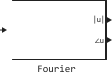
Block Fourier performs a Fourier analysis of the input signal in a window of one cycle of the fundamental frequency of the signal. Block Fourier It can be configured to calculate the module and phase of the DC component, the main component, or any harmonic component of the input signal.
The signal It can be written as a Fourier series.:
where represents the harmonic rank ( corresponds to the main component). The modulus and phase of the selected harmonic component are calculated using these equations:
where
where — the main frequency.
Since this block uses a moving average window, one simulation cycle must be completed before the output values match the correct module and phase values. For the first simulation cycle, the output values correspond to the parameter in which the initial values are set.
Ports
Input
#
IN_1
—
signal for analysis
scalar | vector
Details
A signal for analysis.
| Data types |
|
| Complex numbers support |
No |
Output
#
|u|
—
the module of the specified harmonic component
scalar
Details
The modulus of the specified harmonic component is in the same units as the input signal.
| Data types |
|
| Complex numbers support |
No |
#
∠u
—
the phase of the specified harmonic component
scalar
Details
The phase of the specified harmonic component in degrees.
| Data types |
|
| Complex numbers support |
No |
Parameters
Main
# Fundamental frequency, Hz — fundamental frequency
Details
The fundamental frequency of the input signal in Hz.
| Default value |
|
| Program usage name |
|
| Evaluatable |
Yes |
# Harmonic n (0=DC, 1=fundamental) — harmonic component for Fourier analysis
Details
Harmonic component for Fourier analysis. Enter 0 to analyse the DC component. Enter 1 to analyse the fundamental frequency, or enter the number corresponding to the desired harmonic.
| Default value |
|
| Program usage name |
|
| Evaluatable |
Yes |
# Initial input [Magnitude, Phase (deg)] — initial values of modulus and phase of the output signal
Details
Initial values of the modulus and phase of the output signal.
The phase is set in degrees.
| Default value |
|
| Program usage name |
|
| Evaluatable |
Yes |
# Sample time — sampling period
Details
The sampling period of the block in seconds. Set to 0 to realise a continuous block.
| Default value |
|
| Program usage name |
|
| Evaluatable |
Yes |