Counterbalance Valve (IL)
A high-pressure control valve in an isothermal fluid network.
blockType: EngeeFluids.IsothermalLiquid.Valves.PressureControl.Counterbalance
|
Path in the library: |
Description
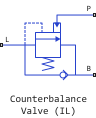
Block Counterbalance Valve (IL) It is a balancing pressure control valve in an isothermal fluid network. The balancing valve is widely used in applications where high pressure situations often occur or where the task requires controlled manipulation of high pressure at production speeds. This includes tasks such as overloading hydraulics or lowering suspended loads. The valve operates by balancing the forces of the spring, the back pressure in port B and the load in port L. The valve responds to pressure changes in the pilot line. When the pressure in the pilot line exceeds the back pressure, the valve begins to open.
There is no flow between ports B and P or ports L and P.
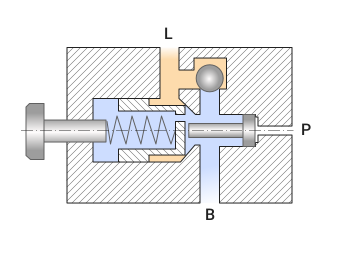
This figure shows a typical section of a balancing valve.
Valve opening
The block balances the valve forces, so that
where
-
— port pressure P;
-
— port pressure L;
-
— port pressure B;
-
— accumulated force generated by the spring;
-
— spring constant;
-
— linear position of the spool housing of the safety valve. This position is determined relative to the set pressure-free position.
The unit sets the pressure action areas , and according to the parameter Pilot ratio, , such that
and the parameter Back pressure ratio, , such that
The following ratios are typical for a balancing valve 4:1 or 3:1.
Set effort It is a combination of the pre-tension of the spring and the force of the spring in port B. This effort is a function of , parameter Set pressure differential:
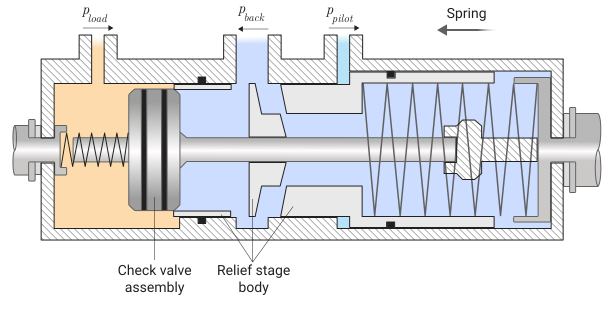
The figure shows a diagram of a balancing valve with a test rig in which pressure ports control the valve by acting on surfaces with different areas. The arrows indicate the direction of the force exerted by pressure or spring force on the safety valve body. The gray areas represent a single housing that moves to the right when the safety valve is opened. The check valve moves to the left when opened.
Parameterization of valve opening
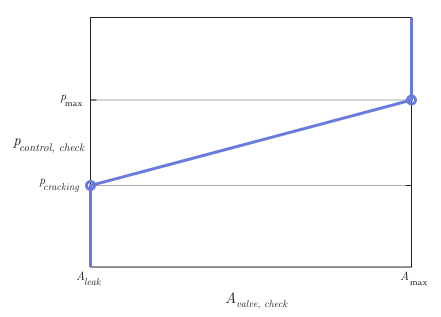
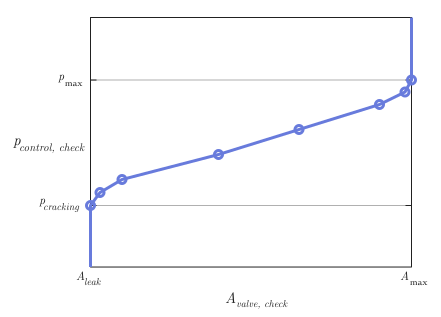
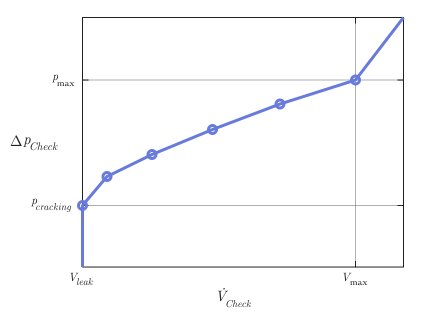
Linear or tabular parameterization is available in the block. The part of the unit connected to the check valve operates identically to the unit Check Valve (IL).
linear parameterization
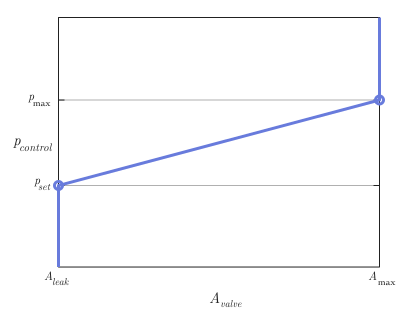
If for the parameter Opening parameterization the value is set Linear - Area vs. pressure, then the valve opening area is
Normalized control pressure calculated as
where — parameter value Maximum opening pressure differential.
The normalized pressure of the check valve is
where
-
— parameter value Cracking pressure differential;
-
— check valve parameter Maximum opening pressure differential.
When the valve is in an almost open or almost closed position in linear parameterization, numerical stability can be maintained in the simulation by adjusting the parameter Smoothing factor. If the parameter Smoothing factor non-zero, the unit smoothly maintains the control pressure between and .
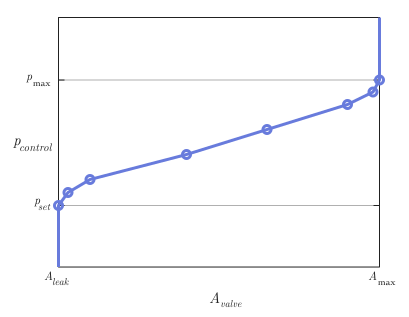
table parameterization of the area
If for the parameter Opening parameterization the value is set Tabulated data - Area vs. pressure, then the block uses the same equations as for linear parameterization, but uses the specified tabular data. The tabular data represent the area values depending on the set control pressure, where . The first element of the parameter Pressure differential vector — this is the control pressure at which the safety valve starts to open. The last element determines the control pressure at which the valve is fully open.
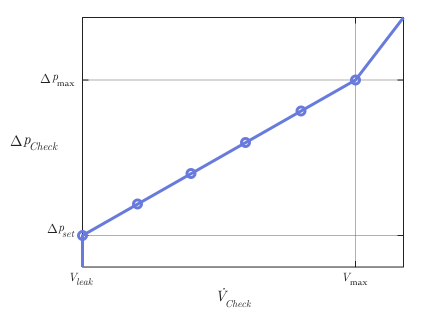
table parameterization of the flow rate
If for the parameter Opening parameterization the value is set Tabulated data - Volumetric flow rate vs. pressure, then the volumetric flow equations use the values listed below:
-
— simulated average flow density of the safety valve;
-
— flow rate through the safety valve;
-
— pressure drop on the safety valve during flow;
-
— critical pressure drop on the safety valve during flow;
-
— simulated control pressure;
-
— internal received table of control pressure values;
-
— preset pressure drop;
-
— parameter value Critical Reynolds number;
-
— parameter value Discharge coefficient;
-
— kinematic viscosity;
-
— an internal resulting table of flow coefficient values depending on the valve area;
-
— vector of reference volume expenses;
-
, , — pilot pressure, back pressure and load pressure for the parameter Reference volumetric flow rate vector accordingly.
The unit calculates the mass flow rate for the safety valve in such a way that
where
-
;
-
;
-
.
The liquid flows from the load port L to the back pressure port B. The block extrapolates the value to the nearest point after calculation how
where . The unit calculates the control pressure as
and the vector of the reference control pressure in the form
where
-
atm;
-
atm;
-
.
The block gets the value , which represents the pressure drop for the fluid flow on the specified reference curve. The block calculates how
The table shows how the unit controls the opening zones of the safety and non-return valves depending on the parameter value. Opening parameterization.
| Opening parameterization | Safety valve | Check valve |
|---|---|---|
|
|
|
|
|
|
|
|
|
Assumptions and limitations
-
The unit operates only in a configuration with an internal drain and an external pilot control, without ventilation.
-
When you set for the parameter Opening parameterization meaning
Tabulated data - Volumetric flow rate vs. pressureThe unit uses the volume flow values as a function of the pressure drop across the safety valve to construct reference curves. The block assumes that the pilot port and the back pressure port are open to atmospheric pressure.
Ports
Conserving
#
P
—
isothermal liquid pressure port
isothermal liquid
Details
A non-directional port connected to the pilot pressure.
| Program usage name |
|
#
B
—
isothermal fluid port
isothermal liquid
Details
A non-directional port connected to the valve back pressure.
| Program usage name |
|
#
L
—
isothermal fluid port
isothermal liquid
Details
A non-directional port associated with the load.
| Program usage name |
|
Parameters
Model Parameterization
# Pilot ratio — pilot area ratio
Details
The ratio of the pilot pressure area to the load area.
| Default value |
|
| Program usage name |
|
| Evaluatable |
Yes |
#
Opening parameterization —
valve opening calculation method
Linear - Area vs. pressure | Tabulated data - Area vs. pressure | Tabulated data - Volumetric flow rate vs. pressure
Details
The method of calculating the valve opening. When choosing Linear - Area vs. pressure or Tabulated data - Area vs. pressure the block connects the opening area to the control pressure. When choosing Tabulated data - Volumetric flow rate vs. pressure The unit uses a reference flow and differential pressure curve for the safety valve and the check valve of the balancing valve, for which the pressure at the back pressure port and the pilot port corresponds 1 atm on the reference curve for the safety valve.
| Values |
|
| Default value |
|
| Program usage name |
|
| Evaluatable |
No |
# Discharge coefficient — expense ratio
Details
A correction factor that takes into account discharge losses in theoretical flows.
| Default value |
|
| Program usage name |
|
| Evaluatable |
Yes |
#
Opening area vector —
vector of values of the non-return valve opening area
m^2 | um^2 | mm^2 | cm^2 | km^2 | in^2 | ft^2 | yd^2 | mi^2 | ha | ac
Details
Vector of values of the non-return valve opening area. The values in this vector correspond to the elements of the vector from the parameter Pressure differential vector.
Dependencies
To use this parameter, set for the parameter Opening parameterization meaning Tabulated data - Area vs. pressure.
| Units |
|
| Default value |
|
| Program usage name |
|
| Evaluatable |
Yes |
# Back pressure ratio — counterpressure area ratios
Details
The ratio of the counterpressure area to the load area.
| Default value |
|
| Program usage name |
|
| Evaluatable |
Yes |
# Critical Reynolds number — upper limit of the Reynolds number for laminar flow
Details
The upper limit of the Reynolds number for laminar flow through the valve.
| Default value |
|
| Program usage name |
|
| Evaluatable |
Yes |
#
Leakage area —
valve clearance area in fully closed position
m^2 | um^2 | mm^2 | cm^2 | km^2 | in^2 | ft^2 | yd^2 | mi^2 | ha | ac
Details
The sum of all clearances when the valve is in the fully closed position. Any area less than this value is equal to the specified leakage area. This parameter contributes to the stability of the numerical solution by maintaining the continuity of the flow.
Dependencies
To use this parameter, set for the parameter Opening parameterization meaning Linear - Area vs. pressure.
| Units |
|
| Default value |
|
| Program usage name |
|
| Evaluatable |
Yes |
#
Pressure differential vector —
pressure drop for non-return valve operation
Pa | uPa | hPa | kPa | MPa | GPa | kgf/m^2 | kgf/cm^2 | kgf/mm^2 | mbar | bar | kbar | atm | ksi | psi | mmHg | inHg
Details
The pressure drop vector for the check valve.
Dependencies
To use this parameter, set for the parameter Opening parameterization meaning Tabulated data - Area vs. pressure or Tabulated data - Volumetric flow rate vs. pressure.
| Units |
|
| Default value |
|
| Program usage name |
|
| Evaluatable |
Yes |
#
Maximum opening area —
maximum opening area of the safety valve
m^2 | um^2 | mm^2 | cm^2 | km^2 | in^2 | ft^2 | yd^2 | mi^2 | ha | ac
Details
The maximum open area of the safety valve.
Dependencies
To use this parameter, set for the parameter Opening parameterization meaning Linear - Area vs. pressure.
| Units |
|
| Default value |
|
| Program usage name |
|
| Evaluatable |
Yes |
#
Opening time constant —
valve opening time constant
s | ns | us | ms | min | hr | d
Details
A constant that determines the time it takes for a liquid to reach a steady state when opening or closing a valve from one position to another. This parameter affects the simulation of the opening dynamics.
Dependencies
To enable this option, check the box Opening dynamics.
| Units |
|
| Default value |
|
| Program usage name |
|
| Evaluatable |
Yes |
# Opening dynamics — should the reaction of the flow to the opening of the valve be taken into account
Details
Is it necessary to take into account the transient effects in the fluid system caused by the opening of the valve? Check the box Opening dynamics approximates the opening conditions by introducing a first-order delay into the flow response. Parameter Opening time constant It also affects the simulated opening dynamics.
If this flag is checked, it applies to the safety valve, not the check valve of the balancing valve.
| Default value |
|
| Program usage name |
|
| Evaluatable |
No |
#
Set pressure differential —
initial compression pressure of the spring
Pa | uPa | hPa | kPa | MPa | GPa | kgf/m^2 | kgf/cm^2 | kgf/mm^2 | mbar | bar | kbar | atm | ksi | psi | mmHg | inHg
Details
The pressure difference for lifting the safety valve. Use this parameter to adjust the preset pressure specified in the specification.
Dependencies
To use this parameter, set for the parameter Opening parameterization meaning Linear - Area vs. pressure or Tabulated data - Volumetric flow rate vs. pressure.
| Units |
|
| Default value |
|
| Program usage name |
|
| Evaluatable |
Yes |
#
Reference pressure differential vector —
pressure drop in the safety valve
Pa | uPa | hPa | kPa | MPa | GPa | kgf/m^2 | kgf/cm^2 | kgf/mm^2 | mbar | bar | kbar | atm | ksi | psi | mmHg | inHg
Details
The vector of pressure drop values in the safety valve. The values in this vector correspond to the elements of the vector from the parameter Reference volumetric flow rate vector.
Dependencies
To use this parameter, set for the parameter Opening parameterization meaning Tabulated data - Volumetric flow rate vs. pressure.
| Units |
|
| Default value |
|
| Program usage name |
|
| Evaluatable |
Yes |
#
Maximum opening pressure differential —
maximum pressure of the safety valve
Pa | uPa | hPa | kPa | MPa | GPa | kgf/m^2 | kgf/cm^2 | kgf/mm^2 | mbar | bar | kbar | atm | ksi | psi | mmHg | inHg
Details
The maximum pressure of the safety valve.
Dependencies
To use this parameter, set for the parameter Opening parameterization meaning Linear - Area vs. pressure.
| Units |
|
| Default value |
|
| Program usage name |
|
| Evaluatable |
Yes |
#
Reference volumetric flow rate vector —
volumetric flow through the safety valve
m^3/s | mm^3/s | cm^3/s | m^3/hr | m^3/min | l/hr | l/min | l/s | gal/hr | gal/min | gal/s | ft^3/hr | ft^3/min | ft^3/s
Details
Vector of volume flow values through the safety valve. The values in this vector correspond to the elements of the vector from the parameter Reference pressure differential vector.
Dependencies
To use this parameter, set for the parameter Opening parameterization meaning Tabulated data - Volumetric flow rate vs. pressure.
| Units |
|
| Default value |
|
| Program usage name |
|
| Evaluatable |
Yes |
# Smoothing factor — numerical smoothing factor
Details
The continuous smoothing coefficient, which ensures smooth opening by correcting the valve characteristics in the almost open and almost closed positions. Set a non-zero value less than one to increase the stability of the simulation in these modes.
| Default value |
|
| Program usage name |
|
| Evaluatable |
Yes |
Check Valve
#
Maximum opening pressure differential —
maximum valve pressure
Pa | uPa | hPa | kPa | MPa | GPa | kgf/m^2 | kgf/cm^2 | kgf/mm^2 | mbar | bar | kbar | atm | ksi | psi | mmHg | inHg
Details
Maximum pressure in the valve. This parameter limits the pressure at the outlet of the valve to maintain the physical values during simulation.
Dependencies
To use this parameter, set for the parameter Opening parameterization meaning Linear - Area vs. pressure.
| Units |
|
| Default value |
|
| Program usage name |
|
| Evaluatable |
Yes |
#
Maximum opening area —
maximum open area
m^2 | um^2 | mm^2 | cm^2 | km^2 | in^2 | ft^2 | yd^2 | mi^2 | ha | ac
Details
The maximum open area of the check valve in the load line. Inside the unit, the check valve is located in parallel with the safety valve.
Dependencies
To use this parameter, set for the parameter Opening parameterization meaning Linear - Area vs. pressure.
| Units |
|
| Default value |
|
| Program usage name |
|
| Evaluatable |
Yes |
#
Volumetric flow rate vector —
volumetric flow through the check valve
m^3/s | mm^3/s | cm^3/s | m^3/hr | m^3/min | l/hr | l/min | l/s | gal/hr | gal/min | gal/s | ft^3/hr | ft^3/min | ft^3/s
Details
Vector of values of volumetric flow rates through the check valve. The values in this vector correspond to the elements of the vector from the parameter Pressure differential vector.
Dependencies
To use this parameter, set for the parameter Opening parameterization meaning Tabulated data - Volumetric flow rate vs. pressure.
| Units |
|
| Default value |
|
| Program usage name |
|
| Evaluatable |
Yes |
#
Opening area vector —
non-return valve opening area
m^2 | um^2 | mm^2 | cm^2 | km^2 | in^2 | ft^2 | yd^2 | mi^2 | ha | ac
Details
Vector of non-return valve opening areas. The values in this vector correspond to the elements of the vector from the parameter Pressure differential vector.
Dependencies
To use this parameter, set for the parameter Opening parameterization meaning Tabulated data - Area vs. pressure.
| Units |
|
| Default value |
|
| Program usage name |
|
| Evaluatable |
Yes |
#
Pressure differential vector —
pressure drop for non-return valve operation
Pa | uPa | hPa | kPa | MPa | GPa | kgf/m^2 | kgf/cm^2 | kgf/mm^2 | mbar | bar | kbar | atm | ksi | psi | mmHg | inHg
Details
The vector of pressure drop values for the check valve.
Dependencies
To use this parameter, set for the parameter Opening parameterization meaning Tabulated data - Area vs. pressure or Tabulated data - Volumetric flow rate vs. pressure.
| Units |
|
| Default value |
|
| Program usage name |
|
| Evaluatable |
Yes |
#
Cracking pressure differential —
operating pressure of the check valve
Pa | uPa | hPa | kPa | MPa | GPa | kgf/m^2 | kgf/cm^2 | kgf/mm^2 | mbar | bar | kbar | atm | ksi | psi | mmHg | inHg
Details
The pressure drop at which the check valve is triggered.
Dependencies
To use this parameter, set for the parameter Opening parameterization meaning Linear - Area vs. pressure.
| Units |
|
| Default value |
|
| Program usage name |
|
| Evaluatable |
Yes |