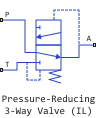
Pressure-Reducing 3-Way Valve (IL)
Combined safety and pressure reducing valve in the isothermal fluid network.
blockType: EngeeFluids.IsothermalLiquid.Valves.PressureControl.ReducingThreeWay
|
Path in the library: |
Description
Block Pressure-Reducing 3-Way Valve (IL) It is a combination of safety and pressure reducing valves. It maintains the pressure at the valve outlet (port A) by limiting the area of the incoming flow through port P and discharging the flow through port T.
Valve functionality
The unit controls the operation of the valve by comparing the pressure difference between ports A and T with a set range of pressure thresholds. When the pressure difference is the distance between ports A and T exceeds , port P begins to close. When It ranges from before , the unit is in the transition range, and both valves on ports P and T are closed. When exceeds the pressure transition range , where The T port begins to open.
To simulate pressure relief or reduction relative to another element of the system, see the description of the unit. Pressure Compensator Valve (IL). To simulate the pressure drop between the valve outlet and the atmosphere, see the description of the unit. Pressure-Reducing Valve (IL). To simulate pressure relief relative to the valve or between the valve outlet and atmospheric pressure, see the description of the unit Pressure Relief Valve (IL).
Pressure regulation
When the pressure is exceeds the threshold pressure , the valve on port P begins to close. When the pressure is outside the transition range, i.e. when , the valve on port T begins to open. The closing and opening of the valve are parameterized in two ways:
-
If the check box is Set pressure control When installed, the unit uses the pressure signal on the Ps port to control the valve. In this mode is the value of the parameter Pressure regulation range, and — the value of the parameter Pressure transition range. The pressure reducing valve starts to close when It’s getting bigger , which corresponds to the value of the signal on the Ps port. The safety valve is triggered, i.e. the port T begins to open, occurs when more And less . Pressure — this is the sum of the parameter values Pressure regulation range and .
-
If the check box Set pressure control removed, the valve closure at port P is continuously adjusted by either linear or tabular parameterization. Similarly, the opening of the safety valve on port T is parameterized linearly or using a lookup table. An example of linear parameterization of a pressure reducing valve (brighter line) and a safety valve (less bright line) is shown below.
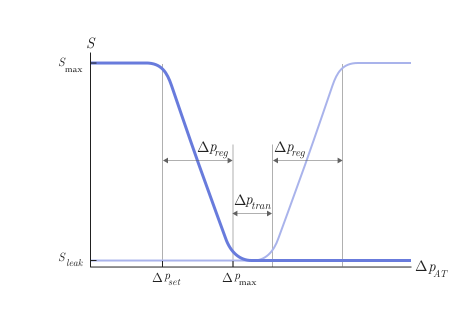
If for the parameter Opening parameterization the value is set
LinearThen — this is the parameter value Set pressure differential for reducing valve, — parameter value Pressure regulation range, — parameter value Pressure transition range. Pressure equal to the sum of the parameter values Pressure regulation range and .If for the parameter Opening parameterization the value is set
Tabulated dataThen and will be the first and last elements of the parameter vector Pressure differential vector for reducing valve accordingly, and and — the first and last elements of the parameter vector Pressure differential vector for relief valve accordingly. An example of tabular parameterization of pressure reducing and safety valves is shown below.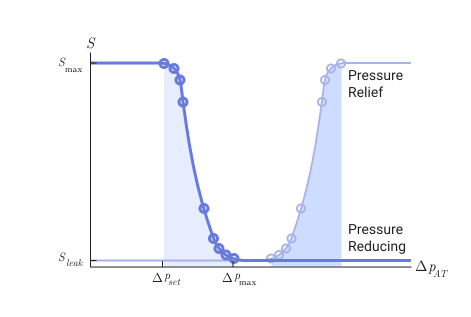
The mass flow equation
The law of conservation of momentum through the valve has the form
The mass flow through the valves is calculated as follows
where
-
— parameter value Discharge coefficient;
-
— the instant opening area of the valve between ports A and P or A and T, as indicated in the subscript;
-
— parameter value Cross-sectional area at ports A, P and T;
-
— the average density of the liquid;
-
— pressure difference in the valve, .
Critical pressure drop — this is the pressure drop associated with the value of the critical Reynolds number , set by the parameter Critical Reynolds number, the mode transition point between laminar and turbulent flow, which corresponds to either the reducing or safety component of the valve. The unit calculates the critical pressure drop as
where — it’s either , or , corresponding to the pressure reducing or safety valve component, respectively.
pressure loss describes a decrease in pressure in the valve due to a decrease in its cross-sectional area and is calculated as
Pressure reduction describes a positive pressure change in the valve due to an increase in the cross-sectional area. To ignore pressure recovery, uncheck the box. Pressure recovery. In this case, the pressure loss is .
If the check box Set pressure control removed, the block calculates the opening area using the parameterization of the pressure reducing valve opening (P k A) or the safety valve (A*k *T) and the valve opening dynamics.
Parameterization of valve opening and closing
If for the parameter Opening parameterization the value is set Linear, the opening area of the pressure reducing valve is determined as follows:
and for the safety valve
Normalized blood pressure represents
where the setting and maximum pressures correspond to the settings of the pressure reducing or safety valve.
When the valve is in an almost open or almost closed position in linear parameterization, numerical stability can be maintained in the simulation by adjusting the parameter Smoothing factor. If the parameter Smoothing factor non-zero, the unit smoothly maintains the control pressure between and .
If for the parameter Opening parameterization the value is set Tabulated data Then and are the first and last elements of the parameter vector Opening area vector reducing valve accordingly, and and — the first and last elements of the parameter vector Opening area vector for relief valve accordingly. The block calculates the opening area as
For the pressure reducing valve, the block calculates the opening area using the tabular search method, where
-
— control pressure, which is the pressure difference between ports A and T;
-
;
-
— parameter value Pressure differential vector for reducing valve;
-
— a change in internal pressure that causes the valve to start closing when ;
-
— parameter value Opening area vector reducing valve.
For the safety valve, the unit calculates the opening area using the tabular search method, where
-
— pressure difference between ports A and T;
-
;
-
— parameter value Pressure differential vector for relief valve;
-
— a change in internal pressure that causes the valve to start opening when ;
-
— parameter value Opening area vector for relief valve.
Dynamics of the opening
If the check box is selected Opening dynamics, then a delay is introduced into the flow response to the valve opening. Meaning It becomes a dynamic opening or closing area. ; otherwise — this is the opening area in a stationary state. This area is typical for the pressure reducing and safety components of the valve or accordingly. The instantaneous change in the dynamic opening area is calculated based on a time constant Opening time constant, :
By default, the checkbox Opening dynamics removed.
Ports
Conserving
#
P
—
isothermal fluid port
isothermal liquid
Details
A non-directional port connected to the liquid inlet to the valve.
| Program usage name |
|
#
A
—
isothermal fluid port
isothermal liquid
Details
A non-directional port connected to the liquid outlet from the valve.
| Program usage name |
|
#
T
—
isothermal fluid port
isothermal liquid
Details
A non-directional port associated with liquid discharge.
| Program usage name |
|
Input
#
Ps
—
controlled pressure drop
scalar
Details
Setting pressure with variable signal to control the operation of the valve.
Dependencies
To use this port, check the box Set pressure control.
| Data types |
|
| Complex numbers support |
No |
Parameters
Parameters
#
Opening area vector reducing valve —
vector of valve opening areas for tabular parameterization of a pressure reducing valve
m^2 | um^2 | mm^2 | cm^2 | km^2 | in^2 | ft^2 | yd^2 | mi^2 | ha | ac
Details
Vector of values of the opening area for tabular parameterization of the opening area. The elements of the vector must correspond to the values in the parameter Pressure differential vector for reducing valve. The squares are listed in descending order. Linear interpolation is used between the points of the tabular data.
Dependencies
To use this option, uncheck the box. Set pressure control and set for the parameter Opening parameterization meaning Tabulated data.
| Units |
|
| Default value |
|
| Program usage name |
|
| Evaluatable |
Yes |
#
Pressure transition range —
valve pressure range with closed ports P and T
Pa | uPa | hPa | kPa | MPa | GPa | kgf/m^2 | kgf/cm^2 | kgf/mm^2 | mbar | bar | kbar | atm | ksi | psi | mmHg | inHg
Details
The pressure range of the three-way valve. This parameter defines the pressure range starting from the end Pressure regulation range, within which both ports P and T are closed. Below this range, the pressure reducing valve on port P is open to flow, and above this range, the safety valve on port T is open.
Dependencies
To use this option, check the box Set pressure control or uncheck the box Set pressure control and set for the parameter Opening parameterization meaning Linear.
| Units |
|
| Default value |
|
| Program usage name |
|
| Evaluatable |
Yes |
#
Opening parameterization —
type of parameterization of the opening
Linear | Tabulated data
Details
The method of calculating the valve opening or closing. The valve opening is parameterized either linearly, which relates the opening area to a given pressure range, or using the provided table of values, which relates the valve opening area to pressure drop data.
Dependencies
To use this option, uncheck the box. Set pressure control.
| Values |
|
| Default value |
|
| Program usage name |
|
| Evaluatable |
No |
#
Opening area vector for relief valve —
vector of valve opening areas for tabular parameterization of the safety valve
m^2 | um^2 | mm^2 | cm^2 | km^2 | in^2 | ft^2 | yd^2 | mi^2 | ha | ac
Details
Vector of values of the opening area for tabular parameterization of the opening area. The elements of the vector must correspond to the values in the parameter Pressure differential vector for relief valve. The squares are listed in ascending order. Linear interpolation is used between the points of the tabular data.
Dependencies
To use this option, uncheck the box. Set pressure control and set for the parameter Opening parameterization meaning Tabulated data.
| Units |
|
| Default value |
|
| Program usage name |
|
| Evaluatable |
Yes |
# Pressure recovery — should the increase in pressure be taken into account when the cross-sectional area is expanded
Details
It takes into account the increase in pressure when liquid flows from an area with a smaller cross-sectional area to an area with a larger cross-sectional area. This increase in pressure is not taken into account if the check box is unchecked. Pressure recovery.
| Default value |
|
| Program usage name |
|
| Evaluatable |
No |
# Discharge coefficient — expense ratio
Details
A correction factor that takes into account flow losses in theoretical flows. By default, the flow rate for the valve in Engee is 0.64.
| Default value |
|
| Program usage name |
|
| Evaluatable |
Yes |
# Critical Reynolds number — upper limit of the Reynolds number for laminar flow
Details
The upper limit of the Reynolds number for laminar flow through the valve.
| Default value |
|
| Program usage name |
|
| Evaluatable |
Yes |
#
Leakage area —
the gap area in the fully closed position
m^2 | um^2 | mm^2 | cm^2 | km^2 | in^2 | ft^2 | yd^2 | mi^2 | ha | ac
Details
The sum of all clearances when the valve is in the fully closed position. Any area less than this value is saturated to the specified leakage area. This contributes to numerical stability by maintaining continuity of flow.
Dependencies
To use this option, check the box Set pressure control or uncheck the box Set pressure control and set for the parameter Opening parameterization meaning Linear.
| Units |
|
| Default value |
|
| Program usage name |
|
| Evaluatable |
Yes |
#
Cross-sectional area at ports A, P and T —
the area of the holes on the non-directional ports
m^2 | um^2 | mm^2 | cm^2 | km^2 | in^2 | ft^2 | yd^2 | mi^2 | ha | ac
Details
The cross-sectional area at the input and output ports of A, P and T. This area is used in the pressure flow equation, which determines the mass flow through the hole.
| Units |
|
| Default value |
|
| Program usage name |
|
| Evaluatable |
Yes |
#
Maximum opening area —
maximum port opening area
m^2 | um^2 | mm^2 | cm^2 | km^2 | in^2 | ft^2 | yd^2 | mi^2 | ha | ac
Details
The cross-sectional area of the valve (P-A or A-T) in the fully open position.
Dependencies
To use this option, check the box Set pressure control or uncheck the box Set pressure control and set for the parameter Opening parameterization meaning Linear.
| Units |
|
| Default value |
|
| Program usage name |
|
| Evaluatable |
Yes |
#
Pressure differential vector for reducing valve —
differential pressure values for the tabular parameterization of the pressure reducing valve
Pa | uPa | hPa | kPa | MPa | GPa | kgf/m^2 | kgf/cm^2 | kgf/mm^2 | mbar | bar | kbar | atm | ksi | psi | mmHg | inHg
Details
Vector of differential pressure values for tabular parameterization of the opening area. The elements of the vector correspond to the values in the parameter Opening area vector reducing valve. The values of the pressure drop vector are listed in ascending order and must have the same number of elements as the parameter Opening area vector reducing valve. Linear interpolation is used between the points of the tabular data.
Dependencies
To use this option, uncheck the box. Set pressure control and set for the parameter Opening parameterization meaning Tabulated data.
| Units |
|
| Default value |
|
| Program usage name |
|
| Evaluatable |
Yes |
#
Opening time constant —
valve opening time constant
s | ns | us | ms | min | hr | d
Details
A constant that determines the time it takes for the liquid to reach a steady state when opening or closing the valve from one position to another. This parameter affects the simulated opening dynamics.
Dependencies
To use this option, check the box Opening dynamics.
| Units |
|
| Default value |
|
| Program usage name |
|
| Evaluatable |
Yes |
#
Pressure differential vector for relief valve —
differential pressure values for tabular parameterization of the safety valve
Pa | uPa | hPa | kPa | MPa | GPa | kgf/m^2 | kgf/cm^2 | kgf/mm^2 | mbar | bar | kbar | atm | ksi | psi | mmHg | inHg
Details
A vector of differential pressure values for tabular parameterization of the opening area. The elements of the vector correspond to the values in the parameter Opening area vector for relief valve. The values of the pressure drop vector are listed in ascending order and must have the same number of elements as the parameter Opening area vector for relief valve. Linear interpolation is used between the points of the tabular data.
Dependencies
To use this option, uncheck the box. Set pressure control and set for the parameter Opening parameterization meaning Tabulated data.
| Units |
|
| Default value |
|
| Program usage name |
|
| Evaluatable |
Yes |
# Opening dynamics — introducing a flow delay due to the opening of the hole
Details
It takes into account the transients in the fluid system caused by the opening of the valve. Check the box Opening dynamics approximates the opening conditions by introducing a first-order delay into the flow response. The time constant Opening time constant It also affects the simulated opening dynamics.
| Default value |
|
| Program usage name |
|
| Evaluatable |
No |
#
Set pressure differential for reducing valve —
the setting pressure for closing the valve at the port P
Pa | uPa | hPa | kPa | MPa | GPa | kgf/m^2 | kgf/cm^2 | kgf/mm^2 | mbar | bar | kbar | atm | ksi | psi | mmHg | inHg
Details
Pressure difference between port T and port A. When the set pressure drop is exceeded, the valve on port P begins to close. Closure is parameterized linearly or using a lookup table, as defined in the parameter description. Opening parameterization.
| Units |
|
| Default value |
|
| Program usage name |
|
| Evaluatable |
Yes |
# Smoothing factor — numerical smoothing coefficient
Details
A continuous smoothing coefficient that introduces a layer of gradual change in the flow response when the valve is in the nearly open or nearly closed position. Set a non-zero value less than one to increase the stability of the simulation in these modes.
Dependencies
To use this parameter, set for the parameter Opening parameterization meaning Linear.
| Default value |
|
| Program usage name |
|
| Evaluatable |
Yes |
#
Pressure regulation range —
valve operating pressure range
Pa | uPa | hPa | kPa | MPa | GPa | kgf/m^2 | kgf/cm^2 | kgf/mm^2 | mbar | bar | kbar | atm | ksi | psi | mmHg | inHg
Details
The operating pressure range of the pressure reducing valve. The pressure control range is between Set pressure differential for reducing valve and the maximum operating pressure of the valve. After the expiration date Pressure regulation range The pressure reducing valve closes and starts Pressure transition range.
Dependencies
To use this option, check the box Set pressure control or uncheck the box Set pressure control and set for the parameter Opening parameterization meaning Linear.
| Units |
|
| Default value |
|
| Program usage name |
|
| Evaluatable |
Yes |
Main
# Set pressure control — valve operation method
Details
The valve’s operating method. If the check box is unchecked, the valve opens or closes linearly in a fixed range of pressure control and pressure transition or in accordance with the provided tabular data on pressure and opening area. If the check box is selected, the valve opens or closes according to the variable setting pressure signal set on port on port Ps in a fixed range of pressure regulation and pressure transition. The selected setting applies to both the operation of the pressure reducing valve and the operation of the safety valve.
| Default value |
|
| Program usage name |
|
| Evaluatable |
No |