OPC UA Client
Connecting to an external OPC server.
blockType: EngeeFunction
|
Path in the library: |
Description
| To work with the block, install/update the support package. equipment. |
Block OPC UA Client designed to connect to an external OPC server via a subsystem Engee.Integrations. The block provides the transmission of input signals to the model and obtaining output data at each step of the simulation.
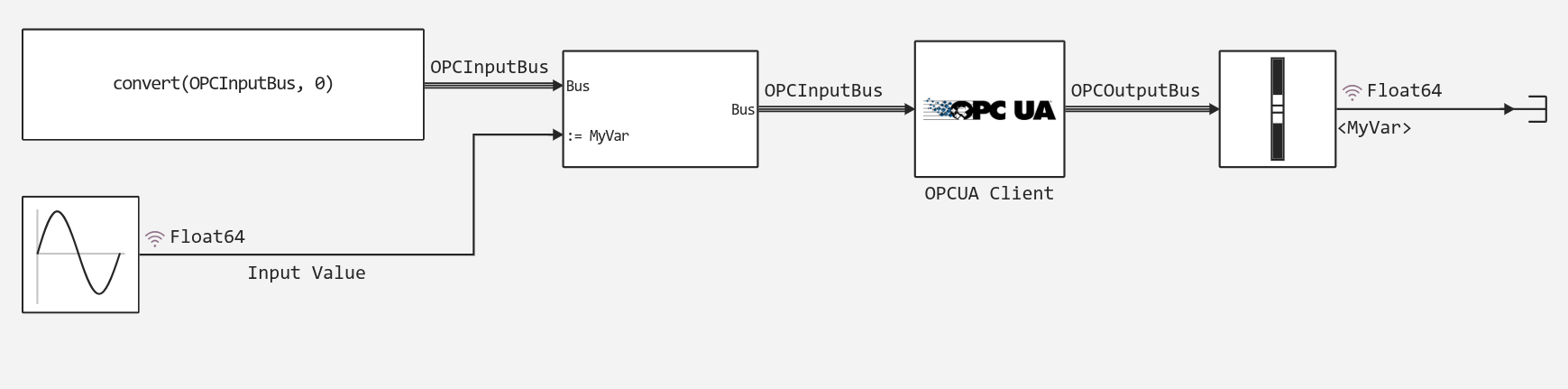
An example of using the block is available in the examples Engee-Device-Manager: example_opcua_client.engee. To get examples, use the command engee.package.getdemos.
Parameters
Main group
# Server address: — server address
Details
| Default value |
|
| Program usage name |
|
| Tunable |
No |
| Evaluatable |
Yes |
#
Security policy: —
Security policy
None | basic256 | basic128Rsa15 | basic256Sha256
Details
| Values |
|
| Default value |
|
| Program usage name |
|
| Tunable |
No |
| Evaluatable |
Yes |
#
Message security: —
messaging security
None | Sign | SignAndEncrypt
Details
| Values |
|
| Default value |
|
| Program usage name |
|
| Tunable |
No |
| Evaluatable |
Yes |
# Read variables: — readable variables
Details
A dictionary of readable variables, in which a match is set for each readable variable. nodeid and type.
OPC_Read_vars = Dict(
        :MyVar => ("ns=2;i=2", Float64),
        :MyVar2 => ("ns=2;i=3 Float64),
        :MyVar3 => ("ns=2;i=4", Float64),
    )
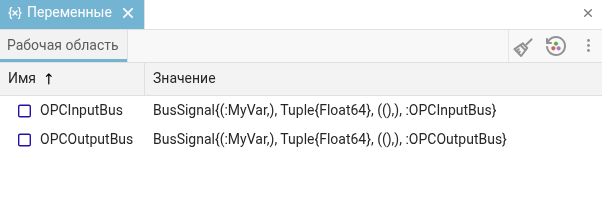
After setting the dictionary of read and write variables (parameter Write variables:) the busbars of the recorded and read signals will be defined in the workspace. Then they can be used in the model. Busses in workspace.
If you do not need to write or read data, specify an empty dictionary. Dict().
| Default value |
|
| Program usage name |
|
| Tunable |
No |
| Evaluatable |
Yes |
# Output Bus Name — output bus name
Details
If there is more than one block in the model OPC UA Client, then it is required to specify the name of the output bus for each instance.
| Default value |
|
| Program usage name |
|
| Tunable |
No |
| Evaluatable |
Yes |
# Write variables: — writable variables
Details
Dictionary of recorded variables. It is set similarly to the dictionary of readable variables. Read variables:.
| Default value |
|
| Program usage name |
|
| Tunable |
No |
| Evaluatable |
Yes |
# Input Bus Name: — name of the input bus
Details
If there is more than one block in the model OPC UA Client, then it is required to specify the name of the input bus for each instance.
| Default value |
|
| Program usage name |
|
| Tunable |
No |
| Evaluatable |
Yes |
# Экспортировать шины: — export tires
Details
| Default value |
|
| Program usage name |
|
| Tunable |
No |
| Evaluatable |
No |
# Timeout, s: — timeout, with
Details
The time in seconds after which the empty values will be returned.
| Default value |
|
| Program usage name |
|
| Tunable |
No |
| Evaluatable |
Yes |
# Sample time, s: — the period for which the block will be called
Details
Specify the interval between the calculation steps.
| Default value |
|
| Program usage name |
|
| Tunable |
No |
| Evaluatable |
Yes |
Данные пользователя
# Username: — username
Details
The username for authorization on the server.
| Default value |
|
| Program usage name |
|
| Tunable |
No |
| Evaluatable |
Yes |
# Password: — user’s password
Details
The user’s password for authorization on the server.
| Default value |
|
| Program usage name |
|
| Tunable |
No |
| Evaluatable |
Yes |