Solving the problem of integrating Engee and Euler
We are studying how to organize a computational task that is calculated simultaneously in two systems: the Engee dynamic modeling platform and the EULER software package.
EULER is a software package designed to analyze the operation of mechanical systems, including complex kinematics, large movements, rigid and deformable structural elements, hydraulic, pneumatic and electrical systems, control systems and other components. [1]
Engee.Integration – subsystem of the Engee platform; removes the problem of access to low-level interfaces of the operating system, allowing Engee to be connected to external devices, interfaces, protocols and software environments. [2]
Briefly about running the example
In a nutshell, how to prepare the environment for launching Engee-EULER simulation:
- Install the Engee subsystem in Engee.Integration and download the client program
- Copy the folder
eulerfrom this example to any location on the target platform - Open the example
PendulumDll.elrin the EULER software package - Open the example
example_EULER.engeein Engee and launch it - Wait for instructions from the client program and run the calculation in EULER.
By the target platform, we mean the computer on which the EULER software package is installed. Now let's look at these steps in a little more detail.
Engee Preparation
To create a computational environment for the EULER model in Engee, we just need to place a block in the model EULER Cosimulation and set up its interfaces correctly. Let's open an example:
cd(@__DIR__)
engee.open( "example_EULER.engee" )
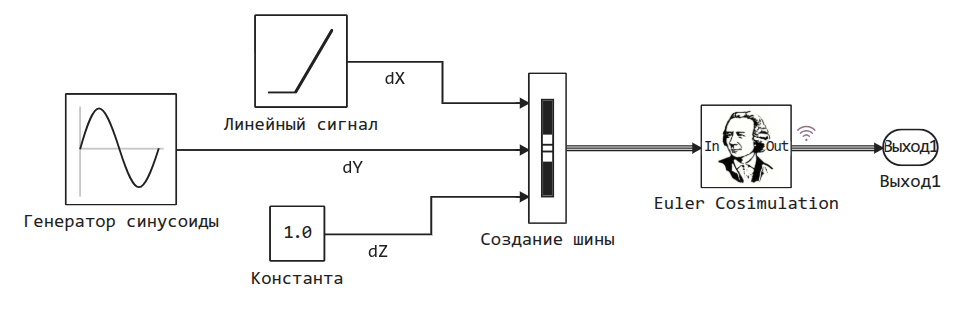
At the input to the component, the signals are collected from the bus. The names of the signal lines will be used inside the block. EULER Cosimulation, which should be configured as follows:
.png)
- list the input signals, this will determine their order in the packet being sent (in the example there are three signals, P1, P2 and P3),
- list the output signals (in fact, here we give them names),
- set receive buffer size (multiply 8 by the number of signals),
- specify the calculation step (it must be less than or equal to the sampling step of the model),
- specify the path to the example – here should be the name of the folder on the target platform where it will be located
elrthe file with the EULER project.
After the block is configured, you need to open the Engee client program.Integration**, which can be obtained using the following command:
engee.package.install("Engee-Device-Manager")
This program receives and transmits information between Engee (cloud platform) and local resources where the EULER software package is running. For more information about installing and running this program, see [2].
Perform the pairing by specifying Engee in the client program.Enter the address given by the previous command and click on the "Connect" button.
To transfer the block settings to EULER, click on the "Generate configuration file" button. It will appear in the specified folder with the example. Its content corresponds to the block settings:
MODEL_NAME example_Euler
INPUT_SIGNAL_COUNT 2
OUTPUT_SIGNAL_COUNT 3
MODEL_PARAM_COUNT 0
INPUT_SIGNAL_NAMES delta1 delta2
OUTPUT_SIGNAL_NAMES P1 P2 P3
MODEL_PARAM_NAMES
INIT_MODEL_PARAM
CONTINUOUS_STATE_NUM_COUNT 0
DISCRETE_STATE_NUM_COUNT 0
DIAGNOSTIC 1
After the interface is installed and the EULER software package has received instructions on the structure of the transmitted data, we can start configuring the project inside EULER.
Task preparation in EULER
The example we're going to look at was created based on a standard example. Samples/Projects/Beginner/Pendulum.elr. In the original example, the Pendulum is suspended from a fixed Post by means of a pair of rotations. We have added a new object - the suspension point, to which the pendulum hinge is suspended, and it is connected to the fixed rack by means of a linear guide (object поступательная пара). From Engee, we will control the force Fx acting on the suspension point.
Let's create a new "Sensor" for co-simulation with Engee and configure it as follows:
- Object name is the name of the sensor being created (in this case
ec, fromengee cosimulation), - Engee model is the address of the DLL file through which the pairing takes place (see the directory with this browser)
- The input variables are the variables that EULER will send to Engee at each step of the exchange,
- Output variables are variables that will be received from Engee and for which sensor objects are automatically created in the EULER model.,
- The sampling step must be less than or equal to the sampling step of the model in Engee.
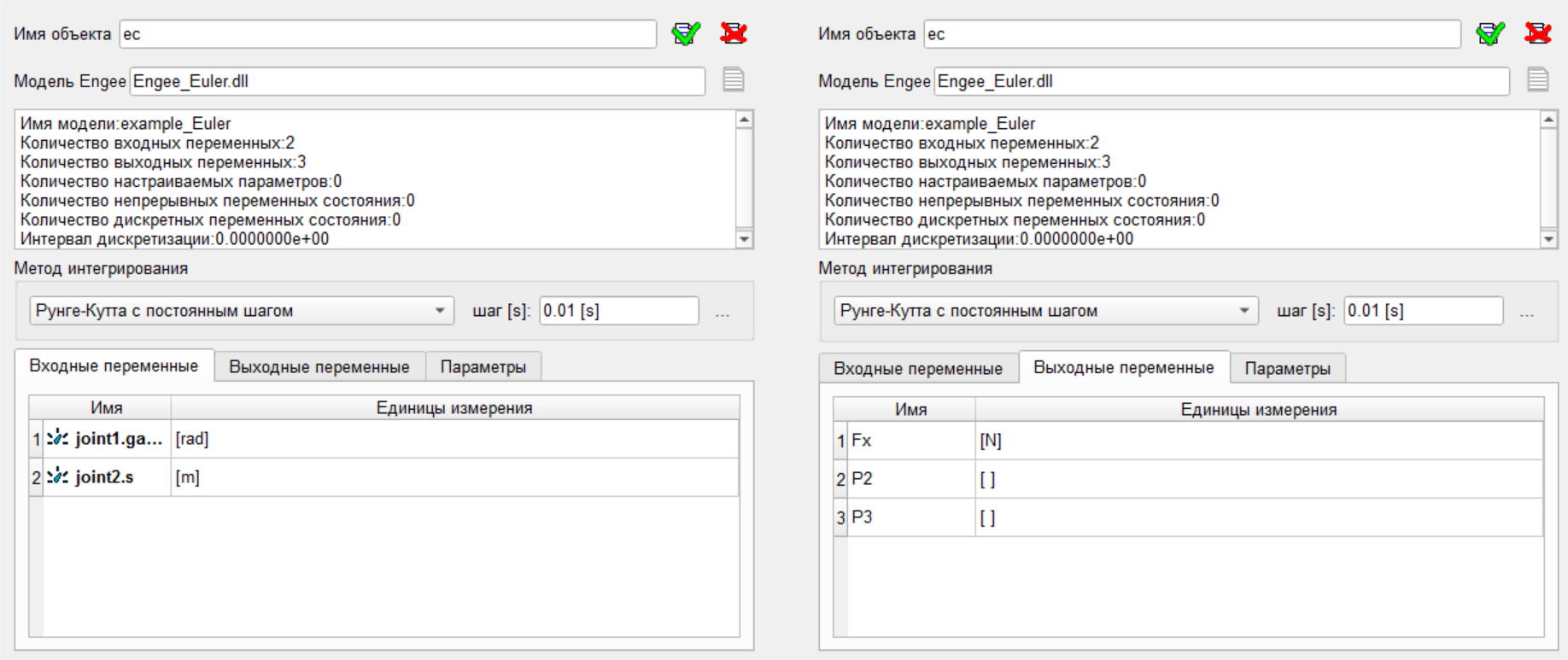
The EULER project code now looks like this
point point1=point( 0 [m], 0 [ m ], 0 [ m ] );
point point2=point( 0 [ m ], -1 [ m ], 0 [ m ] );
solid solid0=sphere( point1, 0.1 [m], mass = 1 [ kg ] );
solid solid1=cylinder( point1, point2, 0.1 [ m ], mass = 1 [ kg ] );
solid solid2=sphere( point2, 0.3 [ m ], mass = 1 [ kg ] );
vector vector1=vectorPP( point1, point2 );
vector vector2=rotate( vector1, projectZ, PI/2*1[rad] );
body Стойка=body( color = index( 4 ) );
body ТочкаПодвеса=body( color = index( 4 ) );
body ТочкаПодвеса < ( solid0 );
body Маятник=body( color = index( 45 ) );
body Маятник < ( solid1, solid2 );
joint joint1=rotational( ТочкаПодвеса, Маятник, point1, projectZ );
joint joint2=translational( Стойка, ТочкаПодвеса, point1, projectX );
gravity gravity1=parallel( reverse( projectY ) );
sensor_array ec=engee( "Engee_Euler.dll", "joint1.gamma  [rad],joint2.s  [m],", "Fx [N],P2 [ ],P3 [ ],", "", 0.01 [s],
	integrMethod = constRK4: );
force force1=force( Маятник, point1, projectX, ec.Fx, list(  ) );

/\///////////////////////////////////////////////////////////////////////////////////
set ground = Стойка;

/\///////////////////////////////////////////////////////////////////////////////////
/\ Единицы измерения;
set units = SI;
The interface of the two payment platforms is configured, you can proceed to the launch.
Launching a joint settlement
The procedure for launching a joint calculation is as follows:
- Run the calculation in Engee,
- Wait for a message in the client program window with a suggestion to start the calculation on the EULER side.,
- Run the calculation on the EULER side.
.png)
Conclusion
The integration between Engee and the EULER software package makes it possible to simplify the modeling of the active parts of the mechanism, either transfer part of the calculations to a simplified 1D model, or simply surround the mechanism model with a web interface and provide another powerful mechanism for pre- and post-processing experimental results.