Solving the problem of integrating Engee and LOGOS
We demonstrate how to organize a computational task that is calculated simultaneously in two systems: the Engee dynamic modeling platform and the LOGOS software package.
LOGOS is a domestic software package for high–precision engineering calculations (CAE-system) that simulates physical processes at all stages of the product lifecycle. It includes modules for calculating strength problems, hydrodynamics, heat and mass transfer, and other tasks, allowing for multiphysical modeling, optimization, and integration of third-party applications to solve complex technical problems in aviation, mechanical engineering, energy, and other industries. [1]
Engee.Integration – subsystem of the Engee platform; removes the problem of access to low-level interfaces of the operating system, allowing Engee to be connected to external devices, interfaces, protocols and software environments. [2]
Engee Preparation
We will calculate the "Taylor rod" problem [3,4] – determining the yield strength of a material during high-speed deformation. Cosimulation in two environments is needed in order to be able to change the parameters of the material on the go (calculation in Engee), update the properties of the FEM model (LOGOS) and receive data back to Engee.
Let's open the Engee model, the vector input and output signals of which match the interface specification in the LOGO.
cd(@__DIR__)
engee.open( "example_LOGOS.engee" )
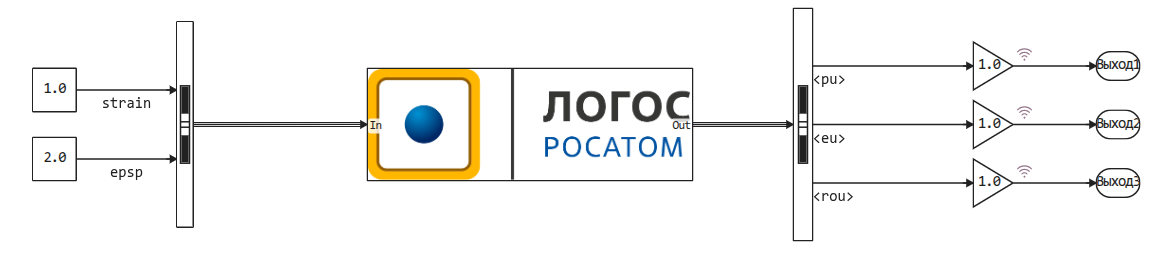
The combination of the model running on the Engee platform with the model running on the local resources of the LOGOS user is carried out using the Engee subsystem.Integration.
To start working with the subsystem, you need to install the Engee-Devica-Manager support package and the client program. If the support package is already installed, you just need to run it.
# engee.package.install("Engee-Device-Manager") # Before the first launch, the package will need to be installed
engee.package.start("Engee-Device-Manager")
When calling the command
engee.package.install("Engee-Device-Manager")in the Engee command line, the user gets the opportunity to download a small program.engee-device-managerfor Windows or for Linux, which will communicate between the local computer (on which the LOGOS software package is running) ** and cloud resources** (on which the Engee model is calculated).
All that remains is to launch the model. After that, the Engee subsystem.The integration will attempt to open a channel to the LOGOS software package
engee.run("example_LOGOS")
In the meantime, let's see how to set up the calculation task on the LOGOS side.
Preparing a task in LOGOS
The configuration of the LOGOS software package will require making one modification to the settings of the example, as which we chose the training task. taylor (Taylor's rod).
We will finalize the "callback" function (user-defined function, UDF), which recalculates the value of a certain variable. erosion. At these moments, the LOGOS solver will receive new variable values coming from Engee and send the output values of the FEM calculation to close the feedback and to be drawn on graphs.
.png)
In the window where the User Functions are edited, we will make changes to the function erosion_user:
.png)
The new feature is listed in the folder accompanying this article and is called example_erosion_cosimulate.py.
Its purpose is to check for new data in the communication channel with Engee at specified time intervals and send calculated data to this channel.
The LOGOS solver performs the calculation steps at its own pace, they can have a variable size. The simulation script relies on signals from Engee (coming at a sampling rate set in Engee) to update the task parameters.
Therefore, it is important that the sampling rate of the model in Engee is greater than the maximum allowable step for calculating the model in LOGOS.
Launching cosimulation via Engee.Integration
When the setup is done, you can run the models in the following order:
- Run calculations in Engee and wait for an invitation to engee-device-manager to run calculations in the LOGO
- Run calculations in the LOGO
After that, the calculations will run in parallel, and the calculation tasks will exchange the results.
Let's take a closer look at each stage.:
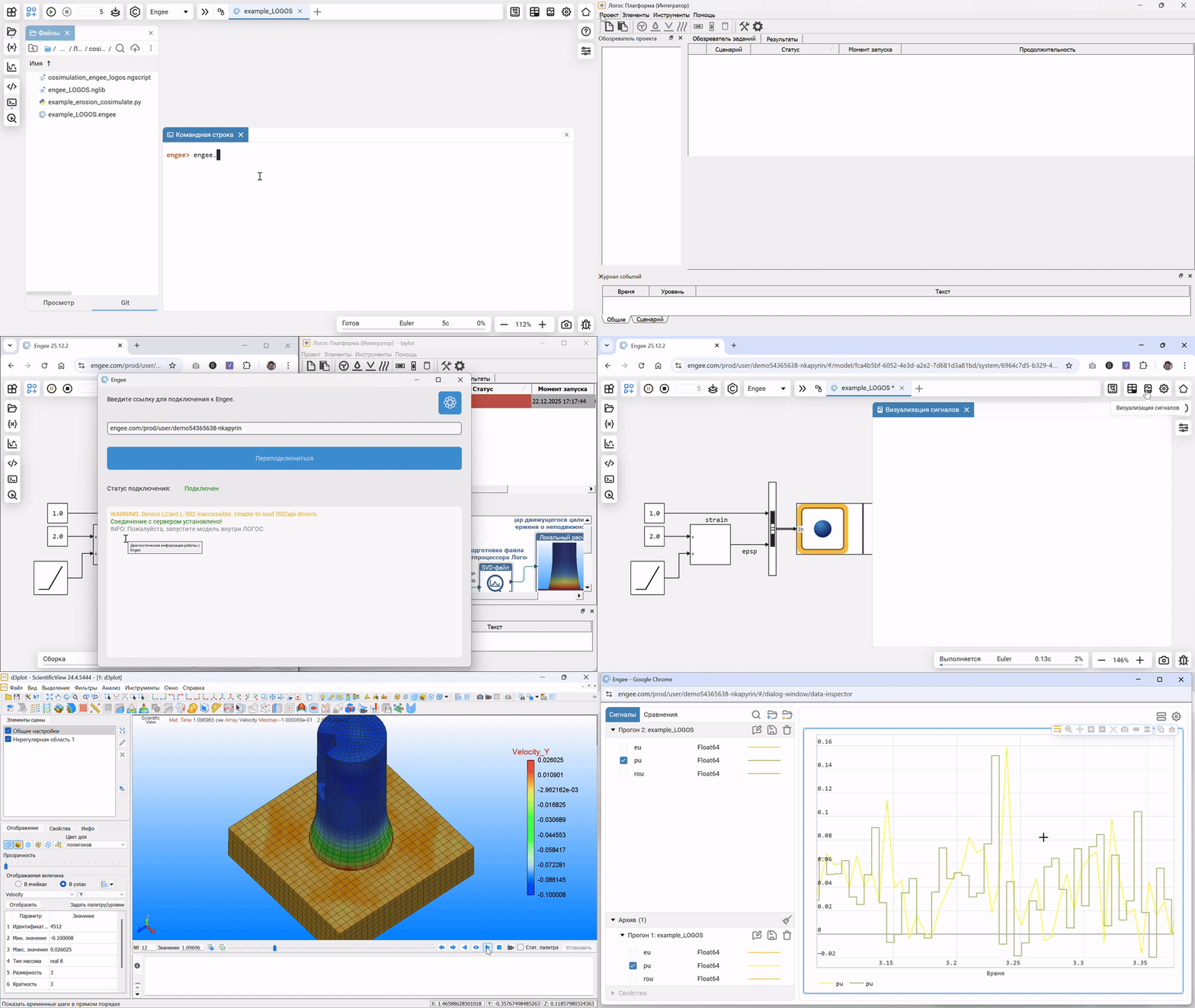
If both systems are configured correctly, we will get the following result, indicating that the joint calculation has been successfully launched. On the Engee side, it will be possible to observe the calculation schedules in real time.:
.png)
After the calculations are completed, it will be possible to start the postprocessor on the LOGOS side and study the details of the calculation.:
.png)
Conclusion
Cosimulation is a mode of launching several computing platforms, in which they exchange the results of their calculations with sufficient frequency so that it can be assumed that the calculations of the platforms are quasi-simultaneous.
We have shown how the solution of the FEM strength problem in the LOGOS software package can be supplemented with algorithms and models that are calculated in Engee.
Links
- https://logos-support.ru/logos/
- https://engee.com/helpcenter/stable/en/engee-hardware/engee-integrations.html
- https://cyberleninka.ru/article/n/udar-zhestko-plasticheskogo-konicheskogo-sterzhnya-po-zhestkoy-pregrade
- https://royalsocietypublishing.org/rspa/article/194/1038/289/6731/The-use-of-flat-ended-projectiles-for-determining