Pure Pursuit
Linear and curvilinear control commands.
blockType: PurePursuit
|
Path in the library: |
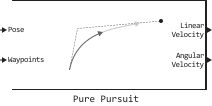
Description
Block Pure Pursuit Calculates linear velocity and curvature commands to follow a trajectory using a set of waypoints and the current position of a vehicle similar to a car or a vehicle with differential drive. The unit uses the updated positions to update the linear velocity and curvature commands so that the vehicle follows a trajectory along a given set of waypoints. Use the parameters Maximum angular velocity (rad/s) and Desired linear velocity (m/s) to update the curvature and linear velocity, respectively, depending on the characteristics of the vehicle.
The port and the parameter of the viewed distance calculate the advance point on the trajectory, which is an instantaneous local target for the vehicle. Based on this point, the curvature command is calculated. Changing the viewed distance has a significant impact on the performance of the algorithm. A larger viewing distance leads to a smoother trajectory of the vehicle, but can lead to cutting corners on the trajectory. Too small a viewing distance can lead to fluctuations in tracking the trajectory, causing unstable behavior.
Ports
Input
#
Pose
—
current position of the vehicle
the matrix
Details
The current position of the vehicle, set as a matrix [x y theta], the elements of which correspond to the position along the axes and and the orientation angle . Positive angles are measured counterclockwise from the positive axis .
| Data types |
|
| Complex numbers support |
No |
#
Waypoints
—
waypoints
[] (default) | array
Details
Waypoints set as an array of pairs [x y] size on , where — the number of waypoints. Waypoints can be
set as an array in Engee.
| Data types |
|
| Complex numbers support |
No |
#
Desired Linear Velocity
—
linear velocity
scalar
Details
The desired linear velocity, given as a scalar in m/s. The controller assumes that the vehicle is moving at a constant linear velocity and the calculated curvature is independent of the linear velocity.
Dependencies
To use this port, check the box Specify desired linear velocity from input port.
| Data types |
|
| Complex numbers support |
No |
#
Lookahead Distance
—
viewed distance
scalar
Details
The viewed distance, set as a scalar in meters. The viewed distance changes the controller’s response. A vehicle with a large viewing distance moves along a smooth trajectory, but makes steeper turns on bends. A vehicle with a shorter viewing distance follows the trajectory precisely and makes sharp turns, but fluctuates along the trajectory.
Dependencies
To use this port, check the box Specify lookahead distance from input port.
| Data types |
|
| Complex numbers support |
No |
Output
#
Linear Velocity
—
linear velocity
scalar
Details
The linear velocity returned as a scalar in m/s.
| Data types |
|
| Complex numbers support |
No |
#
Angular Velocity
—
angular velocity
scalar
Details
The angular velocity returned as a positive real scalar in rad/s. The angular velocity is calculated by multiplying the curvature by the linear velocity.
| Data types |
|
| Complex numbers support |
No |
#
Target Direction
—
the direction of movement of the vehicle
scalar
Details
The target direction of the vehicle, returned as a scalar in radians. The forward direction of the vehicle is considered to be zero radians, and positive angles are measured counterclockwise.
Dependencies
To use this port, check the box Show Target Direction output port.
| Data types |
|
| Complex numbers support |
No |
Parameters
Main
#
Specify desired linear velocity from input port —
activating the input port for desired linear speeds
Logical
Details
Select this option to allow the input of desired linear speeds via the Desired Linear Velocity input port.
Uncheck this box to set the desired linear velocity using the parameter Desired linear velocity (m/s).
| Default value |
|
| Program usage name |
|
| Tunable |
No |
| Evaluatable |
No |
#
Desired linear velocity (m/s) —
linear velocity
Real number
Details
The desired linear velocity, given as a scalar in m/s. The controller assumes that the vehicle is moving at a constant linear velocity and the calculated curvature is independent of the linear velocity.
Dependencies
To use this option, uncheck the box. Specify desired linear velocity from input port.
| Default value |
|
| Program usage name |
|
| Tunable |
Yes |
| Evaluatable |
Yes |
#
Maximum angular velocity (rad/s) —
angular velocity
Real number
Details
The maximum angular velocity, given as a positive real scalar in rad/s.
| Default value |
|
| Program usage name |
|
| Tunable |
Yes |
| Evaluatable |
Yes |
#
Specify lookahead distance from input port —
activating the input port to determine the viewed distance
Logical
Details
Select this option to allow the input of the viewed distances via the input port Lookahead Distance.
Uncheck this box to set the desired viewing distance using the parameter Lookahead distance (m).
| Default value |
|
| Program usage name |
|
| Tunable |
No |
| Evaluatable |
No |
#
Lookahead distance (m) —
viewed distance
Real number
Details
The viewed distance, set as a scalar in meters. The viewed distance changes the controller’s response. A vehicle with a large viewing distance moves along a smooth trajectory, but makes steeper turns on bends. A vehicle with a shorter viewing distance follows the trajectory precisely and makes sharp turns, but fluctuates along the trajectory.
Dependencies
To use this option, uncheck the box. Specify lookahead distance from input port.
| Default value |
|
| Program usage name |
|
| Tunable |
Yes |
| Evaluatable |
Yes |
#
Show Target Direction output port —
goal direction indicator
Logical
Details
Check this box to enable the Target Direction output port. This port displays the direction of the target as an angle in radians from the forward position, with positive angles measured counterclockwise.
| Default value |
|
| Program usage name |
|
| Tunable |
No |
| Evaluatable |
No |