Vector Field Histogram
Avoiding obstacles using a vector field histogram.
blockType: VectorFieldHistogram
|
Path in the library: |
Description
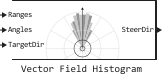
Block Vector Field Histogram (Vector Field Histogram, VFH) allows the vehicle to avoid obstacles based on range sensor data. Having received the sensor readings in the form of ranges and angles, as well as the target direction of movement, the VFH controller calculates the direction of steering, free of obstacles.
For more information about the algorithm, see Histogram of a vector field.
Ports
Input
#
Ranges
—
range values from scan data
vector
Details
The range values from the scan data, set as a vector of scalar values in meters. These range values represent distances from the sensor at specified angles. The length of the vector must match the length of the corresponding vector Angles.
| Data types |
|
| Complex numbers support |
I don’t |
#
Angles
—
angle values from scan data
vector
Details
The angle values from the scan data, specified as a vector of scalar quantities in radians. These angle values represent the specific angles of the specified ranges. The length of the vector must match the length of the corresponding vector Ranges.
| Data types |
|
| Complex numbers support |
I don’t |
#
TargetDir
—
direction of movement of the vehicle
scalar
Details
The target direction of the vehicle, given as a scalar radians. The forward direction of the vehicle is considered to be zero radians, and positive angles are measured counterclockwise. You can use the output port of the Target Direction block Pure Pursuit when creating controls based on a set of waypoints.
| Data types |
|
| Complex numbers support |
I don’t |
Output
#
SteerDir
—
direction of rotation of the vehicle
scalar
Details
The direction of rotation of the vehicle, returned as a scalar in radians. This obstacle-free direction is calculated based on the VFH+ algorithm. The forward direction of the vehicle is considered to be zero radians, and positive angles are measured counterclockwise.
| Data types |
|
| Complex numbers support |
I don’t |
Parameters
Histogram parameters
#
Number of angular sectors —
the number of intervals used to create histograms
Real number
Details
The number of intervals used to create histograms, set as a scalar. You can set the value for this parameter only when initializing the object.
| Default value |
|
| Program usage name |
|
| Tunable |
No |
| Evaluatable |
Yes |
#
Range distance limits (m) —
limits for range sensor readings
Array of real numbers
Details
The limits for the range sensor readings in meters, set as a two-element vector of scalar quantities. The input range readings are taken into account only if they fall within the range limits. Use the lower range limit to ignore false alarms due to poor sensor performance at short distances. Use the upper limit to ignore obstacles that are too far away from the vehicle.
| Default value |
|
| Program usage name |
|
| Tunable |
Yes |
| Evaluatable |
Yes |
#
Histogram thresholds —
thresholds for calculating a binary histogram
Array of real numbers
Details
Threshold values for calculating a binary histogram, set as a two-element vector of scalar quantities. The algorithm uses these values to calculate a binary histogram based on the density of polar obstacles. The values of the polar obstacle density above the upper threshold value are represented as occupied space (1) in a binary histogram. Values less than the lower threshold value are represented as free space (0). Values falling within the limits are set equal to the values of the previous calculated binary histogram, if any exists from previous iterations. If the previous histogram does not exist, the value is set as free space (0).
| Default value |
|
| Program usage name |
|
| Tunable |
Yes |
| Evaluatable |
Yes |
Vehicle parameters
#
Vehicle radius (m) —
vehicle radius
Real number
Details
The radius of the vehicle, set as a scalar in meters. This parameter defines the smallest circle that can encompass the vehicle. The radius of the vehicle is used to account for the size of the vehicle when calculating an obstacle-free direction.
| Default value |
|
| Program usage name |
|
| Tunable |
Yes |
| Evaluatable |
Yes |
#
Safety distance (m) —
a safe distance around the vehicle
Real number
Details
The safe distance remaining around the vehicle’s position, in addition to the parameter Vehicle radius (m), defined as a scalar in meters. The radius of the vehicle and the safe distance are used to calculate the obstacle-free direction.
| Default value |
|
| Program usage name |
|
| Tunable |
Yes |
| Evaluatable |
Yes |
#
Minimum turning radius (m) —
minimum turning radius at current speed
Real number
Details
The minimum turning radius of a vehicle moving at the current speed, set as a scalar in meters.
| Default value |
|
| Program usage name |
|
| Tunable |
Yes |
| Evaluatable |
Yes |
Cost Function Weights
Main
#
Target direction weight —
the weight of the cost function for the target direction
Real number
Details
The weight of the cost function for movement in the target direction, set as a scalar. To follow the target direction, set this parameter to a value greater than the sum of the parameter values. Current direction weight and Previous direction weight. To ignore the cost of the target destination, set this parameter to 0.
| Default value |
|
| Program usage name |
|
| Tunable |
Yes |
| Evaluatable |
Yes |
#
Current direction weight —
the weight of the cost function for the current direction
Real number
Details
The weight of the cost function for moving the vehicle in the current direction, set as a scalar. Higher values of this parameter provide more efficient trajectories. To ignore the cost of the current route, set this parameter to 0.
| Default value |
|
| Program usage name |
|
| Tunable |
Yes |
| Evaluatable |
Yes |
#
Previous direction weight —
the weight of the cost function for the previous direction
Real number
Details
The weight of the cost function for movement in the previously selected direction, set as a scalar. Higher values of this parameter ensure smoother trajectories. To ignore the cost of the previous route, set this parameter to 0.
| Default value |
|
| Program usage name |
|
| Tunable |
Yes |
| Evaluatable |
Yes |
Algorithms
Histogram of a vector field
Details
The block uses the VFH+ algorithm to calculate the obstacle-free direction. First, the algorithm receives range and angle data from the range sensor and builds a polar histogram for the location of obstacles. It then uses the threshold values of the input histogram to calculate a binary histogram indicating the occupied and free directions. Finally, the algorithm calculates a masked histogram, which is determined from a binary histogram based on the minimum turning radius of the vehicle.
The algorithm selects several directions of movement based on the open space and possible direction options. The cost function with weights corresponding to the previous, current and target directions calculates the cost of various possible directions. The algorithm then returns an obstacle-free direction with minimal cost. Using an obstacle-free direction, you can enter commands to move the vehicle in that direction.
To use this block in a custom model, you need to configure the algorithm parameters. The values of the parameters depend on the type of vehicle, the range sensor and the equipment used.