PS-part interfaces and connectors
Network interfaces
The RITM SDR USRP platform is equipped with the following set of network interfaces:
-
2 × Ethernet (PS/PL) with data transfer rates up to 1 Gbit/s;
-
2 × SFP+ with data transfer rates up to 12.5 Gbps.
The PS Ethernet interface is designed to control the device and broadcast data over the PS-TCP protocol. The Ethernet PL interface is used to interact with the platform in USRP compatibility mode using the UHD protocol.
Managing network parameters
The configuration of the Embedded Linux operating system as part By default of RITM SDR USRP ensures that the device is ready for operation without the need to perform additional settings.
The values of the preset network parameters of the interfaces are shown in the table.
| Interface name | By default IP address |
|---|---|
PS-TCP |
192.168.2.8 |
PS-UHD |
192.168.2.10 |
SFP 1 |
Not used |
SFP 2 |
192.168.2.100 |
If it is necessary to reconfigure network parameters, management is carried out directly in the Embedded Linux environment via the SSH protocol or the Serial Port console interface. Standard system utilities are used for configuration, such as ip, ifconfigetc. Configuration files of network interfaces are located in the directory: /etc/systemd/network/
SSH connection
For carrying out diagnostic and debugging work, it is possible to remotely access the SDR USRP RITM via SSH protocol (Secure Shell - a secure network protocol for operating system management).
To establish a connection, you must use any terminal client that supports this protocol (the developers of RITM SDR USRP recommend using MobaXterm). The corresponding IP address of the device should be specified in the connection parameters. The following credentials are used By default:
-
User (Username):
root -
Port (Port):
22
Serial ports
The RITM SDR USRP platform is equipped with the following serial interfaces:
-
4 × USB 3.0
-
UART (PS/PL)
USB interfaces are designed to connect peripheral devices such as external drives (Flash), Wi-Fi adapters and other expansion modules.
UART interfaces are used to monitor system logs and output diagnostic information:
-
PS UART provides access to the console and application processor logs (Cortex-A53 core).
-
PL UART is designed to receive debugging data from a real-time processor (Cortex-R5).
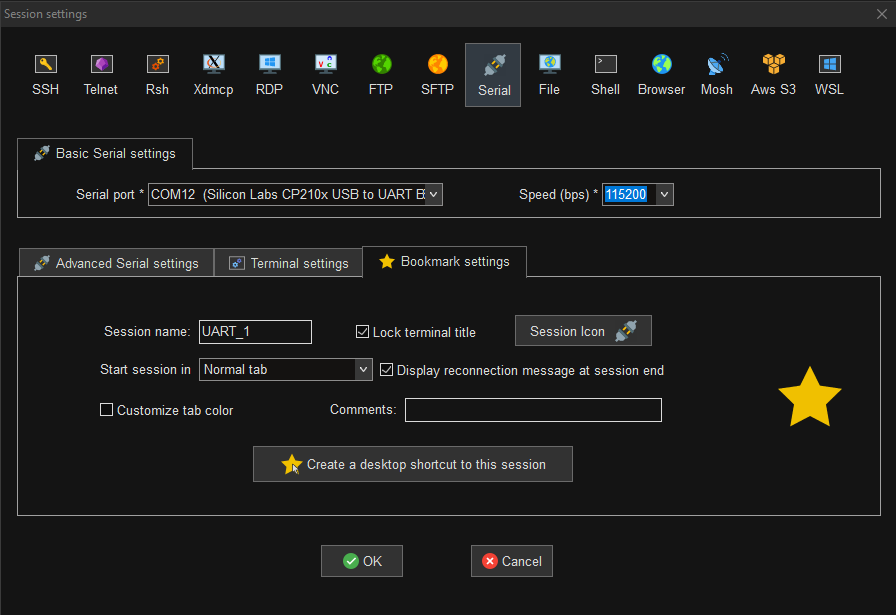
Connection via serial interface (Serial port)
To access diagnostic data and system logs via the UART interface, it is necessary to use specialized software for working with serial ports (MobaXterm is recommended).
Connection establishment procedure:
-
Physically connect the UART interface to the USB connector of the personal computer.
-
In the application settings, select the appropriate COM port (Serial port).
-
Set the Baud rate to 115200 bps.
-
Initiate a communication session.
An example of the settings is shown in the figure.