The base class of the target and the EDM-Target block
The difference between the target and devices consists in assigning a class: the device usually provides custom methods for blocks and scripts, and the target implements the model on the target platform.
Base class
The target class is inherited from BaseTarget and implements model lifecycle methods.
Below is an example of a target with independent mode. Such a target generates and builds a project, uploads or runs the result, but does not support interactive exchange with Engee during the execution of the model. Therefore, the methods start_stream and change_param, which relate to interactive execution, always return an error with a corresponding message.
from pathlib import Path
from typing import List, Optional, Union
from uuid import UUID

from pydantic import BaseModel

from devices.base_models import Result
from targets.base_models import EngeeModel, ModelCode, ModelSettings, TargetResponse
from targets.base_target import BaseTarget
from targets.exceptions import TargetException
from targets.utils.CMIParser import CMIParser
from targets.utils.CodeGen import recreate_dir, render_template_to_file, store_model_src
from targets.utils.CodeGenInfo import create_codegen_info


class MyTargetBlock(BaseModel):
    """Параметры Target-блока в модели Engee.

    Имена полей должны совпадать с именами параметров маски Target-блока.
    """

    port: str
    toolchain_path: str = "auto"
    codegen_folder: str = "."


class MyTarget(BaseTarget):
    """Таргет для платформы TODO: название платформы."""

    def __init__(self) -> None:
        self.cmi_parser = CMIParser()
        self.target_block: Optional[MyTargetBlock] = None
        self.model_settings: Optional[ModelSettings] = None

    def is_connected(self) -> bool:
        """Проверить доступность устройства или программатора."""
        # TODO: вызвать CLI/SDK/драйвер и вернуть фактический статус.
        return False

    def generate_executable_code(
        self,
        model: EngeeModel,
        model_settings: ModelSettings,
        model_code: ModelCode,
    ) -> TargetResponse:
        """Создать проект для целевой платформы из сгенерированного C-кода Engee."""
        self.model_settings = model_settings
        self.target_block = self.cmi_parser.get_target_block_options(
            model_settings.cmi,
            MyTargetBlock,
            self.__class__.__name__,
        )

        project_path = Path(self.target_block.codegen_folder) / model.name
        recreate_dir(project_path)

        codegen_info = create_codegen_info(
            model_code.c_code.c_code_info,
            model_settings.is_ext_mode,
        )

        render_template_to_file(
            "templates/main.c",
            project_path / "main.c",
            codegen_info.model_dump(),
        )
        store_model_src(model_code.c_code, project_path, codegen_info)

        # TODO: скопировать драйверы, runtime, linker script, файлы SDK.
        # TODO: сгенерировать CMakeLists.txt/Makefile/project-файлы IDE.

        return TargetResponse(detail="generate_executable_code")

    def compile_model(self, model: EngeeModel) -> TargetResponse:
        """Собрать проект с помощью тулчейна платформы."""
        # TODO: запустить компилятор, CMake, arduino-cli, vendor CLI или SDK.
        # TODO: проверить, что выходной файл действительно создан.
        return TargetResponse(detail="compile_model")

    def upload_model(self, model: EngeeModel) -> TargetResponse:
        """Загрузить собранный артефакт на устройство."""
        # TODO: прошить .hex/.bin/.elf или скопировать исполняемый файл.
        return TargetResponse(detail="upload_model")

    async def start_model(self, model: EngeeModel) -> TargetResponse:
        """Запустить модель или подготовить соединение с рантаймом."""
        return TargetResponse(detail="start_model")

    async def start_stream(self, simulation_uuid: str) -> Result:
        """Запустить поток данных для интерактивного выполнения."""
        raise TargetException("MyTarget does not support interactive execution streaming.")

    async def change_param(
        self,
        block_key: Union[str, UUID],
        param: str,
        data: Union[int, float, bool, List[int], List[float], List[bool]],
    ) -> TargetResponse:
        """Изменить параметр модели во время выполнения."""
        raise TargetException("MyTarget does not support runtime parameter tuning.")

    async def stop_model(self) -> TargetResponse:
        """Остановить выполнение или освободить ресурсы рантайма."""
        return TargetResponse(detail="stop_model")
Creating an EDM-Target block
The EDM-Target block is a special block on the model’s canvas Engee, which informs the mode Target Hardware, which platform to run the model on and with what settings. When the user chooses to run in Target Hardware mode, Engee searches for the EDM-Target block in the model. Each equipment uses its own block, and the block added to the canvas determines which equipment will be selected to run.
For a custom target, you must:
-
Include the EDM-Target block intended for the user platform in the library of support package blocks.
-
Implement the target’s Python class to read the parameters of this block from the CMI model.
CMI (Compiled Model Information) is a description of the current model that Engee passes it to the target along with the generated code. It has a list of blocks, their parameters, and startup service settings. Method CMIParser.get_target_block_options finds the EDM-Target block of the desired type and converts its parameters into a Python object.
The parameters of the EDM-Target block are described by a separate Pydantic model. The field names of this model must match the names of the EDM-Target block mask parameters in .nglib.
self.target_block = self.cmi_parser.get_target_block_options(
    cmi,
    MyTargetBlock,
    self.__class__.__name__,
)
With examples of models (ArduinoUNOTargetBlock or ATmega328PTargetBlock) can be found in sample directories.
If there is no suitable EDM-Target block in the model, then Engee When running in Target mode, the Hardware will not be able to select a custom target and apply the settings. If there is a block, but the mask fields do not match the Pydantic model, the target will not be able to correctly read the port, the path to the toolchain, the generation folder, or other platform parameters.
Limitations for the Pydantic block model EDM-Target:
-
the names of the model fields must match the names of the EDM-Target block parameters in
.nglib/models; -
validation, normalization of paths, and conversion of enum values should be done immediately after reading the EDM-Target block.
The mask of the EDM-Target block in Engee
The EDM-Target block is created based on the block Subsystem, which contains only a bunch of blocks Ground on Terminator so that the block is not excluded from the model.
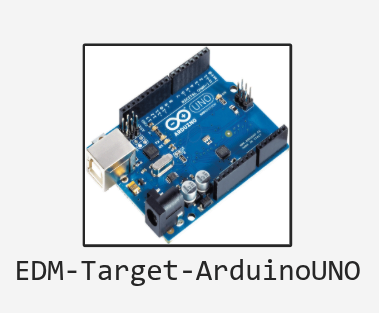
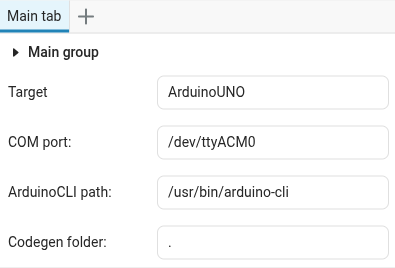
The information required for the target is transmitted through the fields of the block mask. The list of parameters is not fixed and is determined by the target developer depending on the needs of a particular platform.
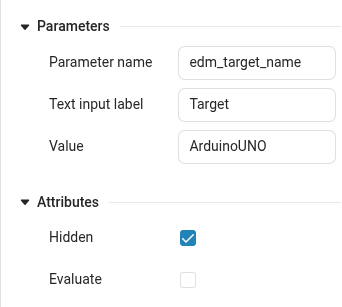
For the Target Hardware mode to work correctly, a parameter named must be declared in the block mask. edm_target_name. The value of this parameter must match the name of the target class that the environment will access. It is better to make this parameter hidden in order to avoid accidental changes.