Absolute Pressure, Temperature & Internal Energy Sensor (2P)
Measurement of pressure, temperature and internal energy in a two-phase liquid network.
blockType: AcausalFoundation.TwoPhaseFluid.Sensors.PressureTemperatureAndInternalEnergy
|
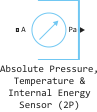
Absolute Pressure, Temperature & Internal Energy Sensor (2P) Path in the library: |
|
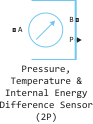
Pressure, Temperature & Internal Energy Difference Sensor (2P) Path in the library: |
Description
Block Absolute Pressure, Temperature & Internal Energy Sensor (2P) It is an ideal sensor that measures pressure, temperature and specific internal energy in a two-phase liquid network. There is no mass and energy flow through the sensor.
Block Absolute Pressure, Temperature & Internal Energy Sensor (2P) It works in two modes depending on the value of the Measurement type parameter:
-
Absolute— the block is in the mode Absolute Pressure, Temperature & Internal Energy Sensor (2P) measures absolute values of temperature and pressure. The sensor contains an implicit reference node, which means that only port A is needed to measure absolute pressure and temperature, as well as overpressure. -
Difference— block in the mode Pressure, Temperature & Internal Energy Difference Sensor (2P) measures temperature or pressure differences. In this mode, the unit has two input ports A and B. The measurements are positive when the values on port A are greater than the values on port B.
Five output ports are available for the output of measurement data:
-
Pa — absolute pressure;
-
Pg — overpressure;
-
P — pressure difference;
-
T — temperature or temperature difference;
-
U is the specific internal energy or the difference in specific internal energies.
These ports are displayed on the block icon depending on the block settings. Configure the parameters of the unit so that only those ports that are necessary for measurements in a particular model are displayed.
Ports
Output
#
P
—
pressure difference, Pa
scalar
Details
The output port. Outputs the result of measuring the pressure difference.
Dependencies
To use this port, set the parameter Measurement reference meaning Difference and check the box Pressure.
| Data types |
|
| Complex numbers support |
No |
#
T
—
temperature, K
scalar
Details
The output port. Displays the result of the temperature measurement if the value of the parameter Measurement reference installed Absolute — the absolute temperature is measured if Difference — the temperature difference in ports A and B is measured.
Dependencies
To use this port, check the box Temperature.
| Data types |
|
| Complex numbers support |
No |
#
Pg
—
excess pressure, Pa
scalar
Details
The output port. Displays the result of the overpressure measurement.
Dependencies
To use this port, set the parameter Measurement reference meaning Absolute, check the box Pressure and for the parameter Pressure type set the value Gauge pressure.
| Data types |
|
| Complex numbers support |
No |
#
Pa
—
absolute pressure, Pa
scalar
Details
The output port. Displays the result of the absolute pressure measurement.
Dependencies
To use this port, set the parameter Measurement reference meaning Absolute, check the box Pressure and for the parameter Pressure type set the value Absolute pressure.
| Data types |
|
| Complex numbers support |
No |
#
U
—
specific internal energy, J/kg
scalar
Details
The output port. Outputs the result of measuring the specific internal energy if the value of the parameter Measurement reference installed Absolute — the absolute specific internal energy is measured if Difference — the difference of specific internal energies in ports A and B is measured.
Dependencies
To use this port, check the box Internal energy.
| Data types |
|
| Complex numbers support |
No |
Conserving
#
A
—
sensor input
two-phase liquid
Details
The two-phase liquid port corresponds to the sensor inlet. Use this port to measure absolute pressure, temperature, and specific internal energy.
| Program usage name |
|
#
B
—
sensor output
two-phase liquid
Details
The two-phase liquid port corresponds to the sensor outlet. When performing absolute measurements, this port is hidden because the sensor contains an implicit reference node. Turn on this port to measure the relative pressure, temperature, or specific internal energy between two nodes in the model. The measurements are positive when the values in port A are greater than the values in port B.
Dependencies
To use this port, set the parameter Measurement reference meaning Difference.
| Program usage name |
|
Parameters
Parameters
#
Measurement reference —
choosing between absolute and relative measurements
Difference | Absolute
Details
Choose between absolute and relative measurements:
-
Absolute— The sensor measures the values in the A port. The sensor contains an implicit reference node, which means that only one port is needed to perform absolute measurements. -
Difference— The sensor measures the difference in values between two nodes in the model. When this value is selected, port B is used.
| Values |
|
| Default value |
|
| Program usage name |
|
| Evaluatable |
No |
# Temperature — enabling the output port for temperature measurement
Details
When this option is selected, the T output port opens, allowing temperature measurement.
| Default value |
|
| Program usage name |
|
| Evaluatable |
No |
#
Pressure type —
the choice between absolute and excessive pressure
Absolute pressure | Gauge pressure
Details
Choose which pressure the sensor measures — absolute or excessive:
-
Absolute pressure— The sensor measures the absolute pressure at port A. When this option is selected, the Pa port is displayed on the block icon. -
Gauge pressure— The sensor measures the overpressure at port A. When this option is selected, the Pg port is displayed on the block icon.
| Values |
|
| Default value |
|
| Program usage name |
|
| Evaluatable |
No |
# Pressure — enabling the output port for pressure measurement
Details
When this option is selected, the output port Pa, Pg or P opens, allowing pressure measurement.
| Default value |
|
| Program usage name |
|
| Evaluatable |
No |
# Internal energy — switching on the output port for internal energy measurement
Details
When this option is selected, the output port U opens, allowing internal energy measurement.
| Default value |
|
| Program usage name |
|
| Evaluatable |
No |