rffilter
Creates Butterworth RF filters, Chebyshev RF filters, and Chebyshev reverse filters.
| Library |
|
Description
Use the function rffilter to create a Butterworth RF filter, Chebyshev RF filter, or Chebyshev reverse filter. An RF filter is a two-port circuit object that can be included as a circuit element. For more information about design, see Filter definition parameters and design tips.
Syntax
Function call
-
rffiltobj = rffilter()— creates a two-port filter, the properties of which are set by default.
-
rffiltobj = rffilter(Name=Value)— sets properties specified by one or more arguments of the type «name-value». Unspecified properties retain their default values.
Arguments
Input arguments «name-value»
Specify optional argument pairs as Name=Value, where Name — the name of the argument, and Value — the appropriate value.
Example: rffiltobj = rffilter(FilterType = "Chebyshev") creates a two-port Chebyshev RF filter. You can specify multiple pairs «name-value».
# filterType — filter type
+
"Butterworth" (by default) | "Chebyshev" | "InverseChebyshev"
Details
The filter type specified as "Butterworth", "Chebyshev" or "InverseChebyshev".
| Типы данных |
|
# responseType — type of filter characteristic
+
"Lowpass" (by default) | "Highpass" | "Bandpass" | "Bandstop"
Details
The type of filter characteristic, set as "Lowpass", "Highpass", "Bandpass" or "Bandstop". For more information, see Frequency characteristics.
| Типы данных |
|
# Implementation — filter implementation
+
"LC Tee" (by default) | "LC Pi" | "Transfer function"
Details
The filter implementation, specified as "LC Tee", "LC Pi" or "Transfer function".
Dependencies
For a type filter "InverseChebyshev" you can only use the implementation "Transfer function".
| Типы данных |
|
# FilterOrder — filter order
+
3 (by default) | scalar
Details
The filter order, given as a real finite non-negative integer scalar. In a low-pass or high-pass filter, the order determines the number of concentrated reactive elements. In a bandpass or notch filter, the number of concentrated reactive elements is twice the value of the order.
Property FilterOrder has the highest priority among all pairs of type arguments. «name-value» in the filter design. Using this property sets for the property UseFilterOrder, read-only, value true.
|
| Типы данных |
|
# PassbandFrequency — bandwidth frequency
+
scalar | vector
Details
The bandwidth frequency, set as follows:
-
Scalar in Hz for low- and high-pass filters.
-
Two-element vector in Hz for bandpass or notch filters.
By default, the values are 1e9 for a low-pass filter, 2e9 for the high-pass filter, [2e9 3e9] for the bandpass filter and [1e9 4e9] for the notch filter.
| Типы данных |
|
#
StopbandFrequency —
frequency
of the delay band
scalar | vector
Details
The frequency of the delay band, set as follows:
-
Scalar in Hz for low- and high-pass filters.
-
Two-element vector in Hz for bandpass or notch filters.
By default, the values are 2e9 for a low-pass filter, 1e9 for the high-pass filter, [1.5e9 3.5e9] for bandpass filters and [2.1e9 2.9e9] for notch filters.
| Типы данных |
|
# PassbandAttenuation — bandwidth attenuation
+
10*log10(2) (by default) | scalar
Details
Bandwidth attenuation, specified as a scalar in dB. For bandpass filters, this value is applied equally to both edges of the bandwidth.
| Типы данных |
|
# StopbandAttenuation — attenuation in the delay band
+
40 (by default) | scalar
Details
The attenuation in the delay band, set as a scalar in dB. For notch filters, this value is applied equally to both edges of the delay band.
| Типы данных |
|
# Zin — source impedance
+
50 (by default) | scalar
Details
The impedance of the source, given as the positive real part of a finite scalar in ohms.
| Типы данных |
|
# Zout — load impedance
+
50 (by default) | scalar
Details
The load impedance, given as the positive real part of a finite scalar in ohms.
| Типы данных |
|
# Name — the name of the RF filter object
+
"Filter" (by default) | line
Details
The name of the RF filter object, set as a string. Two elements in the same schema cannot have the same names.
| Типы данных |
|
# NumPorts — number of ports
+
2 (by default) | scalar
Details
The number of ports, set as a positive scalar.
| This argument is read-only. |
| Типы данных |
|
# Terminals — terminal names
+
("p1+", "p2+", "p1−", "p2−") (by default) | tuple of strings
Details
Terminal names specified as a tuple of strings from 4 elements.
| This argument is read-only. |
# DesignData — filter design data
+
structure
Details
Data about the filter design, specified as a structure.
| This argument is read-only. |
For more information, see Design data for LC Tee and LC Pi topologies and Design data for the implementation of the transfer function.
| Типы данных |
|
# UseFilterOrder — using filter order during design
+
true (by default) | false
Details
Using the filter order in the design, defined as true or false.
| This argument is read-only. |
| Типы данных |
|
Output arguments
# rffiltobj is a two— port filter object
+
object
Details
A two-port filter object containing the following properties:
-
FilterType— the type of filter, for example"Butterworth"; -
ResponseType— filter characteristics, for example"Lowpass"; -
Zin— source impedance; -
Zout— load impedance; -
FilterOrder— filter order; -
PassbandFrequency— bandwidth frequency; -
StopbandFrequency— frequency of the delay band; -
StopbandAttenuation— attenuation in the delay band; -
PassbandAttenuation— bandwidth attenuation; -
Implementation— filter implementation, for example"LC Tee"; -
UseFilterOrder— flag for using the filter order in the design; -
DesignData— information about the filter design:-
FilterType; -
ResponseType; -
Topology; -
FilterOrder; -
PassbandFrequency; -
StopbandFrequency; -
PassbandAttenuation; -
StopbandAttenuation; -
Inductors; -
Capacitors; -
Zeros21; -
Poles; -
AuxNum; -
Numerator11; -
Numerator21; -
Numerator22; -
Denominator; -
Auxiliary;
-
-
Name— the name of the filter, for example"Filter"; -
Ports— port names as a tuple of strings; -
Terminals— terminal names in the form of a tuple of strings; -
ParentNodes— nodes of the parent schema in the form of an array of integers, displayed only after adding the child schema to the parent schema; -
ParentPath— the full path to the parent schema as a string, displayed only after adding the child schema to the parent schema.; -
NumPorts— number of ports.
Methods
groupdelay
|
Calculation of the group delay of S-parameters, RF filter or circuit object
|
lcladder
|
Creating an LC ladder chain object
|
clone
|
Creating a copy of an existing schema element or schema object |
circuit
|
Creating an electrical circuit diagram object |
Examples
Default RF filter
Details
Let’s create and view the properties of the default RF filter object.
using EngeeRF

rfobj = rffilter()

println("FilterType: ", rfobj.FilterType,
        "\nResponseType: ", rfobj.ResponseType,
        "\nZin: ", rfobj.Zin,
        "\nZout: ", rfobj.Zout,
        "\nFilterOrder: ", rfobj.FilterOrder,
        "\nPassbandFrequency: ", rfobj.PassbandFrequency,
        "\nPassbandAttenuation: ", rfobj.PassbandAttenuation,
        "\nImplementation: ", rfobj.Implementation,
        "\nUseFilterOrder: ", rfobj.UseFilterOrder,
        "\nDesignData: ", rfobj.DesignData,
        "\nName: ", rfobj.Name,
        "\nTerminals: ", rfobj.Terminals,
        "\nNumPorts: ", rfobj.NumPorts)
FilterType: Butterworth
ResponseType: Lowpass
Zin: 50.0 + 0.0im
Zout: 50.0 + 0.0im
FilterOrder: 3
PassbandFrequency: 1.0e9
PassbandAttenuation: 3.010299956639812
Implementation: LC Tee
UseFilterOrder: true
DesignData: EngeeRF.RFFilterDesignData("Butterworth", "Lowpass", "lowpasstee", 3, 1.0e9, nothing, 3.010299956639812, nothing, [7.957747154594765e-9, 7.957747154594765e-9], [6.3661977236758135e-12], nothing, nothing, nothing, nothing, nothing, nothing, nothing, nothing)
Name: Filter
Terminals: ("p1+", "p2+", "p1-", "p2-")
NumPorts: 2Consider the values of some of the properties of the argument DesignData.
println("FilterType: ", rfobj.DesignData.FilterType,
        "\nResponseType: ", rfobj.DesignData.ResponseType,
        "\nTopology: ", rfobj.DesignData.Topology,
        "\nFilterOrder: ", rfobj.DesignData.FilterOrder,
        "\nPassbandFrequency: ", rfobj.DesignData.PassbandFrequency,
        "\nPassbandAttenuation: ", rfobj.DesignData.PassbandAttenuation,
        "\nInductors: ", rfobj.DesignData.Inductors,
        "\nCapacitors: ", rfobj.DesignData.Capacitors)
FilterType: Butterworth
ResponseType: Lowpass
Topology: lowpasstee
FilterOrder: 3
PassbandFrequency: 1.0e9
PassbandAttenuation: 3.010299956639812
Inductors: [7.957747154594765e-9, 7.957747154594765e-9]
Capacitors: [6.3661977236758135e-12]S-Butterworth bandpass filter parameters (LC Tee implementation type)
Details
Creating a Butterworth bandpass filter object with the name BFCG_162W with bandwidth frequencies from 950 before 2200 MHz, delay bands from 770 before 3000 MHz, bandwidth attenuation 3.0 dB and attenuation in the delay band 40 dB, using the implementation type "LC Tee". Calculate the S-parameters of the filter at the frequency 2.1 GHz.
using EngeeRF

rfobj = rffilter(ResponseType = "Bandpass", Implementation = "LC Tee",
                 PassbandFrequency = [950e6, 2200e6],
                 StopbandFrequency = [770e6, 3000e6],
                 PassbandAttenuation = 3, StopbandAttenuation = 40)
rfobj.Name = "BFCG_162W"

println("FilterType: ", rfobj.FilterType,
        "\nResponseType: ", rfobj.ResponseType,
        "\nImplementation: ", rfobj.Implementation,
        "\nPassbandFrequency: ", rfobj.PassbandFrequency,
        "\nStopbandFrequency: ", rfobj.StopbandFrequency,
        "\nPassbandAttenuation: ", rfobj.PassbandAttenuation,
        "\nStopbandAttenuation: ", rfobj.StopbandAttenuation,
        "\nZin: ", rfobj.Zin,
        "\nZout: ", rfobj.Zout,
        "\nFilterOrder: ", rfobj.FilterOrder,
        "\nUseFilterOrder: ", rfobj.UseFilterOrder,
        "\nDesignData: ", rfobj.DesignData,
        "\nName: ", rfobj.Name)
FilterType: Butterworth
ResponseType: Bandpass
Implementation: LC Tee
PassbandFrequency: [9.5e8, 2.2e9]
StopbandFrequency: [7.7e8, 3.0e9]
PassbandAttenuation: 3.0
StopbandAttenuation: 40.0
Zin: 50.0 + 0.0im
Zout: 50.0 + 0.0im
FilterOrder: 3
UseFilterOrder: true
DesignData: EngeeRF.RFFilterDesignData("Butterworth", "Bandpass", "bandpasstee", 3, [9.5e8, 2.2e9], [7.7e8, 3.0e9], 3.0, 40.0, [6.366197723675813e-9, 2.3797090773309714e-9, 6.366197723675813e-9], [1.903767261864777e-12, 5.0929581789406516e-12, 1.903767261864777e-12], nothing, nothing, nothing, nothing, nothing, nothing, nothing, nothing)
Name: BFCG_162WCalculate the S-parameters at the frequency 2.1 GHz.
s = sparameters(rfobj, [2.1e9])

println("Impedance: ", s.Impedance,
        "\nNumPorts: ", s.NumPorts,
        "\nFrequencies: ", s.Frequencies,
        "\nParameters: ", s.Parameters)
Impedance: 50.0
NumPorts: 2
Frequencies: [2.1e9]
Parameters: ComplexF64[-0.5036556283329914 + 0.26286600429645146im -0.3807662021320426 - 0.7295543647649324im; -0.38076620213204276 - 0.7295543647649329im -0.5036556283330005 + 0.2628660042964558im;;;]Creating an object lcladder based on the object rffilter. This object lcladder It can be used directly in the circuit, as well as for parametric analysis of inductance and capacitance values.
l = lcladder(rfobj)

println("Name: ", l.Name,
        "\nTopology: ", l.Topology,
        "\nInductances: ", l.Inductances,
        "\nCapacitances: ", l.Capacitances)
Name: BFCG_162W
Topology: bandpasstee
Inductances: Union{Nothing, Float64}[6.366197723675813e-9, 2.3797090773309714e-9, 6.366197723675813e-9]
Capacitances: Union{Nothing, Float64}[1.903767261864777e-12, 5.0929581789406516e-12, 1.903767261864777e-12]Alternatively, for direct access to inductors and capacitors from the filter facility, use:
L = rfobj.DesignData.Inductors
C = rfobj.DesignData.Capacitors
Low-pass Chebyshev filter group delay
Details
Let’s create a Chebyshev low-pass filter with a bandwidth 2 GHz. Let’s set the filter order to 5, and the implementation — "LC Pi".
using EngeeRF

rfobj = rffilter(FilterType = "Chebyshev", PassbandFrequency = 2e9,
                 FilterOrder = 5, Implementation = "LC Pi")
Calculate the group delay of the filter at the frequency 1.9 GHz.
freqs = [1.9e9, 1.9e9 + 1e3]
groupdelay(rfobj, freqs)
2-element Vector{Float64}:
1.4402890343137618e-9
1.4402890343137618e-9Designing a Butterworth filter and determining the filter order
Details
Let’s design a low-pass Butterworth filter with a bandwidth frequency 3 kHz, the frequency of the delay band 7 kHz, attenuation in the bandwidth 2 dB and attenuation in the delay band 60 dB. Let’s display the order of this filter and determine the bandwidth frequency. 3.0103 dB.
filter parameters
Fp = 3e3          # Частота полосы пропускания, Гц
Ap = 2            # Затухание в полосе пропускания, дБ
Fs = 7e3          # Частота полосы задерживания, Гц
As = 60           # Затухание в полосе задерживания, дБ
projecting the filter
using EngeeRF

r = rffilter(FilterType = "Butterworth", ResponseType = "Lowpass",
             Implementation = "Transfer function",
             PassbandFrequency = Fp, PassbandAttenuation = Ap,
             StopbandFrequency = Fs, StopbandAttenuation = As)
The order of the designed filter
N = r.DesignData.FilterOrder
println("Calculated filter order is $N")
Calculated filter order is 9_ Frequency at the level of 3.0103 dB_
F_3dB = r.DesignData.PassbandFrequency / 1e3
println("Frequency at 3.0103 dB is $F_3dB kHz")
Frequency at 3.0103 dB is 3.0907326889546485 kHzVisualize the amplitude response.
frequencies = range(0, 2*Fs, length=1001)
sparams = sparameters(r, frequencies)

s21 = sparams.Parameters[2, 1, :]
s21_dB = 20 * log10.(abs.(s21))

p = plot(frequencies ./ 1e3, s21_dB,
         xlabel="Frequency (kHz)",
         ylabel="Magnitude (dB)",
         title="s21 vs. Frequency", legend = false)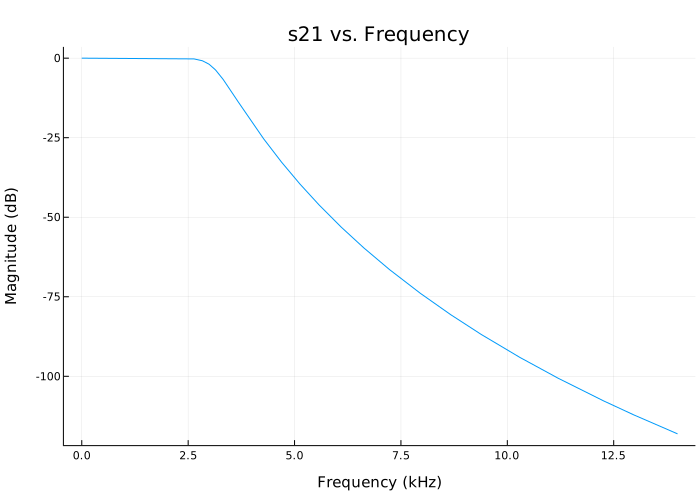
Designing a Chebyshev filter and determining the filter order
Details
Let’s design a low-pass Chebyshev filter with band-pass ripple 0.1 dB, cutoff frequency 1 rad/s and attenuation 50 dB on the frequency 1.1 glad/s. Let’s display the order of this filter [1].
filter parameters
Fp = 1 / (2π)            # Частота полосы пропускания, Гц
Rp = 0.1                 # Пульсации в полосе пропускания, дБ
Fs = 1.1 / (2π)          # Частота полосы задерживания, Гц
As = 50                  # Затухание в полосе задерживания, дБ
projecting the filter
using EngeeRF

r = rffilter(FilterType = "Chebyshev", ResponseType = "Lowpass",
             Implementation = "Transfer function",
             PassbandFrequency = Fp, PassbandAttenuation = Rp,
             StopbandFrequency = Fs, StopbandAttenuation = As)
The order of the designed filter
N = r.DesignData.FilterOrder
println("Calculated filter order is $N")
Calculated filter order is 19Frequency response of an even-order Chebyshev filter
Details
Let’s design an even-order Chebyshev filter and plot its frequency response.
Frequency response of the Chebyshev filter of even order using the implementation of the transfer function_
Let’s design an even-order Chebyshev filter with the specified parameters.
Fp = 3e9          # Частота полосы пропускания, Гц
Ap = 10           # Затухание в полосе пропускания, дБ
Fs = 7e9          # Частота полосы задерживания, Гц
As = 50           # Затухание в полосе задерживания, дБ

using EngeeRF

r = rffilter(FilterType = "Chebyshev", ResponseType = "Lowpass",
             Implementation = "Transfer function",
             PassbandFrequency = Fp, PassbandAttenuation = Ap,
             StopbandFrequency = Fs, StopbandAttenuation = As)
Let’s plot the frequency response of an even-order Chebyshev filter.
frequencies = range(0, 7.5e9, length=1001)
sparams = sparameters(r, frequencies)

s21 = sparams.Parameters[2, 1, :]
s21_dB = 20 * log10.(abs.(s21))

p = plot(frequencies ./ 1e9, s21_dB,
         xlabel="Frequency (GHz)",
         ylabel="Magnitude (dB)",
         title="s21 vs. Frequency", legend = false)
We visualize the attenuation in the delay band and the bandwidth.
plot!(p, [0, 7.5], [-r.PassbandAttenuation, -r.PassbandAttenuation],
      linestyle=:dash,
      label="Passband Attenuation")

plot!(p, [0, 7.5], [-r.StopbandAttenuation, -r.StopbandAttenuation],
      linestyle=:dash,
      label="Stopband Attenuation")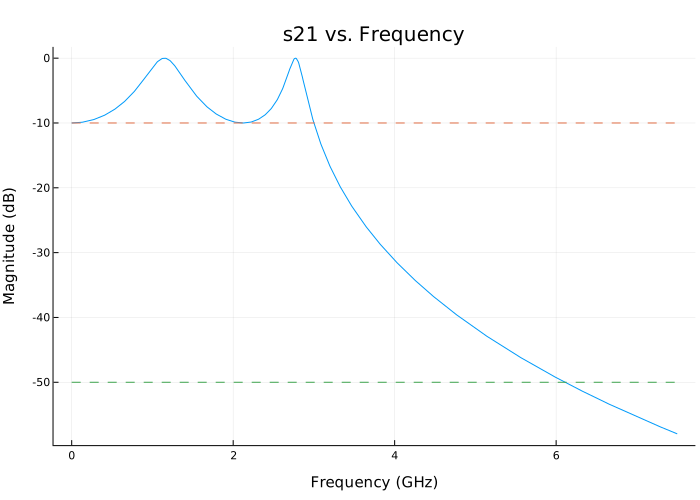
Using the property DesignData to check the filter order.
N = r.DesignData.FilterOrder
println("Calculated filter order is $N")
Calculated filter order is 4Additional Info
Design data for LC Tee and LC Pi topologies
Details
For LC Tee or Pi topologies, the property DesignData returns the values of inductors and capacitors. Besides, DesignData includes other design parameters related to the type of characteristic:
-
Low-frequency/high-frequency response: filter order, bandwidth frequency, bandwidth attenuation.
-
Band-pass characteristic: filter order, bandwidth frequency, bandwidth attenuation, auxiliary parameters (Wx).
-
Delay band characteristic: filter order, delay band frequency, bandwidth attenuation, auxiliary parameters (Wx).
To characterize the delay band, Wx is a correction for the first frequency at which the prototype low—pass filter corresponds to the specified delay band losses. For the band—pass characteristic, Wx is a correction of the attenuation specification in the bandwidth, not equal to 3 dB. For more information, see [1].
Design data for the implementation of the transfer function
Details
To implement the transfer function, the property DesignData returns coefficients of a polynomial decomposed into factors for S-parameters. These multipliers group complex conjugate terms to preserve accuracy. All S-parameters have a common denominator present in the property DesignData.Denominator. The terms of the numerator for S11, S22 and S21 (S21 = S12) can be calculated using the factorized polynomial present in the numerators DesignData.Numerator11, DesignData.Numerator22 and DesignData.Numerator21 accordingly.
For example, consider the default low-pass filter on the frequency 1 GHz. Data S21 on the frequency 1 The GHz for this filter can be found as follows:
using EngeeRF
using Polynomials

r = rffilter(Implementation = "Transfer function")
f = 1e9
s = 1im * 2π * f

num21_1 = Polynomial(reverse(r.DesignData.Numerator21[1, :]))
num21_2 = Polynomial(reverse(r.DesignData.Numerator21[2, :]))
den1 = Polynomial(reverse(r.DesignData.Denominator[1, :]))
den2 = Polynomial(reverse(r.DesignData.Denominator[2, :]))

num21 = [num21_1(s), num21_2(s)]
den = [den1(s), den2(s)]

s21_1GHz = prod(num21 ./ den)
-0.5 - 0.5imAlternatively, to calculate the example, you can use the function sparameters.
using EngeeRF

S = sparameters(r, [1e9])
S.Parameters[2, 1]
-0.49999999999999994 - 0.49999999999999994imBesides, DesignData includes other design parameters related to the type of characteristic:
-
Low-frequency/high-frequency response: filter order, bandwidth frequency, auxiliary parameters (numerator polynomial 21).
For the Butterworth filter, the bandwidth frequency is at 3dB. -
Band-pass characteristic: filter order, bandwidth frequency, auxiliary parameters (Wx, numerator polynomial 21).
-
Delay band characteristic: filter order, delay band frequency, auxiliary parameters (Wx, numerator polynomial 21).
To characterize the delay band, Wx is a correction for the first frequency at which the prototype low—pass filter corresponds to the specified delay band losses. For the band—pass characteristic, Wx is a correction of the attenuation specification in the bandwidth, not equal to 3 dB.
Some additional design tips:
"Lowpass" |
"Highpass" |
"Bandpass" |
"Bandstop" |
|
|---|---|---|---|---|
|
Order, , Auxiliary parameters (numerator polynomial 21) |
Order, , Auxiliary parameters (numerator polynomial 21, Wx) |
Order, , Auxiliary parameters (Wx) |
|
|
Order, , Auxiliary parameters (numerator polynomial 21) |
Order, , Auxiliary parameters (fourth power of the numerator 21, Wx) |
||
|
Order, , Auxiliary parameters (Wx) |
Order, |
||
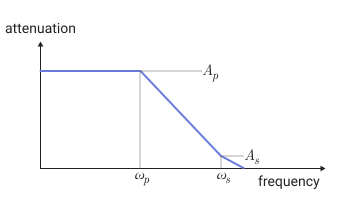
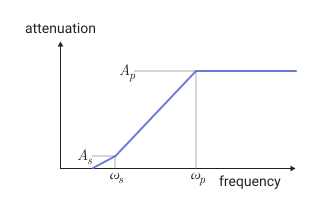
Frequency characteristics
Details
The value of the argument FilterType |
Frequency response | Designations |
|---|---|---|
|
|
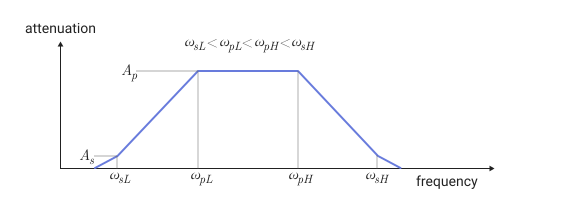
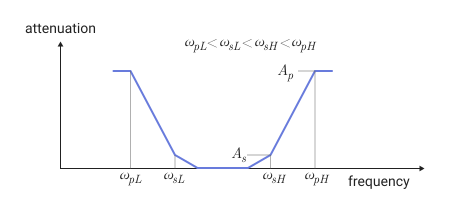
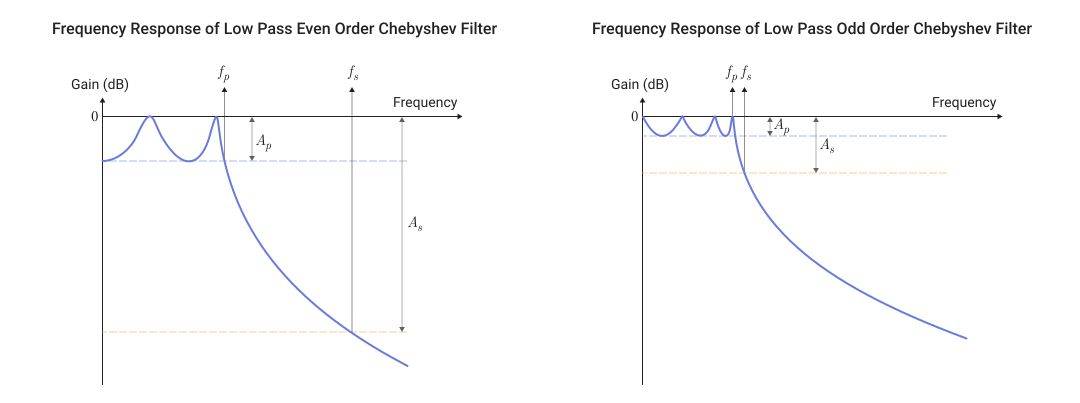
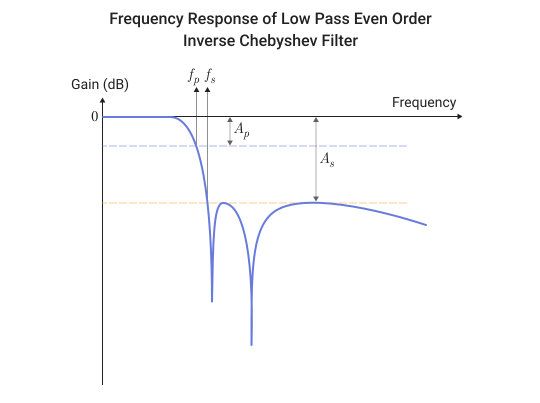
— bandwidth frequency — frequency of the delay band — bandwidth attenuation — attenuation in the delay band |
|
|
|
|
|
— bandwidth frequencies — frequency of the delay band — attenuation in the bandwidth at specified bandwidth frequencies — attenuation in the delay band at the specified delay band frequencies |
|
|
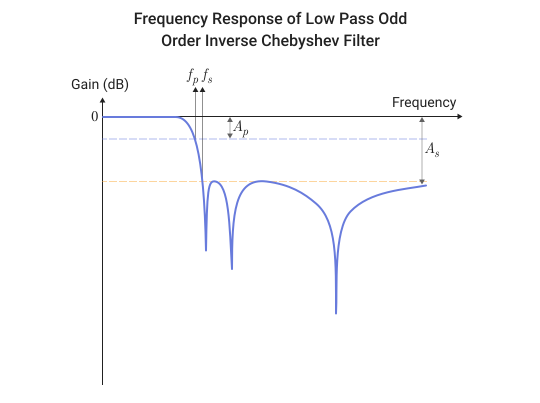
Filter definition parameters and design tips
Details
The table shows all the parameters necessary for the correct design of each filter.
"Lowpass" |
"Highpass" |
"Bandpass" |
"Bandstop" |
|
|---|---|---|---|---|
|
Order, , |
Order, , |
Order, , |
Order, , |
, , , |
, , , |
, , , |
, , , |
|
|
Order, , |
Order, , |
Order, , |
Order, , , |
, , , |
, , , |
, , , |
, , , |
|
|
Order, , , |
Order, , , |
Order, , , |
Order, , |
, , , |
, , , |
, , , |
, , , |
|
Order, , |
Order, , |
Order, , |
The following designations are used in this table:
-
— bandwidth frequency;
-
— attenuation in the bandwidth / unevenness in the bandwidth;
-
— frequency of the delay band;
-
— attenuation in the delay band / unevenness in the delay band.
| The unevenness (ripple) in the bandwidth or delay is analyzed as attenuation in the bandwidth or delay, respectively. |