txlineStripline
Creates a stripe transmission line element.
| Library |
|
Description
Use the function txlineStripline to create a stripe transmission line element.
The following figure shows a cross-section of a strip transmission line. Its physical characteristics include the width of the strip , the length of the strip , the thickness of the strip , the height of the substrate and the relative dielectric constant .
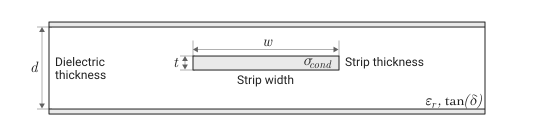
The figure also shows — the value of the argument SigmaConductivity and — the value of the argument LossTangent.
Syntax
Function call
-
txline = txlineStripline()— creates a stripe transmission line object, the properties of which are set by default.
-
txline = txlineStripline(Name=Value)— sets properties specified by one or more arguments of the type «name-value». Unspecified properties retain their default values.
Arguments
Input arguments «name-value»
Specify optional argument pairs as Name=Value, where Name — the name of the argument, and Value — the appropriate value.
Example: txline = txlineStripline(Width = 0.0046) creates a stripe transmission line object with a width of 0.0046 M. You can specify several pairs «name-value».
# Name — name of the stripe transmission line
+
"Stripline" (default) | line
Details
The name of the stripe transmission line, set as a string.
| Типы данных |
|
# Width — the physical width of the strip transmission line, m
+
0.00266 (by default) | scalar
Details
The physical width of the strip transmission line, set as a positive scalar in meters.
| Типы данных |
|
# DielectricThickness is the physical thickness of the dielectric, m
+
0.0032 (default) | scalar
Details
The physical thickness of the dielectric, given as a positive scalar in meters.
| Типы данных |
|
# Thickness — the physical thickness of the strip transmission line, m
+
1.0e−5 (by default) | scalar
Details
The physical thickness of the strip transmission line, given as a positive scalar in meters.
| Типы данных |
|
# EpsilonR — relative permittivity
+
2.2 (default) | scalar
Details
The relative permittivity of a dielectric, given as a positive scalar.
| Типы данных |
|
# LossTangent is the tangent of the dielectric loss angle
+
0.001 (by default) | scalar
Details
The tangent of the dielectric loss angle, given as a non-negative scalar.
| Типы данных |
|
# SigmaConductivity — linear conductivity, Cm/m
+
Inf (by default) | scalar
Details
Linear conductivity, given as a non-negative scalar in Siemens per meter (Cm/m).
| Типы данных |
|
# lineLength is the physical length of the strip transmission line, m
+
0.01 (by default) | scalar
Details
The physical length of the strip transmission line, specified as a positive scalar in meters.
| Типы данных |
|
#
Termination —
closing of the transmission
loop
"NotApplicable" (by default) | "Open" | "Short"
Details
The short circuit of the transmission loop, set by one of the following values: "NotApplicable", "Open", "Short".
# StubMode — loop type
+
"NotAStub" (by default) | "Series" | "Shunt"
Details
The type of loop specified by one of the following values: "NotAStub", "Series", "Shunt".
# NumPorts — number of input and output ports
+
2 (by default) | scalar
Details
The number of input and output ports, set as a positive scalar.
| This argument is read-only. |
| Типы данных |
|
# Terminals — terminals of the strip transmission line
+
("p1+", "p2+", "p1−", "p2−") (by default) | tuple of strings
Details
Terminals of the strip transmission line, specified as a tuple of strings from 4 elements.
| This argument is read-only. |
Output arguments
# txline — transmission line object
+
object
Details
A stripe transmission line object containing the following properties:
-
Width— width of the strip; -
DielectricThickness— thickness of the dielectric; -
Thickness— strip thickness; -
EpsilonR— relative dielectric constant; -
LossTangent— tangent of the dielectric loss angle; -
SigmaConductivity— linear conductivity; -
LineLength— length of the transmission line; -
StubMode— type of train; -
Termination— shorting of the transmission loop line; -
Name— the name of the object as a string, for example"Stripline"; -
Ports— port names as a tuple of strings:("p1", "p2"); -
Terminals— terminal names in the form of a tuple of strings; -
ParentNodes— nodes of the parent schema in the form of an array of integers, displayed only after adding the child schema to the parent schema; -
ParentPath— the full path to the parent schema as a string, displayed only after adding the child schema to the parent schema.; -
NumPorts— number of ports; -
Parent— the parent circuit that the chain object belongs to.
Methods
sparameters: Calculation of S-parameters for radio frequency data, networks, circuits and related objects
groupdelay:: Calculation of the group delay of S-parameters, RF filter or circuit object
noisefigure: Calculation of the noise coefficient of transmission lines, serial and parallel RLC circuits
circuit:: Creating an electrical circuit diagram object
clone:: Creating a copy of an existing schema element or schema object
Examples
Graph of S-parameters of a strip transmission line
Details
Let’s create a striped transmission line.
using EngeeRF

stl = txlineStripline(Width = 0.08e-3, DielectricThickness = 1.6e-3,
                      LineLength = 12.2777e-3, Thickness = 0.01e-3,
                      EpsilonR = 3.9, SigmaConductivity = 5.88e7)
Calculate the S-parameters of the strip transmission line at the frequency 10 GHz.
freq = range(9e9, 15e9, length=101)
spar = sparameters(stl, freq, 50)
Let’s plot the S21 and S11 graphs of the stripe transmission line.
freq = range(9e9, 15e9, length=101)
spar = sparameters(stl, freq, 50)

s21_dB = 20 * log10.(abs.(spar.Parameters[2, 1, :]))
s11_dB = 20 * log10.(abs.(spar.Parameters[1, 1, :]))

plot(freq ./ 1e9, s21_dB,
     xlabel="Frequency (GHz)",
     ylabel="Magnitude (dB)",
     label = "dB(s21)")

plot!(freq ./ 1e9, s11_dB,
      label = "dB(s11)")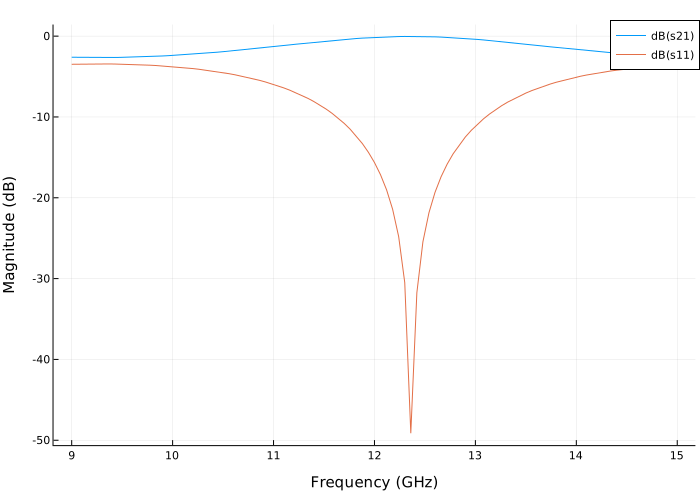
Group delay schedule of a strip transmission line
Details
Creating a stripe transmission line object.
using EngeeRF

txline = txlineStripline()
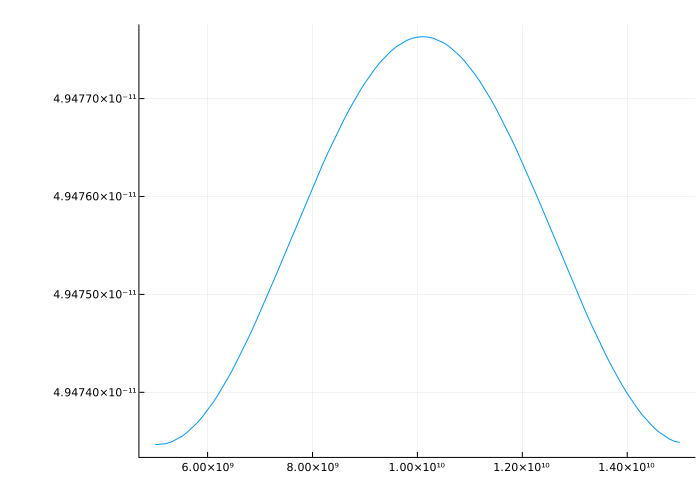
Calculate the group delay of the stripe transmission line.
freq = range(5e9, 15e9, length=101)
gd = groupdelay(txline, freq)
Let’s plot the group delay of the stripe transmission line.
plot(freq, gd, legend = false)