rfplot
Plotting the S-parameter data, as well as the dependence of the total result of calculating the RF budget on the input frequency of the cascade.
| Library |
|
Description
Use the function rfplot to build the following graphs:
-
The total result of the RF budget depends on the input frequency of the cascade;
-
The amplitude-frequency characteristics of the S-parameters.
Syntax
Function call
S-parameters
-
rfplot(sobj)— plots the dependence of the amplitude of all S-parameters ( ) in dB of the frequency along the current axis.
-
rfplot(sobj,"diag")— plots the dependence of the amplitude of the reflection coefficients or diagonal elements from the coefficients of the S-parameter matrix"diag"on the current axis.
-
hline,haxes = rfplot(filter,frequencies)— plots the amplitude-frequency response of the S-parameters of the RF filter.
HRH budget_
-
rfplot(rfobj,rfpara)— plots the dependence of the RF budget result set by RF parametersrfpara, depending on the input frequency range. The input frequencies are fed to a cascade of elements in the RF budget objectrfobj.The total results (i.e. cascade results) are automatically calculated to show the change in the RF budget result across the scheme.
Arguments
Input arguments
# sobj — S-parameters
+
the object of network parameters
Details
S are the parameters set as an object of the library’s network parameters. EngeeRF. To create an object of this type, use the function sparameters.
# i — row index
+
scalar | vector
Details
The index of the data row for plotting, specified as a scalar or vector.
| Chart type | How to set indexes |
|---|---|
One parameter |
Specify
|
A set of parameters |
Specify
|
Specific parameters |
Specify the tuple of scalars
|
# j — column index
+
scalar | vector
Details
The index of the graph data column, specified as a scalar or vector.
| Chart type | How to set indexes |
|---|---|
One parameter |
Specify
|
A set of parameters |
Specify
|
Specific parameters |
Specify the tuple of scalars
|
# plotflag — types of graphs
+
"db" (default) | "real" | "imag" | "abs" | "angle"
Details
Chart types defined as "db", "real", "imag", "abs" or "angle".
# frequencies — frequencies for plotting the amplitude-frequency response
+
vector
Details
Frequencies for plotting the amplitude-frequency response, specified as a vector.
# part — part of the S-parameter matrix
+
"triu" | "tril"
Details
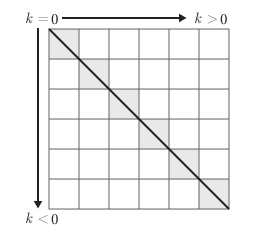
The part of the S-parameter matrix defined as "triu" or "tril". Specify the value "triu" to plot the upper triangular part of the matrix and "tril" to plot the lower triangular part.
# k — diagonals to be included
+
0 (by default) | scalar
Details
The diagonals to be included are set as a scalar.
-
k = 0denotes the main diagonal. -
k > 0indicates the diagonals above the main diagonal. -
k < 0indicates the diagonals below the main diagonal.
# rfpara — RF parameters
+
"Pout" | "GainT" | "NF" | "OIP3" | "IIP3" | 'SNR' | "Sparameters"
Details
RF parameters set using one of the following methods:
-
"Pout"— available output power, dBm; -
"GainT"— converter gain, dB; -
"NF"— noise factor, dB; -
"OIP3"— third-order output signal, dBm; -
`"IIP3`" — third-order input signal, dBm;
-
"SNR"— signal-to-noise ratio, dB; -
"Sparameters"— S-parameters amplitude-frequency response, dB.
# ax — the axes object
+
the axes object | the uiaxes object
Details
The axes object, set as an object axes or uiaxes.
Input arguments «name-value»
Specify optional argument pairs as Name=Value, where Name — the name of the argument, and Value — the appropriate value.
# plotargs… — graph attributes
Details
Argument plotargs… It is used to pass the standard attributes supported by the package to the internal plotting call. Plots.jl. For example, you can set markers, color, line type, signatures, and other parameters in the same way as in the basic function. plot. For more information about the available graph attributes, see the article Attributes
Examples: rfplot(s, marker=:+), rfplot(s, 1, 1, m=:o), rfplot(s, "diag", color=:red).