richards
Converting a chain with concentrated elements into a chain with distributed elements using the Richards transform.
| Library |
|
Syntax
Function call
-
cktOut = richards(cktIn,opFreq)— applies the Richards transform to the circuitcktInand returns the chain objectcktOutat a given reference frequencyopFreq. In the objectcktOutall capacitors and inductors are replaced by transmission line objects based on electrical length (see function descriptiontxlineElectricalLength).The Richards transform can only be applied to circuits in which all the negative terminals of the ports have a common node.
Arguments
Input arguments
# opFreq — operating frequency
+
scalar
Details
The operating frequency at which the Richards transform is applied is set as a positive scalar.
Output arguments
# txOut — transmission line based on electrical length
+
the txlineElectricalLength object
Details
A transmission line based on the electrical length returned as an object txlineElectricalLength.
Examples
Applying the Richards transform to an RF filter
Details
Let’s create a low-frequency LC-Pi Chebyshev filter with a bandwidth frequency 1 GHz, bandwidth attenuation 0.5 dB and filter order 5.
using EngeeRF

Fp = 1e9
Ap = 0.5
Ord = 5
cktIn = rffilter(FilterType = "Chebyshev", ResponseType = "Lowpass",
                 Implementation = "LC Pi", FilterOrder = Ord,
                 PassbandFrequency = Fp, PassbandAttenuation = Ap)
opFreq = 1e9
We transform the concentrated elements of the RF filter into a distributed element using the Richards transform.
cktOut = richards(cktIn, opFreq)circuit(ElementNames = ("C_tx", "L_tx", "C_1_tx", "L_1_tx", "C_2_tx"), Elements = DataType[txlineElectricalLength, txlineElectricalLength, txlineElectricalLength, txlineElectricalLength, txlineElectricalLength], Name = "unnamed", Nodes = [0, 1, 2, 3, 4, 5, 6], NumPorts = 2, Ports = ("p1", "p2"), TerminalNodes = [1, 6, 0, 0], Terminals = ("p1+", "p2+", "p1-", "p2-"))Applying the Richards transform to an inductor
Details
Let’s create an inductor coil with nGn.
LorCobj= inductor(5e-9)Let’s create a chain.
ckt = circuit("new_circuit1")Let’s add a resistor to the circuit and an inductor, an inductor created earlier.
add(ckt, [1 2], LorCobj)
add(ckt, [2 3], resistor(100))
We will set the output parameters and display the result.
setports(ckt, [1 0], [3 0])

println("ElementNames: ", ckt.ElementNames,
        "\nElements: ", ckt.Elements,
        "\nName: ", ckt.Name,
        "\nNodes: ", ckt.Nodes)
ElementNames: ("L", "R")
Elements: EngeeRF.DomainRF.DomainObjectRF[inductor(Inductance = 5.0e-9, Name = "L", ParentNodes = [1, 2], ParentPath = "new_circuit1", Terminals = ("p", "n")), resistor(Name = "R", ParentNodes = [2, 3], ParentPath = "new_circuit1", Resistance = 100.0, Terminals = ("p", "n"))]
Name: new_circuit1
Nodes: [0, 1, 2, 3]Let’s apply the Richards transform to an inductor at a frequency 1 GHz and show the nodes for connecting the transmission line.
txOut, nodes = richards(LorCobj, 1e9)

println("Z0: ", txOut.Z0,
        "\nReferenceFrequency: ", txOut.ReferenceFrequency,
        "\nLineLength: ", txOut.LineLength,
        "\nStubMode: ", txOut.StubMode,
        "\nTermination: ", txOut.Termination,
        "\nName: ", txOut.Name,

        "\n\nnodes: ", nodes)
Z0: 31.41592653589793
ReferenceFrequency: 1.0e9
LineLength: 0.7853981633974483
StubMode: Series
Termination: Short
Name: L_tx
nodes: [1, 2, 0, 0]The nodes in this example are nodes where a two-port transmission line is connected, which is a series inductance . The node’s return value is set to −1 if the ground node cannot be determined from the circuit.
Algorithms
The Richards Transformation
Details
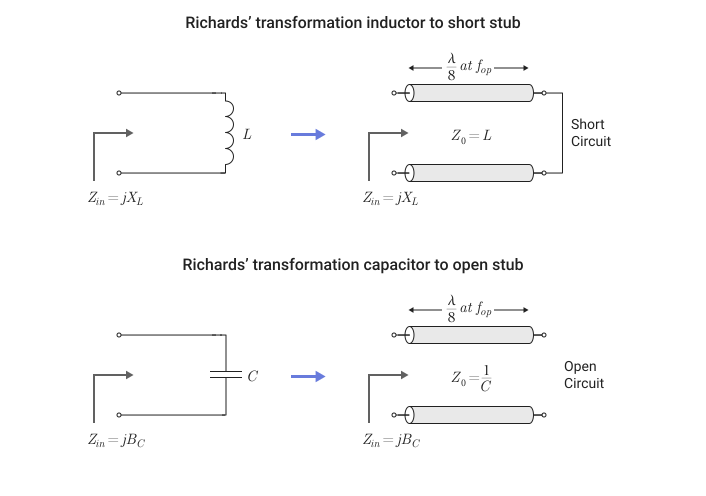
This figure shows how the Richards transform transforms a circuit with capacitors and inductors into an abstract transmission line model [1].