rfckt.twowire
Creates a two-wire transmission line.
| Library |
|
Description
Use the function rfckt.twowire to create a two-wire transmission line characterized by the size of the line, the type of loop and the short circuit.
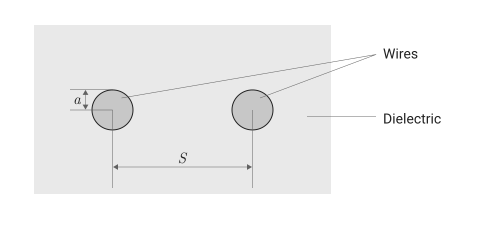
The following figure shows a cross-section of a two-wire transmission line. Its physical characteristics include the radius of the dielectric wires , the distance between the centers of the wires , as well as the relative permittivity and relative magnetic permeability wires. It is assumed that the relative permittivity and relative magnetic permeability are homogeneous.
|
It is recommended to use the function |
Syntax
Function call
-
h = rfckt.twowire()— creates an object of a parallel RLC circuit, all properties of which have default values. The default object is equivalent to an end-to-end two-port network, i.e. the resistor, inductor and capacitor are replaced by a short circuit.
-
h = rfckt.twowire(Name=Value)— sets properties specified by one or more arguments of the type «name-value». Unspecified properties retain their default values.
Arguments
Input arguments «name-value»
Specify optional argument pairs as Name=Value, where Name — the name of the argument, and Value — the appropriate value.
Example: rfckt.twowire(Radius = 7.5e-4) creates a two-wire transmission line object with the radius of the conducting wire 7.5e−4 meters. You can specify multiple pairs «name-value».
# AnalyzedResult — calculated values of S-parameters, noise factor, OIP3 and group delay
+
the rfdata.data object
Details
Calculated values of S-parameters, noise factor, OIP3, and group delay, set as an object rfdata.data. For more information, see Algorithms.
| This argument is read-only. |
# Separation — the distance between the wire centers, m
+
0.00162 (default) | scalar
Details
The distance between the wire centers, set as a positive scalar in meters.
| Типы данных |
|
# EpsilonR — relative permittivity
+
2.3 (by default) | scalar
Details
The relative permittivity of a dielectric, given as a scalar. The relative permittivity is the ratio of the dielectric constant of a dielectric to dielectric constant in vacuum .
| Типы данных |
|
# lineLength — the physical length of the transmission line, m
+
0.01 (by default) | scalar
Details
The physical length of the transmission line, specified as a scalar in meters.
| Типы данных |
|
# LossTangent is the tangent of the dielectric loss angle
+
0 (by default) | scalar
Details
The tangent of the dielectric loss angle, defined as a scalar.
| Типы данных |
|
# MuR — relative magnetic permeability of a dielectric
+
1 (by default) | scalar
Details
The relative magnetic permeability of a dielectric, given as a scalar. The relative magnetic permeability is the ratio of the magnetic permeability of a dielectric magnetic permeability in vacuum .
| Типы данных |
|
# Name — the name of the object
+
"Two-Wire Transmission Line" (by default) | line
Details
The name of the object, set as a string.
| This argument is read-only. |
| Типы данных |
|
# NPort — number of ports
+
2 (by default) | a positive integer
Details
The number of ports specified as a positive integer.
| This argument is read-only. |
| Типы данных |
|
# Radius is the radius of the wire, m
+
0.00067 (by default) | scalar
Details
The radius of a conductive wire in a two-wire transmission line, set as a positive scalar in meters.
| Типы данных |
|
# SigmaCond — linear conductivity, Cm/m
+
Inf (by default) | scalar
Details
Linear conductivity, given as a scalar in Siemens per meter (Cm/m).
| Типы данных |
|
# StubMode — loop type
+
"NotAStub" (default) | "Series" | "Shunt"
Details
The type of loop specified by one of the following values: "NotAStub", "Series", "Shunt".
#
Termination —
shorting of the transmission
loop
"NotApplicable" (by default) | "Open" | "Short"
Details
The short circuit of the transmission loop, set by one of the following values: "NotApplicable", "Open", "Short".
Output arguments
# h — the object of a two-wire transmission line
+
object
Details
The object of a two-wire transmission line.
Methods
analyze: RFCKT object analysis in the frequency domain
groupdelay:: Calculation of the group delay of S-parameters, RF filter or circuit object
Examples
Creating a two-wire transmission line
Details
Let’s create a two-wire transmission line with a radius of a conductive wire 7.5e−4 meters.
using EngeeRF

h = rfckt.twowire(Radius = 7.5e-4)

println("Radius: ", h.Radius,
        "\nSeparation: ", h.Separation,
        "\nMuR: ", h.MuR,
        "\nEpsilonR: ", h.EpsilonR,
        "\nLossTangent: ", h.LossTangent,
        "\nSigmaCond: ", h.SigmaCond,
        "\nLineLength: ", h.LineLength,
        "\nStubMode: ", h.StubMode,
        "\nTermination: ", h.Termination,
        "\nnPort: ", h.nPort,
        "\nAnalyzedResult: ", h.AnalyzedResult,
        "\nName: ", h.Name)
Radius: 0.00075
Separation: 0.00162
MuR: 1.0
EpsilonR: 2.3
LossTangent: 0.0
SigmaCond: Inf
LineLength: 0.01
StubMode: NotAStub
Termination: NotApplicable
nPort: 2
AnalyzedResult: nothing
Name: Two-Wire Transmission LineAlgorithms
-
If we model the transmission line as a line without a loop, the method
analyzeFirst, it calculates the ABCD parameters at each frequency contained in the vector of simulated frequencies. Then he uses the functionabcd2sto convert ABCD parameters to S parameters.Method
analyzecalculates the ABCD parameters using the physical length of the transmission line and a comprehensive distribution constant , using the following equations:
where and — vectors, the elements of which correspond to the elements of the frequency vector specified in the input argument
Freqfunctionsanalyze. Both vectors can be expressed in terms of resistance , inductance , conductivity and capacity per unit length (meters) as follows:
where
In the above equations:
-
— radius of dielectric wires;
-
— the distance between the centers of the wires;
-
— linear conductivity;
-
— magnetic permeability of the dielectric;
-
— dielectric constant of the dielectric;
-
— the imaginary part , where
-
— dielectric constant in vacuum;
-
— the value of the argument
EpsilonR; -
— the value of the argument
LossTangent;
-
-
— the depth of current penetration into the conductor;
-
— the vector of simulated frequencies determined by the block Outport (CE);
-
.
-
-
If we model the transmission line as a parallel or serial loop, the method
analyzefirst, it calculates the ABCD parameters at the specified frequencies. Then he uses the functionabcd2sto convert ABCD parameters to S parameters.If for an argument
StubModethe value is set"Shunt", then the two-port network consists of a loopback transmission line that can be closed or opened, as shown in the following figure.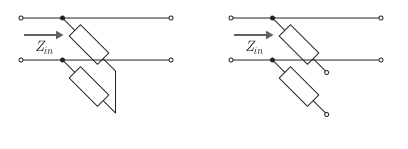
Here — input impedance of the parallel circuit. The ABCD parameters for the parallel loop are calculated as follows:
If for an argument
StubModethe value is set"Series", then the two-port network is a serial transmission line that can be closed or opened, as shown in the following figure.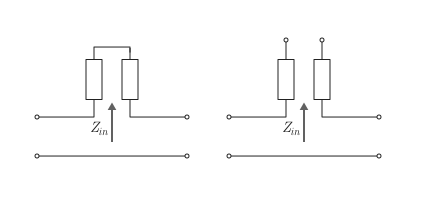
Here — input impedance of the serial circuit. The ABCD parameters for the serial loop are calculated as follows: