txlineTwoWire
Creates a two-wire transmission line.
| Library |
|
Description
Use the function txlineTwoWire to create a two-wire transmission line.
The following figure shows a cross-section of a two-wire transmission line. Its physical characteristics include the radii of the wires, the distance between the centers of the wires, as well as the relative permittivity. and relative magnetic permeability Wednesday. It is assumed that and they are homogeneous.
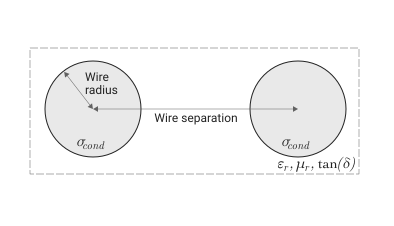
The figure also shows — the value of the argument SigmaCond and — the value of the argument LossTangent.
Syntax
Function call
-
twowiretxline = txlineTwoWire()— creates a two-wire transmission line object with default properties.
-
twowiretxline = txlineTwoWire(Name=Value)— sets properties specified by one or more arguments of the type «name-value». Unspecified properties retain their default values.
Arguments
Input arguments «name-value»
Specify optional argument pairs as Name=Value, where Name — the name of the argument, and Value — the appropriate value.
Example: txline = txlineTwoWire(Separation = 0.0046) creates a two-wire transmission line object with the distance between the wire centers 0.0046 M. You can specify several pairs «name-value».
# Radius is the radius of the wire
+
0.00067 (by default) | scalar
Details
The radius of a wire in a two-wire transmission line, set as a positive scalar in meters.
| Типы данных |
|
# Separation — the distance between the centers of the wires
+
0.00162 (by default) | scalar
Details
The distance between the wire centers, set as a positive scalar in meters.
| Типы данных |
|
# MuR — relative magnetic permeability
+
1.0 (by default) | scalar
Details
The relative magnetic permeability of a dielectric, given as a positive scalar. The relative magnetic permeability is the ratio of the magnetic permeability of a dielectric magnetic permeability in vacuum .
| Типы данных |
|
# EpsilonR — relative permittivity
+
2.3 (by default) | scalar
Details
The relative permittivity of a dielectric, given as a positive scalar.
| Типы данных |
|
# LossTangent is the tangent of the dielectric loss angle
+
0.0 (by default) | scalar
Details
The tangent of the dielectric loss angle, given as a non-negative scalar in degrees.
| Типы данных |
|
# SigmaCond — linear conductivity
+
Inf (by default) | scalar
Details
Linear conductivity, given as a scalar in Siemens per meter (Cm/m).
| Типы данных |
|
# lineLength — physical length
+
0.01 (by default) | scalar
Details
The physical length of a two-wire transmission line, specified as a positive scalar in meters.
| Типы данных |
|
#
Termination —
shorting of the transmission
loop
"NotApplicable" (by default) | "Open" | "Short"
Details
The short circuit of the transmission loop, set by one of the following values: "NotApplicable", "Open", "Short".
# StubMode — loop type
+
"NotAStub" (by default) | "Series" | "Shunt"
Details
The type of loop specified by one of the following values: "NotAStub", "Series", "Shunt".
# Name — the name of the two-wire transmission line
+
"TwoWire" (by default) | line
Details
The name of the two-wire transmission line, set as a string.
| Типы данных |
|
# Terminals — terminals of a two-wire transmission line
+
("p1+", "p2+", "p1−", "p2−") (by default) | tuple of strings
Details
Terminals of a two-wire transmission line, specified as a tuple of strings from 4 elements.
| This argument is read-only. |
# NumPorts — number of input and output ports
+
2 (default) | scalar
Details
The number of input and output ports, set as a positive scalar.
| This argument is read-only. |
| Типы данных |
|
Output arguments
# twowiretxline — transmission line object
+
object
Details
A two-wire transmission line object containing the following properties:
-
Radius— wire radius; -
Separation— the distance between the centers of the wires; -
MuR— relative magnetic permeability; -
EpsilonR— relative dielectric constant; -
LossTangent— tangent of the dielectric loss angle; -
SigmaCond— linear conductivity; -
LineLength— length of the transmission line; -
Termination— shorting of the transmission loop line; -
StubMode— type of train; -
Name— the name of the object as a string, for example"TwoWire"; -
Terminals— terminal names in the form of a tuple of strings; -
NumPorts— number of ports; -
Parent— the parent schema that the chain object belongs to; -
ParentNodes— nodes of the parent schema in the form of an array of integers, displayed only after adding the child schema to the parent schema; -
ParentPath— the full path to the parent schema as a string, displayed only after adding the child schema to the parent schema.; -
Ports— port names as a tuple of strings:("p1", "p2").
Methods
sparameters: Calculation of S-parameters for radio frequency data, networks, circuits and related objects
groupdelay:: Calculation of the group delay of S-parameters, RF filter or circuit object
noisefigure: Calculation of the noise coefficient of transmission lines, serial and parallel RLC circuits
circuit:: Creating an electrical circuit diagram object
clone:: Creating a copy of an existing schema element or schema object
Examples
Group delay of a two-wire transmission line
Details
Let’s create a two-wire transmission line with the following properties:
-
Radius:
0.5mm; -
Relative permittivity:
1.0054; -
The distance between the wire centers:
1.088mm.
using EngeeRF

txline = txlineTwoWire(Radius = 0.5e-3, EpsilonR = 1.0054, Separation = 1.088e-3)

println("Radius: ", txline.Radius,
        "\nSeparation: ", txline.Separation,
        "\nMuR: ", txline.MuR,
        "\nEpsilonR: ", txline.EpsilonR,
        "\nLossTangent: ", txline.LossTangent,
        "\nSigmaCond: ", txline.SigmaCond,
        "\nLineLength: ", txline.LineLength,
        "\nTermination: ", txline.Termination,
        "\nStubMode: ", txline.StubMode,
        "\nName: ", txline.Name,
        "\nTerminals: ", txline.Terminals,
        "\nNumPorts: ", txline.NumPorts)
Radius: 0.0005
Separation: 0.001088
MuR: 1.0
EpsilonR: 1.0054
LossTangent: 0.0
SigmaCond: Inf
LineLength: 0.01
Termination: NotApplicable
StubMode: NotAStub
Name: TwoWire
Terminals: ("p1+", "p2+", "p1-", "p2-")
NumPorts: 2Calculate the group delay of a two-wire transmission line at the frequency 2.5 GHz.
freqs = [2.5e9, 2.5e9 + 1e3]
gd = groupdelay(txline, freqs)
2-element Vector{Float64}:
3.344646858697332e-11
3.344646858697332e-11