rfmodel.rational
Performs a rational fit using the component representation as a pole subtraction.
| Library |
|
Description
Use the function rfmodel.rational to represent RF components using a rational function object of the following form:
There are two ways to create a rational function object:
-
You can adjust the object of a rational function to the component data using the function
rational. -
You can use the function
rfmodel.rationalto directly indicate the representation of the component as a subtraction in the pole.
Syntax
Function call
-
h = rfmodel.rational()— creates an object of a rational function, the properties of which are set by default.
-
h = rfmodel.rational(Name=Value)— sets properties specified by one or more arguments of the type «name-value». Unspecified properties retain their default values.
Arguments
Input arguments «name-value»
Specify optional argument pairs as Name=Value, where Name — the name of the argument, and Value — the appropriate value. You can specify multiple pairs «name-value».
# A — poles of the rational function object
+
[] (by default) | vector
Details
The poles of an object of a rational function, defined as a complex vector in rad/s. The length of the argument is specified in the expression
where — the number of poles of an object of a rational function, it must be equal to the length of the vector that is set as an argument. C.
| Типы данных |
|
# C — deductions of the rational function object
+
[] (by default) | vector
Details
Deductions of an object of a rational function, given as a complex vector in rad/s. The length of the argument is specified in the expression
how — the number of deductions of the rational function object — and must be equal to the length of the vector that is set as an argument A.
| Типы данных |
|
# D — frequency response offset
+
0 (by default) | scalar
Details
The offset of the frequency response, set as a scalar.
| Типы данных |
|
# Delay — delay of the frequency response
+
0 (by default) | scalar
Details
The time delay of the frequency response, set as a scalar.
| Типы данных |
|
# Name — the name of the object
+
"Rational Function" (by default) | line
Details
The name of the object, set as a string.
| This argument is read-only. |
| Типы данных |
|
Output arguments
# h — the object of a rational function
+
object
Details
An object of a rational function containing the following properties:
Examples
Definition, evaluation, and visualization of a rational function
Details
Let’s create an object of a rational function rat with poles in points −5 Hail/s, −3 Deg/s and −4 Mrad/s and deductions in points 600 Mrad/s, 2 Deg/s and 4 Hail/sec.
using EngeeRF

rat = rfmodel.rational(A = [-5e9, -3e9, -4e6], C = [6e8, 2e9, 4e9])
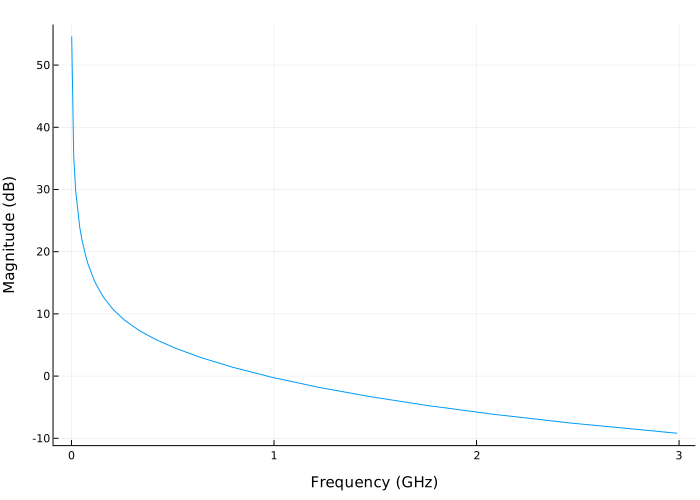
Let’s perform the analysis in the frequency domain in the range from 1 MHz up to 3 GHz.
f = 1e6:1.0e7:3e9Let’s plot the resulting frequency response in dB.
resp = [sum(rat.C[i] / (1im * 2π * freq - rat.A[i]) for i in eachindex(rat.A)) for freq in f]

plot(f ./ 1e9, 20 .* log10.(abs.(resp)),
     xlabel = "Frequency (GHz)", ylabel = "Magnitude (dB)")