Programmatic model editing
Working with models
Adding a block
Before editing the model, open it using the method open. After editing, don’t forget to save the results using save.
A public method is used to add a block. add_block
engee.add_block(lib_block_path, tgt_block_path)-
Adds a copy of the block from
lib_block_pathintgt_block_path. -
lib_block_path— the full path to the block in the model or library. Waylib_block_pathyou can see it by double-clicking on the free area of the workspace and typing the name of the desired block.: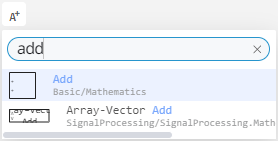
-
tgt_block_path— the path to the system and the expected name. If the name is not specified, it is set automatically. -
If the path to an existing model block matches the path to a block from the library because the names of the model and its systems match the names of the library sections, the block from the model is selected.
-
If in
tgt_block_paththe last one contains the name of the future block, it tries to add a block under this name. -
If
tgt_pathif it does not contain the name of the future block, then the name is formed according to the pattern<block_type>-<index>For exampleSin-1, where the index is the number of blocks of a given type after addition, and Sin is the block_type of the block. -
Adds an additional port to the subsystem when adding a block port, for example,
Inport.
| The added blocks will not be shown immediately. To display the blocks, you need to reopen the model (after saving it), switch between models, or reload the page. |
example
engee.add_block("/Basic/Math Operations/Add", "newmodel_1/")

engee.add_block("/Basic/Math Operations/Complex to Real-Imag", "newmodel_1/Test_name") # adds a block from the library to the system and assigns it the name Test_name.
_ Errors_
-
If the name is occupied, it ends with an error.
IncorrectBlockNameException. -
If the path to the library block is incorrect, it ends with an error.
InvalidBlockPathException. -
If the system to which the block is added does not exist or is closed, it fails.
SystemIsNotExistException.
Deleting a block
The public method is used delete_block
engee.delete_block(block_path)-
Deletes a block along the specified path.
-
block_path— the absolute path to the block in the model by type"newmodel_1/Sine Wave", wherenewmodel_1— the name of the model, andSine Wave— the name of the block. -
It also deletes all lines and ports associated with the block.
Copying a block
Using a public method copy_block:
engee.copy_block(src_block_path::String, tgt_block_path::String)-
src_block_path::String— the full path to the block in the system. -
tgt_block_path::String— the path to the system and the expected name. Format:path/to/system/newblockname(if the name is not specified, it is set automatically).
Example:
# Adds a block named Add-3 from the newmodel_1 model to the newmodel_2 model
engee.copy_block("newmodel_1/Add-3", "newmodel_2/")

# Adds a block named Custom Block Name from the newmodel_1 model to the newmodel_2 model named Test_name
engee.copy_block("newmodel_1/Custom Block Name", "newmodel_2/Test_name")
_ Errors_
-
IncorrectBlockNameException— incorrect name for the new block. -
InvalidBlockPathException— the block being copied does not exist on the specified path. -
SystemIsNotExistException— the system to which the block is added does not exist.
Adding/removing a signal
Public methods are used add_line and delete_line
# adds lines between ports
engee.add_line(src_port, dst_port) = engee.add_line(engee.gcs(), src_port_path, dst_port_path)
engee.add_line(system::String|System, src_port :: String, dst_port :: String)

# deletes lines between ports
engee.delete_line(src_port, dst_port) = delete_line(gcs(), src_port, dst_port)
engee.delete_line(system, src_port :: String, dst_port :: String)-
Adds/removes a line between ports
src_port_pathanddst_port_path, wheresrc_port— full path to the block’s exit port,tgt_port— the full path to the block’s input port. -
If the path points to the subsystem’s block port, it connects/disconnects the subsystem itself via the corresponding port.
-
In all other cases, the blocks of the corresponding ports must be located on the same system.
-
The port name is its serial number.
_ Errors_
-
SourceEdgeIsNotOutputPort— if the port on the src_port_path path is not an out port -
TargetEgdeIsNotInputPort— if the port on the path is tgt_port_path, it is not the input port. -
TargetEdgeAlreadyConnected— if the TGT port is already connected. -
NotAcausalPort— for a non-directional connection, if one of the ports has a non-acausal type. -
LineCannotBeAdded— if the port type or line direction is incorrect.
Writing/reading block and signal parameters
Public methods are used set_param! and get_param
engee.set_param!(blockPath, paramName => paramValue)
engee.get_param(blockPath, paramName)
engee.get_param(blockPath)
engee.set_param!(blockPath, blockParams)-
Similarly
get_paramandset_param!for the model parameters.
You can get the parameters not only of the model, but also of a specific block, and also change them using the variable structure (let’s call it sine_params), for example:
# Getting the current parameters of Sine Wave
sine_params = engee.get_param("newmodel_1/Sine Wave")

# We create a copy of all the parameters and change only one
modified_params = copy(sine_params)
modified_params["Amplitude"] = "2.5"  # we only change the amplitude

# We apply all the parameters (the rest remain as they were)
engee.set_param!("newmodel_1/Sine Wave", pairs(modified_params)...)
The example shows how to change only one parameter of the block (the amplitude), while keeping all other parameters unchanged. Use this approach when you need to modify the block settings point-by-point without risking resetting other parameters.
|
All available block parameters can be obtained by selecting it with the mouse and running the command |
| All public software management methods available in Engee are presented in the article. Public methods of program management. |
Examples
engee.add_block("/Basic/Sources/Sine Wave", "model_name/Sine Wave-x") # inserts the Sine Wave block from the Basic/Sources library and assigns it the name Sine Wave-x

engee.add_block("/Basic/Sinks/Terminator", "model_name/") # inserts the Terminator block from the Basic/Receivers library and assigns a name automatically (for example, Terminator-1 if a block named Terminator already exists)

engee.delete_block("newmodel_1/Terminator") # deletes the block and all associated lines and ports

engee.add_line("Sine Wave/1", "Terminator/1")  # sets the signal between output port No. 1 of the Sin Wave unit and input port No. 1 of the Terminator unit

engee.delete_line("Sine Wave/1", "Terminator/1") # deletes the signal between output port No. 1 of the Sin Wave block and input port No.1 of the Terminator block

engee.get_param("newmodel_1") # getting simulation parameters

engee.set_param!("newmodel_1", "StopTime" => 15, "FixedStep" => 0.05) # change the end time of the simulation and the fixed step size