Simple Gear with Variable Efficiency
A simple cylindrical gearbox with adjustable gearing efficiency.
blockType: Engee1DMechanical.Transmission.Gears.SimpleWithVariableEfficiency
|
Path in the library: |
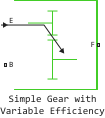
Description
Block Simple Gear with Variable Efficiency It is a simple gear train with adjustable gearing efficiency. The gear transmission transmits the torque with a preset ratio between the driving and driven gears located in parallel planes. The gears can rotate in one direction or in the opposite direction. In the non-ideal case, gear losses include losses in gearing and viscous bearings. To set a variable engagement efficiency, the unit has a control port that can be used to input a time-varying signal. The effects of inertia and malleability are ignored.
Ideal gears and transmission ratios
Block Simple Gear with Variable Efficiency imposes one kinematic constraint on two connected axes:
where
-
— radius of the driven gear;
-
— angular velocity of the driven gear;
-
— radius of the driving gear;
-
— angular velocity of the driving gear.
The gear ratio for engagement of the driven and driving gears is:
where
-
— the number of teeth of the driving gear;
-
— the number of teeth of the driven gear.
Two degrees of freedom are reduced to one independent gear.
The transmission of torque is carried out as follows:
where
-
— input torque;
-
— output torque;
-
— losses during transmission of torque.
For the perfect occasion .
Imperfect limitations and losses in gears
In an imperfect case . For more information, see the article Modeling of mechanical gears with losses.
In an imperfect gear pair The angular velocity, gear ratio, and restrictions on the number of teeth remain unchanged. But the transmitted torque and power are reduced by:
-
Coulomb friction between tooth surfaces on gears and , which is determined by the efficiency, ;
-
Viscous friction coupling of drive shafts with bearings, which is determined by the coefficients of viscous friction, .
The thermal model
You can simulate the effects of heat flow and temperature changes by turning on an additional heat port H. To use the thermal port H, check the box for the option Enable thermal port.
Enabling the thermal model:
-
Opens the non-directional port H.
-
Includes the Thermal mass parameter, which allows you to specify the ability of a component to resist temperature changes.
-
Enables the Initial Temperature parameter, which allows you to set the initial temperature.
Variables
Use the Initial Targets parameter group to set the priority and initial target values for the block parameter variables before modeling. For more information, see Configuring physical blocks using target values.
Ports
Input
#
E
—
meshing efficiency
scalar
Details
Input port associated with the gear meshing efficiency. The efficiency is set in the range ].
| Data types |
|
| Complex numbers support |
No |
Conserving
#
B
—
drive pinion
`rotational mechanics
Details
A non-directional port associated with the drive gear.
| Program usage name |
|
#
F
—
idler gear
`rotational mechanics
Details
A non-directional port associated with the driven gear.
| Program usage name |
|
#
H
—
heat flux
`heat
Details
A non-directional port associated with heat flow.
The heat port allows modelling the heat flow between the unit and the connected network.
Dependencies
To use this port, select the Enable thermal port check box.
| Program usage name |
|
Parameters
Main
# Follower (F) to base (B) teeth ratio (NF/NB) — gear ratio from driven gear to driving gear
Details
Constant gear ratio, , the revolutions of the driven gear to the revolutions of the driving gear.
The gear ratio should be >0.
| Default value |
|
| Program usage name |
|
| Evaluatable |
Yes |
#
Output shaft rotates —
direction of rotation of the driven gear
In same direction as input shaft | In opposite direction to input shaft
Details
The direction of movement of the driven gear relative to the movement of the driving gear.
| Values |
|
| Default value |
|
| Program usage name |
|
| Evaluatable |
No |
Meshing Losses
# Minimum efficiency — minimum efficiency
Details
The lowest efficiency value allowed for this transmission. EFFICIENCY is the ratio of the output and input shaft power. The signal on the E port is maintained at a level above the minimum efficiency and below . The lowest efficiency value should be >0.
| Default value |
|
| Program usage name |
|
| Evaluatable |
Yes |
#
Follower power threshold —
minimum threshold power value
W | uW | mW | kW | MW | GW | V*A | HP_DIN
Details
The absolute value of the power of the driven gear, above which the full values of the torque transmission efficiency are applied, . At values below those indicated, the efficiency is smoothed using a hyperbolic tangent function between 0, when the engine is running, and the set efficiency value.
| Units |
|
| Default value |
|
| Program usage name |
|
| Evaluatable |
Yes |
Viscous Losses
#
Viscous friction coefficients at base (B) and follower (F) —
coefficients of viscous friction between gears
N*m*s/rad | mN*m*s/rad | kN*m*s/rad | kgf*m*s/rad | lbf*ft*s/rad
Details
A vector of values of viscous friction coefficients for the movement of the driving and driven gears, respectively. To neglect viscous losses, use the by default value [0.0, 0.0].
| Units |
|
| Default value |
|
| Program usage name |
|
| Evaluatable |
Yes |
Thermal Port
# Enable thermal port — switching on the thermal port
Details
When this check box is selected, the thermal port H is displayed, which allows you to connect the transmission to the thermal network. Checking this box also enables the Thermal mass parameter and adds the Temperature variable to the Initial Targets section.
| Default value |
|
| Program usage name |
|
| Evaluatable |
No |
#
Thermal mass —
heat capacity
J/K | kJ/K
Details
The thermal energy required to change the temperature of a component by one degree. The greater the heat capacity, the more resistant the component is to temperature changes.
Dependencies
To use this option, select the check box for the Enable thermal port option.
| Units |
|
| Default value |
|
| Program usage name |
|
| Evaluatable |
Yes |