CAN Getstate
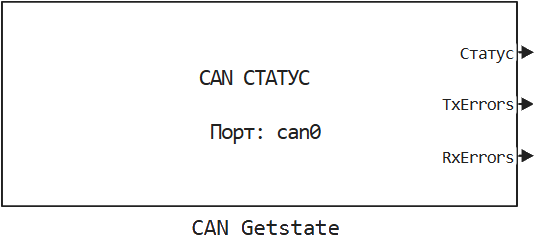
Getting information about the status of the CAN interface and the number of I/O errors.
blockType: EngeeFunction
|
Path in the library: |
Description
| To work with the block, install/update the support package. equipment. |
Block CAN Getstate It is used to get information about the status of the CAN bus and the number of I/O errors.
Ports
Output
#
Status
—
the current status of the port in the form of a bus consisting of several signals
the tire
Details
Signal value 1 in the bus, it means that the corresponding state is active.
-
ACTIVE — the transceiver is working properly, the number of errors is less
96; -
WARNING — fewer errors
128; -
PASSIVE — the transceiver stops actively correcting erroneous traffic on the line, the number of errors is lower
256; -
BUS_OFF — the transceiver stops participating in the exchange, the number of errors is higher
256; -
STOPPED — the transceiver is stopped;
-
SLEEPING — The transceiver is in sleep mode.
| Data types |
|
| Complex numbers support |
No |
#
TxErrors
—
number of transmission errors
scalar
Details
| Data types |
|
| Complex numbers support |
No |
#
RxErrors
—
number of reception errors
scalar
Details
| Data types |
|
| Complex numbers support |
No |
Parameters
Parameters
# Порт: — the CAN port
Details
The CAN port whose status information needs to be received.
| Default value |
|
| Program usage name |
|
| Tunable |
No |
| Evaluatable |
Yes |
# Шаг расчёта, с: — calculation step for receiving CAN data
Details
| Default value |
|
| Program usage name |
|
| Tunable |
No |
| Evaluatable |
Yes |