CAN RX
Receiving CAN messages.
blockType: EngeeFunction
|
Path in the library: |
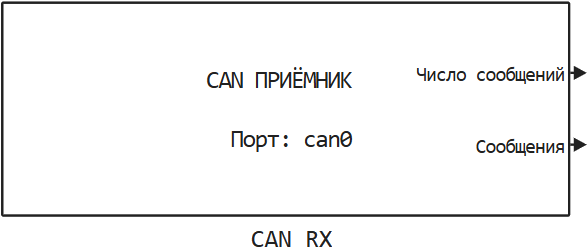
Description
| To work with the block, install/update the support package. equipment. |
Block CAN RX It is used for receiving CAN messages.
Message filter in the CAN RX block
The length of the identifier of the received CAN message can be 29 bit (for extended frame format) or 11 bit (for the standard frame format). The CAN message passes through the filter and is accepted only if all the bits of the identifier have passed through the filter. If at least one bit of the message identifier has not passed through the filter, the message is discarded. Parameters Filter ID: and Mask: allows you to set a filter based on individual bits of the identifier of the received CAN message.
The message passes through the filter if the following condition is met:
CAN ID & Mask == Filter ID & Mask,where CAN ID is the identifier of the received CAN message.
- In other words, the filter can be represented in the form of the following rules
-
-
If the value is Mask: If an individual bit is zero, then this bit is not filtered. That is, this bit is not checked in the filter and passes through the filter.
-
If the value is Mask: for a single bit, it is equal to one, then filtering is performed by the value of this bit.:
-
If the bit is from the CAN ID and the bit is from Filter ID: If they match, then this bit passes through the filter.
-
If the bit is from the CAN ID and the bit is from Filter ID: if they differ, then this bit does not pass through the filter.
-
-
Example of the filter operation
Let the following message filter be set.:
FilterID = 0b0100;
Mask     = 0b0110;
Messages with CAN identifiers 0x4, 0x5 and 0xC they pass through the filter and are accepted:
CAN_ID = [0b0100 0b0101 0b1100];
can_msg_passed = bitand(CAN_ID, Mask) == bitand(FilterID, Mask)
can_msg_passed =

  1×3 logical array

   1   1   1
Messages with CAN identifiers 0x1, 0x2 and 0x6 they do not pass through the filter and are discarded:
CAN_ID = [0b0001 0b0010 0b0110];
can_msg_passed = bitand(CAN_ID, Mask) == bitand(FilterID, Mask)
can_msg_passed =

  1×3 logical array

   0   0   0
Ports
Output
#
Messages count
—
number of messages received
scalar
Details
The number of received messages must be less than the parameter value. Число сообщений:. If there are more messages in the operating system buffer, they will be passed to the model during the next calculation step.
| Data types |
|
| Complex numbers support |
No |
#
Messages
—
messages
the tire
Details
An array of received messages of the type CAN_MESSAGE_BUS.
| Data types |
|
| Complex numbers support |
No |
Parameters
Parameters
# Порт: — the CAN port
Details
The CAN port for receiving messages.
| Default value |
|
| Program usage name |
|
| Tunable |
No |
| Evaluatable |
Yes |
# Число сообщений: — maximum number of messages transmitted
Details
The maximum number of messages transferred from the operating system buffer to the model in one calculation step.
| Default value |
|
| Program usage name |
|
| Tunable |
No |
| Evaluatable |
Yes |
# Filter ID: — filter received messages at the OS level
Details
To disable the filter and receive all messages, set the parameters Filter ID: and Mask: meaning 0. A detailed description of the filter’s operation is given in the Message filter in the CAN RX block section.
| Default value |
|
| Program usage name |
|
| Tunable |
No |
| Evaluatable |
Yes |
# Mask: — filter mask for received messages at the operating system level
Details
The filter mask determines which bits of the CAN identifier are involved in checking when filtering received messages.:
-
If the value of the mask bit is
0, then the corresponding bit of the identifier is not checked and is considered passing through the filter. -
If the value of the mask bit is
1, then the bit of the CAN message identifier is compared with the corresponding bit Filter ID:. If the values do not match, the message is discarded.
To disable the filter and receive all messages, set the parameters Filter ID: and Mask: meaning 0. A detailed description of the filter’s operation is given in the Message filter in the CAN RX block section.
| Default value |
|
| Program usage name |
|
| Tunable |
No |
| Evaluatable |
Yes |
# Потоковое получение данных: — message streaming mode
Details
Using the streaming mode for receiving CAN messages.
Streaming data acquisition is a mode in which the block reads messages from an internal stream and sends them to the model as they appear. It is usually used together with While Iteration subsystem to process all received messages in one step of the model.
| Default value |
|
| Program usage name |
|
| Tunable |
No |
| Evaluatable |
Yes |
# Шаг расчёта, с: — calculation step for receiving CAN messages
Details
The calculation step is in seconds for receiving CAN messages in the real-time application.
| Default value |
|
| Program usage name |
|
| Tunable |
No |
| Evaluatable |
Yes |