Aerodynamic Propeller
An air screw that creates thrust due to rotational motion.
blockType: Engee1DMechanical.Turbomachinery.AerodynamicPropeller
|
Path in the library: |
Description
Block Aerodynamic Propeller It is an air screw (propeller) that converts rotational mechanical motion into thrust for aerodynamic applications. The propeller can be parameterized using constants, polynomials, or tabular data to determine thrust and power coefficients. Tabular data on the incoming flow velocity, tabular data on the flow angle, or tabular data on the lift and drag coefficients of the airfoil can be provided. When modeling inertia, the default parameters of the block are a two-bladed propeller with a mass of 10 kg and diameter 1.5 m.
A scalar signal can be used to control the angle of the blade installation.
The following terminology is useful for understanding the operation of the block:
-
The velocity of the incoming flow_ is the velocity of the flow through the propeller, .
-
The relative tread of the screw is the ratio of the flow velocity through the propeller to the angular velocity of its rotation. The block uses this value to determine and when setting for the parameter Parameterization values
Polynomial fitorTabulated data for advance ratio. -
The flow angle is the angular position of the propeller’s operating modes on a four—quadrant graph. The block uses this value to determine and when setting for the parameter Parameterization values
Tabulated data for advance ratio. -
Quadrant is the relative two—dimensional position of the propeller’s operating mode, where the vertical axis is — , and the horizontal — .
-
The angle of the blade installation is the angle between the plane of rotation of the blade and the chord line of the blade.
The following values are used in the block equations:
-
— thrust of the propeller;
-
— the torque of the propeller;
-
— the density of the medium; the density of the medium can be set using the parameter Fluid density or the port r;
-
— blade mounting angle;
-
— parameter value Propeller diameter;
-
— the angular velocity of the propeller, set through the port w;
-
— the angular velocity of the propeller in revolutions per second, which determines the dimensionless representation of power and thrust; the expression is specified in the block ;
-
— parameter value Rotational speed threshold;
-
— parameter value Propeller direction;
-
— thrust coefficient relative to the speed of rotation of the propeller;
-
— power factor relative to the speed of rotation of the propeller;
-
— vector or two-dimensional matrix of polynomial coefficients for calculating the thrust coefficient;
-
— vector or two-dimensional matrix of polynomial coefficients for calculating power coefficients;
-
— thrust coefficient in relation to the relative velocity of the incoming flow;
-
— the coefficient of torque in relation to the relative velocity of the incoming flow;
-
— parameter value Saturation threshold for nondimensional coefficients;
-
— relative tread of the screw;
-
— the incoming flow velocity set through the Va port;
-
— the relative velocity of the incoming flow at a distance of 70% of the blade radius;
-
— efficiency (efficiency);
-
— thrust coefficient based on the relative velocity of the incoming flow at a distance of 70% of the blade radius;
-
— vector or two-dimensional matrix of thrust reference coefficients;
-
— the torque coefficient based on the relative velocity of the incoming flow at a distance of 70% of the blade radius;
-
— vector or two-dimensional matrix of reference torque coefficients;
-
— flow angle;
-
— vector of reference angles of flow flow.
Parameterizations
The characteristics of the propeller depend on the thrust and power coefficients. Parameter Parameterization provides various options for managing these coefficients. The output power of the screw depends on the quadrant in which it operates. The block defines four quadrants as follows:
-
The first quadrant: ;
-
The second quadrant: ;
-
The third quadrant: ;
-
The fourth quadrant: .
The figure shows a visual representation of the quadrants.
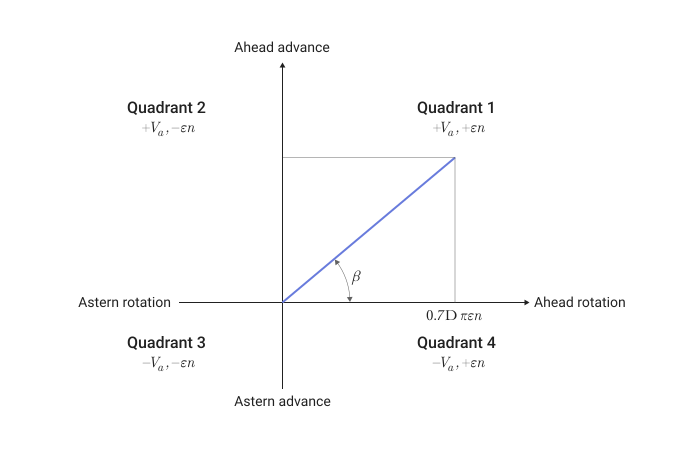
If for the parameter Parameterization the value is set Constant coefficients, this allows you to directly set the thrust and power coefficients. Otherwise, the block calculates these coefficients depending on the parameter value. Parameterization.
The relative tread of the screw
If for the parameter Parameterization the value is set Polynomial fit or Tabulated data for advance ratio, the block uses the relative tread of the screw . The unit uses a numerically smoothed version of the basic thrust and power equations, so that
The block defines the relative tread of the screw as
where is the threshold value of the angular velocity linearizes the speed of rotation of the propeller for smoothing purposes.
If for the parameter Parameterization the value is set:
-
Polynomial fit— values and they change over time in accordance with the values set for the parameters of the coefficients of the polynomial. The block sets the value in the range of0up to the first positive root of the polynomial and limits the values and so that they are always positive. The unit calculates the thrust and power coefficients as follows:
where and these are the coefficients of the polynomial.
-
Tabulated data for advance ratio— you need to specify tabular values for and for the set values or and depending on the flag state Controlled blade pitch.
If the check box is Efficiency sensor installed, the unit calculates the efficiency as follows:
The angle of flow
If for the parameter Parameterization the value is set Tabulated data for advance angle, the unit calculates the thrust and power coefficients in relation to the relative flow angle. The block determines the flow angle as follows:
where — cyclically variable value. The block defines the thrust and power coefficients for the relative velocity of the incoming flow as
where — the relative velocity of the incoming flow on the blade profile at a distance of 70% of the blade radius, such that
Rearranging the coefficient equations yields the block equations for thrust and torque as a function of the relative velocity of the incoming flow:
If the check box Controlled blade pitch:
-
Removed, the unit calculates the thrust and power coefficients as follows:
-
Installed, the unit calculates the thrust and power coefficients as follows:
The efficiency of a propeller is based on a fundamental ratio
If the check box Efficiency sensor installed, the unit calculates the smoothed efficiency as follows:
coeffects of lifting force and drag of blade elements
If for the parameter Parameterization the value is set Tabulated data for airfoil lift and drag coefficients, it is possible to parameterize the coefficients of lift and drag, as well as the geometry of the aerodynamic profile for a given blade element. The unit treats the propeller as a solid disk. The law of conservation of momentum is applied to the air passing through the disk when the block calculates the induced velocity. . The unit uses the induced velocity to determine the magnitude and direction of the total flow velocity in a vector of radial points along the blade, which are then used to determine lift and drag based on interpolation tables of lift and drag coefficients. These values are specific to this parameterization.:
-
— thrust calculated according to the impulse theory;
-
— axial flow velocity created by the movement of the propeller blades;
-
— the speed of the incoming air flow acting on the screw;
-
— axial velocity at the location of the blade;
-
— theoretical inductive speed in hover mode;
-
— dimensionless value ;
-
— the function used by the block to calculate the incoming flow;
-
— thrust calculated according to the theory of the blade element;
-
— the torque calculated according to the theory of the blade element;
-
— number of propeller blades;
-
— the discrete location of the blade element, determined by a dimensionless parameter Nondimensional radial location vector, r, which the block interpolates to find ;
-
is the length of the chord at a point along the blade, where the length is dimensionless, so that geometric chord length ;
-
— the dimensionless position of the comet, set by the first element of the parameter Nondimensional radial location vector, r;
-
— the tangential component of the velocity vector as a function of ;
-
— element-wise coefficients of lifting force and drag , respectively;
-
— the angle of the incoming flow at a given point along the blade.
The block uses momentum theory to determine the smoothed thrust equation in such a way that
where the block implicitly solves the equation for and . The block smooths out to find , which allows transitions between forward and backward streams in such a way that
The block interpolates values from the parameter Nondimensional radial location vector, r to find . The block then interpolates the lift and drag coefficients to find and based on tabular values of the angle of attack and coefficients of lift and drag. The unit uses the theory of the blade element to calculate thrust and torque in such a way that
The unit performs this integration for each discrete element of the blade. The block samples according to the parameter settings Number of blade elements.
managed blade installation
When the checkbox is selected Controlled blade pitch You can parameterize the propeller in the range of blade mounting angles. . Meaning it must be specified as a vector in the parameter Pitch angle vector, θ where each element corresponds to a row in the arrays and .
Inertia
Optionally, you can turn on the inertia of the translational and rotational motion of the propeller. To simulate inertia, set the parameters Rotational connections or Translational connections meaning Conserving, and then check the box Model inertia. When the checkbox is selected Model inertia and setting for the parameter Rotational connections values Conserving set the initial rotation speed or shaft torque in the parameter group Initial targets or set an algebraically related variable with a high priority to initialize the inertia of rotation. When the checkbox is selected Model inertia and setting for the parameter Translational connections values Conserving set the initial translational velocity or thrust in the parameter group Initial targets or set an algebraically related variable with a high priority to initialize translational inertia.
|
For non-directional ports with a domain For non-directional ports with a domain |
Assumptions and limitations
-
The block considers the velocity of the external environment as quasi-stationary in time. The external environment flows evenly around the propeller.
-
The unit takes into account only the axial flow through the propeller.
-
If for the parameter Parameterization the value is set
Polynomial fitThe block assumes that the power and thrust coefficients of the propeller are symmetrical to the first quadrant. -
If for the parameter Parameterization the value is set
Tabulated data for advance ratioThe block assumes that the power and thrust coefficients are the same in the first and third quadrants, as well as in the second and fourth quadrants. If all the elements are If they are positive, then the block assumes that the coefficients in all quadrants are symmetric to the first quadrant. -
If for the parameter Parameterization the value is set
Tabulated data for advance angle, the block removes a sign from . To obtain negative thrust and torque values, the signs in the values must be taken into account. and .
Variables
Use the parameter group Initial targets to set the priority and initial target values for the block parameter variables before modeling. For more information, see Configuring physical blocks using target values.
Ports
Conserving
#
C2
—
reference flow
translational mechanics
Details
A non-directional port associated with the movement of air or wind against which the propeller rotates.
Dependencies
To use this port, set the parameter Translational connections meaning Conserving.
| Program usage name |
|
#
R1
—
propeller shaft
rotational mechanics
Details
A non-directional port connected to the propeller shaft.
Dependencies
To use this port, set the parameter Rotational connections meaning Conserving.
| Program usage name |
|
#
R2
—
vehicle speed and thrust
translational mechanics
Details
A non-directional port related to the speed and thrust of the vehicle.
Dependencies
To use this port, set the parameter Translational connections meaning Conserving.
| Program usage name |
|
Input
#
θ
—
blade mounting angle, degrees
scalar
Details
The input port of the scalar signal associated with the angle of the blade, measured in degrees.
Dependencies
To use this port, check the box Controlled blade pitch.
| Data types |
|
| Complex numbers support |
No |
#
w
—
propeller rotation speed, rad/s
scalar
Details
The input port of the scalar signal is associated with the speed of rotation of the propeller, measured in rad/s.
Dependencies
To use this port, set the parameter Rotational connections meaning Signals.
| Data types |
|
| Complex numbers support |
No |
#
ρ
—
variable density, kg/m3
scalar
Details
The input port of the scalar signal is associated with the density of the external environment, measured in kg/m 3.
Dependencies
To use this port, check the box Variable fluid density.
| Data types |
|
| Complex numbers support |
No |
#
Va
—
incoming flow velocity, m/s
scalar
Details
The input port of the scalar signal is associated with the flow velocity passing through the propeller, measured in m/s.
Dependencies
To use this port, set the parameter Translational connections meaning Signals.
| Data types |
|
| Complex numbers support |
No |
Output
#
Th
—
propeller thrust, N
scalar
Details
The output port of the scalar signal associated with the thrust generated by the propeller, measured in Newtons.
Dependencies
To use this port, set the parameter Translational connections meaning Signals.
| Data types |
|
| Complex numbers support |
No |
#
Q
—
resistance of the propeller blades, NM
scalar
Details
The output port of the scalar signal is connected to the resistance of the propeller blades, measured in Nm.
Dependencies
To use this port, set the parameter Rotational connections meaning Signals.
| Data types |
|
| Complex numbers support |
No |
#
E
—
efficiency, dimensionless
scalar
Details
The output port of the scalar signal associated with the efficiency of the propeller. The efficiency signal is a function of the absolute value of the relative thrust of the screw.
Dependencies
To use this port, check the box Efficiency sensor.
| Data types |
|
| Complex numbers support |
No |
Parameters
Propeller
# Power coefficient vector, kP(J) — tabular values of the power factor for a given relative thrust of the screw
Details
Tabular values of the power factor depending on the relative speed of the screw.
Dependencies
To use this parameter, set for the parameter Parameterization meaning Tabulated data for advance ratio and uncheck the box Controlled blade pitch.
| Default value |
|
| Program usage name |
|
| Evaluatable |
Yes |
# Advance ratio vector, J — range of relative steps for tabular thrust and power coefficients
Details
Tabular values of relative steps. Each element has a corresponding element in the parameters Thrust coefficient vector, kT(J) and Power coefficient vector, kP(J) or a column in the parameters Thrust coefficient table, kT(θ, J) and Power coefficient table, kP(θ, J).
Dependencies
To use this parameter, set for the parameter Parameterization meaning Tabulated data for advance ratio.
| Default value |
|
| Program usage name |
|
| Evaluatable |
Yes |
# Airfoil drag coefficient table, Cd(α,r) — drag coefficients of the aerodynamic profile
Details
Drag coefficients of the airfoil for a given angle of attack and radial position along the blade. The rows of this matrix correspond one to one to the parameter Airfoil angle of attack vector, α. The columns of this matrix correspond one to one to the parameter Nondimensional radial location vector, r.
Dependencies
To use this parameter, set for the parameter Parameterization meaning Tabulated data for airfoil lift and drag coefficients.
| Default value |
|
| Program usage name |
|
| Evaluatable |
Yes |
#
Advance angle vector, β —
increasing flow angles
rad | deg | rev | mrad | arcsec | arcmin | gon
Details
Tabular values of the flow angles. Use a monotonically increasing vector whose elements are in the range [0, 360] degrees. During the simulation, the flow angle can be in the range of [0, 360) degrees, where the block covers the angle from 0 before 360 degrees.
If for the parameter Extrapolation method the value is set Linear or Nearest:
-
If the first element is not equal to
0, then the block extrapolates based on the first or two elements when less than the first element. -
If the last element is not equal
360degrees, then the block extrapolates based on the last or two elements when more than the last element.
Dependencies
To use this parameter, set for the parameter Parameterization meaning Tabulated data for advance angle.
| Units |
|
| Default value |
|
| Program usage name |
|
| Evaluatable |
Yes |
#
Propeller diameter —
diameter of the propeller
m | um | mm | cm | km | in | ft | yd | mi | nmi
Details
The diameter of the propeller.
| Units |
|
| Default value |
|
| Program usage name |
|
| Evaluatable |
Yes |
#
Blade twist vector, θ_tw(r) —
turning the blade elements
rad | deg | rev | mrad | arcsec | arcmin | gon
Details
The corners turning the blade for a given radial position. The elements of this vector are correlated one-to-one with the elements of the vector in the parameter Nondimensional radial location vector, r.
Dependencies
To use this parameter, set for the parameter Parameterization meaning Tabulated data for airfoil lift and drag coefficients.
| Units |
|
| Default value |
|
| Program usage name |
|
| Evaluatable |
Yes |
#
Interpolation method —
the method of interpolation between the values of inflection points
Linear | Smooth
Details
The method used to interpolate inflection points in an interpolation table.
-
Linear— select this value for the lowest computational cost. -
Smooth— select this value to obtain a continuous curve with continuous first-order derivatives.
Dependencies
To use this parameter, set for the parameter Parameterization meaning Tabulated data for advance ratio or Tabulated data for advance angle.
| Values |
|
| Default value |
|
| Program usage name |
|
| Evaluatable |
No |
# Number of blade elements — number of blade elements
Details
The number of blade elements per blade.
Dependencies
To use this parameter, set for the parameter Parameterization meaning Tabulated data for airfoil lift and drag coefficients.
| Default value |
|
| Program usage name |
|
| Evaluatable |
Yes |
#
Airfoil angle of attack vector, α —
Angle of attack
rad | deg | rev | mrad | arcsec | arcmin | gon
Details
Range of angles of attack. The elements of this vector are correlated one-to-one with the rows in the parameters Airfoil lift coefficient table, Cl(α,r) and Airfoil drag coefficient table, Cd(α,r).
Dependencies
To use this parameter, set for the parameter Parameterization meaning Tabulated data for airfoil lift and drag coefficients.
| Units |
|
| Default value |
|
| Program usage name |
|
| Evaluatable |
Yes |
# Thrust coefficient table, Ct(θ, β) — tabular thrust coefficients for the specified blade mounting angle and flow angle
Details
Tabular thrust coefficients depending on the angle of installation of the blade and the angle of flow.
Dependencies
To use this parameter, set for the parameter Parameterization meaning Tabulated data for advance angle and check the box Controlled blade pitch.
| Default value |
|
| Program usage name |
|
| Evaluatable |
Yes |
# Table of kT polynomial coefficients (θ, pN...p0) — polynomial coefficients for calculating thrust coefficients in the case of propellers with adjustable blade angle
Details
A table of vectors of polynomial coefficients for calculating the thrust coefficient for a given value in the parameter Pitch angle vector, θ.
Dependencies
To use this parameter, set for the parameter Parameterization meaning Tabulated data for advance ratio and check the box Controlled blade pitch.
| Default value |
|
| Program usage name |
|
| Evaluatable |
Yes |
#
Root pitch angle —
angle of installation of the wing section of the blade
rad | deg | rev | mrad | arcsec | arcmin | gon
Details
A constant angle of displacement of the installation of the wing section of the propeller blade.
Dependencies
To use this parameter, set for the parameter Parameterization meaning Tabulated data for airfoil lift and drag coefficients and uncheck the box Controlled blade pitch.
| Units |
|
| Default value |
|
| Program usage name |
|
| Evaluatable |
Yes |
#
Extrapolation method —
a method for processing input values that fall outside the range of the inflection point dataset
Linear | Nearest | Error
Details
A method used to extrapolate inflection points in an interpolation table. This method determines the output value when the input value is outside the range specified in the argument list.
-
Linear— select this value to obtain a curve with continuous first-order derivatives in the extrapolation region and on the boundary with the interpolation region. -
Nearest— Select this value to build an extrapolation that does not go beyond the highest data point and does not fall below the lowest data point. -
Error— select this value to avoid extrapolation if you want your data to be within the range of the table. If the input signal is outside the range of the table, the simulation stops and outputs an error.
Dependencies
To use this parameter, set for the parameter Parameterization meaning Tabulated data for advance ratio or Tabulated data for advance angle.
| Values |
|
| Default value |
|
| Program usage name |
|
| Evaluatable |
No |
# Controlled blade pitch — constant or adjustable blade mounting angle
Details
The type of blade being modeled. Uncheck the box for a blade with a constant angle of installation or check the box for a blade with an adjustable angle of installation, which is set using the port *.
Dependencies
To use this parameter, set for the parameter Parameterization one of the following values:
-
Polynomial fit; -
Tabulated data for advance ratio; -
Tabulated data for advance angle; -
Tabulated data for airfoil lift and drag coefficients.
| Default value |
|
| Program usage name |
|
| Evaluatable |
No |
# Thrust coefficient vector, kT(J) — tabular values of the thrust coefficient for a given relative thrust of the propeller
Details
Tabular values of the thrust coefficient depending on the relative thrust of the propeller.
Dependencies
To use this parameter, set for the parameter Parameterization meaning Tabulated data for advance ratio and uncheck the box Controlled blade pitch.
| Default value |
|
| Program usage name |
|
| Evaluatable |
Yes |
# kT polynomial coefficients (pN...p0) — polynomial coefficients for calculating the thrust coefficient
Details
A vector of dimensionless polynomial coefficients for calculating the thrust coefficient. Specify the elements in descending order. The block uses these coefficients to create an interpolation table.
Dependencies
To use this parameter, set for the parameter Parameterization meaning Polynomial fit and uncheck the box Controlled blade pitch.
| Default value |
|
| Program usage name |
|
| Evaluatable |
Yes |
# Torque coefficient vector, Cq(β) — tabular torque coefficients for a given flow angle
Details
Tabular torque coefficients depending on the flow angle. This coefficient depends on the relative velocity of the incoming flow at a distance of 70% of the blade radius. The elements of this vector are correlated one-to-one with the elements of the vector in the parameter Advance angle vector, β.
Dependencies
To use this parameter, set for the parameter Parameterization meaning Tabulated data for advance angle and uncheck the box Controlled blade pitch.
| Default value |
|
| Program usage name |
|
| Evaluatable |
Yes |
# Airfoil lift coefficient table, Cl(α,r) — lifting force coefficients of the aerodynamic profile
Details
Coefficients of the lifting force of the profile for a given angle of attack and radial position along the blade. The rows of this matrix correspond one to one to the parameter Airfoil angle of attack vector, α. The columns of this matrix correspond one to one to the parameter Nondimensional radial location vector, r.
Dependencies
To use this parameter, set for the parameter Parameterization meaning Tabulated data for airfoil lift and drag coefficients.
| Default value |
|
| Program usage name |
|
| Evaluatable |
Yes |
# Thrust coefficient vector, Ct(β) — tabular thrust coefficients for a given flow angle
Details
Tabular thrust coefficients depending on the flow angle. This coefficient depends on the relative velocity of the incoming flow at a distance of 70% of the blade radius. The elements of this vector are correlated one-to-one with the elements of the vector in the parameter Advance angle vector, β.
Dependencies
To use this parameter, set for the parameter Parameterization meaning Tabulated data for advance angle and uncheck the box Controlled blade pitch.
| Default value |
|
| Program usage name |
|
| Evaluatable |
Yes |
# Number of blades — number of blades
Details
The number of propeller blades.
Dependencies
To use this parameter, set for the parameter Parameterization meaning Tabulated data for airfoil lift and drag coefficients.
| Default value |
|
| Program usage name |
|
| Evaluatable |
Yes |
# kP polynomial coefficients (pN...p0) — polynomial coefficients for calculating the power factor
Details
A vector of dimensionless polynomial coefficients for calculating the power factor. Specify the elements in descending order. The block uses these coefficients to create an interpolation table.
Dependencies
To use this parameter, set for the parameter Parameterization meaning Polynomial fit and uncheck the box Controlled blade pitch.
| Default value |
|
| Program usage name |
|
| Evaluatable |
Yes |
#
Pitch angle vector, θ —
blade mounting angles
rad | deg | rev | mrad | arcsec | arcmin | gon
Details
The reference angles of the blades when the flag is set Controlled blade pitch.
Dependencies
To use this parameter, set for the parameter Parameterization meaning Polynomial fit, Tabulated data for advance ratio or Tabulated data for advance angle and check the box Controlled blade pitch.
| Units |
|
| Default value |
|
| Program usage name |
|
| Evaluatable |
Yes |
#
Propeller direction —
the direction of rotation of the propeller
Positive rotational velocity generates positive thrust for positive thrust coefficients | Negative rotational velocity generates positive thrust for positive thrust coefficients
Details
The direction of rotation of the propeller. Choose one of the following options:
-
Positive rotational velocity generates positive thrust for positive thrust coefficients— . -
Negative rotational velocity generates positive thrust for positive thrust coefficients— .
| Values |
|
| Default value |
|
| Program usage name |
|
| Evaluatable |
No |
# Thrust coefficient, kT — thrust coefficient
Details
A dimensionless constant thrust coefficient.
Dependencies
To use this parameter, set for the parameter Parameterization meaning Constant coefficients.
| Default value |
|
| Program usage name |
|
| Evaluatable |
Yes |
# Thrust coefficient table, kT(θ, J) — tabular values of the thrust coefficient for the specified angle of the blade and the relative thrust of the propeller
Details
Tabular values of thrust coefficients depending on the angle of the blade and the relative thrust of the propeller. The columns correspond to the parameter elements Advance ratio vector, J, and the strings correspond to the elements of the parameter Pitch angle vector, θ.
Dependencies
To use this parameter, set for the parameter Parameterization meaning Tabulated data for advance ratio and check the box Controlled blade pitch.
| Default value |
|
| Program usage name |
|
| Evaluatable |
Yes |
# Power coefficient, kP — Power factor
Details
A dimensionless constant power factor.
Dependencies
To use this parameter, set for the parameter Parameterization meaning Constant coefficients.
| Default value |
|
| Program usage name |
|
| Evaluatable |
Yes |
# Nondimensional radial location vector, r — radial position
Details
The radial position for a given set of blade sizes. Meaning 1 equivalent to the radius of the blade. The first element of this vector defines — komel.
Dependencies
To use this parameter, set for the parameter Parameterization meaning Tabulated data for airfoil lift and drag coefficients.
| Default value |
|
| Program usage name |
|
| Evaluatable |
Yes |
# Power coefficient table, kP(θ, J) — tabular values of the power factor for the specified angle of the blade and the relative tread of the screw
Details
Tabular values of the power coefficients depending on the angle of the blade and the relative thrust of the propeller. The columns correspond to the parameter elements Advance ratio vector, J, and the strings correspond to the elements of the parameter Pitch angle vector, θ.
Dependencies
To use this parameter, set for the parameter Parameterization meaning Tabulated data for advance ratio and check the box Controlled blade pitch.
| Default value |
|
| Program usage name |
|
| Evaluatable |
Yes |
# Table of kP polynomial coefficients (θ, pN...p0) — polynomial coefficients for calculating power coefficients in the case of propellers with adjustable blade angle
Details
A table of vectors of polynomial coefficients for calculating power coefficients for a given value in the parameter Pitch angle vector, θ.
Dependencies
To use this parameter, set for the parameter Parameterization meaning Tabulated data for advance ratio and check the box Controlled blade pitch.
| Default value |
|
| Program usage name |
|
| Evaluatable |
Yes |
#
Parameterization —
parameterization of the propeller
Constant coefficients | Polynomial fit | Tabulated data for advance ratio | Tabulated data for advance angle | Tabulated data for airfoil lift and drag coefficients
Details
Parameterization of a propeller using constants, polynomials, tabular thrust and power coefficients, or tabular lift and drag coefficients. Choose one of the following options:
-
Constant coefficients— the use of constant thrust and power coefficients depending on the relative thrust of the propeller. -
Polynomial fit— the use of polynomial coefficients to parameterize the relative speed of the screw. -
Tabulated data for advance ratio— using tabular data to parameterize the relative speed of the screw. -
Tabulated data for advance angle— the use of thrust and power coefficients depending on the relative velocity of the incoming flow at a distance of 70% of the blade radius. -
Tabulated data for airfoil lift and drag coefficients— the use of lifting force and drag coefficients depending on the position along the blade.
| Values |
|
| Default value |
|
| Program usage name |
|
| Evaluatable |
No |
# Torque coefficient table, Cq(θ, β) — tabular torque coefficients for the specified blade mounting angle and flow angle
Details
Tabular torque coefficients depending on the angle of installation of the blade and the angle of flow.
Dependencies
To use this parameter, set for the parameter Parameterization meaning Tabulated data for advance angle and check the box Controlled blade pitch.
| Default value |
|
| Program usage name |
|
| Evaluatable |
Yes |
# Normalized chord length vector, c(r)/D — length of the chord of the blade element
Details
The length of the chord, normalized to the diameter, for a given radial position along the blade. The elements of this vector are correlated one-to-one with the elements of the vector in the parameter Nondimensional radial location vector, r and columns in the parameters Airfoil lift coefficient table, Cl(α,r) and Airfoil drag coefficient table, Cd(α,r).
Dependencies
To use this parameter, set for the parameter Parameterization meaning Tabulated data for airfoil lift and drag coefficients.
| Default value |
|
| Program usage name |
|
| Evaluatable |
Yes |
Environment and Dynamics
# Model inertia — inertia modeling option
Details
Setting this flag allows you to simulate inertia caused by the movement of the rotor. The unit applies rotational inertia at port R1 and translational inertia at port R2.
Dependencies
To use this parameter, set for the parameter Rotational connections or Translational connections meaning Conserving.
| Default value |
|
| Program usage name |
|
| Evaluatable |
No |
#
Translational connections —
translational motion modeling option
Signals | Conserving
Details
A parameter that allows you to simulate the velocity of the incoming flow and the thrust of the propeller as input and output scalar signals, respectively, or as translational connections. This parameter determines the color of the blades on the block icon, which indicates the domain of the scalar signal. When selecting a value Conserving The constant coefficient of the associated flow reduces the speed of the incoming flow relative to the speed of the vehicle.
| Values |
|
| Default value |
|
| Program usage name |
|
| Evaluatable |
No |
#
Propeller mass —
weight of the propeller
kg | mg | g | t | lbm | oz | slug
Details
The mass of the propeller assembly. The unit applies the inertia of translational motion in port R2.
Dependencies
To use this parameter, set for the parameter Translational connections meaning Conserving and check the box Model inertia.
| Units |
|
| Default value |
|
| Program usage name |
|
| Evaluatable |
Yes |
#
Rotational connections —
rotational motion simulation option
Signals | Conserving
Details
A parameter that allows you to simulate the speed of rotation of the propeller and the torque of the resistance as input and output scalar signals, respectively, or as rotational connections. This parameter determines the color of the propeller shaft on the block icon, which indicates the domain of the scalar signal.
| Values |
|
| Default value |
|
| Program usage name |
|
| Evaluatable |
No |
# Variable fluid density — choosing the method of setting the density of the external environment
Details
If the checkbox is unchecked, the density of the external environment is considered constant. If the box is checked, the density of the external environment is considered variable.
| Default value |
|
| Program usage name |
|
| Evaluatable |
No |
#
Fluid density —
constant value of the density of the external environment
kg/m^3 | g/m^3 | g/cm^3 | g/mm^3 | lbm/ft^3 | lbm/gal | lbm/in^3
Details
A constant value of the density of the external environment.
Dependencies
To use this option, uncheck the box. Variable fluid density.
| Units |
|
| Default value |
|
| Program usage name |
|
| Evaluatable |
Yes |
#
Propeller inertia —
propeller inertia
kg*m^2 | g*m^2 | kg*cm^2 | g*cm^2 | lbm*in^2 | lbm*ft^2 | slug*in^2 | slug*ft^2
Details
Inertia of the propeller assembly. The unit applies rotational inertia at port R1.
Dependencies
To use this parameter, set for the parameter Rotational connections meaning Conserving and check the box Model inertia.
| Units |
|
| Default value |
|
| Program usage name |
|
| Evaluatable |
Yes |
Advanced
# Saturation threshold for nondimensional coefficients — smoothing point for dimensionless coefficients
Details
Saturation threshold value in which the block applies smoothing to the dimensionless coefficients.
| Default value |
|
| Program usage name |
|
| Evaluatable |
Yes |
#
Power threshold for efficiency calculation —
power threshold value
W | uW | mW | kW | MW | GW | V*A | HP_DIN
Details
The threshold value of power when calculating efficiency.
Dependencies
To use this parameter, set for the parameter Parameterization meaning Tabulated data for airfoil lift and drag coefficients and check the box Efficiency sensor.
| Units |
|
| Default value |
|
| Program usage name |
|
| Evaluatable |
Yes |
# Efficiency sensor — the option of displaying information about efficiency
Details
By checking this box, you can activate the E port, which outputs a positive efficiency signal.
| Default value |
|
| Program usage name |
|
| Evaluatable |
No |
#
Rotational speed threshold —
the smoothing point of the rotation speed
Hz | kHz | MHz | GHz
Details
Saturation threshold value , after exceeding which the block applies smoothing to the saturation point.
| Units |
|
| Default value |
|
| Program usage name |
|
| Evaluatable |
Yes |
#
Check if operating beyond normal propeller operation —
tolerance of working boundaries
None | Error
Details
This parameter allows you to display an error when the propeller exceeds the operating parameters. The unit checks whether the propeller is working in the first quadrant. If the values are or If they are not positive, the propeller generates thrust and torque coefficients with the appropriate signs and outputs an error if this parameter is adjusted accordingly. When the parameter value is increased Rotational speed threshold the trigger becomes less sensitive.
If for the parameter Parameterization the value is set Polynomial fit, the block outputs an error when the propeller exceeds the first positive root of the parameter value .
The block approximates hydrodynamics using symmetric or asymmetric behavior relative to the first quadrant.
Dependencies
To use this parameter, set for the parameter Parameterization meaning Polynomial fit or Tabulated data for advance ratio.
| Values |
|
| Default value |
|
| Program usage name |
|
| Evaluatable |
No |