Poppet with Plain Seat (IL)
A control disc valve with a flat seat.
blockType: EngeeFluids.IsothermalLiquid.DesignComponents.Poppets.PlainSeat
|
Poppet with Plain Seat (IL) Path in the library: |
|
Poppet with Plain Seat with Moving Body (IL) Path in the library: |
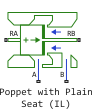
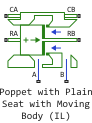
Description
Block Poppet with Plain Seat (IL) It represents a one-dimensional movement of a control flat valve with a flat seat.

The diameter values should be determined as follows:
where
-
— valve diameter;
-
— inner diameter of the seat;
-
— the diameter of the valve stem on the seat side.
In the parameter Pressure acting in the flapper seat area You can set one of three options for calculating the pressure force acting in the seat area:
-
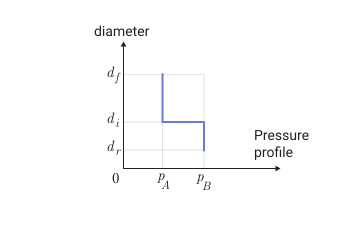
ConstantIt is assumed that the pressure in port B affects the active area adjacent to the opening and tends to open it. The pressure in port A affects the remaining area of the seat. This assumption is valid for turbulent flow (mainly for high lift values).
-
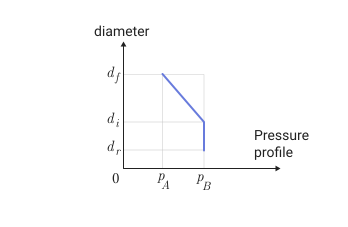
GradientIt is assumed that the pressure in port B acts on the active region adjacent to the opening and tends to open it. A linear pressure gradient (between the pressure in port B and the pressure in port A) acts on the remaining area of the seat. These assumptions give the pressure force acting on the saddle.
-
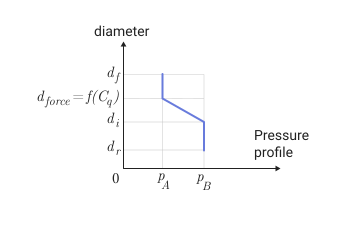
TransitionIt is assumed that the pressure in port B acts on the active region adjacent to the opening and tends to open it. A new diameter is being introduced , linearly dependent on the flow rate :
-
if the flow is laminar, then — valve diameter;
-
if the current is turbulent, then — the diameter of the saddle.
A linear pressure gradient (between the pressure in port B and the pressure in port A) acts on the valve area, limited by and , and the pressure in port A applies to the remaining area.
For laminar flow, this option is equivalent to option 2, and for turbulent flow, it is equivalent to option 1. These assumptions give the pressure force acting on the valve.
-
The movement and speed of the rod are transmitted to the RB port.
If the check box is selected Moving body, then the block is implemented Poppet with Plain Seat with Moving Body (IL) and the body movement is simulated. In this case, the displacement and velocity of the case are transmitted to the CA port.
There are no restrictions on the displacement value in the block, but restrictions can be provided by an attached block using end stops (Translational Hard Stop).
The area of the open opening is a variable related to the movement of the valve and the movement of the body, if modeled.
Under no circumstances should the area of the opening exceed the area of the neck, determined by the inner diameter of the seat and the diameter of the stem (on the side of the seat). Sometimes it is useful to limit the hole area to a minimum and/or maximum value. The minimum area can be used to simulate a leak or a special flow hole, even when the valve is fully attached to the seat. The maximum area can be used to simulate the flow area adjacent to the opening when the valve is wide open.
The flow rate is calculated based on the movement of the valve.
The equations
If the check box Moving body removed and the body movement is not simulated, the valve lift is defined as
where
-
— the rise corresponding to the zero offset, the value of the parameter Lift corresponding to zero displacement;
-
— moving the rod in the RA port.
If the check box is Moving body If the valve body is installed and the movement is simulated, then the valve lift is defined as
where — moving the case in port CA.
The cross-sectional area of the flow corresponding to the rise , calculated as
and the hydraulic diameter is
It is assumed that this surface divides the area occupied by the liquid into two zones. One of these areas is under pressure. , and the other is under pressure , operating in the valve area. These assumptions are correct if the amount of lift is small compared to the diameter of the seat. If the rise is large, it is obvious that at some point the smallest limitation will be the area of the neck. Therefore, the cross-sectional area of the flow corresponding to the rise , there will never be less than the neck area:
The value used for , limited between and . Usually the value is it is zero, but it can be set higher to simulate the leakage rate. Meaning usually very large (for example, Inf), but a much lower value can be set to simulate an additional hole.
If the check box is Moving body removed, the volumes of liquid that are discharged to ports A and B are calculated as
where and — the value of the parameters Volume at port A corresponding to zero lift and Volume at port B corresponding to zero lift accordingly.
If the check box Moving body installed, then
Flow coefficient calculated as
where
-
— pressure difference between ports;
-
— hydraulic diameter;
-
— kinematic viscosity;
-
— the average density of the liquid.
Expense ratio calculated as
where
-
— maximum flow rate, parameter value Maximum flow coefficient;
-
— critical flow coefficient, parameter value Critical flow number.
For meaning practically does not change. For low meaning it changes linearly with the change .
A reasonable value the default is 1000. However, for holes with complex (rough) geometry, it may be smaller. 50. For very smooth geometry, it can be set to 50000.
The average fluid velocity is
The volume consumption is
where
-
— the cross-sectional area of the flow;
-
— the density of a liquid at atmospheric pressure.
If the check box Moving body if withdrawn, the volume costs in ports B and A are calculated as
where
-
— liquid density at port pressure B, ;
-
— liquid density at port pressure A, ;
-
— the speed of the rod in the port RA.
If the check box is Moving body installed, then
where — the speed of the case in the port CA.
The hydrodynamic force is not taken into account in this model.
Power in the port RA calculated based on the strength in port RB , the pressure force in port B acting on the seat between the diameters and , and pressure forces between the diameters and :
Power calculated using one of the three possible methods specified in the parameter Pressure acting in the flapper seat area:
-
Constant: It is considered permanent in the saddle area: -
Gradient: between and A linear gradient is applied:
-
Transition: between and A linear gradient is applied in the area between and , the remaining area uses a constant :
where
If the check box Pressure force contribution on the flapper seat at zero lift removed, then for The value of power smoothly changes between 0 and the force calculated by the chosen method.
Ports
Conserving
#
RB
—
stock
translational mechanics
Details
Mechanical translational port corresponding to the rod.
| Program usage name |
|
#
CA
—
housing
translational mechanics
Details
Mechanical translational port corresponding to the body.
Dependencies
To use this port, check the box Moving body.
| Program usage name |
|
#
B
—
Isothermal liquid port
Isothermal liquid
Details
The isothermal liquid port corresponding to the inlet or outlet.
| Program usage name |
|
#
RA
—
stock
translational mechanics
Details
Mechanical translational port corresponding to the rod.
| Program usage name |
|
#
CB
—
housing
translational mechanics
Details
Mechanical translational port corresponding to the body.
Dependencies
To use this port, check the box Moving body.
| Program usage name |
|
#
A
—
Isothermal liquid port
Isothermal liquid
Details
The isothermal liquid port corresponding to the inlet or outlet.
| Program usage name |
|
Parameters
Parameters
#
Nozzle internal diameter (hole) —
seat diameter
m | um | mm | cm | km | in | ft | yd | mi | nmi
Details
Seat diameter .
| Units |
|
| Default value |
|
| Program usage name |
|
| Evaluatable |
Yes |
# Moving body — movable housing
Details
Check this box if you are modeling a movable enclosure.
If the flag is unchecked, it is assumed that the body is stationary.
| Default value |
|
| Program usage name |
|
| Evaluatable |
No |
#
Pressure acting in the flapper seat area —
method for calculating the pressure force acting in the seat area
Constant | Gradient | Transition
Details
A method for calculating the pressure force acting in the seat area.
| Values |
|
| Default value |
|
| Program usage name |
|
| Evaluatable |
No |
#
Rod diameter (nozzle side) —
diameter of the stem on the seat side
m | um | mm | cm | km | in | ft | yd | mi | nmi
Details
Diameter of the rod on the seat side .
| Units |
|
| Default value |
|
| Program usage name |
|
| Evaluatable |
Yes |
# Pressure force contribution on the flapper seat at zero lift — the effect of the pressure force on the seat at zero lift
Details
If this option is selected, the force of pressure on the seat (between and ) is taken into account at the moment of touch. If the flag is unchecked, the force of pressure on the seat at the moment of touch is not taken into account, and the adapter hole for the force of pressure on the seat corresponds to lifting starting from which the pressure force is fully applied to the seat.
| Default value |
|
| Program usage name |
|
| Evaluatable |
No |
#
Lift corresponding to minimum area —
lifting corresponding to the minimum area
m | um | mm | cm | km | in | ft | yd | mi | nmi
Details
Lift , corresponding to the minimum area of the passage hole.
| Units |
|
| Default value |
|
| Program usage name |
|
| Evaluatable |
Yes |
#
Lift corresponding to zero displacement —
the rise corresponding to the zero offset
m | um | mm | cm | km | in | ft | yd | mi | nmi
Details
The rise corresponding to the zero offset.
| Units |
|
| Default value |
|
| Program usage name |
|
| Evaluatable |
Yes |
#
Opening orientation —
the direction of movement of the spool corresponding to the opening of the hole
Positive relative rod displacement opens orifice | Negative relative rod displacement opens orifice
Details
The direction of movement of the element corresponding to the opening of the hole:
-
Positive orientation
Positive relative rod displacement opens orificeit means that the positive movement of the spool opens the hole. -
The negative direction
Negative relative rod displacement opens orificethis means that the negative movement of the spool opens the hole.
| Values |
|
| Default value |
|
| Program usage name |
|
| Evaluatable |
No |
#
Volume at port A corresponding to zero lift —
the volume in port A corresponding to zero lift
m^3 | um^3 | mm^3 | cm^3 | km^3 | ml | l | gal | igal | in^3 | ft^3 | yd^3 | mi^3
Details
The volume in port A corresponding to zero lift.
| Units |
|
| Default value |
|
| Program usage name |
|
| Evaluatable |
Yes |
#
Flapper diameter —
valve diameter
m | um | mm | cm | km | in | ft | yd | mi | nmi
Details
Valve diameter .
| Units |
|
| Default value |
|
| Program usage name |
|
| Evaluatable |
Yes |
#
Lift corresponding to maximum area —
lifting corresponding to the maximum area
m | um | mm | cm | km | in | ft | yd | mi | nmi
Details
Lift , corresponding to the maximum area of the passage hole.
| Units |
|
| Default value |
|
| Program usage name |
|
| Evaluatable |
Yes |
#
Transition opening for pressure force on the flapper seat —
adapter hole for pressure force on the seat
m | um | mm | cm | km | in | ft | yd | mi | nmi
Details
Lift , corresponding to the adapter hole for the pressure force on the seat.
Dependencies
To use this option, uncheck the box. Pressure force contribution on the flapper seat at zero lift.
| Units |
|
| Default value |
|
| Program usage name |
|
| Evaluatable |
Yes |
#
Volume at port B corresponding to zero lift —
the volume in port B corresponding to zero lift
m^3 | um^3 | mm^3 | cm^3 | km^3 | ml | l | gal | igal | in^3 | ft^3 | yd^3 | mi^3
Details
The volume in port B corresponding to zero lift.
| Units |
|
| Default value |
|
| Program usage name |
|
| Evaluatable |
Yes |
Initial Conditions
#
Initial rod displacement —
initial displacement of the rod
m | um | mm | cm | km | in | ft | yd | mi | nmi
Details
The initial displacement of the rod.
| Units |
|
| Default value |
|
| Program usage name |
|
| Evaluatable |
Yes |
#
Initial case displacement —
initial displacement of the body
m | um | mm | cm | km | in | ft | yd | mi | nmi
Details
The initial displacement of the body.
Dependencies
To use this option, check the box Moving body.
| Units |
|
| Default value |
|
| Program usage name |
|
| Evaluatable |
Yes |
Flow Coefficient Law
# Critical flow number — critical flow coefficient
Details
The critical flow coefficient affects the flow rate/pressure drop characteristics in the orifice. For most applications, this value can be left at the default.
| Default value |
|
| Program usage name |
|
| Evaluatable |
Yes |
# Maximum flow coefficient — maximum flow rate
Details
The maximum flow rate affects the flow rate/pressure drop characteristics in the orifice. For most applications, this value can be left at the default.
| Default value |
|
| Program usage name |
|
| Evaluatable |
Yes |