Spool Edge with Notches (IL)
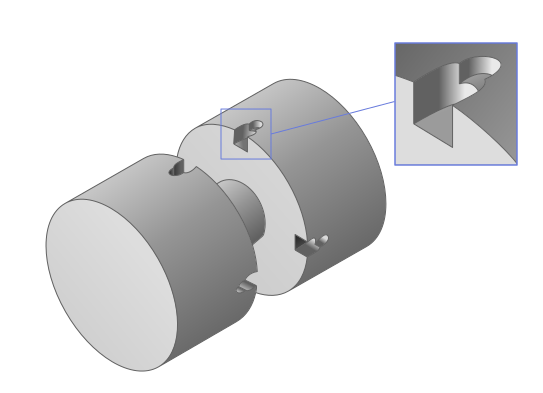
A spool valve with recesses along the edge.
blockType: EngeeFluids.IsothermalLiquid.DesignComponents.Spools.NotchesEdge
|
Spool Edge with Notches (IL) Path in the library: |
|
Spool Edge with Notches with Moving Body (IL) Path in the library: |
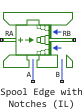
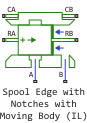
Description
Block Spool Edge with Notches (IL) It is a model of a metering edge for spool valves. The model allows you to design various geometries of recesses on the sharp edge of the spool to smooth out fluctuations in fluid flow between the positions of the spool, which is usually required for industrial and mobile hydraulic systems. This is a universal model that allows you to estimate the minimum cross-sectional area and hydraulic diameter, depending on both the geometric parameters of the recesses and the position of the spool.
The displaced volume is calculated in port B as a function of the working volume of the spool. The volume flow between ports A and B can be caused by the inlet pressure (leakage flow in case of negative overlap, flow through the hole in case of positive overlap, for more information, see Determining overlap) or the speed of the spool (if the Couette effect is enabled).
The resulting force acting on the spool is due to the pressure force (if it is taken into account), external forces, viscous friction on the spool (if the Couette effect is included) and the hydrodynamic force (if it is taken into account). It is assumed that the pressure in port B acts on the active region adjacent to the hole and tends to open the hole. The pressure in port A does not act directly on the spool. These assumptions give the pressure force acting on the spool. For the hydrodynamic force, it is assumed that the angle of inclination of the jet is constant.
The movement and speed of the rod are transmitted to the RA port. There are no restrictions on the displacement value in the block, but restrictions can be provided by an attached block using end stops (Translational Hard Stop).
If the check box is selected Moving body, then the block is implemented Spool Edge with Notches with Moving Body (IL) and the body movement is simulated. In this case, the displacement and velocity of the case are transmitted to the CA port. There are no restrictions on the displacement value in the block, but restrictions can be provided by an attached block using end stops.
Determining overlap
The figure shows the definition of overlap:
-
The P-A connection has a negative overlap value because liquid cannot flow through the closed P-A connection (except for leaks);
-
The P-B connection has a positive overlap value because some of the liquid can flow through the P-B connection (the P-B connection is open).
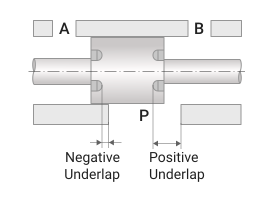
Parameter value Underlap corresponding to zero displacement — this is the relative position between the edge of the recess or the edge of the spool (in the case of a spool without recesses) and the port for the inlet of the isothermal fluid, if the position set in the port RA is 0.
Parameter value Underlap corresponding to maximum area — this is the overlap value at which the flow cross-sectional area reaches its maximum value. This parameter can be used to simulate the effect of geometric features of the spool or housing that restrict the flow of liquid (for example, when the hole begins to have a minimum cross-section at a given position of the spool).
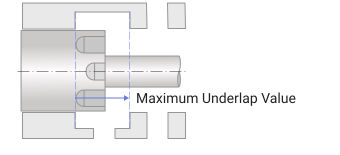
Note that the cross-sectional area of the flow should be an increasing function of the overlap value. In particular, it is assumed that the recess will never be blocked by the housing if the overlap is positive (as shown in the figure: with a slight shift to the left, the recess of the spool will be blocked by the housing). In any case, this hole in the housing is not modeled, so it is simply impossible to determine, for example, its diameter and, consequently, the moment when the flow cross-sectional area should decrease after reaching the maximum value at the maximum overlap value. This hypothesis should not cause problems in real systems, since they are not designed for such large overlap values.
Defining the geometry of the recesses
Parameter Number of slots sets the number of recesses on the spool edge. It is assumed that all recesses have the same geometry. Note that adding additional recesses only leads to an increase in the flow cross-sectional area for a given spool position. The angular position of the recesses on the spool circumference does not affect the simulation results and is not set in the block.
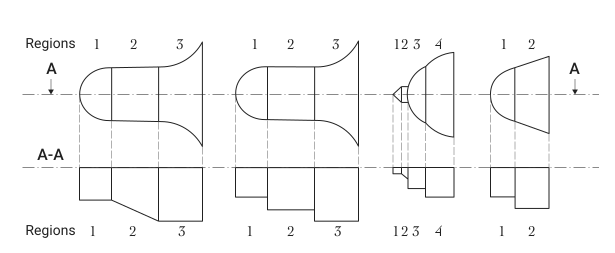
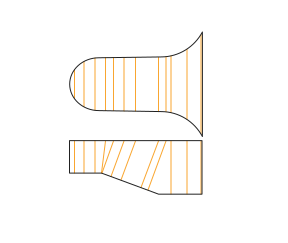
The notch is created by adding simple shapes called areas to each other. The number of areas is set in the parameter Number of regions. For each area, you can set geometric characteristics in the corresponding parameter group. The documentation provides a group of parameters for the first area only. Define Geometry Region 1 the others differ only in their ordinal number. The shape of the area is set in the parameter Shape selection R1 and it can take the following values: Circular, Triangular, Rectangular, Trapezoidal, Trapezoidal with rounded edges. A notch is a collection of areas of different geometries, as shown in the figure.
Each area has its own radial depth (parameter value Radial depth R1), which is constant along the axis of the spool for all geometries, with the exception of rectangular geometry, which allows a linear change in depth along the axis. In any case, the width of the recess perpendicular to the radial direction remains constant along the radial direction.
circular area
The geometry of the circular area is shown in the figure.
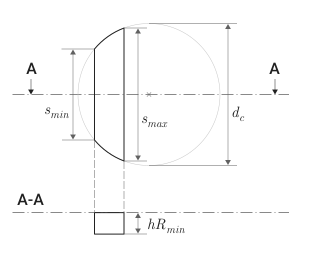
-
— diameter of the circular area, parameter value Circle diameter R1;
-
— the length of the smaller segment, the value of the parameter Minor segment length R1;
-
— the length of the larger segment, the value of the parameter Major segment length R1.
The triangular area
The geometry of the triangular area is shown in the figure.
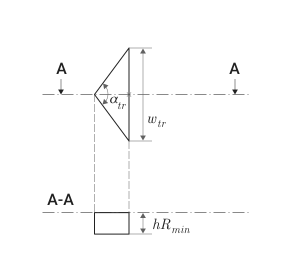
-
— the angle of the solution of the triangular area, the value of the parameter Angle of the triangular opening R1;
-
— the width of the base of the triangular area, the value of the parameter Width of triangular opening R1.
The rectangular area
The geometry of the rectangular area is shown in the figure.
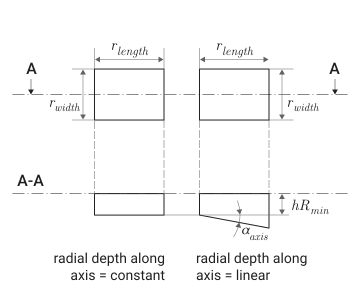
-
— the width of the rectangular area, the value of the parameter Angle of the triangular opening R1;
-
— the length of the rectangular area, the value of the parameter Length of the rectangular opening R1;
-
Radial depth along axis R1 — a parameter that determines how the radial depth is set:
-
Constant— radial depth constant, the value of the parameter Radial depth R1; -
Linear— the radial depth varies linearly and is determined by the parameters Radial depth R1 ( ) and Angle with spool axis R1 ( ).
-
trapecial region
The geometry of the trapezoidal area is shown in the figure.
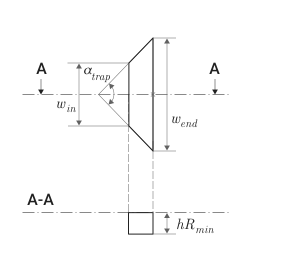
-
— the angle of the solution of the trapezoidal region, the value of the parameter Angle for trapezoidal opening R1;
-
— the width of the smaller base of the trapezoidal area, the value of the parameter Initial width of the trapezoidal opening R1;
-
— the width of the larger base of the trapezoidal area, the value of the parameter Final width of the trapezoidal opening R1.
trapect -shaped area with rounded sides
The geometry of the trapezoidal area with rounded sides is shown in the figure.
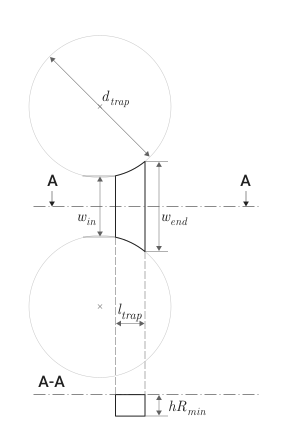
-
— the width of the smaller base of the trapezoidal area, the value of the parameter Initial width of the rounded trapezoidal opening R1;
-
— the width of the larger base of the trapezoidal area, the value of the parameter Final width of the rounded trapezoidal opening R1;
-
— the height of the trapezoidal area, the value of the parameter Axial length of the rounded trapezoidal opening R1;
-
— the diameter of the rounded sides of the trapezoidal area, the value of the parameter Diameter of the round edges R1.
The equations
If the check box is Moving body removed and the body movement is not simulated, the overlap value is defined as
where
-
— the overlap corresponding to the zero offset, the value of the parameter Underlap corresponding to zero displacement;
-
— moving the spool in port RA.
If the check box is Moving body If installed and the body movement is simulated, then the overlap value is defined as
where — moving the case in port CA.
The length of the camera is defined as
where — the length of the camera at zero offset, the value of the parameter Chamber length at zero displacement.
The formula for calculating the volume of the camera depends on the parameter value Evaluate pressure resultant force and volume variation:
-
if the check box Evaluate pressure resultant force and volume variation installed, then
-
if the check box is Evaluate pressure resultant force and volume variation not installed, then
In these formulas
-
— diameter of the spool;
-
— diameter of the stem.
The block evaluates various areas as a function of overlap, depending on geometric parameters.
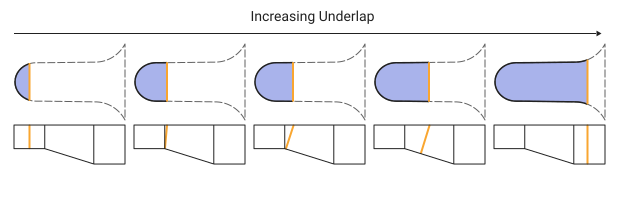
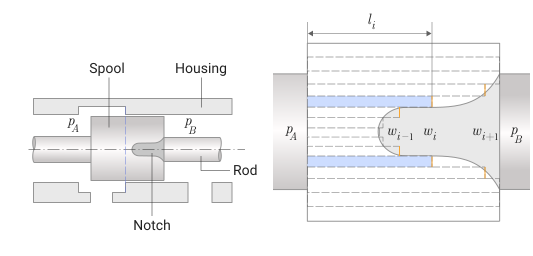
For each floor with a recess, the block searches for the minimum area. between two candidate squares:
-
the area of the plane defined by the shape of each area (blue area in the figure), hereinafter this area will be called the circumferential area, since it lies on the side surface of the cylindrical spool;
-
an area that depends on the width and depth of the recess for the current overlap (the orange lines in the figure define the perimeter of this area), then this area will be called the saturation area.
Hydraulic diameter It is calculated based on the cross-sectional area and the perimeter of the wetted surface as follows:
In the case of a simple spool valve with sharp edges, the flow area is calculated as described in the block Spool with Annular Orifice (IL).
Flow coefficient calculated as
where
-
— pressure difference between ports;
-
— hydraulic diameter;
-
— kinematic viscosity;
-
— the average density of the liquid.
Expense ratio calculated as
where
-
— maximum flow rate, parameter value Maximum flow coefficient;
-
— critical flow coefficient, parameter value Critical flow number.
For meaning practically does not change. For low meaning it changes linearly with the change .
A reasonable value the default is 1000. However, for holes with complex (rough) geometry, it may be smaller. 50. For very smooth geometry, it can be set to 50000.
The average fluid velocity is
Consumption is determined by the following factors:
-
opening of the metering edge (with recesses) under conditions of positive overlap ( ):
where
-
— the area of the passage hole;
-
— the density of the liquid at atmospheric pressure;
-
-
leaks in negative overlap conditions ( ). The leakage rate is calculated using a typical laminar flow equation for annular holes with eccentricity:
where
-
— the absolute average viscosity of the liquid;
-
— diametrical gap, parameter value Clearance on diameter, it should be borne in mind that for diametrical gaps more than
60microns of leakage should be overestimated; -
— relative eccentricity, parameter value Eccentricity ratio, which is defined as the ratio of eccentricity and half of the diametrical gap:
The value of the relative eccentricity should be from
0before1.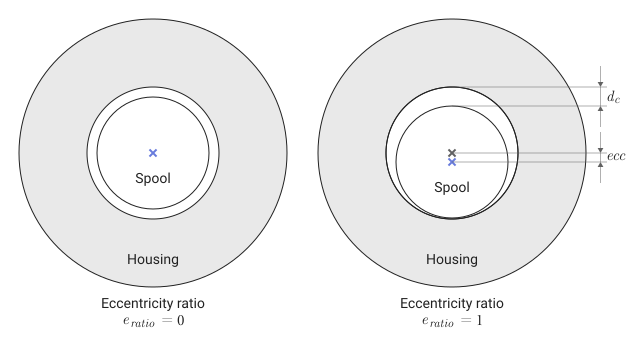
-
and shown in the picture.
The considered length of the leak is limited by the distance from edge to edge .
-
If the check box is selected Evaluate pressure resultant force and volume variation, then the contribution to the flow rate due to the movement of the spool is calculated as
where — the speed of the spool movement.
The hydrodynamic force acting on the spool is determined by estimating the change in momentum. This force tends to close the valve. For a steady-state fluid flow, the hydrodynamic force is
where — the angle of the jet.
Dependence of the hydrodynamic force from overlap It is defined as follows:
Check the box Couette effect allows you to take into account the Couette effect, that is, to take into account the contribution of the Couette current to the force of viscous friction.:
-
if the body movement is not simulated
-
if the body movement is simulated
where
-
— contact length, parameter value Edge-to-edge distance;
-
— the speed of the hull movement.
The force in the port RA is calculated taking into account the force in the port RB, the pressure force (if the check box is selected Evaluate pressure resultant force and volume variation), viscous friction forces (if the check box is selected Couette effect) and hydrodynamic force as
If the check box is selected Moving body and the hull movement is modeled, then the force in port CA is calculated based on the force in port CB:
Ports
Conserving
#
A
—
Isothermal liquid port
Isothermal liquid
Details
The isothermal liquid port corresponding to the inlet or outlet.
| Program usage name |
|
#
B
—
Isothermal liquid port
Isothermal liquid
Details
The isothermal liquid port corresponding to the inlet or outlet.
| Program usage name |
|
#
RA
—
stock
translational mechanics
Details
Mechanical translational port corresponding to the rod.
| Program usage name |
|
#
RB
—
stock
translational mechanics
Details
Mechanical translational port corresponding to the rod.
| Program usage name |
|
#
CA
—
housing
translational mechanics
Details
Mechanical translational port corresponding to the body.
Dependencies
To use this port, check the box Moving body.
| Program usage name |
|
#
CB
—
housing
translational mechanics
Details
Mechanical translational port corresponding to the body.
Dependencies
To use this port, check the box Moving body.
| Program usage name |
|
Parameters
Main
#
Opening orientation —
the direction of movement of the spool corresponding to the opening of the hole
Positive relative rod displacement opens orifice | Negative relative rod displacement opens orifice
Details
The direction of movement of the element corresponding to the opening of the hole:
-
Positive orientation
Positive relative rod displacement opens orificemeans that the positive movement of the spool opens the hole.; -
The negative direction
Negative relative rod displacement opens orificethis means that the negative movement of the spool opens the hole.
| Values |
|
| Default value |
|
| Program usage name |
|
| Evaluatable |
No |
Parameters
# Moving body — movable housing
Details
Select this option if you are modeling a movable enclosure.
If the flag is unchecked, it is assumed that the body is stationary.
| Default value |
|
| Program usage name |
|
| Evaluatable |
No |
#
Number of slots —
number of recesses on the spool edge
0 | 1 | 2 | 3 | 4 | 5 | 6 | 7 | 8 | 9 | 10
Details
The number of recesses on the spool edge.
| Values |
|
| Default value |
|
| Program usage name |
|
| Evaluatable |
No |
#
Number of regions —
the number of geometric areas that make up the recess
0 | 1 | 2 | 3 | 4 | 5 | 6 | 7 | 8 | 9 | 10
Details
The number of geometric areas that make up the recess.
Dependencies
To use this parameter, set for the parameter Number of slots The value is greater 0.
| Values |
|
| Default value |
|
| Program usage name |
|
| Evaluatable |
No |
# Evaluate annular area (notch uncovered) — calculate the area of the annular section (the recess is not blocked)
Details
Check this box to calculate the area of the annular section when the recess is not blocked.
Dependencies
To use this parameter, set for the parameters Number of slots and Number of regions The value is greater 0.
| Default value |
|
| Program usage name |
|
| Evaluatable |
No |
# Evaluate pressure resultant force and volume variation — calculate the resulting pressure force and volume change
Details
Check this box to calculate the resulting pressure force and volume change.
| Default value |
|
| Program usage name |
|
| Evaluatable |
No |
# Couette effect — the Couette effect
Details
Checking this box means that the Couette effect is taken into account, that is, the contribution of the Couette current to the force of internal friction.
| Default value |
|
| Program usage name |
|
| Evaluatable |
No |
#
Spool diameter —
diameter of the spool
m | um | mm | cm | km | in | ft | yd | mi | nmi
Details
The diameter of the spool must be larger than the diameter of the stem.
| Units |
|
| Default value |
|
| Program usage name |
|
| Evaluatable |
Yes |
#
Rod diameter —
stem diameter
m | um | mm | cm | km | in | ft | yd | mi | nmi
Details
The diameter of the rod.
| Units |
|
| Default value |
|
| Program usage name |
|
| Evaluatable |
Yes |
#
Chamber length at zero displacement —
camera length at zero offset
m | um | mm | cm | km | in | ft | yd | mi | nmi
Details
The length of the camera at zero offset (within the calculated camera volume).
| Units |
|
| Default value |
|
| Program usage name |
|
| Evaluatable |
Yes |
Underlap Definition
#
Underlap corresponding to zero displacement —
overlap corresponding to the zero offset
m | um | mm | cm | km | in | ft | yd | mi | nmi
Details
The overlap corresponding to the zero offset.
| Units |
|
| Default value |
|
| Program usage name |
|
| Evaluatable |
Yes |
#
Underlap corresponding to maximum area —
overlap corresponding to the maximum area
m | um | mm | cm | km | in | ft | yd | mi | nmi
Details
The overlap corresponding to the maximum opening area.
| Units |
|
| Default value |
|
| Program usage name |
|
| Evaluatable |
Yes |
Leakages on the Spool
#
Clearance on diameter —
diametrical gap
m | um | mm | cm | km | in | ft | yd | mi | nmi
Details
The diameter gap between the spool and the housing. It should be borne in mind that for diametrical gaps more than 60 microns of leakage should be overestimated.
| Units |
|
| Default value |
|
| Program usage name |
|
| Evaluatable |
Yes |
# Eccentricity ratio — relative eccentricity
Details
The relative eccentricity of 0 before 1.
| Default value |
|
| Program usage name |
|
| Evaluatable |
Yes |
#
Edge-to-edge distance —
edge-to-edge distance
m | um | mm | cm | km | in | ft | yd | mi | nmi
Details
Edge-to-edge distance , which limits the length of the leak.
| Units |
|
| Default value |
|
| Program usage name |
|
| Evaluatable |
Yes |
Regions Discretization
# Number of points for each region — the number of points to sample each area
Details
The number of points to sample each area.
| Default value |
|
| Program usage name |
|
| Evaluatable |
Yes |
# Discontinuity handling — gap treatment
Details
Gap processing can be enabled or disabled. As a rule, it can be left disabled. You may need to enable it if the geometry at the boundaries of the regions has significantly changed. However, it should be borne in mind that this leads to an increase in the calculation time.
| Default value |
|
| Program usage name |
|
| Evaluatable |
No |
Jet Force Evaluation
#
Jet angle —
The angle of the jet
rad | deg | rev | mrad | arcsec | arcmin | gon
Details
The angle of inclination of the jet is assumed to be constant. For most applications, this value can be left at the default. The jet angle is set relative to the valve axis.
| Units |
|
| Default value |
|
| Program usage name |
|
| Evaluatable |
Yes |
# Jet force coefficient — coefficient of hydrodynamic force
Details
The coefficient of hydrodynamic force, which is at the value 0 (by default) disables the hydrodynamic force, and when set to 1 turns it on. If there is experimental data for this coefficient, then you can adjust the model to fit this data.
| Default value |
|
| Program usage name |
|
| Evaluatable |
Yes |
Flow Coefficient Law
# Maximum flow coefficient — maximum flow rate
Details
The maximum flow rate affects the flow rate/pressure drop characteristics in the orifice. For most applications, this value can be left at the default.
| Default value |
|
| Program usage name |
|
| Evaluatable |
Yes |
# Critical flow number — critical flow coefficient
Details
The critical flow coefficient affects the flow rate/pressure drop characteristics in the orifice. For most applications, this value can be left at the default.
| Default value |
|
| Program usage name |
|
| Evaluatable |
Yes |
Initial Conditions
#
Initial rod displacement —
initial displacement of the rod
m | um | mm | cm | km | in | ft | yd | mi | nmi
Details
The initial displacement of the rod.
| Units |
|
| Default value |
|
| Program usage name |
|
| Evaluatable |
Yes |
#
Initial case displacement —
initial displacement of the body
m | um | mm | cm | km | in | ft | yd | mi | nmi
Details
The initial displacement of the body.
Dependencies
To use this option, check the box Moving body.
| Units |
|
| Default value |
|
| Program usage name |
|
| Evaluatable |
Yes |
Define Geometry Region 1
#
Shape selection R1 —
the shape of the area
Circular | Triangular | Rectangular | Trapezoidal | Trapezoidal with rounded edges
Details
Choose the shape of the area:
-
Circular; -
Triangular; -
Rectangular; -
Trapezoidal; -
Trapezoidal with rounded edges.
For more information, see Defining the geometry of the recesses.
Dependencies
To use this parameter, set for the parameters Number of slots and Number of regions The value is greater 0.
| Values |
|
| Default value |
|
| Program usage name |
|
| Evaluatable |
No |
#
Circle diameter R1 —
diameter of the circular area
m | um | mm | cm | km | in | ft | yd | mi | nmi
Details
The diameter of the circular area.
Dependencies
To use this parameter, set for the parameter:
-
Number of slots and Number of regions The value is greater
0; -
Shape selection R1 meaning
Circular.
| Units |
|
| Default value |
|
| Program usage name |
|
| Evaluatable |
Yes |
#
Minor segment length R1 —
the length of the smaller segment of the circular area
m | um | mm | cm | km | in | ft | yd | mi | nmi
Details
The length of the smaller segment of the circular area.
Dependencies
To use this parameter, set for the parameter:
-
Number of slots and Number of regions The value is greater
0; -
Shape selection R1 meaning
Circular.
| Units |
|
| Default value |
|
| Program usage name |
|
| Evaluatable |
Yes |
#
Major segment length R1 —
the length of the larger segment of the circular area
m | um | mm | cm | km | in | ft | yd | mi | nmi
Details
The length of the larger segment of the circular area.
Dependencies
To use this parameter, set for the parameter:
-
Number of slots and Number of regions The value is greater
0; -
Shape selection R1 meaning
Circular.
| Units |
|
| Default value |
|
| Program usage name |
|
| Evaluatable |
Yes |
#
Angle of the triangular opening R1 —
the solution angle of the triangular area
rad | deg | rev | mrad | arcsec | arcmin | gon
Details
The angle of the solution of the triangular area.
Dependencies
To use this parameter, set for the parameter:
-
Number of slots and Number of regions The value is greater
0; -
Shape selection R1 meaning
Triangular.
| Units |
|
| Default value |
|
| Program usage name |
|
| Evaluatable |
Yes |
#
Width of triangular opening R1 —
the width of the base of the triangular area
m | um | mm | cm | km | in | ft | yd | mi | nmi
Details
The width of the base of the triangular area.
Dependencies
To use this parameter, set for the parameter:
-
Number of slots and Number of regions The value is greater
0; -
Shape selection R1 meaning
Triangular.
| Units |
|
| Default value |
|
| Program usage name |
|
| Evaluatable |
Yes |
#
Width of the rectangular opening R1 —
width of the rectangular area
m | um | mm | cm | km | in | ft | yd | mi | nmi
Details
The width of the rectangular area.
Dependencies
To use this parameter, set for the parameter:
-
Number of slots and Number of regions The value is greater
0; -
Shape selection R1 meaning
Rectangular.
| Units |
|
| Default value |
|
| Program usage name |
|
| Evaluatable |
Yes |
#
Length of the rectangular opening R1 —
the length of the rectangular area
m | um | mm | cm | km | in | ft | yd | mi | nmi
Details
The length of the rectangular area.
Dependencies
To use this parameter, set for the parameter:
-
Number of slots and Number of regions The value is greater
0; -
Shape selection R1 meaning
Rectangular.
| Units |
|
| Default value |
|
| Program usage name |
|
| Evaluatable |
Yes |
#
Initial width of the trapezoidal opening R1 —
the width of the smaller base of the trapezoidal area
m | um | mm | cm | km | in | ft | yd | mi | nmi
Details
The width of the smaller base of the trapezoid area.
Dependencies
To use this parameter, set for the parameter:
-
Number of slots and Number of regions The value is greater
0; -
Shape selection R1 meaning
Trapezoidal.
| Units |
|
| Default value |
|
| Program usage name |
|
| Evaluatable |
Yes |
#
Final width of the trapezoidal opening R1 —
the width of the larger base of the trapezoidal area
m | um | mm | cm | km | in | ft | yd | mi | nmi
Details
The width of the larger base of the trapezoidal area.
Dependencies
To use this parameter, set for the parameter:
-
Number of slots and Number of regions The value is greater
0; -
Shape selection R1 meaning
Trapezoidal.
| Units |
|
| Default value |
|
| Program usage name |
|
| Evaluatable |
Yes |
#
Angle for trapezoidal opening R1 —
The solution angle of the trapezoidal area
rad | deg | rev | mrad | arcsec | arcmin | gon
Details
The solution angle of the trapezoidal area.
Dependencies
To use this parameter, set for the parameter:
-
Number of slots and Number of regions The value is greater
0; -
Shape selection R1 meaning
Trapezoidal.
| Units |
|
| Default value |
|
| Program usage name |
|
| Evaluatable |
Yes |
#
Initial width of the rounded trapezoidal opening R1 —
the width of the smaller base of the trapezoidal area with rounded sides
m | um | mm | cm | km | in | ft | yd | mi | nmi
Details
The width of the smaller base of the trapezoidal area with rounded sides.
Dependencies
To use this parameter, set for the parameter:
-
Number of slots and Number of regions The value is greater
0; -
Shape selection R1 meaning
Trapezoidal with rounded edges.
| Units |
|
| Default value |
|
| Program usage name |
|
| Evaluatable |
Yes |
#
Final width of the rounded trapezoidal opening R1 —
the width of the larger base of the trapezoidal area with rounded sides
m | um | mm | cm | km | in | ft | yd | mi | nmi
Details
The width of the larger base of the trapezoidal area with rounded sides.
Dependencies
To use this parameter, set for the parameter:
-
Number of slots and Number of regions The value is greater
0; -
Shape selection R1 meaning
Trapezoidal with rounded edges.
| Units |
|
| Default value |
|
| Program usage name |
|
| Evaluatable |
Yes |
#
Axial length of the rounded trapezoidal opening R1 —
the height of the trapezoidal area with rounded sides
m | um | mm | cm | km | in | ft | yd | mi | nmi
Details
The height of the trapezoidal area with rounded sides.
Dependencies
To use this parameter, set for the parameter:
-
Number of slots and Number of regions The value is greater
0; -
Shape selection R1 meaning
Trapezoidal with rounded edges.
| Units |
|
| Default value |
|
| Program usage name |
|
| Evaluatable |
Yes |
#
Diameter of the round edges R1 —
the diameter of the rounded sides of the trapezoidal area
m | um | mm | cm | km | in | ft | yd | mi | nmi
Details
The diameter of the rounded sides of the trapezoidal area.
Dependencies
To use this parameter, set for the parameter:
-
Number of slots and Number of regions The value is greater
0; -
Shape selection R1 meaning
Trapezoidal with rounded edges.
| Units |
|
| Default value |
|
| Program usage name |
|
| Evaluatable |
Yes |
#
Radial depth R1 —
radial depth
m | um | mm | cm | km | in | ft | yd | mi | nmi
Details
The radial depth of the area.
Dependencies
To use this parameter, set for the parameters Number of slots and Number of regions The value is greater 0.
| Units |
|
| Default value |
|
| Program usage name |
|
| Evaluatable |
Yes |
#
Radial depth along axis R1 —
type of radial depth assignment
Constant | Linear
Details
Determine how the radial depth is set for a rectangular area.:
-
Constant— radial depth constant, the value of the parameter Radial depth R1; -
Linear— the radial depth varies linearly and is determined by the parameters Radial depth R1 ( ) and Angle with spool axis R1 ( ).
Dependencies
To use this parameter, set for the parameter:
-
Number of slots and Number of regions The value is greater
0; -
Shape selection R1 meaning
Rectangular.
| Values |
|
| Default value |
|
| Program usage name |
|
| Evaluatable |
No |
#
Angle with spool axis R1 —
the angle of change of the radial depth relative to the axis of the spool
rad | deg | rev | mrad | arcsec | arcmin | gon
Details
The angle of change of the radial depth of the rectangular area relative to the axis of the spool.
Dependencies
To use this parameter, set for the parameter:
-
Number of slots and Number of regions The value is greater
0; -
Shape selection R1 meaning
Rectangular.
| Units |
|
| Default value |
|
| Program usage name |
|
| Evaluatable |
Yes |