Automation of experiments
The project presents an Engee application that allows you to configure a computational experiment, during which a certain model will be repeatedly run. Rearranging the values of its parameters allows you to form a grid of combinations and calculate the operation of the model in a wide range of conditions and form a table or matrix to determine the target functionality in order to ultimately select the desired set of configurations for further research.
Launching the app
In the folder with this example you will find the file app.jl with the application code, which we will launch with the following command:
genie_app = engee.genie.start("$(@__DIR__)/app.jl", log_file="log.txt", open_url=true);
To stop the application, run the following command, uncomenting it:
# engee.genie.stop("$(@__DIR__)/app.jl");
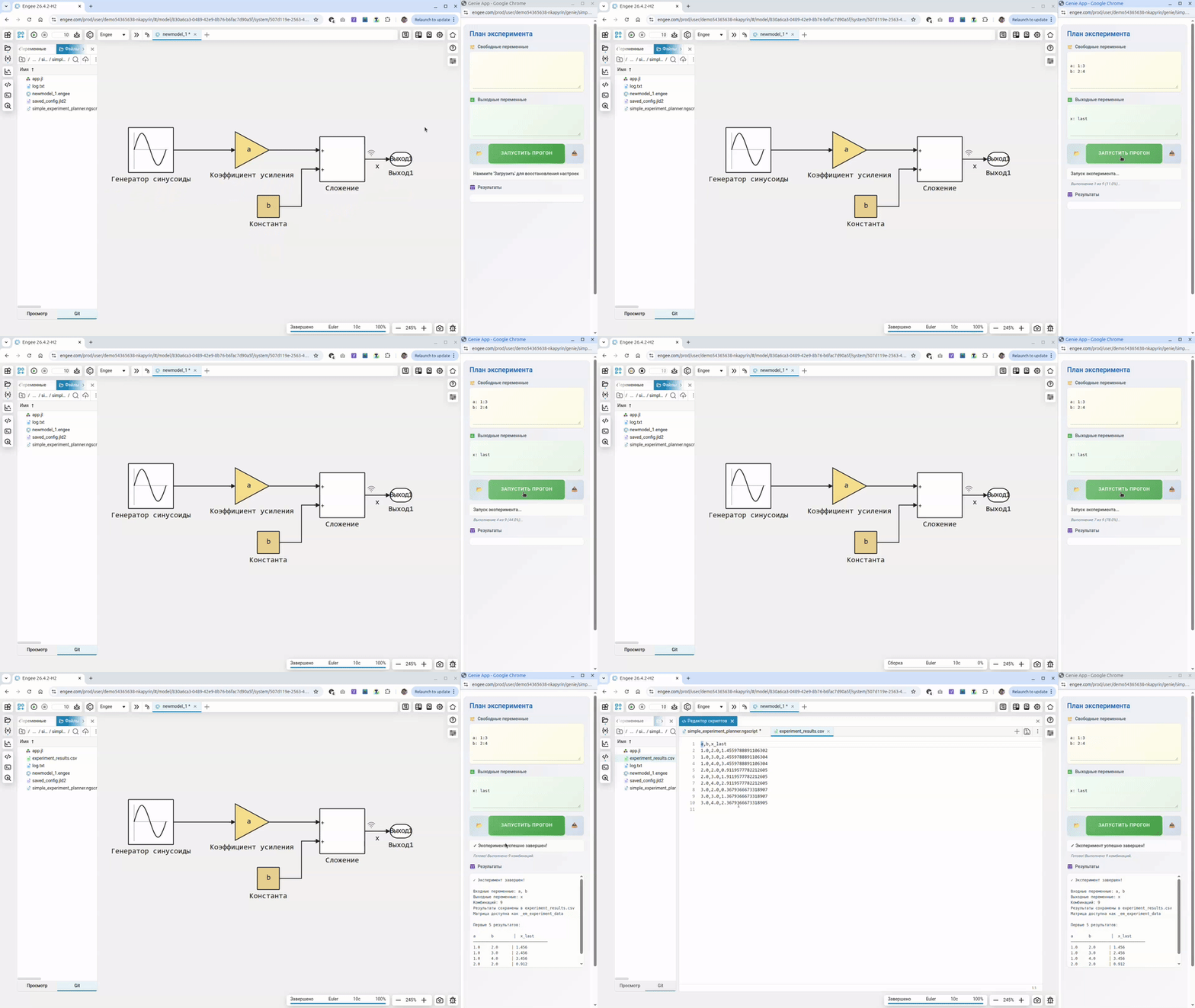
Information about the preparation of the environment
The preparation is carried out in four simple steps:
- Open a model suitable for modification and multiple launch
- Set the list and range of input variables
- Set the list of output variables and the aggregation function
- Run the experiment (the data will be saved to a file
experiment_results.csv)
The experiment scheduler sends new values to the ** variables in the** Engee workspace. To influence the operation of the model, these variables must be used somewhere in the block parameters or in the initialization code of the model.
You can start to formulate a computational task by specifying a vector of input variables. This vector can be set either by listing the necessary values (for example [1,2,3]), or by specifying a range (1:10 or 1:0.1:10). Any expression computable in Julia is also suitable. Each input variable is declared on a separate line according to the following syntax: var1: 1:10 where var1 - the name of the variable, followed by the calculated value after the first colon.
The output variables are set in a similar way, but the second argument is the identifier of the operation that will allow the output vector of the model values to be converted into a scalar. In the simplest case, it will be taking the last element (x: end), but you can use the first element, the average, the maximum, etc.
In order for the variable x to be used as an output variable of the model, it must be represented as a named signal, and the signal line must be marked as intended for recording (logging).
After configuration, you can save the settings for future use (they are saved to the variables workspace) or load them from the variables, if any. By clicking on the button Запустить you are actually running a multiple execution of the model with the substitution of all permutations of the input parameters.
The experiment scheduler runs the current, currently open model on the canvas (by executing engee.run()). If the model is not open, you will see an error message in the application status bar.
The application allows you to save and download an experiment plan from variables located in the workspace.
Saving and loading experiment settings
To load an experiment plan from variables, you first need to create them in the workspace. For example, by downloading (using the Open button) from a file saved_config.jld.
Conclusion
Here is an example of a fairly simple experiment planner that will allow you to repeatedly run your model without additional programming and get objects in the workspace from which you can build graphs, find the best set of parameters, or simply use the table for further analysis.