Charge Pump
The output current is proportional to the difference in the fill coefficients between the two input ports.
blockType: SubSystem
|
Path in the library: |
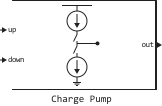
Description
Block Charge Pump generates an output current proportional to the difference in the fill coefficients between the signals on its input ports up and down. In the phase frequency auto-tuning (PLL) system, the block Charge Pump converts the phase error represented by the two outputs of the block PFD, into the single-pole current at the input of the Loop Filter unit.
Ports
Output
#
out
—
Output port
scalar
Details
The output port connected to the Loop Filter unit in the PLL system. The out port outputs a current proportional to the difference in fill factors between the input ports up and down.
| Data types |
|
| Complex numbers support |
I don’t |
Parameters
Configuration
Configuration
# Output Current (A) — estimated output current
Details
The total value of the calculated output current, set as a positive real scalar in amperes.
program usage
-
Use
get_param(gcb,"OutputCurrent")to view the current parameter value Output Current (A). -
Use
set_param(gcb,"OutputCurrent",value)to set for the parameter Output Current (A) a certain value.
| Default value |
|
| Program usage name |
|
| Tunable |
No |
| Evaluatable |
Yes |
# Input Threshold (V) — threshold for logical switching on input ports
Details
The threshold of logical switching on the input ports, set as a scalar in volts.
program usage
-
Use
get_param(gcb,"InputThreshold")to view the current parameter value Input Threshold (V). -
Use
set_param(gcb,"InputThreshold",value)to set for the parameter Input Threshold (V) a certain value.
| Default value |
|
| Program usage name |
|
| Tunable |
No |
| Evaluatable |
Yes |
# Enable increased buffer size — enabling buffer size increase
Details
Select this option to enable buffer size increase during simulation. This will increase the size of the block buffer. Logic Decision and Slew Rate inside the block Charge Pump. The checkbox is unchecked by default.
| Default value |
|
| Program usage name |
|
| Tunable |
No |
| Evaluatable |
Yes |
# Buffer size — the number of input buffer samples available during the simulation
Details
The number of input buffer samples available during the simulation, set as a positive integer scalar. This parameter sets the size of the block buffer Logic Decision and Slew Rate inside the block Charge Pump.
Choosing different simulation solvers or sampling strategies can change the number of input samples needed to obtain an accurate output sample. Set for the parameter Buffer size The value is large enough for the input buffer to contain all the necessary input samples.
Dependencies
To use this option, check the box Enable increased buffer size on the tab Configuration.
program usage
-
Use
get_param(gcb,"NBuffer")to view the current parameter value Buffer size. -
Use
set_param(gcb,"NBuffer",value)to set for the parameter Buffer size a certain value.
| Default value |
|
| Program usage name |
|
| Tunable |
No |
| Evaluatable |
Yes |
Impairments
Current impairments
# Enable current impairments — adding current degradation to the simulation
Details
Check this box to add current impairments such as current imbalance and leakage current to the simulation. The checkbox is checked by default.
| Default value |
|
| Program usage name |
|
| Tunable |
No |
| Evaluatable |
Yes |
# Current imbalance — the difference between positive and negative current in the full range
Details
The difference between the positive and negative current in the full range, given as a positive real scalar in amperes.
Dependencies
To use this option, check the box Enable current impairments on the tab Impairments.
program usage
-
Use
get_param(gcb,"CurrentImbalance")to view the current parameter value Current imbalance. -
Use
set_param(gcb,"CurrentImbalance",value)to set for the parameter Current imbalance a certain value.
| Default value |
|
| Program usage name |
|
| Tunable |
No |
| Evaluatable |
Yes |
# Leakage current — output current without input signal
Details
The output current, when both inputs are equal to logical zero, is set as a non-negative real scalar in amperes.
Dependencies
To use this option, check the box Enable current impairments on the tab Impairments.
program usage
-
Use
get_param(gcb,"LeakageCurrent")to view the current parameter value Leakage current. -
Use
set_param(gcb,"LeakageCurrent",value)to set for the parameter Leakage current a certain value.
| Default value |
|
| Program usage name |
|
| Tunable |
No |
| Evaluatable |
Yes |
Timing impairmens
# Enable timing impairments — adding temporary impairments to the simulation
Details
Check this box to add temporary impairments to the simulation, such as rise/fall time and propagation delay. The checkbox is checked by default.
| Default value |
|
| Program usage name |
|
| Tunable |
No |
| Evaluatable |
Yes |
#
Output step size calculation —
determining the method of calculating the output signal step
Default | Advanced
Details
Determining the method of calculating the output signal step:
-
Default— calculate the step size of the output signal based on the rise/fall time; the step size of the output signal is determined by the formula -
Advanced— calculate the step size of the output signal based on the maximum frequency of interest; the step size of the output signal is determined by the formula
Dependencies
To use this option, check the box Enable timing impairments on the tab Impairments.
| Values |
|
| Default value |
|
| Program usage name |
|
| Tunable |
No |
| Evaluatable |
Yes |
# Maximum frequency of interest (Hz) — maximum output frequency of interest
Details
The maximum output frequency of interest, set as a positive real scalar in Hz.
Dependencies
To use this option, check the box Enable timing impairments on the tab Impairments and set for the parameter Output step size calculation meaning Advanced.
program usage
-
Use
get_param(gcb,"MaxFreqInterest")to view the current parameter value Maximum frequency of interest (Hz). -
Use
set_param(gcb,"MaxFreqInterest",value)to set for the parameter Maximum frequency of interest (Hz) a certain value.
| Default value |
|
| Program usage name |
|
| Tunable |
No |
| Evaluatable |
Yes |
#
Up rise/fall time (s) —
rise/fall time 20%–80% for the input port up
Details
Rise/fall time 20%–80% for the input port up, set as a positive real scalar in seconds.
Dependencies
To use this option, check the box Enable timing impairments on the tab Impairments.
program usage
-
Use
get_param(gcb,"RiseFallUp")to view the current parameter value Up rise/fall time (s). -
Use
set_param(gcb,"RiseFallUp",value)to set for the parameter Up rise/fall time (s) a certain value.
| Default value |
|
| Program usage name |
|
| Tunable |
No |
| Evaluatable |
Yes |
# Up propagation delay — total signal propagation delay for the input port up
Details
The total signal propagation delay for the input port up, given as a positive real scalar in seconds.
Dependencies
To use this option, check the box Enable timing impairments on the tab Impairments.
program usage
-
Use
get_param(gcb,"PropDelayUp")to view the current parameter value Up propagation delay. -
Use
set_param(gcb,"PropDelayUp",value)to set for the parameter Up propagation delay a certain value.
| Default value |
|
| Program usage name |
|
| Tunable |
No |
| Evaluatable |
Yes |
#
Down rise/fall time (s) —
rise/fall time 20%–80% for the input port down
Details
Rise/fall time 20%–80% for the input port down, set as a positive real scalar in seconds.
Dependencies
To use this option, check the box Enable timing impairments on the tab Impairments.
program usage
-
Use
get_param(gcb,"RiseFallDown")to view the current parameter value Down rise/fall time (s). -
Use
set_param(gcb,"RiseFallDown",value)to set for the parameter Down rise/fall time (s) a certain value.
| Default value |
|
| Program usage name |
|
| Tunable |
No |
| Evaluatable |
Yes |
# Down propagation delay — total signal propagation delay for input port down
Details
The total signal propagation delay for the input port is down, specified as a positive real scalar in seconds.
Dependencies
To use this option, check the box Enable timing impairments on the tab Impairments.
program usage
-
Use
get_param(gcb,"PropDelayDown")to view the current parameter value Down propagation delay. -
Use
set_param(gcb,"PropDelayDown",value)to set for the parameter Down propagation delay a certain value.
| Default value |
|
| Program usage name |
|
| Tunable |
No |
| Evaluatable |
Yes |
Additional Info
Inside the block Charge Pump
Details
Block Charge Pump converts two block outputs PFD one way out. It consists of two currents: one "up" and one "down". The difference between these two currents is summed up with the deterioration of the leakage current if this option is enabled.
Each branch of the current consists of a block Logic Decision, the degradation subsystem and the gain unit. Block Logic Decision compares the incoming signal with the value of the parameter Input Threshold (V). The degradation subsystem takes into account the impact of the degradation caused by the block Charge Pump. The gain unit multiplies the output signal of the degradation subsystem to obtain the current level defined in the parameter Output Current (A).