RITM-CAN Setup
Configuring the CAN port of the module.
blockType: CFunction
|
Path in the library: |
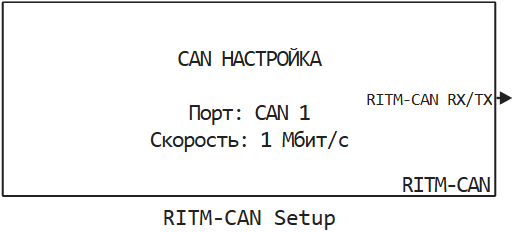
Description
| To work with the block, install/update the support package RITM blocks. |
Block RITM-CAN Setup It is used to configure the CAN port of the module.
Ports
Output
#
RITM-CAN RX/TX
—
the descriptor of the configured CAN interface for RITM-CAN RX/TX units.
scalar
Details
The output port forms the handle of the CAN interface configured by this unit RITM-CAN Setup. This signal is not data from CAN messages; it is used as a "reference" to a specific CAN port selected in the parameter. Интерфейс CAN:, and must be connected to the input of the RITM-CAN Setup blocks RITM-CAN TX/ RITM-CAN RX (and other library blocks that work with the same port).
Recommendations for use:
-
Connect RITM-CAN TX/ RITM-CAN RX with that block RITM-CAN Setup, which configures the required physical port;
-
Do not change or use the value of the descriptor in calculations — just pass it over the connection.;
-
One way out RITM-CAN Setup It can be branched into several blocks. RITM-CAN TX/ RITM-CAN RX if they all have to work with one port.
| Data types |
|
| Complex numbers support |
No |
Parameters
Main group
#
Интерфейс CAN: —
CAN port to be used for message transmission
CAN 1 | CAN 2 | CAN 3 | CAN 4 | CAN 5 | CAN 6 | CAN 7 | CAN 8
Details
The port numbers are indicated on the case of the KPM "RITM".
| Values |
|
| Default value |
|
| Program usage name |
|
| Tunable |
No |
| Evaluatable |
Yes |
#
Скорость передачи: —
network transfer rate
10 кбит/с | 20 кбит/с | 50 кбит/с | 100 кбит/с | 125 кбит/с | 250 кбит/с | 500 кбит/с | 800 кбит/с | 1 Мбит/с
Details
Network transfer rate (from 10 kbit/s up to 1 Mbit/s). All nodes in the network should work at the same speed.
| Values |
|
| Default value |
|
| Program usage name |
|
| Tunable |
No |
| Evaluatable |
Yes |
# Время восстановления, мс: — time to restore the active state of the interface after entering the Bus-off state
Details
The time to restore the active state of the interface after entering the Bus-off state (in milliseconds). Number 0 means — do not recover after Bus-off.
| Default value |
|
| Program usage name |
|
| Tunable |
No |
| Evaluatable |
Yes |