From File
Reading data from a file.
blockType: EngeeFunction
|
Path in the library: |
Description
| To work with the block, install/update the support package RITM blocks. |
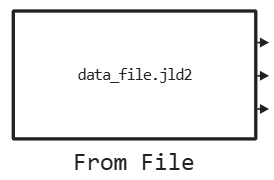
Block From File reads data from a file in Engee. The block reads data from the file in parts, without consuming memory during the simulation. The block icon displays the name of the file from which the data will be read. The block supports reading data from files CSV and JLD2.
The unit supports operation during simulation in Engee and on the complex of semi-natural modeling «RITM». When working on «RITM» files are being searched in the folder /home/ritm/data.
Example of using the block ritm-engee_demo_block_from_file.engee available in the directory with examples. To get examples, use the command engee.package.getdemos:
engee.package.getdemos("RITM-Engee-Blocks")Requirements for the data format in the file
- The following types of data are supported
-
-
Bool; -
Int8; -
Int16; -
Int32; -
Int64; -
UInt8; -
UInt16; -
UInt32; -
UInt64; -
Float32; -
Float64.
-
Reading data of the following dimensions is supported:
-
scalar;
-
vector;
-
a two-dimensional matrix.
JLD2
All signals in the JLD2 file must be written to a variable signals in the format DataFrames. DataFrame must contain a scalar field time with the data type Float64. This field is interpreted by the block From File as a timestamp of all the other data in this row. During the modeling process, the block From File sequentially reads data from the file and returns to the model the values of the signals for the time points satisfying the condition time ≤ t, where t — current model time.
using JLD2: jldsave

using DataFrames

time = collect(range(0, stop=10.0, step=0.01))
frequencies = [1.0, 2.0, 3.0]

sines = [
    [sin(2π * f * t) for f in frequencies]
    for t in time
]

counter = UInt8.(mod.(0:length(time)-1, 5))

df = DataFrame(
    time = time,
    sines = sines,
    counter = counter,
)

jldsave(joinpath(@__DIR__, "from_file.jld2"); signals = df)

df
CSV
Block From File uses its own field naming convention in CSV to support vectors and matrices. To record in the correct format, use the auxiliary function from SignalBin — the package supplied with "RITM-Engee-Blocks".
For the record DataFrame in the file, use:
using Main.SignalBin
SignalBin.dataframe_to_csv(df, "to_file_copy.csv")
For reading DataFrame from the file, use:
using Main.SignalBin
SignalBin.csv_to_dataframe("to_file.csv")
Ports
The block ports are a dynamic list of output signals. The signals are automatically detected in the file specified in the parameter File name:.
Parameters
Main group
# File name: — name of the input file
Details
The name of the input file with the extension .jld2 or .csv.
| Default value |
|
| Program usage name |
|
| Tunable |
No |
| Evaluatable |
Yes |
# Update signals list — updating the output signals
Details
When this button is pressed, the unit re-reads the data from the file and updates the list of output signals.
| Default value |
|
| Program usage name |
|
| Tunable |
No |
| Evaluatable |
No |
# Loopback mode: — cyclic mode
Details
If this option is selected, the block will start displaying the time series again after reaching the last time point in the file.
| Default value |
|
| Program usage name |
|
| Tunable |
No |
| Evaluatable |
Yes |
# Sample time: — the period from which the block will be called
Details
Specify the interval between the calculation steps as a non-negative number. To inherit the calculation step, set this parameter to −1.
| Default value |
|
| Program usage name |
|
| Tunable |
No |
| Evaluatable |
Yes |