To File
Writing data to a file.
blockType: EngeeFunction
|
Path in the library: |
Description
| To work with the block, install/update the support package RITM blocks. |
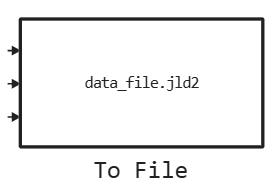
Block To File writes the input signal data to a file. The block writes data to a file in parts with minimal memory consumption during the simulation. If the output file exists before the simulation starts, the block will overwrite it. The file is automatically closed when the simulation is completed. The block icon displays the name of the file to which the data will be written. The block supports writing to files CSV and JLD2.
The unit supports operation during simulation in Engee and on the complex of semi-natural modeling «RITM». When working on «RITM» files are saved to a folder /home/ritm/data.
Example of using the block ritm-engee_demo_block_to_file.engee available in the directory with examples. To get examples, use the command engee.package.getdemos:
engee.package.getdemos("RITM-Engee-Blocks")Parameters
Main group
# Input signals: — dictionary of recorded signals
Details
A dictionary of recorded signals in which the type and dimension are specified for each variable.
input_signals = Dict(
    :metrix => (Float64, ()),
    :data => (Int64, ()),
    :matrix => (Float64, (2,2)),
)
After setting the dictionary of recorded signals, the block will set the number and type of input ports according to it. After that, they can be used in the model.
The following types of data recording are supported:
-
Bool; -
Int8; -
Int16; -
Int32; -
Int64; -
UInt8; -
UInt16; -
UInt32; -
UInt64; -
Float32; -
Float64.
Data recording of the following dimensions is supported:
-
scalar;
-
vector;
-
a two-dimensional matrix.
| Default value |
|
| Program usage name |
|
| Tunable |
No |
| Evaluatable |
Yes |
# File name: — name of the output file
Details
The name of the output file with the extension .jld2 or .csv.
| Default value |
|
| Program usage name |
|
| Tunable |
No |
| Evaluatable |
Yes |