EngeeDSP.MedianFilter
The median filter.
| Library |
|
| Block |
Description
System object EngeeDSP.MedianFilter calculates the moving median of the input signal for each channel independently over time. To calculate the sliding median, the object uses the sliding window method. In this method, a window of a given length is moved through each channel in one-count increments, and the object calculates the median of the data entering the window. For more information, see Algorithms.
And the object EngeeDSP.MedianFilter, and the function movmedian calculate the moving median of the input signal. However, the object is capable of processing large data streams in real time and automatically managing the system status. The function performs one-time calculations on existing data and does not support state management of the system.
To calculate the moving median, follow these steps:
-
Create an object EngeeDSP.MedianFilter and set its properties.
-
Call the object with arguments as if it were a function.
To learn more about how to work with system objects, see Engee System Objects.
Syntax
Creation
-
medFilt = EngeeDSP.MedianFilter()— returns the median filter system object.medFiltusing default properties. -
medFilt = EngeeDSP.MedianFilter(len)— returns the median filter system object.medFilt, which has for the property WindowLength is set tolen. -
medFilt = EngeeDSP.MedianFilter(Name=Value)— returns the median filter system object.medFiltwith the specified properties as a pairName=Value, whereName— the name of the property, andValue— the appropriate value. You can specify multiple pairs «name-value» the order of the pairs does not matter. Unspecified properties retain their default values.
Arguments
Input arguments
# x — input signal
+
vector | the matrix
Details
An input signal specified as a vector or matrix. If x — the matrix, each of its columns is considered as an independent channel. The moving median is calculated for each channel. The object supports multi-channel input data in size on , where — the number of samples in each frame (or channel), and — the number of channels.
The input signal can have a variable size. After locking the object, you can change the size of each input channel, but you cannot change the number of channels.
| Типы данных |
|
Output arguments
# y — filtered output signal
+
vector | the matrix
Details
The filtered output signal returned as a vector or matrix. The dimension and data type of the output signal correspond to the dimension and data type of the input signal.
| Типы данных |
|
Features
#
WindowLength —
sliding window length
Int64 integer
Details
The length of the sliding window in counts, set as a positive integer.
By default — 5.
Algorithms
Sliding window method
Details
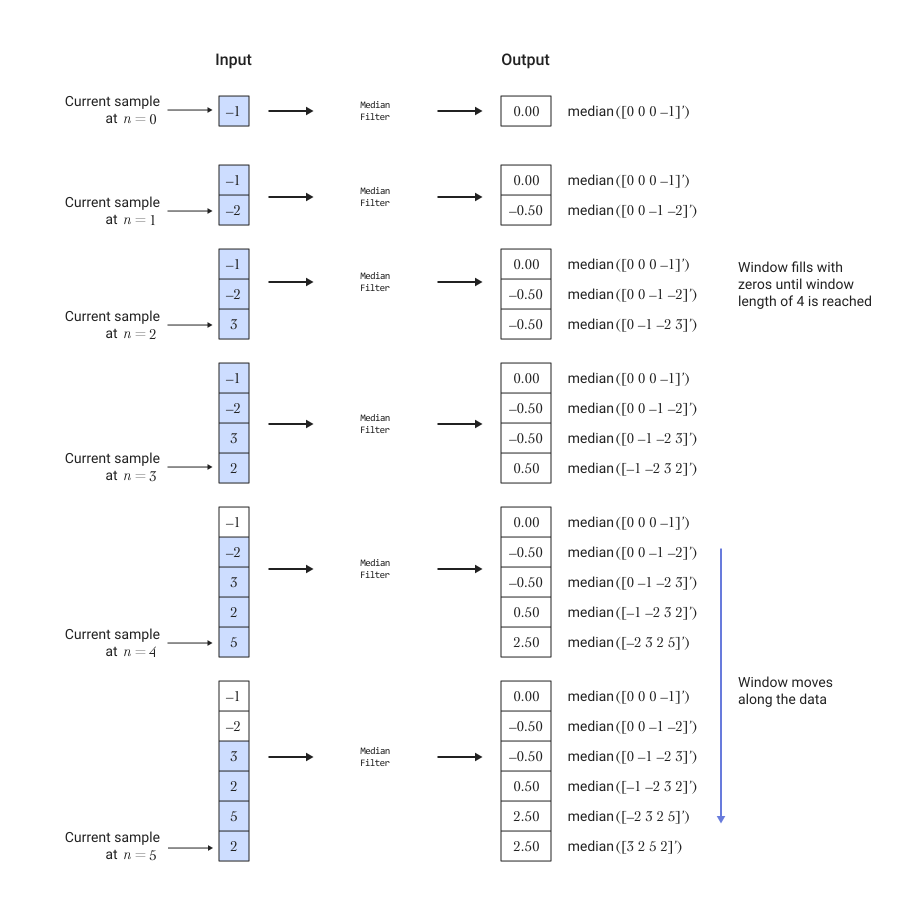
In the sliding window method, the output value for each input sample is the median based on the current sample and previous counts, where — this is the length of the window in counts.
To calculate the first When there is not enough data in the window yet, the algorithm fills the window with zeros. For example, to calculate the median value when the second input sample arrives, the algorithm fills the window. with zeros; thus, the data vector it consists of two data samples, followed by zero. This object performs median filtering of input data in real time.
Let’s consider an example of calculating the moving median of streaming input data using the sliding window method. The algorithm uses a window of length 4. When each new input sample arrives, the window is 4 moves along the sequence of data.
Literature
-
Bodenham, Dean. Adaptive Filtering and Change Detection for Streaming Data. Ph.D. Thesis. Imperial College, London, 2012.