movmean
The moving average.
| Library |
|
Syntax
Function call
-
M = movmean(A,k)— returns local averages forkpoints where each average is calculated in a sliding window of lengthk, which moves through the neighboring elements of the arrayA. Ifkodd, the window is centered relative to the element in the current position. Ifkeven, the window is centered relative to the current and previous elements. The window size is automatically truncated at the endpoints when there are not enough elements to fill it. When the window is truncated, the average value is taken only for the elements filling the window.Mhas the same size asA.
-
M = movmean(___,dim)— defines the dimension of the matrixA, which is used to perform the operation for any of the previous syntax options. For example, ifA— the matrix, thenmovmean(A,k,2)performs an operation on the columns of the matrixA, calculating the moving average ofkelements for each row.
-
M = movmean(___,Name,Value)— sets additional parameters of the moving average using one or more arguments like «name-value». For example, ifxis a vector of time values, thenmovmean(A,k,"SamplePoints",x)calculates a moving average relative to the time values inx.
Arguments
Input arguments
# A — input data
+
vector | the matrix | multidimensional array
Details
Input data specified as a vector, matrix, or multidimensional array.
| Data types |
|
# k — window length
+
scalar
Details
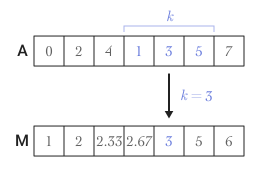
The length of the window, set as a scalar. If k — a positive integer, the centered average includes the element at the current position and its neighbors.
For example, movmean(A,3) calculates an array of values for the local three-point average.
# [kb kf] is the length of the directional window
+
A two-element vector is a string
Details
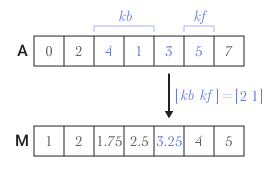
The length of the directional window, set as a string vector containing two elements. If kb and kf — positive integers, the calculation is performed by kb + kf + 1 the elements. The calculation includes an element in the current position, kb elements up to the current position and kf items after the current position.
For example, movmean(A,[2 1]) calculates an array of values of the local four-point average.
# dim — the dimension along which the operation is performed
+
a positive integer scalar
Details
The dimension along which the operation is performed, specified as a positive integer scalar. If no dimension is specified, the first dimension of the array is used by default, the size of which is not equal to 1.
Argument dim specifies the dimension along which the function is executed movmean, that is, the direction in which the specified window is moving.
Consider the input matrix A size m on n:
-
movmean(A,k,1)calculates the moving average forkelements for each column of the matrixAand returns a matrix of sizemonn.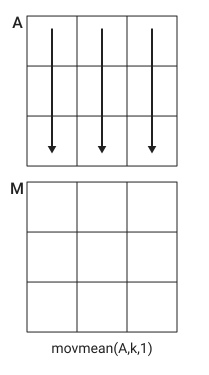
-
movmean(A,k,2)calculates the moving average forkelements for each row of the matrixAand returns a matrix of sizemonn.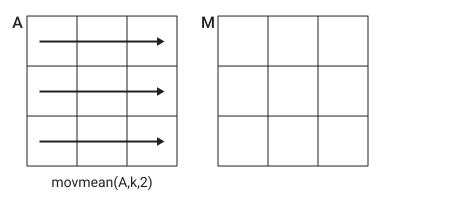
# nanflag — condition for missing value
+
"includemissing" (by default) | "includenan" | "omitmissing" | "omitnan"
Details
The condition for processing a missing value, set by one of the following values:
-
"includemissing"or"includenan"— enable valuesNaNinAwhen calculating each average. If any element is in the window —NaN, then the corresponding element inM—NaN. Values"includemissing"and"includenan"they behave the same way. -
"omitmissing"or"omitnan"— ignore all valuesNaNinAand calculate each average for fewer points. If all the elements are in the window —NaN, then the corresponding element inM—NaN. Values"omitmissing"and"omitnan"they behave the same way.
Input arguments «name-value»
Specify optional argument pairs in the format Name, Value, where Name — the name of the argument, and Value — the appropriate value. Type arguments «name-value» they should be placed after the other arguments, but the order of the pairs does not matter.
Use commas to separate the name and value, and Name put it in quotation marks.
Example: M = movmean(A, k, "Endpoints", "fill")
# Endpoints — a method for processing windows near endpoints
+
"shrink" (by default) | "discard" | "fill" | scalar
Details
The method of processing windows near endpoints, specified by one of the following options:
| Meaning | Description |
|---|---|
|
Reduce the window size near the endpoints of the input data to include only existing elements. |
|
Do not display any average values if the window does not completely overlap the existing elements. |
|
Replace non-existent elements with |
|
Replace non-existent elements with the specified numeric or logical value. |
# SamplePoints — sampling points for calculating averages
+
vector
Details
Sample points for calculating averages, set as a vector. The sample points represent the location of the data in A. The sample points do not have to be evenly distributed. By default, the vector of sample points has the form [1 2 3 … ].
Sliding windows are defined relative to the sampling points, which should be sorted and contain unique elements. For example, if t is the time vector corresponding to the input data, then movmean(rand(1, 10), 3, "SamplePoints", t) it has a window representing the time interval between t[i] − 1.5 and t[i] + 1.5.
If the sampling points are not evenly spaced and the parameter is set Endpoints, then its value should be "shrink".
Output arguments
# M — output data
+
vector | the matrix | multidimensional array
Details
The output data returned as a vector, matrix, or multidimensional array.
Examples
The centered moving average of the vector
Details
Calculate the three-point centered moving average of the row vector. If there are less than three elements in the window at the endpoints, let’s take the average of the available elements.
import EngeeDSP.Functions: movmean

A = [4 8 6 -1 -2 -3 -1 3 4 5]
M = movmean(A, 3)
1×10 Matrix{Float64}:
6.0 6.0 4.33333 1.0 -2.0 -2.0 -0.333333 2.0 4.0 4.5The moving average of the vector
Details
Let’s calculate the three-point moving average of the row vector. If there are less than three elements in the window at the endpoints, let’s take the average of the available elements.
import EngeeDSP.Functions: movmean

A = [4 8 6 -1 -2 -3 -1 3 4 5]
M = movmean(A, [2 1])
1×10 Matrix{Float64}:
6.0 6.0 4.25 2.75 0.0 -1.75 -0.75 0.75 2.75 4.0The moving average of the matrix
Details
Calculate the three-point centered moving average for each row of the matrix. The window starts from the first line, slides horizontally to the end of the line, then moves to the second line, and so on. The dimension argument is two, which allows you to slide through the columns of the matrix A.
A = [4 8 6; -1 -2 -3; -1 3 4]3×3 Matrix{Int64}:
4 8 6
-1 -2 -3
-1 3 4import EngeeDSP.Functions: movmean
M = movmean(A, 3, 2)3×3 Matrix{Float64}:
6.0 6.0 7.0
-1.5 -2.0 -2.5
1.0 2.0 3.5The moving average of a vector with missing values
Details
Let’s calculate the three-point centered moving average of a row vector containing two elements NaN.
import EngeeDSP.Functions: movmean

A = [4 8 NaN -1 -2 -3 NaN 3 4 5]
M = movmean(A, 3)
1×10 Matrix{Float64}:
6.0 NaN NaN NaN -2.0 NaN NaN NaN 4.0 4.5Recalculate the average value, but exclude the values NaN. When the function movmean ignores the elements NaN, it calculates the average value for the remaining elements in the window.
M = movmean(A, 3, "omitnan")1×10 Matrix{Float64}:
6.0 6.0 3.5 -1.5 -2.0 -2.5 0.0 3.5 4.0 4.5Getting only the average values of the full window
Details
Let’s calculate the three-point centered moving average of the row vector, but discard all calculations using less than three points from the output data. In other words, we will return only the average values calculated for the full three-element window, discarding calculations at the endpoints.
import EngeeDSP.Functions: movmean

A = [4 8 6 -1 -2 -3 -1 3 4 5]
M = movmean(A, 3, "Endpoints", "discard")
1×8 Matrix{Float64}:
6.0 4.33333 1.0 -2.0 -2.0 -0.333333 2.0 4.0