xcov
Mutual covariance.
| Library |
|
Syntax
Function call
-
c = xcov(x,y)— returns mutual covariance of two discrete sequences. Mutual covariance measures the similarity between a vectorxand shifted (delayed) copies of the vectoryas a function of the delay. Ifxandythey have different lengths. The function adds zeros to the end of the shorter vector so that it has the same length as the other one.
-
c = xcov(x)— returns the sequence autocovariance of the argumentx. Ifxis the matrix, then the output argument is[Argument:with]is a matrix whose columns contain sequences of autocovariance and mutual covariance for all combinations of columnsx.
-
[Argument:with] = xcov(___,maxlag)— sets the delay range from−maxlagbeforemaxlagfor any of the previous syntaxes.
-
[Argument:with] = xcov(___,scaleopt)— also sets the normalization parameter for mutual covariance or autocovariance. Any argument valuescaleopt, other than"none"(by default), requires that the input argumentsxandythey had the same length.
Arguments
Input arguments
# x — input array
+
vector | the matrix | multidimensional array
Details
An input array specified as a vector, matrix, or multidimensional array. If x is a multidimensional array, then the function xcov it works in columns across all dimensions and returns each autocovariance and mutual covariance as columns of a matrix.
| Data types |
|
| Support for complex numbers |
Yes |
# y — input array
+
vector
Details
The input array specified as a vector.
| Data types |
|
| Support for complex numbers |
Yes |
# maxlag — maximum delay
+
an integer scalar
Details
The maximum delay, set as an integer scalar. If the argument is maxlag set, the returned sequence of mutual covariance ranges from −maxlag before maxlag. If the argument is maxlag not set. By default, the lag range is , where — the larger of the input argument lengths x and y.
| Data types |
|
# scaleopt — normalization parameter
+
"none" (by default) | "biased" | "unbiased" | "normalized" | "coeff"
Details
A normalization parameter set using one of the following methods:
-
"none"— raw, unscaled mutual covariance. Meaning"none"— the only valid option is if the input arguments arexandythey have different lengths. -
"biased"— biased estimation of mutual covariance. -
"unbiased"— unbiased estimation of mutual covariance. -
"normalized"or"coeff"— normalizes the sequence so that the autocovariances at zero delay are equal1.
Output arguments
# c — mutual covariance or autocovariance
+
vector | the matrix
Details
Mutual covariance or autocovariance, returned as a vector or matrix.
If x — matrix size on Then xcov(x) returns a matrix of size on with autocovariances and mutual column covariances x. If the argument is maxlag if set, then the output argument is c It has a size on .
For example, if S it has three columns: , then the result of the operation c = xcov(S) It will be organized as follows:
Examples
Mutual covariance of two random vectors
Details
Create a vector of random numbers x and the vector y, equal to the vector x, shifted 3 elements to the right. Calculate and plot the estimated mutual covariance x and y. The largest spike is observed at the delay value when the elements x and y they match exactly (−3).
import EngeeDSP.Functions: xcov

using Random

Random.seed!(123)

x = rand(20, 1)
y = circshift(x, 3)

c, lags = xcov(x, y)

plot(vec(lags), c,
     seriestype = :stem, marker = :circle,
     legend = false)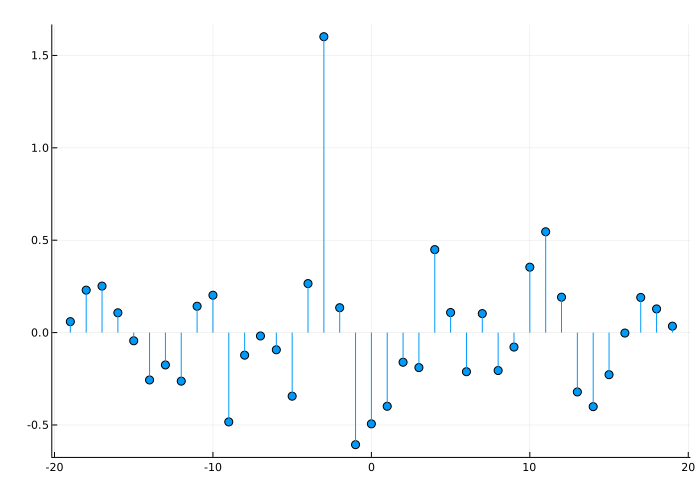
Autocovariance of a random vector
Details
Create a random vector of size 20 on 1 then we calculate and plot the estimated autocovariance. The largest spike is observed at zero delay, when the vector is exactly equal to itself.
import EngeeDSP.Functions: xcov

using Random

Random.seed!(123)

x = rand(20, 1)

c, lags = xcov(x)

plot(vec(lags), c,
     seriestype = :stem, marker = :circle,
     legend = false)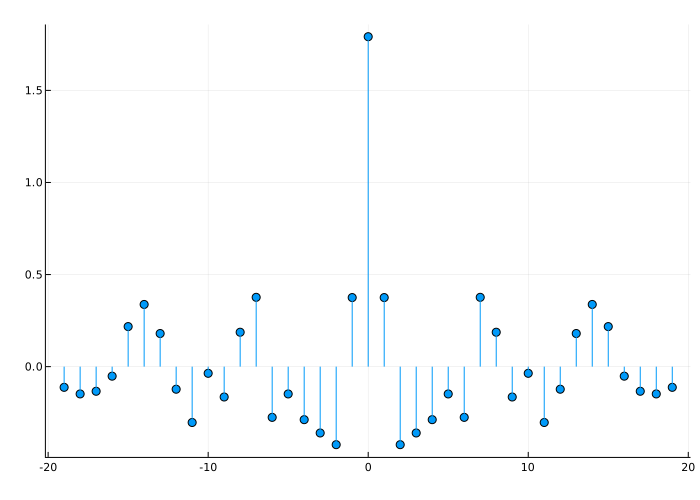
Normalized autocovariance of noise
Details
Let’s calculate and plot the estimated autocovariance of white Gaussian noise for . Normalize the sequence so that it is equal to one with zero delay.
import EngeeDSP.Functions: xcov

using Random

Random.seed!(123)

x = rand(1000, 1)

maxlag = 10

c, lags = xcov(x, maxlag, "normalized")

plot(vec(lags), c,
     seriestype = :stem, marker = :circle,
     legend = false)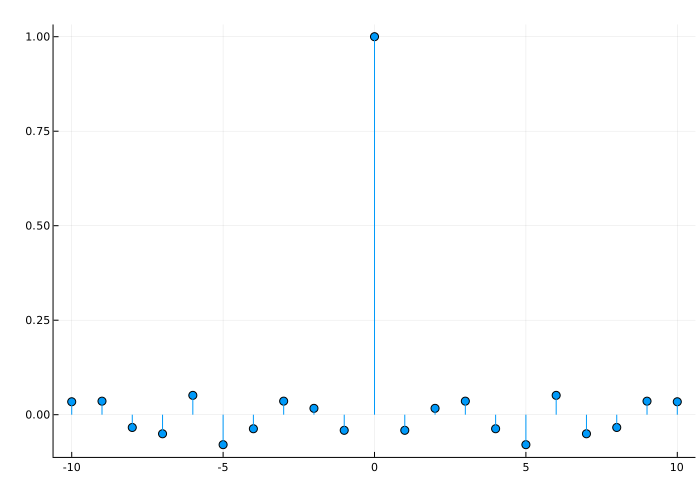
Offset mutual covariance of two shifted signals
Details
Let’s create a signal consisting of two signals shifted relative to each other in a circle by 50 counts.
using Random

Random.seed!(123)

shft = 50
s1 = rand(150, 1)
s2 = circshift(s1, [shft 0])
x = [s1 s2]
Let’s calculate and plot the biased estimates of the autocovariance and mutual covariance sequences. The output matrix c it is organized as four column vectors such that . Element it has maxima in points −50 and +100, and — maxima in points +50 and −100 as a result of the circular shift.
import EngeeDSP.Functions: xcov

c, lags = xcov(x, "biased")

plot(vec(lags), c,
     label = ["c_s1s1" "c_s1s2" "c_s2s1" "c_s2s2"])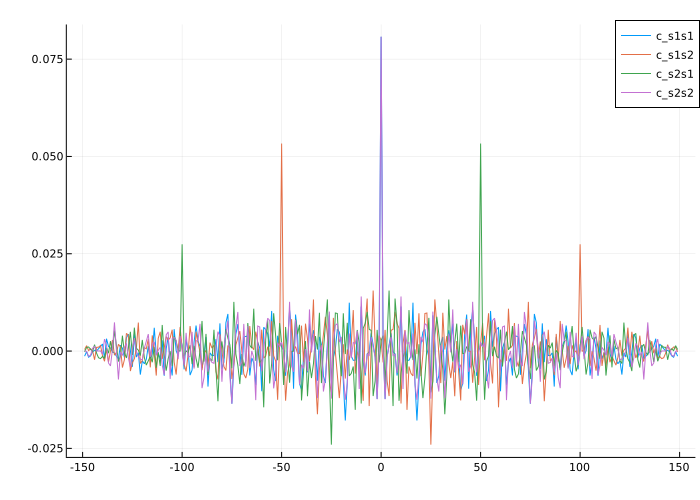
Additional Info
Mutual covariance and autocovariance
Details
Function xcov calculates the average value of its input data, subtracts this average value, and then calls the function xcorr.
The result of the function xcov It can be interpreted as an estimate of the covariance between two random sequences or as a deterministic covariance between two deterministic signals.
The true sequence of mutual covariance of two jointly stationary random processes and It is a cross-correlation of centered sequences.,
where and — the average values of two stationary random processes, the asterisk indicates the complex conjugation, — the mathematical expectation operator. Function xcov It can only evaluate the sequence, since in practice only a finite segment of a single implementation of a random process of infinite length is available.
The default function is xcov calculates raw covariances without normalization:
Output vector c it has elements specified by the formula
To obtain a correct estimate, the covariance function requires normalization. You can control the normalization of covariance using the input argument scaleopt.
Literature
-
Orfanidis, Sophocles J. Optimum Signal Processing: An Introduction. 2nd Edition. New York: McGraw-Hill, 1996.
-
Larsen, Jan. Correlation Functions and Power Spectra. November, 2009. https://www2.imm.dtu.dk/pubdb/edoc/imm4932.pdf