interp1
One-dimensional data interpolation (search table).
| Library |
|
Syntax
Function call
-
vq = interp1(x,v,xq,method,extrapolation)— defines a strategy for evaluating points that lie outside the definition areax. Set for the argumentextrapolationmeaning"extrap"to use the algorithmmethodfor extrapolation. Alternatively, you can specify a scalar value, in which case the functioninterp1returns this value for all points outside the definition area.x.
-
vq = interp1(v,xq,method,extrapolation)— defines an extrapolation strategy and uses default sampling points.
Arguments
Input arguments
# x — sample points
+
vector
Details
Sample points specified as a row vector or column vector of real numbers. Values in x they should be different. Length x must meet one of the following requirements:
| Data types |
|
# v — sample values
+
vector | the matrix | array
Details
Sample values specified as a vector, matrix, or array of real or complex numbers. If v — a matrix or an array, then each column contains a separate set of one-dimensional values.
If v contains complex numbers, then the function interp1 interpolates the real and imaginary parts separately.
| Data types |
|
| Support for complex numbers |
Yes |
# xq — query points
+
scalar | vector | the matrix | array
Details
Query points specified as a scalar, vector, matrix, or array of real numbers.
| Data types |
|
# method — interpolation method
+
"linear" (by default) | "nearest" | "next" | "previous" | "pchip" | "cubic" | "v5cubic" | "makima" | "spline"
Details
The interpolation method specified as one of the options in this table.
| Method | Description | Continuity | Comments |
|---|---|---|---|
|
Linear interpolation. The interpolated value at the query point is based on linear interpolation of values at neighboring grid points in each corresponding dimension. This is the default interpolation method. |
|
|
|
Nearest neighbor interpolation. The interpolated value at the query point is the value at the nearest point in the sampling grid. |
Intermittent |
|
|
Interpolation to the next neighbor. The interpolated value at the query point is the value at the next point in the selection grid. |
Intermittent |
|
|
Interpolation by the previous neighbor. The interpolated value at the query point is the value at the previous point in the selection grid. |
Intermittent |
|
|
Piecewise cubic shape-preserving interpolation. The interpolated value at the query point is based on piecewise cubic interpolation of values at neighboring grid points while preserving the shape. |
|
|
|
Cubic convolution used in Engee. |
|
|
|
The same as |
|
|
|
Akim’s modified interpolation by cubic Hermite polynomials. The interpolated value at the query point is based on a piecewise linear function of polynomials of degree no higher than the third. Akim’s formula has been modified to prevent emissions. |
|
|
|
Spline interpolation using "not-a-knot" conditions. The interpolated value at the query point is based on cubic interpolation of values at neighboring grid points in each corresponding dimension. |
|
|
# extrapolation — extrapolation strategy
+
"extrap" | scalar
Details
The extrapolation strategy, defined as "extrap" or a real scalar value.
-
Specify
"extrap"if you want the function tointerp1calculated points outside the definition area using the same method as for interpolation. -
Specify a scalar value if you want the function to
interp1returned a certain constant value for points outside the definition area.
The default behavior depends on the input arguments:
-
If the interpolation methods are specified
"pchip","spline"or"makima", the default behavior is —"extrap". -
All other interpolation methods return by default
NaNfor query points outside the definition area.
| Data types |
|
Output arguments
# vq — interpolated values
+
scalar | vector | the matrix | array
Details
Interpolated values returned as a scalar, vector, matrix, or array. Size vq depends on the form v and xq.
Form v |
Form xq |
Size vq |
Example |
|---|---|---|---|
Vector |
Vector |
|
If |
Vector |
A matrix or an N-dimensional array |
|
If |
A matrix or an N-dimensional array |
Vector |
|
If |
A matrix or an N-dimensional array |
A matrix or an N-dimensional array |
|
If |
Examples
Interpolation of a roughly sampled sinusoidal function
Details
Let’s define the sampling points x and the corresponding sample values v.
x = 0:π/4:2π
v = sin.(x)
Let’s define the query points for a more accurate selection in the range x.
xq = 0:π/16:2πWe interpolate the function at the query points and plot the result graph.
import EngeeDSP.Functions: interp1

vq1 = interp1(x, v, xq)

plot(xq, vq1, linestyle = :dot)
scatter!(x, v,
         markershape = :circle,
         xlims = (0, 2π),
         title = "(Default) Linear Interpolation")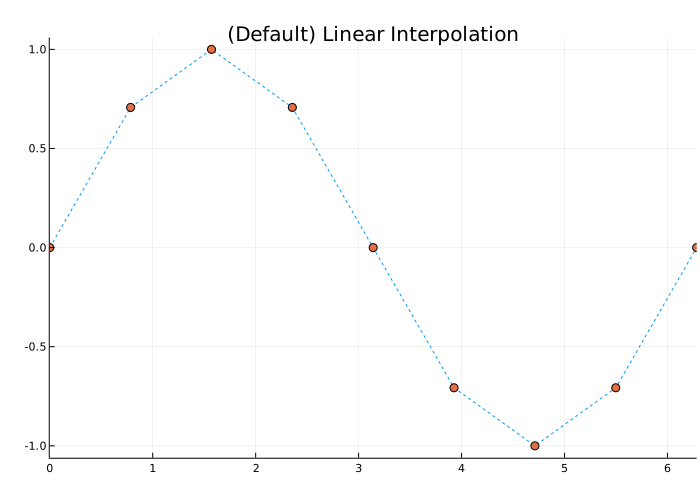
Now let’s evaluate v at the same points, using the method "spline".
vq2 = interp1(x, v, xq, "spline")

plot(xq, vq2, linestyle = :dot)
scatter!(x, v,
         markershape = :circle,
         xlims = (0, 2π),
         title = "Spline Interpolation")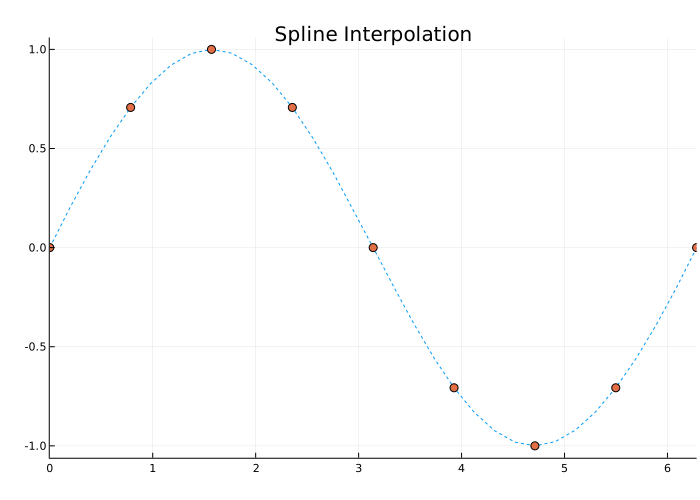
Interpolation without specifying points
Details
Let’s define a set of function values.
v = [0, 1.41, 2, 1.41, 0, -1.41, -2, -1.41, 0]Let’s define a set of query points that fall within the interval between the default points., 1:9. In this case, the default points are — 1:9 because v contains 9 values.
xq = 1.5:8.5Let’s evaluate v in points xq.
import EngeeDSP.Functions: interp1

vq = interp1(v, xq)
Let’s plot the result graph.
plot(1:9, v,
     seriestype = :scatter,
     markershape = :circle,
     label = "v")
plot!(xq, vq,
      seriestype = :scatter,
      markershape = :diamond,
      label = "vq")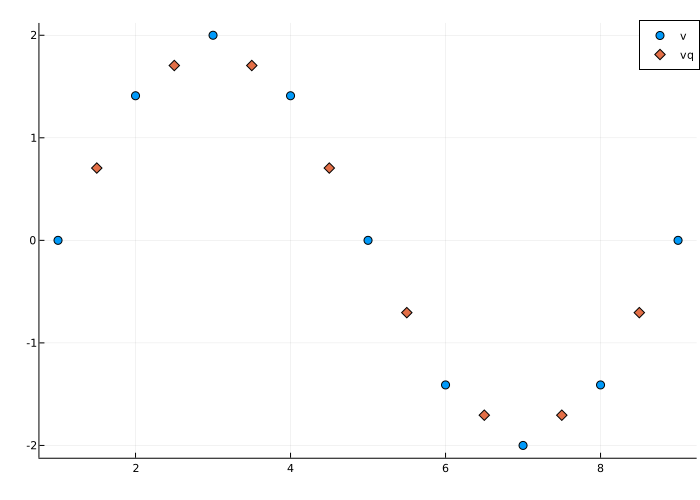
Interpolation of complex values
Details
Let’s define a set of sample points.
x = 1:10Define the values of the function at the sample points.
v = 5*x + x.^2*1imLet’s define the query points for a more accurate selection in the range x.
xq = 1:0.25:10Interpolating v at the request points.
import EngeeDSP.Functions: interp1

vq = interp1(x, v, xq)
We will represent the real part of the result in red, and the imaginary part in blue.
plot(x, real(v),
     seriestype = :scatter,
     color = :red,
     markershape = :diamond)
plot!(xq, real(vq), color = :red)
plot!(x, imag(v),
     seriestype = :scatter,
     color = :blue,
     markershape = :diamond)
plot!(xq, imag(vq), color = :blue)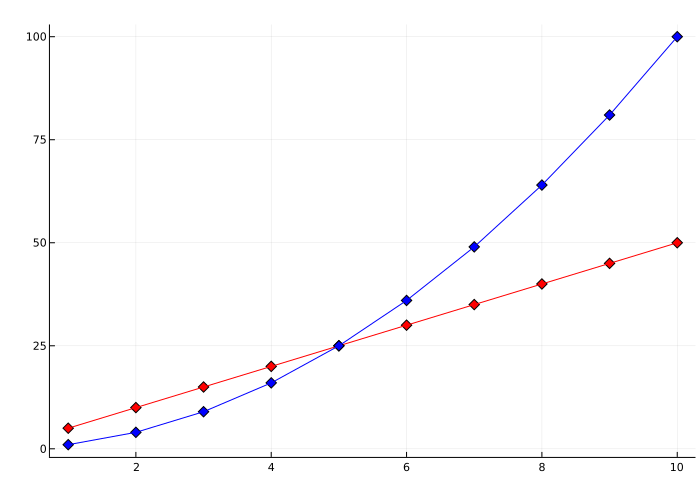
Extrapolation using two different methods
Details
Let’s define the sampling points x and the corresponding sample values v.
x = [1, 2, 3, 4, 5]
v = [12, 16, 31, 10, 6]
Specify the request points xq which go beyond the scope of definition x.
xq = [0, 0.5, 1.5, 5.5, 6]Let’s evaluate v at the point xq using the method "pchip".
import EngeeDSP.Functions: interp1

vq1 = interp1(x, v, xq, "pchip")
5-element Vector{Float64}:
19.36842105263158
13.631578947368421
13.210526315789474
7.48
12.559999999999999Next, let’s evaluate v at the point xq using the method "linear".
vq2 = interp1(x, v, xq, "linear")5-element Vector{Float64}:
NaN
NaN
14.0
NaN
NaNNow we use the method "linear" with the option "extrap".
vq3 = interp1(x, v, xq, "linear", "extrap")5-element Vector{Float64}:
8.0
10.0
14.0
4.0
2.0"pchip" extrapolates by default, and "linear" - no.
Assigning a constant value to all queries outside the scope of x definition
Details
Let’s define the sampling points x and the corresponding sample values v.
x = [-3, -2, -1, 0, 1, 2, 3]
v = 3*x.^2
Specify the request points xq which go beyond the scope of definition x.
xq = [-4, -2.5, -0.5, 0.5, 2.5, 4]Now let’s evaluate v in points xq using the method "pchip", and assign to any value outside the scope of definition x meaning 27.
import EngeeDSP.Functions: interp1

vq = interp1(x, v, xq, "pchip", 27)
6-element Vector{Float64}:
27.0
18.65625
0.9375
0.9375
18.65625
27.0Interpolating multiple data sets in one go
Details
Let’s define the sampling points.
x = (-5:5)Let’s choose three different parabolic functions at the points defined in x.
v1 = x.^2
v2 = 2*x.^2 .+ 2
v3 = 3*x.^2 .+ 4
Create a matrix v, the columns of which are vectors v1, v2 and v3.
v = [v1 v2 v3]Define a set of query points xq for more accurate sampling in the range x.
xq = -5:0.1:5Let’s evaluate all three functions in points xq and let’s plot the results.
import EngeeDSP.Functions: interp1

vq = interp1(x, v, xq, "pchip")

plot(x, v, seriestype = :scatter, markershape = :circle)
plot!(xq, vq, xticks = (-5:5))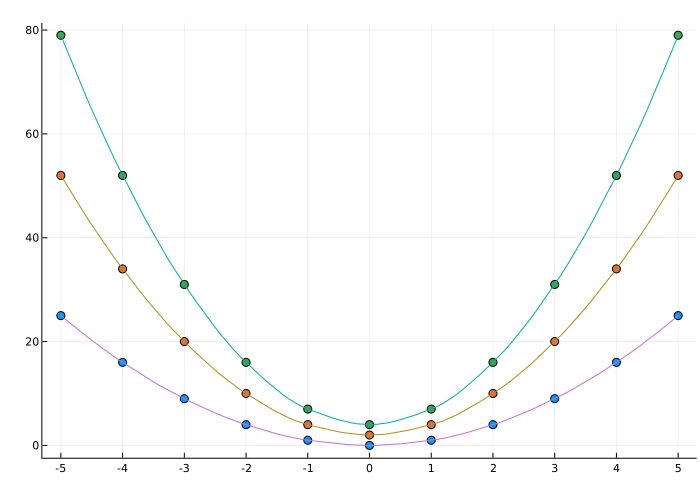
The circles on the graph indicate v, and the solid lines denote vq.
Additional Info
Akim and spline interpolation
Details
Akim’s algorithm for one-dimensional interpolation, described in [1] and [2], performs cubic interpolation to obtain piecewise polynomials with continuous first-order derivatives ( ). The algorithm preserves the slope and avoids undulation on flat areas. A flat section occurs when there are three or more consecutive collinear points that the algorithm connects with a straight line. To ensure that the area between two data points is flat, insert an additional data point between them.
When two flat areas with different slopes intersect, a modification of Akim’s original algorithm gives more weight to the side whose slope is closer to zero. This modification gives priority to the side closer to the horizontal, which is more intuitive and avoids overshooting. (Akim’s original algorithm gives equal weights to the points on both sides, thereby evenly distributing the undulation.)
The Spline algorithm, on the other hand, performs cubic interpolation to obtain piecewise polynomials with continuous second-order derivatives ( The result is comparable to conventional polynomial interpolation, but less susceptible to strong fluctuations between data points for high degrees. However, this method may be subject to outliers and fluctuations between data points.
Compared to the spline algorithm, Akim’s algorithm creates fewer wave-like oscillations and is better suited to handle rapid changes between flat areas.
Literature
-
Akima, Hiroshi. «A new method of interpolation and smooth curve fitting based on local procedures.» Journal of the ACM (JACM), 17.4, 1970, pp. 589–602
-
Akima, Hiroshi. «A method of bivariate interpolation and smooth surface fitting based on local procedures.» Communications of the ACM, 17.1, 1974, pp. 18–20.