pchip
Piecewise Cubic Hermite Interpolating Polynomial (PCHIP).
| Library |
|
Arguments
Input arguments
# y — function values at the sample points
+
vector | the matrix | array
Details
The values of the function at the sample points, specified as a numeric vector, matrix, or array. Arguments x and y they must have the same length.
If y — a matrix or an array, then the values in the last dimension, y[:,…,:,j] are taken as values to be compared with x. In this case, the last dimension is y must have the same length as x.
| Data types |
|
# xq — query points
+
scalar | vector | the matrix | array
Details
Query points specified as a scalar, vector, matrix, or array. The points specified in the argument xq, represent -coordinates of the interpolated function values yq, calculated using the function pchip.
| Data types |
|
Examples
Data interpolation using spline and pchip
Details
Let’s compare the interpolation results obtained using the functions spline and pchip for two different data sets. All these functions implement various forms of piecewise cubic Hermite interpolation. Each function has a different way of calculating the slopes of the interpolant, which leads to different behavior depending on whether there are flat areas or irregularities in the source data.
Let’s compare the results of interpolation on sample data connecting flat regions. Creating vectors of values x, the values of the functions at these points y and query points xq. Let’s calculate the interpolations at the query points using the functions spline and pchip. Let’s plot the interpolated function values at the query points for comparison.
import EngeeDSP.Functions: pchip, spline

x = -3:3
y = [-1, -1, -1, 0, 1, 1, 1]
xq1 = -3:0.01:3

p = pchip(x, y, xq1)
s = spline(x, y, xq1)

plot(x, y,
     seriestype = :scatter,
     markercolor = :white,
     label = "Sample Points",
     legend = :bottomright)
plot!(xq1, p, label = "pchip")
plot!(xq1, s, linestyle = :dashdot, label = "spline")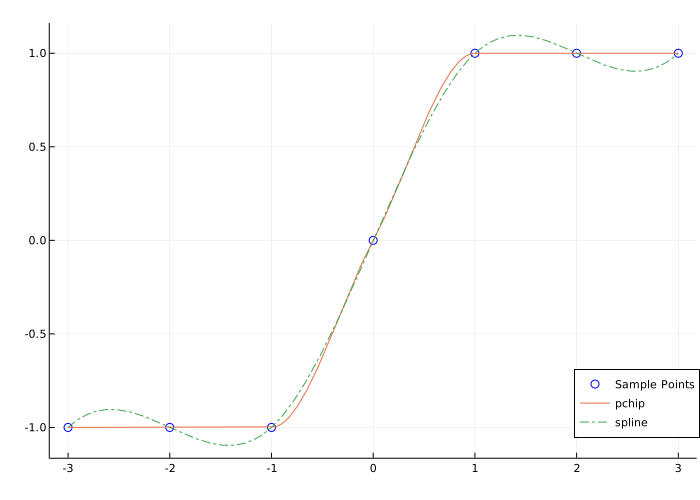
In this case, the function pchip avoids outliers and can accurately connect flat areas.
Let’s perform the second comparison using the sampling oscillation function.
import EngeeDSP.Functions: pchip, spline, besselj

x = 0:15
y = besselj.(1, x)
xq2 = 0:0.01:15

p = pchip(x, y, xq2)
s = spline(x, y, xq2)

plot(x, y,
     seriestype = :scatter,
     markercolor = :white,
     label = "Sample Points")
plot!(xq2, p, label = "pchip")
plot!(xq2, s, linestyle = :dashdot, label = "spline")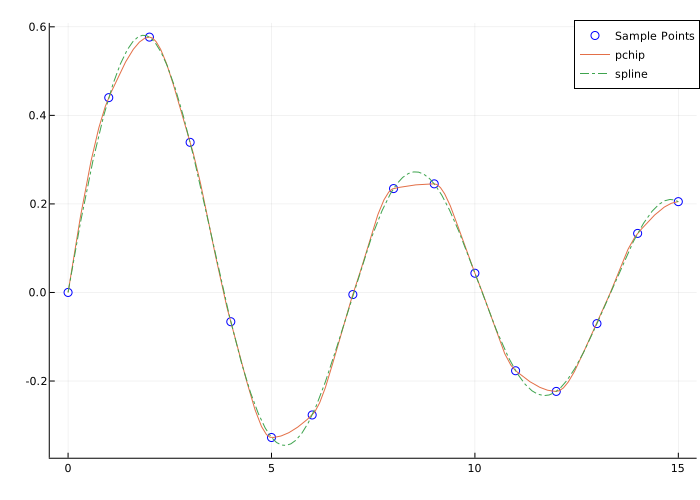
If the base function is oscillatory, spline it captures movement between points better than pchip, which is strongly smoothed out near local extremes.
Additional Info
Shape-preserving piecewise cubic interpolation
Details
Function pchip interpolates using a piecewise cubic polynomial with the properties listed below.
-
On each subinterval the polynomial is a cubic Hermite interpolation polynomial for given data points with given derivatives (slopes) at the interpolation points.
-
interpolates That is , , and the first derivative continuous. The second derivative probably not continuous, so there may be jumps at the point .
-
Cubic interpolant retains its shape. Slopes at a point they are selected in such a way that it kept the data form and monotony. Therefore, at intervals where the data is monotonic, It is also monotonic, and at points where the data has a local extremum., it is also monotonous.
| If — the matrix, satisfies these properties for each row . |
Recommendations
Function spline builds almost the same as the function pchip builds . However spline selects the slopes at a point in another way, namely to do continuous. This difference has several effects:
-
splineallows you to get a smoother result, that is continuous. -
splinegives a more accurate result if the data consists of values of a smooth function. -
pchipIt has no outliers and less fluctuations if the data is not smooth. -
pchipless expensive to set up. -
Evaluating both options is equally costly.